
SHub Reaper macOS malware hides persistence as a fake Google Software Update


 8 min. read
  Published on
A new SHub macOS infostealer variant called Reaper is using fake WeChat and Miro installers, AppleScript execution, and a fake Google Software Update LaunchAgent to steal data and maintain access on infected Macs.
SentinelOne researchers say the campaign abuses trusted branding at several stages. The lure may look like a popular app installer, the payload pretends to be an Apple security update, and persistence hides inside a folder that imitates Google’s software update system.

Access content across the globe at the highest speed rate.
70% of our readers choose Private Internet Access
70% of our readers choose ExpressVPN

Browse the web from multiple devices with industry-standard security protocols.

Faster dedicated servers for specific actions (currently at summer discounts)
The malware targets browser data, macOS credentials, cryptocurrency wallets, Telegram sessions, business files, and other sensitive information. It also installs a backdoor that can run attacker-supplied commands every 60 seconds.
How the SHub Reaper infection starts
The attack begins when users visit fake installer pages for apps such as WeChat or Miro. Some of these pages use typo-squatted domains designed to look like trusted infrastructure, including a Microsoft-themed domain.
Instead of relying on the older ClickFix method that tricks users into pasting commands into Terminal, Reaper uses the applescript:// URL scheme to open macOS Script Editor with a malicious script already loaded.
The malicious AppleScript is padded with fake installer text and visual filler, pushing the real command below the visible part of the Script Editor window. If the user clicks Run, the script displays a fake Apple XProtectRemediator update message while fetching the next payload in the background.
| Stage | Disguise | Purpose |
|---|---|---|
| Initial lure | Fake WeChat or Miro installer | Tricks users into starting the infection |
| Delivery | Typo-squatted Microsoft-themed domain | Makes the source look more trustworthy |
| Execution | Fake Apple security update message | Encourages users to run the AppleScript |
| Persistence | Fake Google Software Update folder | Keeps the malware active after infection |
Reaper bypasses Terminal-focused protections
Earlier macOS infostealer campaigns often used Terminal-based tricks. Apple has added protections against some of those flows, but Reaper shifts execution into Script Editor.
This matters because Script Editor is a normal macOS application. The malware can run through a user-approved AppleScript flow without dropping a traditional malicious binary at the first stage.
After execution starts, Reaper checks the user’s local settings by reading the com.apple.HIToolbox.plist file. If it detects Russian input sources or signs that the system belongs to the Commonwealth of Independent States region, it sends a blocked telemetry event and exits.
Fake Google Update creates persistence
Before finishing its initial run, Reaper creates a directory that imitates Google Software Update. The path sits under the user’s Library folder and looks similar to legitimate Google updater components.
The malware places a base64-decoded bash script named GoogleUpdate inside that fake application directory. It then registers a LaunchAgent named com.google.keystone.agent.plist, borrowing the naming style of Google’s legitimate Keystone update system.
The LaunchAgent runs every 60 seconds. Each time it runs, the script sends system information to the attacker’s /api/bot/heartbeat endpoint and waits for a response.
- The fake updater path is ~/Library/Application Support/Google/GoogleUpdate.app/Contents/MacOS/GoogleUpdate.
- The malicious LaunchAgent is ~/Library/LaunchAgents/com.google.keystone.agent.plist.
- The heartbeat endpoint is /api/bot/heartbeat.
- If the server returns code, the malware writes it to /tmp/.c.sh.
- The temporary script runs with the current user’s privileges and is then deleted.
The backdoor can run new commands
The GoogleUpdate persistence script does more than keep the malware alive. It also gives attackers a lightweight backdoor for continued access.
If the command-and-control server returns a code payload, the script decodes it, writes it to a hidden temporary shell script, executes it, and removes it after execution. This gives the attacker a way to run new commands without leaving a long-lived script in the same location.
That design makes the malware more flexible. Operators can steal data during the first run, then return later with additional commands or payloads if the Mac remains infected.
What Reaper steals from Macs
Reaper keeps the core data theft behavior associated with SHub. It targets browser data, macOS Keychain material, iCloud account data, Telegram session data, developer-related files, and cryptocurrency wallets.
The malware targets several browsers, including Chrome, Firefox, Brave, Edge, Opera, Vivaldi, Arc, and Orion. It also checks browser extensions for password managers and crypto wallets such as 1Password, Bitwarden, LastPass, MetaMask, and Phantom.
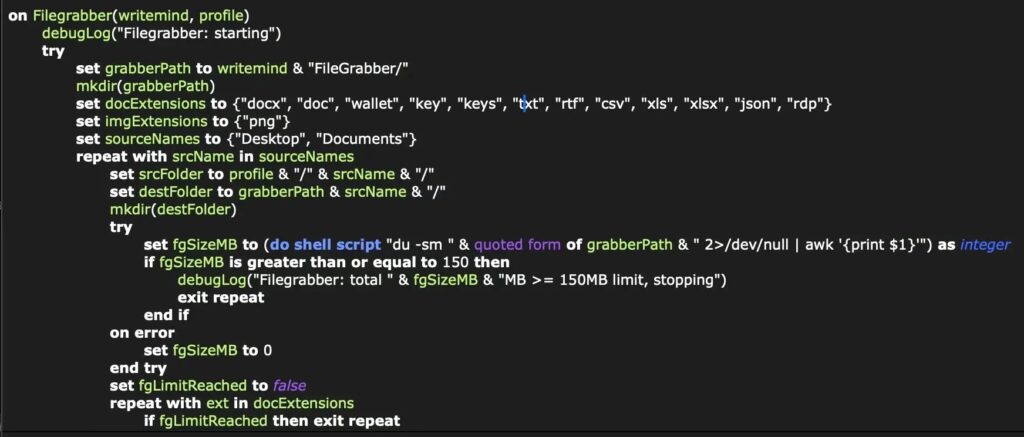
The FileGrabber component searches Desktop and Documents folders for files likely to contain business, finance, or access information. SentinelOne says it targets document and data file types under 2MB, PNG images under 6MB, and applies a 150MB total collection cap.
| Data type | Examples |
|---|---|
| Browsers | Chrome, Firefox, Brave, Edge, Opera, Vivaldi, Arc, Orion |
| Password managers | 1Password, Bitwarden, LastPass browser extensions |
| Crypto wallets | MetaMask, Phantom, Exodus, Atomic, Ledger Live, Trezor Suite |
| macOS data | Keychain, iCloud account data, Telegram sessions |
| User files | Documents, wallet files, keys, JSON files, spreadsheets, RDP files |
Reaper also hijacks desktop crypto wallets
After stealing user data, Reaper looks for cryptocurrency wallet applications installed on the Mac. SentinelOne says it searches for Exodus, Atomic Wallet, Ledger Wallet, Ledger Live, and Trezor Suite.
If it finds a targeted wallet, it downloads a modified app.asar file from the command-and-control server. It then stops the active wallet process and replaces the legitimate application file.
The malware also clears quarantine attributes and uses ad hoc code signing to help the modified app run. This can let attackers continue targeting wallet activity even after the first wave of credential theft.
Anti-analysis checks help the malware stay hidden
The fake installer pages do more than deliver malware. They also fingerprint visitors before triggering the next stage.
The web pages collect IP address, location data, WebGL details, VPN indicators, virtual machine signals, and installed browser extension data. That information helps the operators decide whether the visitor looks like a real victim or a researcher.
The pages also interfere with security analysis. They override console functions, watch for developer keystrokes, run debugger loops, and can replace the page with a Russian-language access denied message when DevTools activity is detected.
Indicators of compromise
Security teams can use the following indicators for threat hunting. Network indicators are defanged to prevent accidental access.
| Type | Indicator | Description |
|---|---|---|
| Domain | hebsbsbzjsjshduxbs[.]xyz | Primary command-and-control domain |
| Domain | mlcrosoft[.]co[.]com | Fake WeChat lure domain |
| Domain | qq-0732gwh22[.]com | Fake WeChat lure domain |
| Domain | mlroweb[.]com | Fake Miro lure domain |
| Endpoint | hxxps://hebsbsbzjsjshduxbs[.]xyz/api/bot/heartbeat | Backdoor heartbeat endpoint |
| Endpoint | hxxps://hebsbsbzjsjshduxbs[.]xyz/gate | Command-and-control endpoint |
| Endpoint | hxxps://hebsbsbzjsjshduxbs[.]xyz/gate/chunk | Chunked file upload endpoint |
Files and paths defenders should monitor
The fake Google Software Update path is one of the strongest signs of infection. A legitimate Google Keystone installation should not match this suspicious behavior or act as a user-level backdoor.
Defenders should also watch for temporary archives and scripts in /tmp, especially after Script Editor or osascript activity.
Unexpected LaunchAgents that imitate trusted vendors should receive immediate review. Attackers often choose names that look familiar because users and analysts may overlook them during routine checks.
| Path or identifier | Purpose |
|---|---|
| ~/Library/Application Support/Google/GoogleUpdate.app/Contents/MacOS/GoogleUpdate | Fake GoogleUpdate backdoor script |
| ~/Library/LaunchAgents/com.google.keystone.agent.plist | Malicious LaunchAgent persistence file |
| /tmp/.c.sh | Temporary script used for command execution |
| /tmp/shub_log.zip | Staged exfiltration archive |
| /tmp/shub_split.sh | Archive-splitting script |
| /tmp/shub_mzip_*.zip | Segmented exfiltration chunks |
| Build name: Reaper | Internal build name reported by SentinelOne |
How Mac users can reduce risk
Mac users should avoid any website that asks them to open Script Editor and run a manual security update. Apple does not deliver XProtectRemediator updates by asking users to run hidden AppleScript commands from a website.
Users should download apps only from official developer websites or the Mac App Store. Search ads, typo-squatted domains, and lookalike download pages remain common delivery paths for macOS stealers.
Anyone who ran a suspicious installer should disconnect from sensitive accounts, change passwords from a clean device, and check for unknown LaunchAgents in the user Library folder.
- Do not run AppleScript commands from websites claiming to offer security updates.
- Download WeChat, Miro, and other apps only from official sources.
- Check URLs carefully before downloading software.
- Review ~/Library/LaunchAgents for suspicious Google-like plist files.
- Watch for unexpected Script Editor, osascript, or curl activity.
- Rotate passwords and wallet credentials if infection is suspected.
- Use endpoint protection that detects script-based macOS malware behavior.
Why SHub Reaper matters
Reaper shows how macOS infostealers are becoming more polished and harder for ordinary users to spot. The attack does not rely on one unfamiliar malware file. It layers trusted brand names, normal macOS tools, and user-approved script execution.
The fake Google Software Update LaunchAgent also changes the risk profile. Reaper is not only a one-time stealer. It can keep contacting the attacker’s infrastructure and run new code later.
For businesses, the threat goes beyond personal credential theft. A single infected Mac can expose browser sessions, cloud tokens, internal documents, developer files, and wallet data, creating both security and financial risk.
FAQ
SHub Reaper is a macOS infostealer variant analyzed by SentinelOne. It uses fake app installers, AppleScript execution, and a fake Google Software Update LaunchAgent to steal data and maintain access on infected Macs.
Reaper uses fake WeChat and Miro installer pages that launch Script Editor through the applescript:// URL scheme. The script pretends to download an Apple security update while fetching and running the malware payload.
The fake LaunchAgent runs a GoogleUpdate script every 60 seconds. The script sends system details to the attacker’s heartbeat endpoint and can execute returned code through a temporary shell script.
Reaper targets browser data, password manager extensions, macOS Keychain data, iCloud information, Telegram sessions, cryptocurrency wallets, and files from Desktop and Documents folders.


Read our disclosure page to find out how can you help VPNCentral sustain the editorial team Read more


Improve this guide




User forum
0 messages