
CountLoader malware uses JavaScript, PowerShell, and shellcode to deliver crypto clipper


 9 min. read
  Published on

McAfee Labs has uncovered a large CountLoader malware campaign that uses JavaScript, PowerShell, shellcode injection, and Windows utilities to deliver a cryptocurrency clipper payload.
The campaign reached about 86,000 unique infected machines, with McAfee’s sinkhole seeing roughly 5,000 connections per minute. The highest infection numbers appeared in India, followed by Indonesia, the United States, and several countries across Southeast Asia.

Access content across the globe at the highest speed rate.
🔥 Save 81% + 2 bonus months! 🔥
70% of our readers choose Private Internet Access
70% of our readers choose ExpressVPN
2
Browse the web from multiple devices with industry-standard security protocols.
🔥 Save 73%! 🔥

Faster dedicated servers for specific actions (currently at summer discounts)
🔥 Save 69%! 🔥
The final payload monitors the Windows clipboard and replaces copied cryptocurrency wallet addresses with attacker-controlled ones. If victims do not notice the change before sending funds, the transaction can go directly to the attackers.
How the CountLoader campaign works
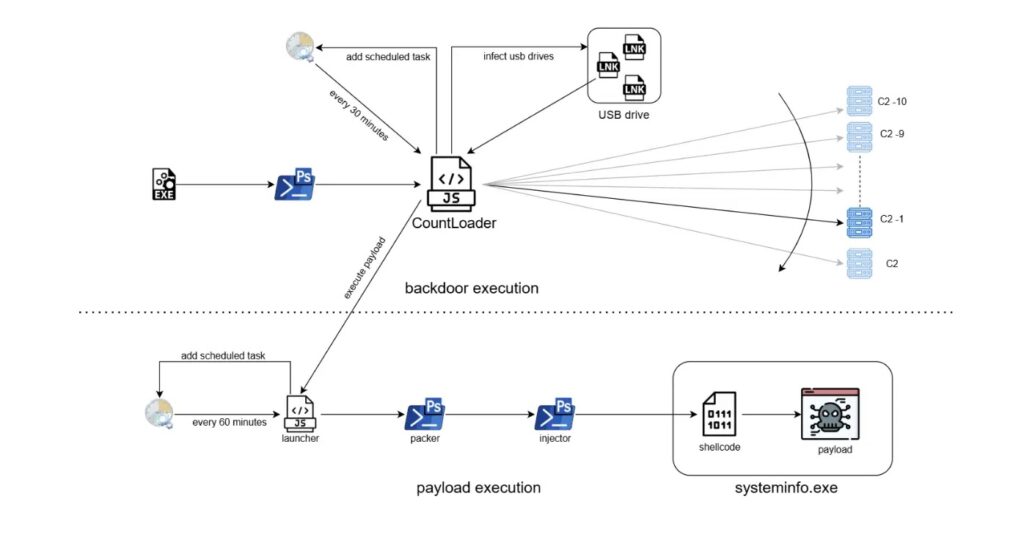
The infection starts with a malicious EXE file. Once opened, it launches a PowerShell one-liner that downloads and runs an obfuscated JavaScript loader through mshta.exe.
Mshta is a legitimate Windows tool for running HTML application files. Malware operators often abuse it because the process can look less suspicious than a standalone unknown executable.
CountLoader then establishes persistence, contacts command-and-control servers, receives tasks, and downloads additional stages. The full chain eventually loads the crypto clipper directly in memory.
| Stage | Component | Role |
|---|---|---|
| Stage 1 | Malicious EXE | Starts the infection and launches PowerShell |
| Stage 2 | PowerShell script | Decodes and executes the next payload |
| Stage 3 | CountLoader HTA | Runs through mshta.exe, contacts C2 servers, and creates persistence |
| Stage 4 | PowerShell packer | Decrypts and launches another PowerShell stage |
| Stage 5 | Shellcode injector | Disables AMSI and injects shellcode into a legitimate process |
| Final stage | Crypto clipper | Runs in memory under systeminfo.exe and replaces wallet addresses |
McAfee sinkholed the campaign infrastructure
McAfee researchers found that CountLoader contacted its command-and-control servers in reverse order. The attackers were using hell1-kitty.cc, while a backup domain named hell10-kitty.cc remained available.
By registering that backup domain, McAfee redirected infected hosts to a researcher-controlled sinkhole. This gave researchers visibility into the campaign’s scale without letting those machines keep communicating with the attackers.
The sinkhole showed about 86,000 unique infections. It also revealed that around 9,000 infections were linked to USB-based spreading.
USB spreading increased the campaign’s reach
CountLoader can spread through removable drives when its command server sends the USB propagation task. The malware replaces certain files on connected external drives with malicious LNK shortcuts.
When a victim opens one of those shortcuts, the malware runs while the original file also opens. This helps the infection stay hidden because the victim still sees the expected document or file.
McAfee said the targeted file types include EXE, PDF, DOC, and DOCX files. The malware also appends “_usb” to the build ID when it spreads through removable media.
- CountLoader can infect connected USB drives when instructed by its C2 server.
- It replaces selected files with malicious LNK shortcuts.
- The shortcut opens the original file while running malware in the background.
- About 9,000 infections were linked to USB-based propagation.
- This method can move the infection across offline or semi-isolated systems.
The loader uses encrypted C2 communication
CountLoader uses a custom encrypted protocol to communicate with command-and-control servers. Each message uses a randomly generated six-digit key combined with XOR and Base64 encoding.
After a successful handshake, the malware requests a JWT token. It sends host details to the server, including information about installed cryptocurrency wallets and browser extensions.
This lets the attackers identify higher-value victims. A system with crypto wallets or browser wallet extensions may receive a different follow-up payload than a system with no cryptocurrency indicators.
Commands supported by CountLoader
CountLoader can receive different command types from its server. This makes it more flexible than a simple one-purpose downloader.
In this campaign, McAfee observed commands tied to USB spreading and PowerShell payload deployment. The broader command set also supports running EXE, Python, DLL, MSI, HTA, and PowerShell files.
That flexibility means the same loader can support multiple future payloads, not only the crypto clipper seen in this campaign.
| Command code | Action |
|---|---|
| 1 | Execute EXE file |
| 2 | Execute Python file |
| 3 | Execute DLL file |
| 4 | Uninstall itself |
| 5 | Send domain information to C2 |
| 6 | Execute MSI file |
| 9 | Spread through USB files |
| 10 | Execute HTA file |
| 11 | Execute PowerShell file |
PowerShell and shellcode hide the final payload
After CountLoader receives the next-stage task, it launches a payload chain that uses more PowerShell and shellcode. A secondary launcher creates another scheduled task that runs every 60 minutes.
The PowerShell packer decrypts and launches the injector stage. Before injection, the script disables AMSI, a Windows feature that helps detect malicious scripts.
The shellcode then loads the final crypto clipper directly into memory. McAfee observed the payload running under systeminfo.exe, which helps the malware avoid leaving a normal executable payload on disk.
EtherHiding makes the clipper harder to block
The crypto clipper does not rely only on a hardcoded command-and-control domain. It uses EtherHiding to fetch a C2 server address from the Ethereum blockchain.
This makes takedown harder because defenders cannot simply remove one malicious server or domain to break the chain. The blockchain record can point infected machines toward new infrastructure.
Once the clipper retrieves its server address, it reports system activity and continuously monitors the clipboard for cryptocurrency wallet addresses.
Why crypto clippers are dangerous
Crypto clippers rely on a simple user habit. Many people copy and paste wallet addresses instead of typing them manually.
The malware watches for wallet-like strings in the clipboard. When it detects one, it swaps the copied address with an attacker-controlled address that uses the same cryptocurrency format.
The change can be hard to notice because wallet addresses are long and visually similar. A rushed user may send funds before realizing that the address changed.
- Always compare the first and last characters of the wallet address before sending funds.
- Use wallet address allowlists where supported.
- Send a small test transaction before moving large amounts.
- Avoid using infected or untrusted Windows systems for crypto transfers.
- Do not trust a pasted wallet address unless you verify it again.
Indicators of compromise
Security teams can use the following selected indicators for hunting and triage. Network indicators are defanged to prevent accidental access.
| Type | Indicator | Description |
|---|---|---|
| SHA-256 | 5f9ff671955a6d551595f9838aed063c496da5039be0d222fe84f96cb3e1d32a | Stage 1 EXE |
| URL | hxxps://memory-scanner[.]cc/Presentation[.]pdf | PowerShell stage 2 download URL |
| SHA-256 | 3c278499c5e3ced3bf1a6a7287808c5267075f1dec0aa5c7be2c4c444f33f2bc | PowerShell stage 2 script |
| SHA-256 | c68e436d4cb984db026210806f50d0c81eec5f6e4860197dab91fab6f31ef796 | CountLoader v3.3 |
| SHA-256 | e2faad8111e7d47349cbc549b85e62231b8678057906bc813aad7242fa95ae63 | CountLoader v4.1 |
| SHA-256 | e5e1d8ec4cd109df290752ee3d4b2cbc9de6df4360e9983548f1bc6b1d088540 | CountLoader v4.1 |
| SHA-256 | dc602cb53a9c24abfcdaadf0ca8256b5fb5cac6d91d20ed8431bdaaf51c0cafe | Final clipper payload |
| URL | hxxps://edr-security-bucket1[.]cc/ | Payload C2 server URL |
CountLoader C2 domains
McAfee listed multiple domains used by CountLoader. These domains should be reviewed in DNS, proxy, EDR, and firewall logs.
| Domain | Role |
|---|---|
| hell1-kitty[.]cc | CountLoader C2 domain |
| alphazero1-endscape[.]cc | CountLoader C2 domain |
| api-microservice-us1[.]com | CountLoader C2 domain |
| bucket-aws-s1[.]com | CountLoader C2 domain |
| bucket-aws-s2[.]com | CountLoader C2 domain |
| fileless-storage-s3[.]cc | CountLoader C2 domain |
| globalsnn1-new[.]cc | CountLoader C2 domain |
| globalsnn2-new[.]cc | CountLoader C2 domain |
| globalsnn3-new[.]cc | CountLoader C2 domain |
| hardware-office[.]cc | CountLoader C2 domain |
| memory-protection-layer1[.]cc | CountLoader C2 domain |
| s3-updatehub[.]cc | CountLoader C2 domain |
What defenders should monitor
Detection should focus on the full chain rather than a single file. CountLoader uses legitimate Windows tools, so process context matters.
Security teams should look for suspicious PowerShell launched by unknown executables, mshta.exe reaching external domains, scheduled tasks created by unusual parent processes, and systeminfo.exe running after script-based activity.
USB-based spreading also deserves attention in environments where removable media remains common. LNK files replacing real documents on external drives should trigger immediate investigation.
- Unknown EXE files launching PowerShell one-liners.
- PowerShell downloading content from suspicious external domains.
- mshta.exe running HTA content from the internet.
- Scheduled tasks created to run every 30 or 60 minutes.
- PowerShell scripts that disable AMSI.
- Shellcode injection into legitimate Windows processes.
- systeminfo.exe appearing in an unexpected payload chain.
- External drives where documents are replaced by LNK shortcuts.
How users can reduce risk
Users should avoid running EXE files from unknown sources, especially when they arrive through downloads, cracked software, messages, or removable drives.
Crypto users should verify every wallet address before sending funds. A clipper infection can steal money even when the wallet app itself remains uncompromised.
Organizations should combine endpoint protection, PowerShell logging, script restrictions, USB controls, and user training. CountLoader succeeds when several trusted tools run in sequence without enough scrutiny.
- Do not run unexpected EXE files from untrusted sources.
- Disable or restrict USB drive use where business needs allow it.
- Turn on PowerShell script block logging and command-line logging.
- Monitor mshta.exe, powershell.exe, and scheduled task creation.
- Keep endpoint security tools and detections updated.
- Verify cryptocurrency wallet addresses before confirming transfers.
- Rebuild infected systems if in-memory malware or credential theft cannot be ruled out.
Why this campaign matters
CountLoader shows how commodity malware campaigns continue to adopt techniques once associated with more advanced actors. The chain uses obfuscation, encrypted C2 traffic, scheduled tasks, AMSI bypass, in-memory execution, and blockchain-based infrastructure discovery.
The scale also matters. With tens of thousands of infected systems and removable-media spreading, this campaign can reach both home users and business environments.
For defenders, the main lesson is that crypto theft does not always start inside a wallet app. It can begin with a normal Windows process chain that slowly loads a clipboard hijacker into memory.
FAQ
CountLoader is a multi-stage malware loader that uses obfuscated JavaScript, PowerShell, mshta.exe, scheduled tasks, and in-memory shellcode execution to deliver additional payloads. In this campaign, it delivered a cryptocurrency clipper.
McAfee Labs observed about 86,000 unique infected machines through its sinkhole. The sinkhole also received roughly 5,000 connections per minute from infected clients.
The clipper monitors the Windows clipboard for cryptocurrency wallet addresses. When a user copies an address, the malware replaces it with an attacker-controlled address before the victim sends the transaction.
Yes. When instructed by its command server, CountLoader can replace files on connected USB drives with malicious LNK shortcuts that run the malware while opening the original file to avoid suspicion.


Read our disclosure page to find out how can you help VPNCentral sustain the editorial team Read more


Improve this guide




User forum
0 messages