
Compromised GitHub Actions stole CI/CD secrets through hijacked version tags


 7 min. read
  Published on
Attackers compromised the widely used actions-cool/issues-helper GitHub Action and redirected its version tags to malicious commits that attempted to steal CI/CD credentials from workflow runs.
The incident is serious because many GitHub Actions workflows reference third-party actions by version tag, such as v3 or v3.8.0. When those tags move, the workflow can run different code without the repository owner changing any workflow file.

Access content across the globe at the highest speed rate.
70% of our readers choose Private Internet Access
70% of our readers choose ExpressVPN

Browse the web from multiple devices with industry-standard security protocols.

Faster dedicated servers for specific actions (currently at summer discounts)
StepSecurity reported the compromise on May 18, 2026. The company said every existing tag for actions-cool/issues-helper was moved to imposter commits outside the action’s normal branch history. A second action from the same organization, actions-cool/maintain-one-comment, was also compromised with the same technique.
What happened in the GitHub Actions attack
The attackers did not need to change the normal source tree to reach victims. Instead, they abused Git tags, which many developers treat as stable release pointers.
In the actions-cool/issues-helper case, StepSecurity said 53 tags were affected. In the maintain-one-comment case, 15 tags were affected. Workflows that referenced those tags could pull the malicious code the next time they ran.
GitHub now shows the actions-cool/issues-helper repository as disabled by GitHub Staff. That limits access to the repository, but teams that already ran affected workflows still need to review logs and rotate exposed secrets.
| Item | Details |
|---|---|
| Main affected action | actions-cool/issues-helper |
| Second affected action | actions-cool/maintain-one-comment |
| Reported disclosure date | May 18, 2026 |
| Attack method | Version tags redirected to imposter commits |
| Main payload behavior | Steals workflow credentials from GitHub Actions runner memory |
| Exfiltration domain | t.m-kosche.com |
Why tag hijacking makes this attack dangerous
Many teams use version tags because they are convenient. A workflow may reference an action with a line like uses: actions-cool/issues-helper@v3, expecting that tag to keep pointing to trusted code.
This attack shows why that assumption can fail. If an attacker gains the ability to move tags inside an action repository, a workflow can execute malicious code while still appearing to use the same dependency name and version label.
GitHub’s own security guidance says pinning third-party actions to a full-length commit SHA is the only way to use an action as an immutable release. Tags remain easier to read, but they can move or disappear if an attacker gains repository access.
How the malicious action stole secrets
The malicious code used a staged process inside GitHub Actions runners. StepSecurity said the payload downloaded the Bun JavaScript runtime, executed an index.js file, and then launched a Python process.
The Python process attempted to read memory from the GitHub Actions Runner.Worker process through the Linux /proc filesystem. Runner.Worker can hold decrypted workflow secrets while a job runs.
The payload then looked for values marked as secrets, pulled authentication material, and sent the collected data to an attacker-controlled domain over HTTPS.
- Downloaded Bun to the GitHub Actions runner.
- Executed a malicious JavaScript payload.
- Spawned Python to read Runner.Worker memory.
- Searched for values marked as workflow secrets.
- Attempted to collect GitHub authentication tokens.
- Sent stolen data to t.m-kosche.com over port 443.
Why CI/CD credentials are high-value targets
CI/CD pipelines often hold sensitive credentials because they build, test, publish, and deploy software. A single workflow may have access to GitHub tokens, cloud keys, package registry tokens, signing keys, and production deployment secrets.
If attackers steal those secrets, they can move beyond one workflow. They may push code, publish packages, access cloud services, tamper with deployments, or use stolen tokens in follow-on supply chain attacks.
The risk increases when workflows use broad permissions. GitHub says actions can access the GITHUB_TOKEN through the github.token context even when the workflow does not explicitly pass it to the action. That makes least-privilege permissions important for every workflow.
Indicators of compromise
Security teams should review recent workflow runs that used actions-cool/issues-helper or actions-cool/maintain-one-comment. Any job that ran the compromised action should be treated as a potential credential exposure event.
| Indicator type | Indicator |
|---|---|
| Domain | t.m-kosche.com |
| Runtime path | /home/runner/.bun/bin/bun |
| Memory path | /proc/<Runner.Worker PID>/mem |
| Suspicious process | python3 launched with elevated privileges |
| Token command | gh auth token |
| Known issues-helper commit | 1c9e803c80cc7fed000022d4c94f4b5bc2e90062 |
| Known maintain-one-comment commit | 7f6120bb10c870b9fde146961a18e5bf0b3d4 |
What developers should do now
Teams that used either affected action should stop using it immediately until they can confirm a safe replacement or a verified clean commit. They should also review all workflow runs that executed after the compromise window.
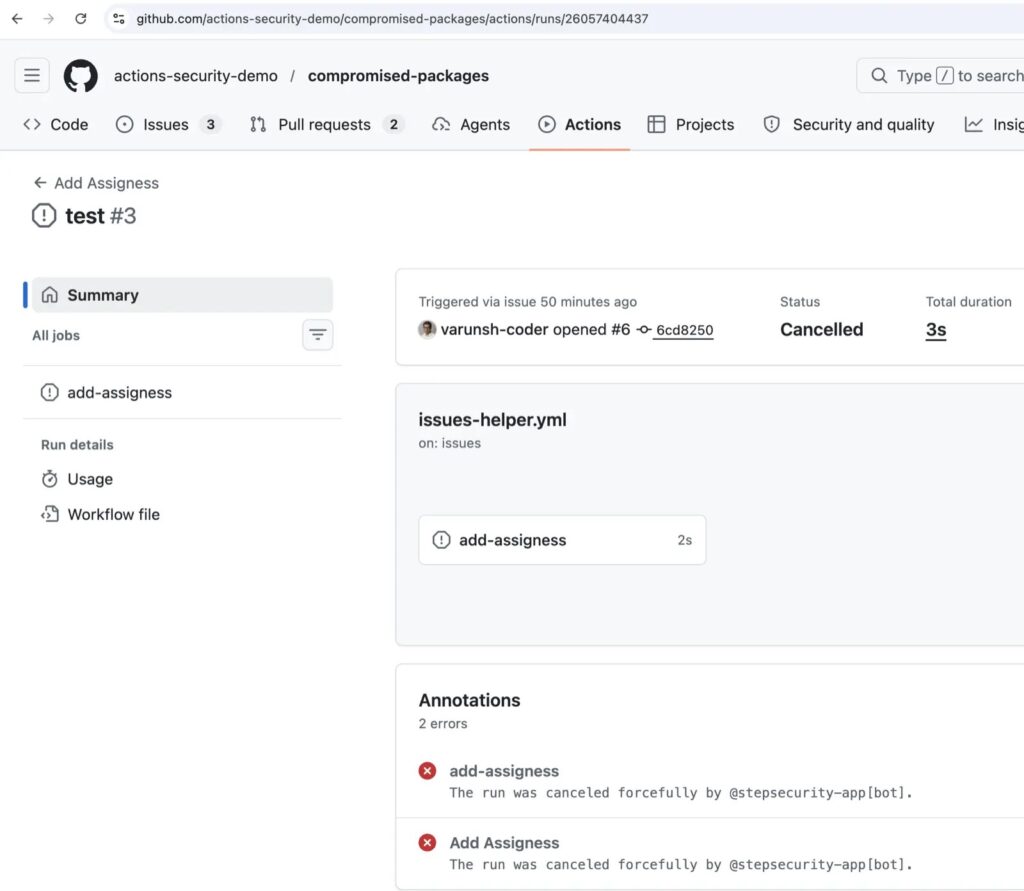
Secret rotation should take priority. Tokens and keys exposed to affected jobs should be considered compromised, even if logs do not show obvious misuse.
Organizations should also search for outbound connections to the attacker domain. A connection to t.m-kosche.com from a GitHub Actions runner should be treated as a strong sign that the payload executed.
- Search all repositories for uses of actions-cool/issues-helper and actions-cool/maintain-one-comment.
- Stop workflows that still reference either action by tag.
- Review workflow runs from the compromise window onward.
- Rotate GitHub tokens, cloud credentials, registry tokens, and deployment secrets exposed to those jobs.
- Check CI logs and network telemetry for t.m-kosche.com.
- Pin third-party actions to full-length commit SHAs from trusted sources.
- Limit GITHUB_TOKEN permissions at the workflow and job level.
- Use organization policies to require SHA-pinned actions where possible.
How to prevent similar GitHub Actions compromises
This incident highlights a common weakness in CI/CD security. Developers often lock application dependencies carefully but leave workflow dependencies pinned to mutable tags.
Pinning to a full commit SHA reduces that risk because the workflow runs a specific reviewed object instead of a movable label. Teams should also verify that the SHA comes from the original repository, not from a fork.
Least-privilege tokens can limit damage if a third-party action becomes malicious. Repository and organization settings can restrict the default permissions granted to GITHUB_TOKEN, and workflows can define narrower permissions for each job.
| Control | Why it helps |
|---|---|
| Full commit SHA pinning | Prevents moved tags from silently changing executed code. |
| Restricted GITHUB_TOKEN permissions | Limits what a compromised action can do inside a repository. |
| Network egress monitoring | Can catch unexpected outbound calls from CI jobs. |
| Secret rotation playbooks | Speeds recovery when CI credentials may have leaked. |
| Action allowlists | Reduces exposure to unreviewed third-party actions. |
Supply chain attacks keep moving into developer tools
The compromised actions-cool incident fits a broader trend of attacks targeting developer infrastructure. Instead of attacking one finished application, threat actors target tools that many organizations run automatically.
GitHub Actions workflows are especially attractive because they combine trusted automation, repository access, and secrets needed for deployment. A compromised action can therefore become a shortcut into many software delivery pipelines.
The safest response is to treat CI/CD dependencies like production dependencies. Review them, pin them, limit their permissions, and monitor what they do during every workflow run.
FAQ
The GitHub Action actions-cool/issues-helper was compromised after attackers redirected its version tags to imposter commits containing credential-stealing code. Workflows using those tags could execute the malicious code during CI/CD runs.
Yes. StepSecurity reported that actions-cool/maintain-one-comment was compromised with the same technique. Its version tags were also redirected to imposter commits using the same payload and exfiltration domain.
The malicious action attempted to steal CI/CD secrets from GitHub Actions runner memory, including workflow secrets and GitHub authentication tokens available during job execution.
Developers should pin third-party GitHub Actions to full-length commit SHAs, verify the SHA comes from the original repository, restrict GITHUB_TOKEN permissions, and monitor CI jobs for unexpected outbound network activity.
Teams should stop using the action, audit recent workflow runs, search for connections to t.m-kosche.com, and rotate all secrets exposed to affected jobs. They should also replace tag-based action references with full commit SHA pins.


Read our disclosure page to find out how can you help VPNCentral sustain the editorial team Read more


Improve this guide




User forum
0 messages