
Compromised Nx Console extension stole developer and cloud secrets


 8 min. read
  Published on
A compromised version of the Nx Console VS Code extension exposed developers to credential theft after attackers published a malicious build to extension marketplaces.
The affected version, Nx Console 18.95.0, was released on May 18, 2026. It fetched and executed an obfuscated payload after a developer opened a workspace, putting GitHub tokens, npm credentials, cloud secrets, SSH keys, and other sensitive data at risk.

Access content across the globe at the highest speed rate.
70% of our readers choose Private Internet Access
70% of our readers choose ExpressVPN

Browse the web from multiple devices with industry-standard security protocols.

Faster dedicated servers for specific actions (currently at summer discounts)
Nx has rated the issue critical and assigned it CVE-2026-48027. Developers who installed version 18.95.0 during the exposure window should update to Nx Console 18.100.0 or later, remove persistence artifacts, and rotate every credential reachable from the affected machine.
What happened to Nx Console
Nx Console is a popular developer extension used with the Nx build system and monorepo platform. The VS Code extension has more than 2.2 million installations, which made it an attractive target for a supply chain attack.
Attackers published version 18.95.0 of the extension to the Visual Studio Marketplace. The official advisory says Microsoft registered the upload at 12:30 UTC, the maintainer received the upload email at 12:36 UTC, and the package was unpublished at 12:48 UTC.
OpenVSX was also affected. The malicious version was published there at 12:33 UTC and removed at 13:09 UTC, giving it a longer exposure window than the Visual Studio Marketplace release.
| Detail | Information |
|---|---|
| Product | Nx Console for VS Code |
| Affected version | 18.95.0 |
| Fixed version | 18.100.0 or later |
| Severity | Critical |
| CVE | CVE-2026-48027 |
| Main impact | Developer, cloud, and CI/CD credential theft |
How the attackers reached developers
The attack started with a compromised developer account. Nx says one of its developers was affected by a recent TanStack supply chain compromise, which leaked GitHub credentials through GitHub CLI.
That access allowed the attacker to run workflows on the Nx GitHub repository as a contributor. StepSecurity said the attacker also pushed an orphan commit into the official nrwl/nx repository.
The orphan commit did not sit on a normal branch. It contained a small package structure and a large obfuscated JavaScript payload that the malicious extension fetched when activated.
How the malicious extension worked
The malicious code was injected into the extension’s minified main.js file. When a developer opened any workspace, the extension created a background task that ran an npx command against the orphan commit.
That task fetched the payload from the nrwl/nx GitHub repository and executed it. The task name was designed to look like normal Nx Console functionality, helping the malicious activity blend into the developer environment.
The payload used Bun to run an obfuscated JavaScript file. StepSecurity said the file was about 498 KB and used multiple layers of obfuscation to slow down analysis.
- The extension activated when a workspace opened.
- It launched a hidden background task.
- The task fetched an orphan commit from the official nrwl/nx repository.
- The payload ran through Bun.
- The stealer collected secrets from the local machine, memory, and developer tools.
- Stolen data was sent through HTTPS, the GitHub API, and DNS.
What data the payload targeted
The payload targeted secrets that developers commonly use to build, publish, and deploy software. That includes credentials stored in configuration files, command-line tools, memory, and cloud metadata services.
Nx says the compromised extension harvested Vault tokens, npm tokens, AWS credentials, GitHub tokens, 1Password data when an active CLI session existed, private keys, connection strings, Docker credentials, and GCP credentials.
StepSecurity also said the payload targeted Claude Code configuration files. That makes the incident notable because AI coding assistant settings and credentials are now part of the developer supply chain attack surface.
| Targeted area | Examples |
|---|---|
| GitHub | GitHub tokens, Actions secrets, process memory |
| npm | .npmrc tokens and OIDC token exchange |
| AWS | IMDS, ECS metadata, Secrets Manager, SSM, Web Identity tokens |
| HashiCorp Vault | Local Vault tokens and secrets reachable through active credentials |
| 1Password | Vault contents reachable through an active op CLI session |
| Filesystem | Private keys, connection strings, Docker credentials, and .env secrets |
Why the attack was especially risky
This was not a normal malicious extension with a single data theft path. The payload used three exfiltration channels: HTTPS, the GitHub API, and DNS. That gave attackers several ways to receive stolen data if one route failed.
The malware also included anti-analysis checks. It skipped machines with fewer than four CPU cores and avoided execution in some Russian or CIS time zone environments, according to StepSecurity’s analysis.
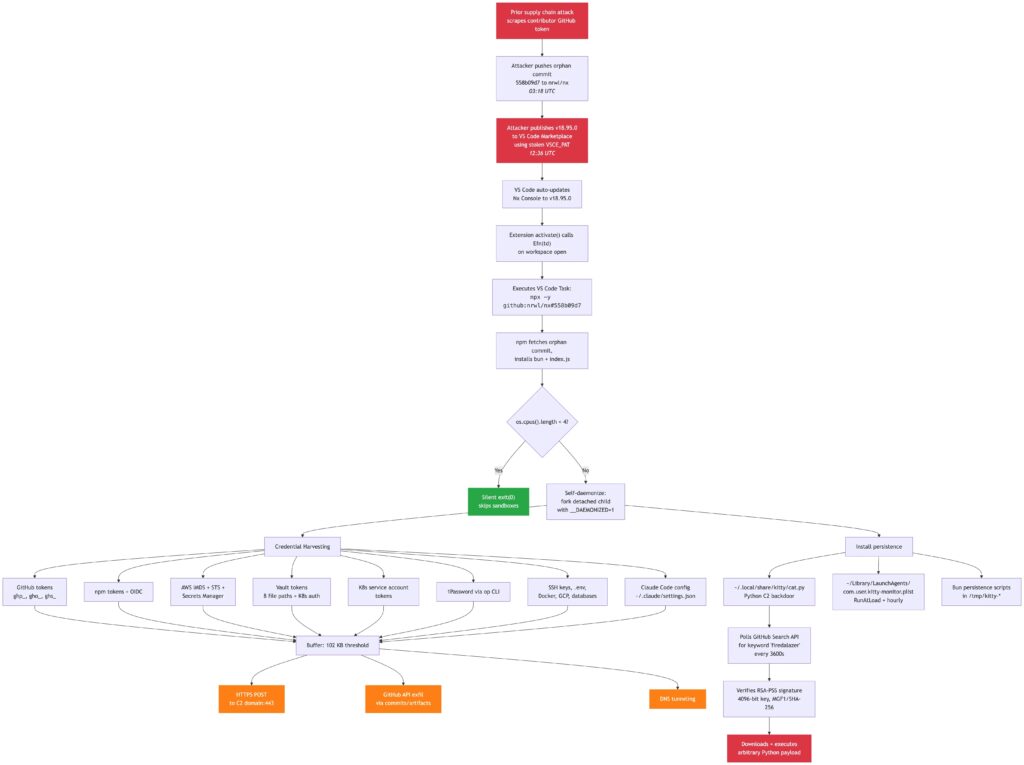
On macOS, the payload installed a Python backdoor that used a LaunchAgent for persistence. That means cleanup requires more than uninstalling the extension.
How many users may have been affected
The official advisory says Microsoft and OpenVSX initially reported low download numbers for the affected version, 28 and 41 respectively.
Nx said its own internal analytics suggested the impact may be much higher. Two days after the attack, it had registered about 6,000 extension activations from VS Code.
This difference matters for response planning. Organizations should not rely only on marketplace download counts. They should search developer machines directly for the affected version and known persistence artifacts.
Indicators developers should check
Developers and security teams should first check whether Nx Console 18.95.0 was installed during the exposure window. They should then search for files, processes, and runtime artifacts tied to the payload.
| Indicator type | Indicator |
|---|---|
| Malicious extension version | nrwl.angular-console 18.95.0 |
| Fixed version | 18.100.0 or later |
| Orphan commit | 558b09d7ad0d1660e2a0fb8a06da81a6f42e0b23 |
| macOS backdoor | ~/.local/share/kitty/cat.py |
| macOS LaunchAgent | ~/Library/LaunchAgents/com.user.kitty-monitor.plist |
| Temporary staging path | /tmp/kitty-* |
| Anti-replay state file | /var/tmp/.gh_update_state |
| Suspicious process | python running cat.py or a process with __DAEMONIZED=1 |
What affected developers should do now
Developers who installed Nx Console 18.95.0 should update immediately to version 18.100.0 or later. They should also kill any related background processes and delete persistence files left by the payload.
Credential rotation should cover more than local files. StepSecurity warned that the payload could reach password managers, remote secret stores, cloud metadata services, and GitHub Actions secrets through credentials available on the machine.
Teams should treat all credentials reachable from the affected workstation as compromised. That includes tokens, SSH keys, package registry credentials, cloud credentials, database passwords, and secrets stored in .env files.
- Update Nx Console to version 18.100.0 or later.
- Remove Nx Console 18.95.0 from all VS Code installations.
- Kill processes running
cat.pyor using__DAEMONIZED=1. - Delete
~/.local/share/kitty/cat.py,/tmp/kitty-*, and/var/tmp/.gh_update_state. - On macOS, unload and remove
~/Library/LaunchAgents/com.user.kitty-monitor.plist. - Rotate GitHub, npm, SSH, cloud, Vault, Docker, database, and CI/CD credentials.
- Review 1Password CLI access history if the op CLI had an active session.
- Audit cloud logs, GitHub logs, npm publishing activity, and repository access.
What organizations should change
The incident shows that IDE extensions now deserve the same security attention as npm packages, GitHub Actions, and CI/CD tools. A compromised extension runs on developer machines that often hold broad access to source code and production systems.
Organizations should maintain an inventory of installed extensions and their versions. They should also block unapproved extensions and monitor for sudden updates from high-risk developer tools.
Nx says it has hardened its publishing process so two admins must manually approve new Nx Console releases. Other software teams should review whether one stolen credential can still publish production developer tooling.
- Require approval for new IDE extensions.
- Monitor installed extension versions across developer machines.
- Restrict marketplace access where possible.
- Use endpoint detection rules for suspicious developer tool behavior.
- Limit long-lived tokens on developer workstations.
- Use short-lived cloud credentials where possible.
- Require manual review for extension publishing pipelines.
Why this matters for the software supply chain
The Nx Console incident follows a broader shift in supply chain attacks. Attackers no longer target only package registries. They also target developer machines, IDE extensions, CI/CD workflows, and AI coding tools.
That approach gives attackers a powerful shortcut. Instead of breaching one production system directly, they compromise a tool that trusted developers run every day.
The safest response is to treat development environments as high-value production assets. Extension updates, local secrets, publishing tokens, and AI coding assistant configurations all need stronger controls.
FAQ
Attackers published a malicious version of Nx Console 18.95.0 that fetched and executed an obfuscated credential-stealing payload when a developer opened a workspace.
Nx Console 18.95.0 was compromised. The fixed version is 18.100.0 or later, and affected developers should update immediately.
The payload targeted GitHub tokens, npm tokens, AWS credentials, HashiCorp Vault tokens, Kubernetes and cloud secrets, SSH keys, Docker credentials, connection strings, 1Password CLI-accessible vault data, and .env secrets.
Yes. The official Nx advisory says the malicious version was available on OpenVSX from 12:33 UTC to 13:09 UTC on May 18, 2026.
Developers should update to Nx Console 18.100.0 or later, remove persistence artifacts such as cat.py and the kitty LaunchAgent, kill related processes, and rotate every credential reachable from the affected machine.


Read our disclosure page to find out how can you help VPNCentral sustain the editorial team Read more


Improve this guide




User forum
0 messages