
Trapdoor Android Ad Fraud Campaign Used 455 Apps to Generate Fake Ad Activity


 8 min. read
  Published on
A large Android ad fraud operation called Trapdoor used 455 malicious apps and 183 attacker-controlled domains to generate fake advertising activity. Researchers say the campaign reached 659 million bid requests in a single day and affected apps with more than 24 million downloads.
The operation combined malvertising and hidden ad fraud in one pipeline. Users first downloaded apps that looked like normal utilities, such as PDF readers, file managers, and cleanup tools. Those apps then pushed fake update ads that led users to install a second app controlled by the same threat actors.

Access content across the globe at the highest speed rate.
70% of our readers choose Private Internet Access
70% of our readers choose ExpressVPN

Browse the web from multiple devices with industry-standard security protocols.

Faster dedicated servers for specific actions (currently at summer discounts)
The second-stage app carried out the real fraud. It opened hidden WebViews, loaded HTML5 domains owned by the attackers, and performed automated ad interactions without showing the activity to the user.
What is Trapdoor?
Trapdoor is an Android ad fraud and malvertising operation uncovered by HUMAN’s Satori Threat Intelligence and Research Team. It used ordinary-looking apps to create a multi-stage fraud chain that could earn money from fake ad activity.
The name reflects how the operation worked. A normal-looking app install acted as the entry point, then the user was pushed into another install through deceptive ads. That second app quietly generated ad traffic in the background.
Google removed the identified malicious apps from the Play Store after responsible disclosure, but researchers said the threat actors continued publishing new apps and rotating domains while the report was being prepared.
Trapdoor at a glance
| Detail | Information |
|---|---|
| Campaign name | Trapdoor |
| Main target | Android users |
| Malicious apps | 455 identified apps |
| Attacker domains | 183 command-and-control domains |
| Reported downloads | More than 24 million |
| Peak activity | 659 million bid requests in one day |
| Main technique | Malvertising, hidden WebViews, attribution abuse, and automated touch fraud |
How the campaign spread
Trapdoor relied on utility-style Android apps that did not look suspicious at first glance. These apps claimed to help users read PDF files, manage files, clean devices, or perform other simple tasks.
After installation, the first app displayed ads that looked like urgent app update warnings. A user who tapped the prompt would install another Trapdoor-linked app, believing it was part of a normal update process.
This second app then launched the hidden fraud workflow. It loaded attacker-controlled HTML5 pages and requested ads, creating fake activity that could drain real advertising budgets.
The four-stage Trapdoor pipeline
| Stage | What happens |
|---|---|
| Distribution | Users download utility-style Android apps that appear harmless. |
| Activation | The app checks how the user installed it and triggers fraud only for selected installs. |
| Payload delivery | Fake update ads push the user toward a second threat actor-owned app. |
| Monetization | The second app opens hidden WebViews and performs automated ad interactions. |
Why Trapdoor was hard to detect
One of Trapdoor’s strongest evasion tricks involved install attribution data. The apps checked whether a user came through a threat actor-run ad campaign or installed the app directly.
If a researcher downloaded the app from the Play Store directly, the malicious workflow would not activate. This made the apps appear harmless during basic analysis.
For users who arrived through the attackers’ paid campaigns, the app moved into the fraud chain. This helped the operators target real victims while avoiding some security researchers and automated review systems.
How the fake clicks worked
The second-stage apps used hidden WebViews to load HTML5 domains tied to the operation. These WebViews stayed out of sight while the app requested ads and interacted with them.
Researchers found bundled files named move.txt and click.txt. These files contained coordinates and timing instructions for taps, swipes, and other gestures.
The apps used this data to simulate human-like interactions through Android’s touch event system. This made the ad activity appear more realistic than simple repeated clicks.
- move.txt stored gesture movement paths.
- click.txt stored tap coordinates and timing data.
- TouchConfig and TouchData handled the automated gesture model.
- Hidden WebViews loaded HTML5 ad pages controlled by the attackers.
- C2 responses supplied click configuration, delays, and banner details.
Anti-analysis features slowed researchers
Trapdoor also used several techniques to complicate static and dynamic analysis. Researchers found checks for rooted devices, debugging indicators, and VPN usage.
The VPN check matters because security researchers often use VPNs and traffic interception tools when analyzing suspicious Android apps. If the app detected signs of analysis, it could suppress the malicious behavior.
Many samples also used native packing, string encryption, and code virtualization. Some variants tried to impersonate legitimate advertising SDK structures, which helped the malicious logic blend into the Android advertising ecosystem.
Why advertisers and users both lose
Trapdoor mainly harmed the advertising ecosystem by creating fake engagement. Advertisers could pay for impressions, clicks, or bid activity that did not come from real users.
Users also faced risk. Even when the main goal was ad fraud, the apps still ran unwanted background activity and pushed users toward more unwanted installs. That can affect privacy, device performance, battery life, and trust in app updates.
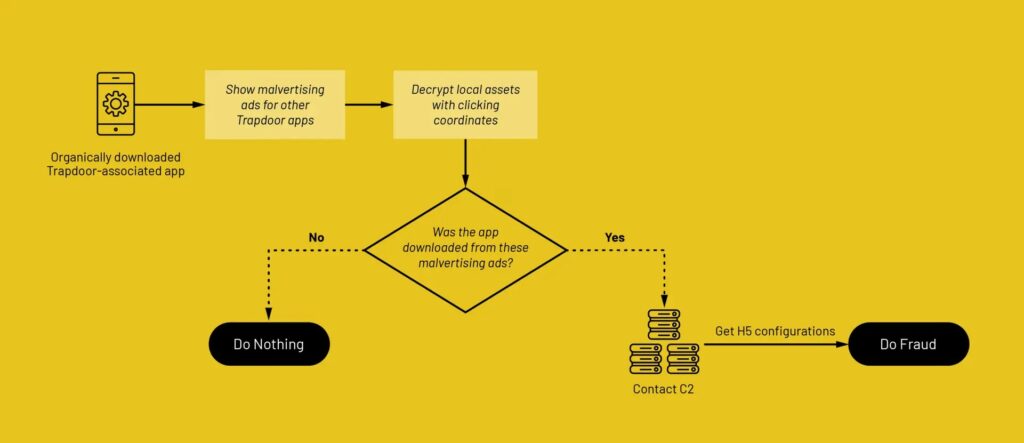
The self-funding model made the campaign more dangerous. Fraud revenue could support more malvertising, which could drive more installs and keep the cycle running.
Warning signs for Android users
- Utility apps from unknown developers that push urgent update messages.
- Apps that ask users to install another app to keep working.
- Update prompts delivered through ads rather than the Play Store update screen.
- Apps that request permissions unrelated to their stated purpose.
- Unexpected battery drain, data use, or background activity after installing a simple tool.
Users should update apps only through Google Play or another trusted app store. They should avoid update prompts that appear as ads inside unrelated apps.
How Android users can reduce exposure
Users should remove apps they no longer need, especially old utility apps from unfamiliar developers. They should also review permissions and avoid apps that ask for access beyond their function.
Keeping Android and Google Play services updated can also reduce risk. Current security protections make it harder for known malicious apps to remain active on devices.
When a simple app suddenly asks for another download, users should treat the prompt as suspicious. A legitimate update should come through the official app store, not through a pop-up ad.
What security teams should monitor
Trapdoor shows why mobile ad fraud needs both cybersecurity and advertising fraud monitoring. The campaign did not rely on one malicious file or one domain, so defenders need behavior-based detection.
Security teams should look for hidden WebView activity, suspicious attribution-based activation, C2 requests to unknown HTML5 domains, and automated gesture patterns.
Organizations should also watch for apps that suppress behavior on rooted devices, debugging environments, or VPN connections. These checks often signal that the app wants to avoid analysis.
Key indicators from the operation
| Indicator type | Example | Why it matters |
|---|---|---|
| File name | move.txt | Stores automated swipe and movement coordinates. |
| File name | click.txt | Stores tap coordinates and timing data. |
| C2 domains | 183 attacker-owned domains | Served click configuration, HTML5 cashout pages, and anti-analysis signals. |
| API endpoint | /api/referrer | Delivered signals linked to rooted-device, debugging, and VPN checks. |
| Data classes | TouchConfig and TouchData | Supported automated touch-event execution. |
| App behavior | Hidden WebViews | Loaded ad pages without visible user interaction. |
The bigger mobile ad fraud problem
Trapdoor follows other large mobile ad fraud campaigns that abused hidden browser activity and cashout domains. These operations keep evolving because they can turn ordinary app installs into revenue-generating fraud nodes.
The campaign also shows how attackers can misuse legitimate mobile marketing tools. Attribution systems help advertisers measure installs, but Trapdoor used similar signals to decide when to hide or activate malicious behavior.
For users, the safest habit remains simple: install apps from trusted developers, avoid fake update prompts, and delete apps that no longer serve a clear purpose. For advertisers and platforms, the lesson is broader. App behavior, traffic quality, and monetization patterns need continuous review.
FAQ
Trapdoor is an Android ad fraud and malvertising operation that used 455 malicious apps and 183 attacker-controlled domains to generate fake ad activity through hidden WebViews and automated touch interactions.
Trapdoor apps often appeared as normal utility apps. After installation, they showed fake update ads that pushed users to install a second app, which then performed hidden ad fraud activity.
Trapdoor used selective activation based on install attribution data. The malicious workflow stayed hidden for organic installs and activated mainly for users who arrived through the attackers’ ad campaigns.
Hidden WebViews are invisible browser windows inside Android apps. Trapdoor used them to load attacker-controlled HTML5 domains, request ads, and perform automated ad interactions without showing the activity to users.
Android users should install apps from trusted developers, avoid update prompts shown as ads, review app permissions, remove unused apps, and keep Android security updates current.


Read our disclosure page to find out how can you help VPNCentral sustain the editorial team Read more


Improve this guide




User forum
0 messages