
Mustang Panda Uses Fake Browser Update to Deploy PlugX RAT in Multi-Stage Attack Chain


 7 min. read
  Published on

Mustang Panda has been linked to a new PlugX malware campaign that uses a fake browser update to infect Windows systems through a layered loader chain. The attack starts with files such as Browser_Update.zip and Browser_Updater.exe, then moves through a disguised payload, DLL sideloading, and an encrypted PlugX implant.
The campaign was analyzed in a BlueCyber analysis of a January 2026 sample. The report describes a staged infection flow that hides malicious activity across multiple files instead of placing the full malware logic in one obvious executable.

Access content across the globe at the highest speed rate.
70% of our readers choose Private Internet Access
70% of our readers choose ExpressVPN

Browse the web from multiple devices with industry-standard security protocols.

Faster dedicated servers for specific actions (currently at summer discounts)
Mustang Panda, also tracked as Bronze President and other aliases, has a long history of using phishing, decoy files, DLL sideloading, and PlugX in cyber-espionage operations. MITRE ATT&CK describes the group as a China-based threat actor active since at least 2012.
How the Fake Browser Update Attack Works
The attack uses a fake update theme to make the first stage look less suspicious. The dropper presents itself as a browser update and displays a convincing installer-style window with normal-looking buttons.
After the user starts the update, the malware reaches out to a remote server and downloads a file that appears to be a JPEG image. In reality, the file acts as a hidden MSI installer that drops three components on the system.
Those files are Avk.exe, Avk.dll, and AVKTray.dat. The executable is a legitimate signed G DATA AntiVirus binary, while the DLL and data file contain the malicious parts of the chain. This setup lets the attackers abuse trust in a signed program while keeping the PlugX payload encrypted until runtime.
Key Details From the PlugX Campaign
| Item | Details |
|---|---|
| Threat actor | Mustang Panda |
| Main malware | PlugX RAT |
| Initial lure | Fake browser update |
| Initial archive | Browser_Update.zip |
| Downloader | Browser_Updater.exe |
| Dropped files | Avk.exe, Avk.dll, and AVKTray.dat |
| Technique | DLL sideloading through a legitimate signed binary |
| C2 server | fruitbrat[.]com over port 443, according to public reporting |
| Persistence | Windows Run key under the current user profile |
Why DLL Sideloading Makes Detection Harder
The campaign uses DLL sideloading to run malicious code through a legitimate executable. This technique works when a trusted program loads a DLL from a location controlled by the attacker.
In this case, Avk.exe helps disguise the execution chain because it carries a valid signature. Security tools may trust the executable at first glance, while the malicious Avk.dll performs the next step.
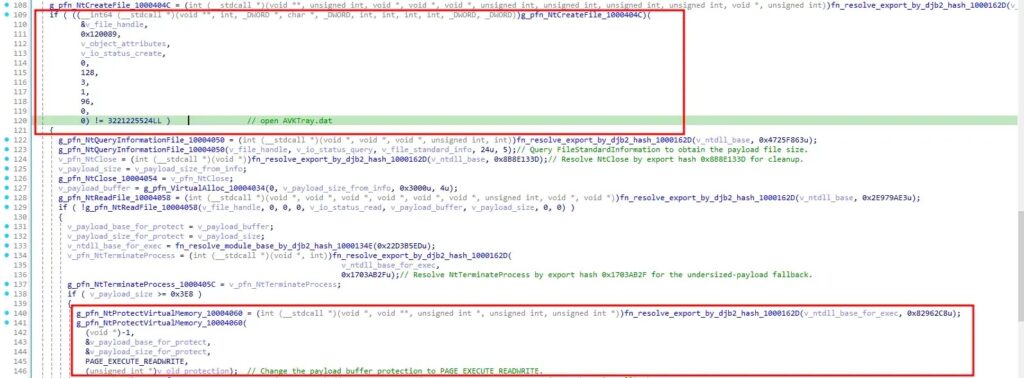
The loader reads the encrypted AVKTray.dat file, decrypts the payload, changes memory permissions, and runs the implant in memory. The BlueCyber report said the payload uses multiple layers of unpacking and decryption before reaching the final PlugX implant.
PlugX Capabilities and Command-and-Control
PlugX is a long-running remote access tool used by multiple threat groups. The MITRE PlugX profile describes it as a modular RAT that runs on Windows and supports plugin-based functionality.
In this campaign, the implant communicates with command-and-control infrastructure over HTTPS on port 443. This helps the traffic blend into normal web activity, especially in environments that allow outbound encrypted web traffic by default.
The reported implant can download and execute files, launch processes, capture command output, upload and download file chunks, enumerate files, delete files, and load additional plugin functionality. Those features make the malware useful for long-term access, internal reconnaissance, and follow-on operations.
Related LNK and PowerShell Tradecraft
The Browser_Updater chain should not be confused with every Mustang Panda PlugX campaign. Other recent research has documented Mustang Panda activity using malicious LNK files, PowerShell staging, DLL sideloading, encrypted payloads, and HTTPS command-and-control.
SOC Prime’s analysis of Mustang Panda and PlugX describes a separate chain that begins with a Windows shortcut file, launches PowerShell, and eventually deploys PlugX through reflective loading and thread-pool injection.
The overlap matters because it shows a broader pattern. Mustang Panda often separates delivery, loading, persistence, and command-and-control into different layers. That design makes simple file-based detection less reliable.
Why Mustang Panda Remains a High-Priority Threat
Mustang Panda has repeatedly used PlugX in operations against government, diplomatic, non-governmental, and policy-related targets. MITRE’s Mustang Panda profile notes that the group uses tailored phishing lures and decoy documents to deliver payloads.
The group’s tradecraft continues to evolve, but several patterns remain consistent. It frequently relies on social engineering, legitimate binaries, encrypted payloads, registry persistence, and command-and-control channels that blend into normal network traffic.
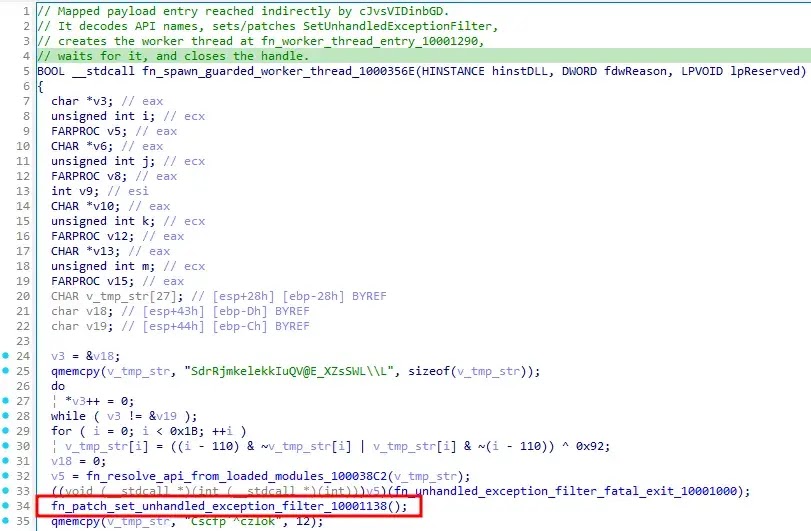
For defenders, the most important lesson is to watch the full behavior chain. A signed executable, a data file, or a normal HTTPS connection may not look dangerous alone. Together, they can reveal a multi-stage PlugX infection.
Indicators Security Teams Should Watch
| Type | Indicator | Purpose |
|---|---|---|
| File name | Browser_Updater.exe | Fake update dropper |
| File name | Avk.exe | Signed executable used for sideloading |
| File name | Avk.dll | Malicious intermediate loader |
| File name | AVKTray.dat | Encrypted PlugX payload container |
| Path | %PUBLIC%\GData\ | Reported persistence location |
| Path | %LOCALAPPDATA%\pZhozR\ | Reported staging directory |
| Registry | HKCU\SOFTWARE\Microsoft\Windows\CurrentVersion\Run\G Data | Reported startup persistence |
| Domain | fruitbrat[.]com:443 | Reported command-and-control endpoint |
Defensive Steps for Windows Environments
Security teams should prioritize behavior-based hunting instead of relying only on static hashes. Attackers can change file hashes quickly, but the combination of fake update lures, suspicious sideloading, encrypted payload containers, and unusual Run key entries is harder to hide.
- Block suspicious archives and executables that arrive through email, messaging apps, or untrusted links.
- Monitor for signed antivirus binaries running from unusual user-writable folders.
- Alert when Avk.exe, Avk.dll, and AVKTray.dat appear together outside legitimate software paths.
- Review Run key entries that point to user-writable directories or include unusual arguments.
- Detect PowerShell commands launched from LNK files in related Mustang Panda activity.
- Inspect outbound HTTPS traffic to rare or newly observed domains.
- Capture memory from suspected hosts before wiping or reinstalling systems.
The same guidance applies to related LNK and PowerShell operations. SOC Prime recommends blocking untrusted shortcut files, constraining PowerShell execution, and monitoring suspicious file creation in user-writable locations.
What Organizations Should Do After Detection
If security teams find matching artifacts, they should isolate the endpoint, preserve volatile memory, collect the dropped files, and export relevant registry keys. They should also review network logs for connections to reported C2 infrastructure and look for later movement from the same host.
Credential rotation may also be necessary if the infected system had access to sensitive accounts, VPN profiles, browser sessions, or internal applications. PlugX can support additional payloads, so defenders should assume the first visible implant may not show the full scope of the intrusion.
The campaign reinforces a familiar but important point. Mustang Panda’s PlugX operations do not depend only on one file or one trick. They rely on a chain of small steps that look less suspicious alone, which makes layered endpoint, identity, and network monitoring essential.
FAQ
The campaign uses a fake browser update to deliver a multi-stage loader that eventually installs PlugX RAT on Windows systems. The chain includes a disguised payload, DLL sideloading, encrypted payload storage, registry persistence, and HTTPS command-and-control.
PlugX is a Windows remote access trojan used by multiple threat groups. It can support remote command execution, file transfer, process control, system discovery, and plugin-based functionality.
The attack splits the infection chain across several components. It uses a fake browser update, a legitimate signed executable, malicious DLL sideloading, encrypted payload storage, and in-memory execution to reduce obvious detection signs.
Defenders should look for suspicious combinations of Browser_Updater.exe, Avk.exe, Avk.dll, and AVKTray.dat, especially under user-writable paths such as %PUBLIC% or %LOCALAPPDATA%. They should also check Run key entries pointing to those files.
Organizations should block untrusted archives and shortcut files, restrict PowerShell abuse, monitor DLL sideloading from user-writable folders, inspect unusual HTTPS traffic, and isolate endpoints that show PlugX-related artifacts.


Read our disclosure page to find out how can you help VPNCentral sustain the editorial team Read more


Improve this guide


User forum
0 messages