
SolyxImmortal Python Malware Steals Browser Passwords, Cookies, Files, and Keystrokes


 8 min. read
  Published on
SolyxImmortal is a Python-based Windows information stealer that can collect browser passwords, cookies, documents, screenshots, and keystrokes from infected systems. The malware uses common Python libraries and runs several tasks in parallel, allowing it to steal data while continuing to monitor user activity in the background.
A Pulsedive analysis published on May 27, 2026, said the malware targets sensitive files, Chromium-based browser credentials, and keystrokes. The sample analyzed by Pulsedive had a SHA-256 hash of 5a1b440861ef652cc207158e7e129f0b3a22ed5ef5d2ea5968e1d9eff33017bc and was available through MalwareBazaar.

Access content across the globe at the highest speed rate.
70% of our readers choose Private Internet Access
70% of our readers choose ExpressVPN

Browse the web from multiple devices with industry-standard security protocols.

Faster dedicated servers for specific actions (currently at summer discounts)
The malware also appears to focus on Turkish-speaking users. A CYFIRMA report from January 2026 described SolyxImmortal as a Windows infostealer that uses Discord webhooks for exfiltration and includes Turkish-language messages, banking-related keywords, and targeted screenshot triggers.
How SolyxImmortal Infects and Persists on Windows
Once executed, SolyxImmortal copies itself into the user’s AppData directory and creates a Run key under the current user registry hive. This lets the malware restart automatically when the user logs in, without requiring administrator privileges.
The persistence copy uses a Windows-like name, win_gfx_driver.exe, and sits under %APPDATA%\WindowsGraphics\. The malware also marks the file as hidden and system-protected, which makes it less visible during a casual file check.
This approach keeps the malware simple but effective. It does not need kernel drivers, privilege escalation, or complex exploit chains. It relies on user-space execution, browser data access, and normal Windows persistence behavior.
Key Details About SolyxImmortal
| Item | Details |
|---|---|
| Malware name | SolyxImmortal |
| Platform | Windows |
| Language | Python |
| Main behavior | Information theft, keylogging, screenshot capture, file harvesting, and persistence |
| Exfiltration channel | Discord webhooks, according to the CYFIRMA malware analysis |
| Sample hash | 5a1b440861ef652cc207158e7e129f0b3a22ed5ef5d2ea5968e1d9eff33017bc |
| Persistence path | %APPDATA%\WindowsGraphics\win_gfx_driver.exe |
| Registry persistence | HKCU\Software\Microsoft\Windows\CurrentVersion\Run\WindowsGfxDriver |
What Data SolyxImmortal Tries to Steal
SolyxImmortal targets data that can quickly give attackers access to online accounts, business systems, and private files. It focuses on browsers, local documents, keystrokes, and screenshots from sensitive windows.
- Saved passwords from Chromium-based browsers such as Chrome, Edge, Brave, and OperaGX.
- Firefox cookies copied from local browser profile databases.
- Text files, PDF files, Word documents, and Excel spreadsheets.
- Keystrokes captured from the user’s keyboard.
- Routine screenshots and keyword-triggered screenshots.
- System and user context that can help attackers identify valuable victims.
According to the technical breakdown, the malware stores decrypted browser credentials in a file named sifreler.txt, which means passwords in Turkish. It then stages collected files in a temporary folder and compresses them into Solyx_Final_Data.zip before exfiltration.
Browser Password Theft Uses Local Data Stores
SolyxImmortal reads known browser profile paths and targets the Local State and Login Data files used by Chromium-based browsers. It extracts the browser master key, accesses SQLite login databases, and attempts to decrypt saved credentials in the context of the current Windows user.
This method works because browsers store credentials locally for convenience. If malware runs under the same user account, it can often reach the same protected data that the user can access.
A Broadcom protection bulletin also describes SolyxImmortal as a stealer that targets Chromium browsers and uses Windows DPAPI-related access to recover browser credentials.
Keylogging and Screenshots Increase the Risk
The malware’s keylogger runs in a separate thread and records keystrokes as the victim types. It periodically sends collected keystrokes as structured data, which can expose passwords, messages, search queries, and internal system names.
SolyxImmortal also captures screenshots on a schedule and when certain keywords appear in the active window title. The keywords include terms tied to Gmail, sign-in pages, and Turkish banking activity, which suggests the author wanted to capture high-value login events.
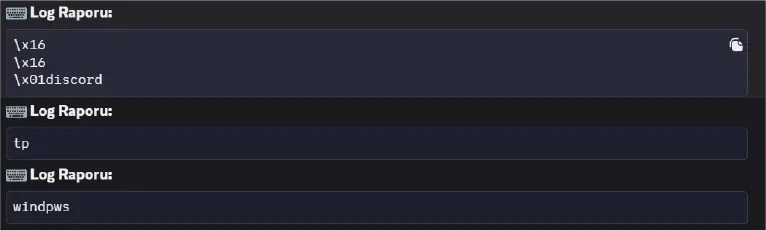
This combination makes the malware more intrusive than a basic browser stealer. Even if a password never exists in the browser database, the keylogger and screenshot module may still capture it during login.
Why Discord Webhooks Help the Malware Blend In
Discord webhook abuse gives attackers a convenient way to receive stolen data without maintaining traditional command-and-control infrastructure. Many environments allow Discord traffic, and HTTPS traffic to a known service can look less suspicious than traffic to an unknown domain.
Security teams should not treat all traffic to popular platforms as safe. Malware often abuses trusted services because defenders hesitate to block them and because attackers can create new endpoints quickly.
A SOC Prime threat summary maps SolyxImmortal activity to techniques including Python execution, Run key persistence, hidden file attributes, browser credential theft, keylogging, screen capture, archive creation, and exfiltration over webhooks.
Indicators of Compromise
| Type | Indicator | Description |
|---|---|---|
| SHA-256 | 5a1b440861ef652cc207158e7e129f0b3a22ed5ef5d2ea5968e1d9eff33017bc | Reported SolyxImmortal Python malware sample |
| SHA-1 | 81c66c043982cfee9e60ae94203f4336da0b50c0 | Reported sample hash |
| MD5 | 2690f7c685784fff006fe451fa3b154c | Reported sample hash |
| File name | win_gfx_driver.exe | Persistence copy under AppData |
| File name | sifreler.txt | Staging file for stolen browser passwords |
| File name | Solyx_Final_Data.zip | Compressed archive used for stolen data |
| File name | alert.png | Screenshot captured when a sensitive window title is detected |
| File path | %APPDATA%\WindowsGraphics\win_gfx_driver.exe | Reported persistence location |
| Registry key | HKCU\Software\Microsoft\Windows\CurrentVersion\Run | Run key used with the WindowsGfxDriver value |
How Security Teams Can Detect SolyxImmortal
Detection should focus on behavior, not only hashes. Python-based malware can change quickly, but its activity still leaves patterns in process, file, registry, and network telemetry.
- Watch for Python or packaged Python executables creating files under %APPDATA%\WindowsGraphics\.
- Alert on new HKCU Run key values that reference user-writable paths.
- Monitor for files named win_gfx_driver.exe, sifreler.txt, Solyx_Pack_Final, and Solyx_Final_Data.zip.
- Detect unusual access to browser Local State, Login Data, and cookie databases.
- Flag repeated screenshot capture from unexpected processes.
- Monitor outbound HTTPS POST requests to Discord webhook endpoints.
- Review creation of hidden or system-attributed files inside AppData.
The SOC Prime analysis recommends monitoring binaries from user-writable paths, detecting user-level Run key changes, and alerting on outbound HTTPS POST activity to Discord webhook endpoints.
What Users Should Do After a Suspected Infection
Anyone who finds SolyxImmortal indicators should isolate the affected Windows system from the network. The next step should include collecting logs, preserving relevant files, and checking whether the malware exfiltrated browser credentials or documents.
Users should rotate passwords from a clean device, revoke active sessions, reset browser sync tokens where possible, and replace any exposed API keys or SSH keys. If the machine handled work accounts or financial accounts, teams should review login history for suspicious access.
Security teams should also remove the persistence copy and delete the WindowsGfxDriver Run key value only after preserving evidence. Broadcom’s SolyxImmortal stealer bulletin reinforces the need to focus on browser credential access, AppData persistence, and local data collection when building detections.
Why Python Infostealers Remain Dangerous
Python malware can look simple compared with custom native malware, but it can still cause serious damage. SolyxImmortal uses common libraries to take screenshots, log keys, read SQLite databases, compress files, and send web requests.
The malware’s strength comes from combining many basic capabilities into one persistent implant. It steals existing browser secrets, watches what the user types next, and captures screenshots when the user visits sensitive windows.
The best defense is layered. Organizations should restrict unnecessary Python execution, use endpoint detection, monitor registry persistence, block risky webhook abuse where possible, and train users to avoid suspicious downloads and attachments.
FAQ
SolyxImmortal is a Python-based Windows information stealer that collects browser passwords, cookies, documents, screenshots, and keystrokes from infected systems.
SolyxImmortal copies itself to %APPDATA%\WindowsGraphics\win_gfx_driver.exe and adds a WindowsGfxDriver value under the HKCU Run registry key so it starts again when the user logs in.
SolyxImmortal targets Chromium-based browsers such as Google Chrome, Microsoft Edge, Brave, and OperaGX. It also attempts to copy Firefox cookie databases from local browser profile folders.
Public research says SolyxImmortal uses Discord webhooks to exfiltrate stolen data, including credential files, zipped documents, screenshots, and keystroke logs.
Users should disconnect the affected system from the network, preserve evidence, remove the persistence entry after investigation, rotate passwords from a clean device, revoke active sessions, and replace any exposed API keys or SSH keys.


Read our disclosure page to find out how can you help VPNCentral sustain the editorial team Read more


Improve this guide




User forum
0 messages