
DragonForce Ransomware Attack Abuses Microsoft Teams Relays to Hide Malicious Traffic


 7 min. read
  Published on
DragonForce ransomware attackers used Microsoft Teams relay infrastructure to hide command-and-control traffic during an attack on a major U.S. services company. The technique made malicious traffic look like normal outbound connections to trusted Microsoft services.
The campaign was documented by Broadcom’s Symantec and Carbon Black Threat Hunter Team in its DragonForce Teams relay report. Researchers said the attackers deployed a custom Go-based remote access Trojan called Backdoor.Turn.

Access content across the globe at the highest speed rate.
70% of our readers choose Private Internet Access
70% of our readers choose ExpressVPN

Browse the web from multiple devices with industry-standard security protocols.

Faster dedicated servers for specific actions (currently at summer discounts)
The attack does not mean Microsoft Teams itself was compromised. Instead, the malware abused the way Teams uses relay infrastructure to support communications when direct network paths are not available.
How Backdoor.Turn Hid Traffic Inside Microsoft Teams Relays
Backdoor.Turn obtains an anonymous Teams visitor token from Microsoft’s Skype-backed identity services. It then uses legitimate Microsoft TURN relay infrastructure to set up a relay session before creating a QUIC connection to the attacker’s real command-and-control server.
Microsoft’s own Teams call flow documentation explains that Microsoft 365 supports functions such as Transport Relay, conferencing servers, and media processors. Teams can relay media through Microsoft 365 when a direct peer-to-peer connection is not available.
That normal design gave the malware cover. From a defender’s point of view, the most visible traffic went to Microsoft Teams infrastructure rather than an obvious attacker-controlled domain.
| Component | Role in the attack | Why it matters |
|---|---|---|
| Backdoor.Turn | Go-based remote access Trojan | Provides remote access, command execution, scanning, and credential-related functions |
| Microsoft Teams TURN relays | Used as traffic camouflage | Makes C2 traffic appear to involve trusted Microsoft infrastructure |
| QUIC session | Connects the relay session to the real C2 server | Helps the attacker keep communication hidden behind legitimate-looking traffic |
| BYOVD tools | Used to disable security tools at kernel level | Reduces endpoint visibility before and during ransomware activity |
The Campaign Was Linked to DragonForce
SecurityWeek reported that the malware appeared in a DragonForce ransomware attack against a U.S. services firm. The attackers accessed the victim network in December 2025 and remained active before deploying ransomware and follow-on tooling, according to the SecurityWeek report.
The initial intrusion vector remains unclear. Researchers believe the attackers may have exploited an unknown SQL or MSSQL server weakness, or they may have purchased access from an initial access broker.
After gaining access, the attackers used DLL sideloading with a legitimate VirtualBox executable and a malicious DLL. They then performed reconnaissance, harvested credentials, moved laterally, created accounts, changed firewall rules, and prepared the network for ransomware deployment.
Why This Technique Is Difficult to Detect
Trusted cloud services create a visibility problem for defenders. Blocking Microsoft Teams traffic can break business communications, but allowing it without inspection can give attackers a hiding place.
Praetorian’s earlier Ghost Calls research showed how web conferencing traffic can be abused for covert command-and-control channels. The research focused on how high-volume, encrypted, trusted meeting traffic can blend into normal enterprise activity.
Symantec said Backdoor.Turn appears to be the first known malware family to use Microsoft Teams TURN relay infrastructure in this way in a real-world attack. That makes the campaign a useful warning for security teams that rely heavily on domain trust and allowlists.
The Attackers Also Used Vulnerable Drivers
The Teams relay technique was only one part of the operation. The attackers also used a Bring Your Own Vulnerable Driver strategy to disable security tools at a deeper level.
Microsoft’s recommended driver block rules warn that attackers exploit vulnerable signed kernel drivers to run malware in the Windows kernel. Microsoft says its vulnerable driver blocklist helps harden systems against drivers with known security flaws or behaviors that can undermine the Windows security model.
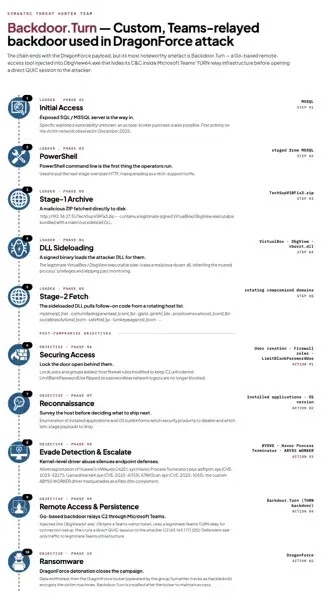
In this case, Symantec observed abuse of vulnerable drivers, including a previously unknown exploitation path involving the Huawei HWAuidoOs2Ec.sys driver. The attackers also used Abyss Worker, a malicious driver disguised as a Palo Alto driver, to terminate security processes.
Backdoor.Turn Capabilities
- Execute commands on compromised systems
- Create and manage processes
- Scan internal networks
- Map Active Directory and LDAP environments
- Move laterally using stolen credentials
- Steal credentials from browsers
- Maintain access after ransomware deployment
The timing of Backdoor.Turn is also notable. The malware was reportedly deployed after the ransomware stage, which suggests the attackers may have wanted to preserve access or prepare the victim environment for future monetization.
The Broadcom analysis described the tradecraft as unusually sophisticated for ransomware operators. The group combined trusted cloud relay abuse, custom malware, DLL sideloading, vulnerable-driver exploitation, and long-term persistence.
What Security Teams Should Do
Defenders should not treat all Microsoft Teams traffic as automatically safe. The better approach is to baseline normal Teams activity, then hunt for unusual relay usage, suspicious QUIC sessions, unexpected token activity, and communication patterns that do not match normal user behavior.
The Microsoft Teams call flow guidance can help network teams understand normal Teams relay and media paths. That context matters when building detections that avoid breaking collaboration tools while still flagging abnormal activity.
Security teams should also review endpoint controls. The Microsoft driver blocklist guidance recommends HVCI, App Control for Business, and the Attack Surface Reduction rule that blocks abuse of exploited vulnerable signed drivers.
- Audit Teams and Microsoft 365 traffic for unusual relay behavior.
- Look for suspicious QUIC traffic tied to unexpected processes.
- Monitor for DLL sideloading involving legitimate executables.
- Hunt for vulnerable driver loading and kernel-level tampering attempts.
- Enable HVCI where possible and keep driver blocklists current.
- Investigate new local accounts, firewall rule changes, and persistence settings.
- Review post-ransomware activity for signs of continued access.
DragonForce Shows How Ransomware Tradecraft Is Changing
DragonForce has been active since 2023 and has increasingly adopted a more structured ransomware model. The latest case shows how ransomware operators are moving beyond basic encryption playbooks and using stealthier post-compromise tools.
The SecurityWeek coverage noted that Backdoor.Turn can support reconnaissance, credential theft, lateral movement, and data exfiltration. Those capabilities make it more than a simple backdoor.
The technique also builds on the same risk described in Praetorian’s Ghost Calls research: attackers can hide inside collaboration traffic that businesses depend on every day.
For defenders, the lesson is clear. Trusted cloud traffic still needs behavioral monitoring, and endpoint protection must include controls against vulnerable driver abuse. Ransomware groups now use legitimate infrastructure as camouflage, which means static allowlists and simple domain-based trust can leave major blind spots.
FAQ
No. The reports do not say Microsoft Teams was breached. Attackers abused legitimate Teams TURN relay infrastructure to disguise command-and-control traffic as normal Microsoft Teams-related traffic.
Backdoor.Turn is a Go-based remote access Trojan used in a DragonForce ransomware attack. It can execute commands, scan networks, map Active Directory, move laterally, and help maintain access after ransomware deployment.
Attackers used Teams TURN relays because traffic to Microsoft infrastructure often looks legitimate in enterprise networks. This can make malicious command-and-control activity harder to distinguish from normal collaboration traffic.
BYOVD stands for Bring Your Own Vulnerable Driver. Attackers load or abuse a legitimate but vulnerable signed driver to gain kernel-level access, disable security tools, and evade endpoint defenses.
Companies should baseline normal Teams traffic, monitor suspicious relay and QUIC activity, investigate unusual process behavior, restrict vulnerable drivers, enable HVCI where possible, and hunt for persistence changes such as new accounts or firewall rules.


Read our disclosure page to find out how can you help VPNCentral sustain the editorial team Read more


Improve this guide




User forum
0 messages