
Millenium RAT Rewritten in C++ Infects 62,289 Devices Across 160 Countries


 7 min. read
  Published on
Millenium RAT has re-emerged as a larger and more capable Windows threat after a major rewrite from .NET to native C++. Researchers at Group-IB say version 4 of the malware has infected 62,289 devices across more than 160 countries, with 39,730 infections recorded in the first quarter of 2026 alone.
The latest version keeps one of the malware’s most useful traits for attackers: command and control through Telegram. Instead of relying on dedicated attacker-owned servers, Millenium RAT uses Telegram bot traffic to receive commands and send stolen data.

Access content across the globe at the highest speed rate.
🔥 Save 81% + 2 bonus months! 🔥
70% of our readers choose Private Internet Access
70% of our readers choose ExpressVPN
2
Browse the web from multiple devices with industry-standard security protocols.
🔥 Save 73%! 🔥

Faster dedicated servers for specific actions (currently at summer discounts)
🔥 Save 69%! 🔥
The malware is linked to a threat cluster tracked by Group-IB as Y2K Operators. Its developer, known as ShinyEnigma, promotes the tool across underground forums and developer platforms, selling access through a low-cost Malware-as-a-Service model.
What Changed in Millenium RAT Version 4
The biggest change is the move from .NET to C++. Earlier research from CYFIRMA covered Millenium RAT version 2.4 in 2023 as a .NET-based Windows executable. Group-IB’s newer analysis shows that version 4 has shifted to a native C++ application.
That rewrite removes the dependency on .NET being available on the victim’s machine. It can also make static detection harder because the new codebase changes the malware’s structure and behavior compared with older samples.
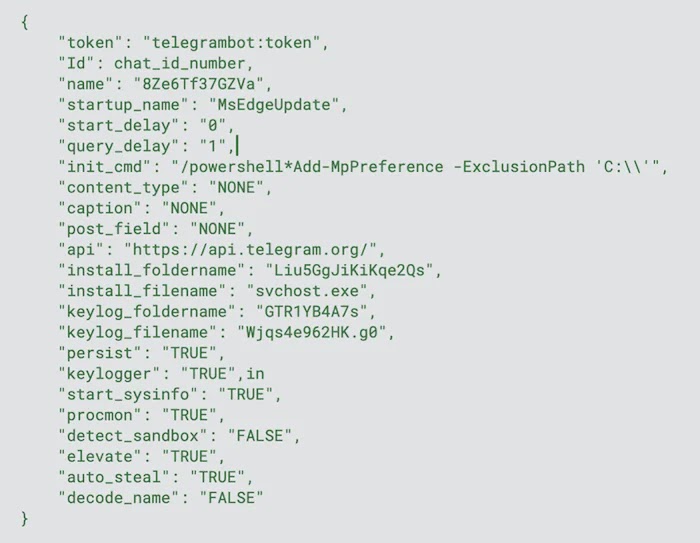
The RAT loads an encrypted configuration from an embedded PE resource. The configuration contains details such as the Telegram bot token, chat ID, persistence settings, keylogger options, startup delay, install path and command polling interval.
| Feature | Version 2.4 | Version 4 |
|---|---|---|
| Core language | .NET | Native C++ |
| Main platform | Windows | Windows |
| Command channel | Telegram API | Telegram Bot API |
| Business model | Sold by the developer | Subscription-based Malware-as-a-Service |
Telegram Bot API Used as Command Channel
Millenium RAT uses Telegram as a ready-made command channel. The official Telegram Bot API is an HTTP-based interface for developers building Telegram bots, and Group-IB says the malware uses it over HTTPS to poll for commands.
That approach gives attackers several practical advantages. Telegram traffic may blend into normal web activity, operators do not need to maintain a dedicated command server, and bot-based communication can simplify control of many infected machines.
Group-IB says the malware can receive structured commands for screenshot capture, browser data theft, Discord and Telegram session collection, file upload, file download, process control, PowerShell execution, shutdown, restart and keylog retrieval.
What Millenium RAT Can Steal
Millenium RAT behaves like a full remote access trojan. Once installed, it can collect browser credentials, cookies, browsing history, Discord tokens, Telegram session files, desktop files, screenshots, webcam images and microphone recordings.
It can also log keystrokes and collect system information. In some commands, the RAT can download and run additional files, execute Windows command-line instructions, invoke PowerShell, and encrypt user files.
The malware’s broad capability set makes it useful for credential theft, account takeover, surveillance and follow-on intrusion. The earlier CYFIRMA research also described Millenium RAT as a tool designed for remote control, persistence and sensitive data collection.
- Browser passwords, cookies and history
- Discord tokens and Telegram session data
- Screenshots, webcam images and microphone recordings
- Keystrokes captured through keylogging
- Desktop files and other local data
- System information and installed software details
How the Malware Stays on Windows Devices
Millenium RAT sets persistence by copying itself into a folder under %APPDATA% and creating an autorun entry under HKCU\Software\Microsoft\Windows\CurrentVersion\Run. MITRE tracks this behavior under Registry Run Keys and Startup Folder, a common persistence technique used by malware.
The RAT also stores internal data under HKCU\Software and uses registry values to influence execution flow. These artifacts give defenders useful places to look during endpoint investigation.
Persistence alone does not make the malware advanced, but it makes cleanup more difficult. If the payload survives reboot and keeps its command channel active, attackers can return to the compromised device after the initial infection.
| Behavior | Defender focus |
|---|---|
| Autorun registry entry | Check HKCU Run keys for unknown values |
| Payload copied under %APPDATA% | Look for system-like filenames in user-writable paths |
| Telegram polling | Review unusual bot API traffic from endpoints |
| Browser data collection | Monitor access to browser profile and cookie stores |
| PowerShell execution | Correlate script activity with suspicious downloads |
Y2K Operators Rely on Social Engineering
Group-IB says the Y2K Operators use broad social engineering rather than zero-day exploits. Lures include credit card generators, crypto balance checkers, hacking tools, cracked software, OSINT kits, Roblox-related utilities and fake PDF documents.
One campaign used a shortcut disguised as a PDF. When opened, it launched PowerShell in the background, downloaded a decoy document, and executed the RAT while the fake document opened in the foreground.
The operators also target would-be cybercriminals by repackaging RAT builders, exploit kits and hacking tools with hidden backdoors. A person trying to download an illicit tool may instead infect their own machine.
No Zero-Day Needed for Privilege Escalation
Millenium RAT does not need a zero-day vulnerability to request higher privileges. Group-IB says its elevation attempt relies on a standard Windows User Account Control prompt and assumes the user will approve it.
Microsoft’s User Account Control documentation explains that UAC helps prevent malware from damaging a machine and helps organizations deploy a better-managed desktop. In this case, the malware tries to abuse user trust rather than bypass the feature silently.
Users should treat unexpected elevation prompts as suspicious, especially when they appear after opening a file from an untrusted archive, cracked software package or messaging-app link.
- Do not run executables from cracked software sites or unknown archives.
- Reject UAC prompts that appear without a clear reason.
- Use a standard account for daily work instead of an administrator account.
- Keep Microsoft Defender, SmartScreen and endpoint protection enabled.
- Enable multi-factor authentication to reduce the value of stolen passwords.
Why Millenium RAT Is Spreading Quickly
The low price helps explain the scale. Group-IB says Millenium RAT is sold for $50 for the first month, $10 for renewals, or $90 for lifetime access, making it cheap enough for low-skilled operators to adopt.
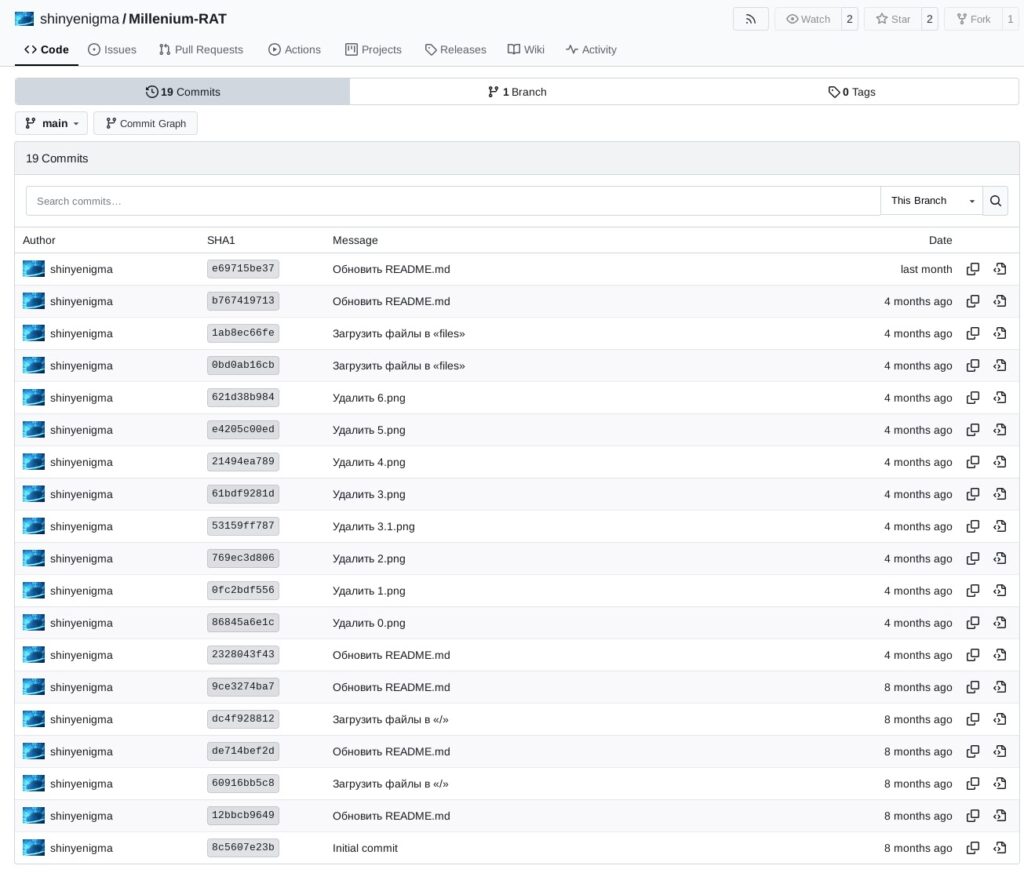
The Group-IB report also notes that ShinyEnigma advertised the tool on GitHub, GitLab, Gitea and underground forums, although some repositories had already been removed at the time of writing.
This mix of cheap access, Telegram-based control and simple social engineering gives the malware a wide reach. It does not need a narrow victim profile because the lures target ordinary users, gamers, crypto users, software pirates and aspiring criminals.
What Security Teams Should Watch For
Defenders should monitor for unusual Telegram bot connections from endpoints, especially when paired with new files in %APPDATA%, unknown Run key entries, suspicious PowerShell activity or processes using trusted-looking names outside normal Windows directories.
MITRE’s T1547.001 guidance is useful for mapping Millenium RAT persistence, while the Telegram Bot API documentation helps analysts understand why bot traffic can look like normal HTTPS communication.
Organizations should also educate users about unexpected UAC prompts. Microsoft’s UAC guidance reinforces why users should not approve elevation requests unless they understand which program requested access.
Millenium RAT shows how fast a low-cost malware family can grow when attackers combine a native rewrite, trusted cloud messaging infrastructure and convincing lures. The shift to C++ does not make the malware unstoppable, but it raises the cost of detection and gives defenders less room to rely on old signatures.
FAQ
Millenium RAT is a Windows remote access trojan sold as Malware-as-a-Service. It lets attackers steal data, capture screenshots, log keystrokes, collect browser information and control infected devices remotely.
Group-IB says Millenium RAT version 4 has infected 62,289 devices across more than 160 countries, including 39,730 infections in the first quarter of 2026.
Version 4 was rewritten from .NET to native C++. This removes the need for .NET on the victim’s machine and changes the malware’s structure, which can make older detection logic less useful.
Millenium RAT uses the Telegram Bot API to poll for commands and send stolen data. This lets operators control infected machines without maintaining a dedicated command-and-control server.
Users should avoid cracked software, fake hacking tools, unknown archives and unexpected attachments. They should reject suspicious UAC prompts, use a standard account for daily work, keep endpoint protection enabled and enable multi-factor authentication.


Read our disclosure page to find out how can you help VPNCentral sustain the editorial team Read more


Improve this guide




User forum
0 messages