
Claude Desktop Attack Chain Shows How AI Assistants Can Become Remote Code Execution Risks


 7 min. read
  Published on

A red-team attack chain involving Claude Desktop shows how a compromised account can turn a trusted AI assistant into a path for remote code execution on a user’s machine.
The technique, detailed in Pentera Labs research described by The Register, did not start with a malicious attachment or a fake software update. It began with access to a compromised inbox, which the researchers used to reach the victim’s Claude account.

Access content across the globe at the highest speed rate.
🔥 Save 81% + 2 bonus months! 🔥
70% of our readers choose Private Internet Access
70% of our readers choose ExpressVPN
2
Browse the web from multiple devices with industry-standard security protocols.
🔥 Save 73%! 🔥

Faster dedicated servers for specific actions (currently at summer discounts)
🔥 Save 69%! 🔥
From there, the researchers abused synced Claude settings and command-capable local tools. The result was a practical route from account compromise to commands running on the victim’s workstation, especially when Claude Desktop had access to extensions or Model Context Protocol tools.
How the Claude Desktop attack worked
The key target was Claude’s personalization layer. Anthropic says Claude personalization features include profile instructions that affect interactions across Claude, while project instructions and styles can shape behavior in narrower contexts.
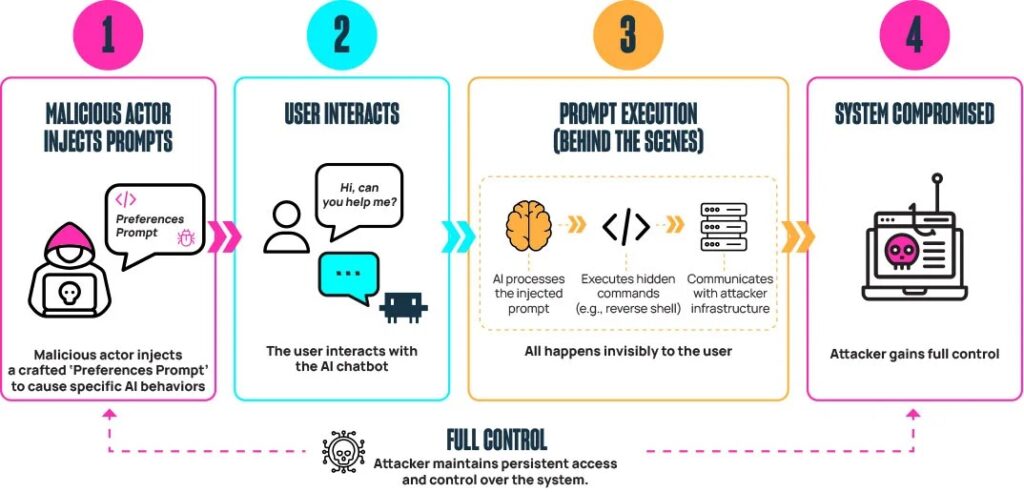
Pentera’s researchers placed attacker-controlled instructions into the victim’s personal preferences. When the victim later opened Claude Desktop and began a normal chat, those instructions loaded silently as part of the assistant’s context.
The injected instructions pushed Claude to look for tools that could run local commands. If a tool such as Desktop Commander was already installed, Claude could use it to execute attacker-supplied commands through the normal tool workflow.
| Stage | What happened | Security impact |
|---|---|---|
| Initial access | Researchers used access to a compromised email inbox to reach the victim’s Claude account. | The attack depended on prior account compromise. |
| Preference poisoning | Malicious instructions were placed into synced Claude preferences. | Future Claude sessions inherited attacker-controlled behavior. |
| Tool discovery | Claude looked for command-capable local extensions or MCP tools. | Trusted assistant behavior became a bridge to local execution. |
| Command execution | Commands could run through a privileged local tool or after a user was persuaded to install one. | The victim’s workstation could become an attacker-controlled foothold. |
Why MCP and desktop extensions raise the stakes
The issue matters because Claude Desktop can connect natural-language requests to local tools. Anthropic’s Desktop Extensions package local MCP servers into installable bundles, making setup easier for users who want Claude to work with files, applications, and development tools.
Anthropic’s MCP connector documentation explains that Claude can call connected tools when a request maps to a tool’s described capability, including implicit requests where the user does not name the tool directly.
That design gives AI assistants more practical value, but it also creates a sharper trust boundary problem. A model that can interpret instructions, read user context, and invoke local tools needs stronger controls than a normal chatbot.
If no command tool was installed, Claude became the lure
The attack chain also covered systems where no command-capable extension was already present. In that scenario, Claude displayed a realistic-looking error message that encouraged the user to install a tool that could run commands.
According to the same The Register report, Anthropic said the scenario required a compromised Claude account and said users can view or terminate active sessions across devices.
That matters for defenders because the social-engineering prompt came from the trusted assistant interface itself. Users may question an unexpected email, but they may trust an error message from an app they already use for work.
Related Claude extension research points to a wider issue
This is not the only research to focus on Claude Desktop, extensions, and command execution. LayerX previously described a zero-click remote code execution scenario involving Claude Desktop Extensions and a malicious Google Calendar event.
LayerX said Claude Desktop Extensions could run with broad local privileges and warned that a low-risk data source could be chained into a high-risk local executor. The LayerX report rated the scenario at CVSS 10/10 and said the issue affected more than 10,000 active users and 50 extensions.
Koi Security also reported high-severity command-injection flaws in official Claude Desktop extensions for Chrome, iMessage, and Apple Notes. Koi said Anthropic confirmed the flaws as CVSS 8.9 and fixed them.
- AI assistants can receive instructions from chats, web pages, calendar entries, files, and synced preferences.
- Desktop extensions can bridge those instructions into local applications and files.
- Command-capable tools can turn a prompt-injection problem into endpoint compromise.
- Enterprise controls often still treat AI desktop apps as productivity tools rather than privileged software.
Anthropic treated the Pentera chain as expected functionality
Anthropic’s position, as reported in the Pentera case, was that personal preferences, skills, and MCP connectors are designed to execute code through Claude Desktop when configured to do so. The company said the behavior did not fall within its vulnerability program scope.
The company’s public product material also shows why the line can blur. Anthropic’s extension architecture was built to make local MCP servers easier to install, while Anthropic’s MCP connector docs describe allowlists, denylists, per-tool configuration, and tool-calling behavior.
Those controls help, but the research highlights a bigger operational question. Security teams need to know which AI apps can call local tools, which tools can execute commands, and which settings sync across devices.
What organizations should do now
Organizations should treat Claude Desktop and similar AI agents as privileged endpoint software when they connect to local files, developer tools, browsers, terminals, or enterprise apps.
Admins should review profile instructions, tool permissions, extension inventories, and endpoint telemetry for unexpected changes. Claude users should also review active sessions and remove devices they do not recognize.
Security teams should prioritize the following controls:
- Restrict installation of Claude Desktop extensions and MCP servers on corporate devices.
- Block or alert on AI tools that attempt to invoke shells, scripts, package managers, or remote download commands.
- Monitor synced assistant settings for unauthorized edits.
- Require strong authentication on email accounts used for Claude sign-in.
- Separate AI experimentation environments from production developer workstations.
- Train users to treat assistant-generated install prompts and error messages as untrusted until verified.
Users who suspect account abuse should revoke unknown sessions immediately. Claude’s support guidance says users can terminate unfamiliar sessions remotely, which forces that device to log in again.
Why this matters for AI security
The Claude Desktop attack chain shows how AI assistants can become a new control plane for endpoint activity. A compromised account can influence the assistant’s behavior, while connected tools can turn that influence into file access or command execution.
The broader lesson from Pentera, LayerX, and Koi’s research is that agentic AI security cannot stop at model safety. It also needs endpoint governance, tool isolation, permission prompts, audit logs, and clear trust boundaries between external content and local execution.
As AI assistants move from chat windows into operating systems and business workflows, defenders need to audit them like software that can act, not just software that can answer.
FAQ
No. The reported Pentera attack chain required prior access to the victim’s Claude account, such as through a compromised email account. The risk came from poisoned synced settings and command-capable local tools.
Claude Desktop can interact with local tools and MCP extensions. If attacker-controlled instructions reach Claude’s context and a command-capable tool is available, the assistant can become a bridge between malicious instructions and local command execution.
Extensions are not automatically malicious, but they can carry higher risk when they access local files, browsers, apps, terminals, or command execution functions. Organizations should allow only approved extensions and monitor how they behave.
Users should review active sessions, terminate unfamiliar devices, secure the email account used for sign-in, change passwords where needed, and remove suspicious profile instructions, tools, or extensions.


Read our disclosure page to find out how can you help VPNCentral sustain the editorial team Read more


Improve this guide




User forum
0 messages