
Claude Cowork Lets Users Manage AI Sessions From Mobile and Web


 10 min. read
  Published on
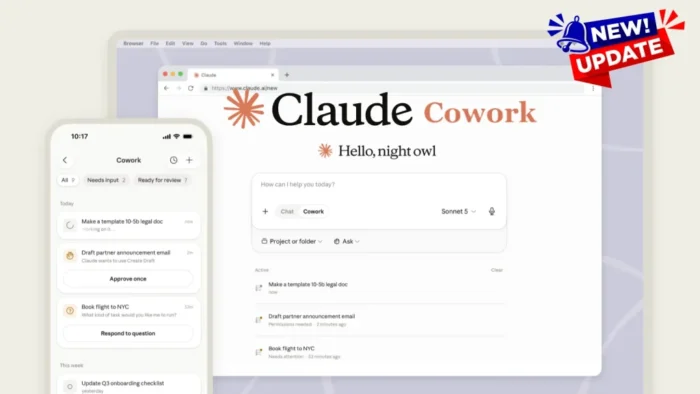
Anthropic is expanding Claude Cowork to mobile and web, giving users a way to manage AI agent sessions from phones, tablets, browsers, and desktop apps.
The update means Cowork tasks can continue in the cloud even when a laptop is closed. Users can start or review work across devices, while Claude sends phone notifications when it needs something reviewed or approved.

Access content across the globe at the highest speed rate.
70% of our readers choose Private Internet Access
70% of our readers choose ExpressVPN

Browse the web from multiple devices with industry-standard security protocols.

Faster dedicated servers for specific actions (currently at summer discounts)
According to The Verge, the rollout started on July 7, 2026, and is initially available to Claude Max subscribers before expanding to users on other plans in the coming weeks.
Claude Cowork is moving beyond desktop
Claude Cowork was previously limited to the Claude desktop apps for macOS and Windows. The new rollout brings limited Cowork access to iOS, Android, and web users for the first time.
The full experience is still on desktop, especially for features such as local file access. However, cloud-based sessions are now the default, which lets Cowork continue tasks across devices without requiring a desktop session to stay awake.
Wired reported that the change removes the old need to keep a laptop open just to keep an agent task running overnight or while the user is away.
| Feature | What changed |
|---|---|
| Mobile access | Cowork can now be used through Claude on iOS and Android |
| Web access | Users can interact with Cowork from a browser |
| Cloud sessions | Tasks can continue even when a laptop is closed |
| Desktop mode | Local file access remains part of the full desktop experience |
| Notifications | Claude can alert users when it needs review or approval |
Max subscribers get access first
The rollout starts with Claude Max users. Wider availability is expected later, but Anthropic has not presented the feature as a free-tier launch.
Max is the higher-usage Claude plan aimed at users who need more capacity and early access to advanced features. Cowork’s mobile and web expansion fits that positioning because long-running agent tasks can consume more resources than normal chat sessions.
The The Verge report also notes that Anthropic extended doubled Cowork usage limits through August 5 alongside the mobile and web launch.
Cloud sessions are now the default
The biggest technical change is that Cowork sessions now run in the cloud by default. That allows a task to keep running when the original device is offline or closed.
Users can still switch to local processing on the desktop app. That option matters for people who want certain tasks to stay tied to their local machine, especially if the workflow involves files on the device.
For everyday users, the change makes Cowork feel closer to a persistent assistant. A task can begin on one device, continue in the background, and then ask the user for a decision on another device.
- Users can begin a Cowork session on desktop.
- The session can continue in the cloud.
- The user can later check progress from mobile or web.
- Claude can send a notification when it needs input.
- Scheduled tasks can run even when devices are offline.
Cowork focuses on workflows, not single answers
Claude Cowork differs from a normal chatbot because it is designed to complete multi-step tasks. Instead of only answering a question, it can plan, use tools, gather information, and produce work across connected sources.
Axios reported earlier this year that Cowork is built on the same models that power Claude Code, but provides a simpler interface for planning, executing, and iterating on complex tasks.
That makes it more accessible to non-programmers. Business users can ask Cowork to prepare reports, summarize documents, organize research, draft follow-ups, or build project materials without working in a terminal.
| Use case | How Cowork can help |
|---|---|
| Meeting preparation | Gather notes, emails, transcripts, and public updates |
| Business operations | Create checklists, reports, summaries, and status documents |
| Content work | Draft proposals, decks, briefs, and client messages |
| File organization | Sort and label files when desktop access is available |
| Enterprise workflows | Use company-specific tools and plugins where configured |
Mobile notifications keep users in the loop
The new mobile workflow also adds a human checkpoint. Claude can notify users when Cowork has something ready to review or when it needs approval before moving forward.
This is important because agentic tools can take actions, not just generate text. A review step helps users keep control when the task involves files, communications, business documents, or third-party services.
In practical terms, a user could ask Cowork to prepare a meeting brief in the morning, then approve the next step from a phone before sharing or using the output.
Business users are a key target
Anthropic is clearly aiming Cowork at business productivity, not only personal assistant use. The examples around the update focus on emails, Slack messages, meeting transcripts, reports, documents, and client communication.
Wired reported that Anthropic’s usage data shows Cowork activity clustering around business process and operations, as well as content creation and copywriting.
That direction makes sense. Multi-step business tasks often involve several sources of information, and users may want the agent to keep working while they are away from their desks.
Plugins could make Cowork more company-specific
Cowork’s long-term enterprise value depends partly on integrations. If a company can connect internal systems safely, the agent can become more useful for role-specific work.
In January, Axios reported that Anthropic was launching Cowork plugins that let companies package workflows, tools, and integrations into role-based AI apps.
Examples included sales preparation, financial analysis, legal review, enterprise search, customer support, and marketing workflows. Mobile and web access now make those workflows easier to monitor away from the desktop.
Security concerns increase with persistent agents
The feature also brings new security questions. A cloud-based agent that can keep working after a device goes offline creates more convenience, but it also increases the need for strong session management, device security, and access controls.
Anthropic’s Privacy Policy says inputs and outputs can include chat, coding, agentic sessions, connected services, uploaded content, and third-party applications that users choose to integrate or interact with.
The same policy notes that, depending on permissions, outputs can result in actions outside Anthropic’s services, such as sending communications, modifying files, or interacting with third-party services on the user’s behalf.
- Organizations should require multifactor authentication for Claude accounts.
- Mobile devices should use strong device locks and managed security policies.
- Admins should limit which third-party services Cowork can access.
- Users should review agent actions before sending or modifying business data.
- Teams should log and audit sensitive workflows where possible.
Third-party integrations need careful controls
Cowork becomes more powerful when connected to email, calendars, file repositories, messaging tools, and business systems. Those same connections can create data exposure risk if access is too broad.
The Anthropic Privacy Policy says Claude may send inputs, outputs, and instructions to third-party services to perform actions on the user’s behalf. It also says some integrations may allow ongoing access until the user disables the feature or disconnects the integration.
That means organizations should treat Cowork like any other tool with access to sensitive business systems. Permissions should be narrow, reviewed regularly, and removed when no longer needed.
Commercial customers still need human review
Agentic work can reduce manual effort, but companies still need review processes. A model can draft a report, generate a summary, or prepare a message, but the organization remains responsible for deciding when the output is safe to use.
Anthropic’s Commercial Terms say customers are responsible for evaluating whether outputs are appropriate for their use case, including where human review is appropriate, before using or sharing them.
This is especially relevant for Cowork because it can handle multi-step workflows. A small error in an early step could affect a later report, email, schedule, or file action if nobody reviews the chain.
Cloud-based Cowork changes enterprise risk planning
Desktop-only agents are easier to reason about because their work depends on a specific machine being open and available. Cloud-based Cowork changes that model.
Tasks can continue across devices and offline periods, which is useful for scheduled work. It also means organizations need clear policies for which tasks can run unattended and which tasks require approval before moving forward.
The Commercial Terms also state that customers are responsible for all activity under their account and should notify Anthropic if they believe an account has been compromised.
| Risk area | Recommended control |
|---|---|
| Mobile access | Require MFA and device-level protection |
| Cloud sessions | Define which workflows can run unattended |
| Connected tools | Use least-privilege permissions |
| Sensitive outputs | Require human review before sharing |
| Account compromise | Monitor sessions and revoke suspicious access quickly |
What users can do with the new Cowork access
The clearest benefit is continuity. A user can start a research task on a laptop, close it, and later review the result from a phone.
Another benefit is scheduling. Cowork can run tasks while the user is offline, which makes it useful for morning briefings, meeting preparation, recurring summaries, or draft creation before a workday starts.
For teams, the bigger shift is workflow delegation. Cowork can become a place where users assign longer work, step away, and return only when a decision or review is needed.
What still stays on desktop
The mobile and web rollout does not make every desktop feature available everywhere. Local file access remains part of the full desktop experience, which means some workflows still need the Mac or Windows app.
This distinction is important for users who expect full parity between devices. Mobile and web access improve monitoring, review, and continuity, but the desktop app remains the main place for local machine work.
Users should also remember that cloud sessions and local processing are different modes. A task involving private local files may need different handling than a task that pulls from cloud services.
The update pushes AI agents into daily work
Claude Cowork’s mobile and web launch reflects a broader move toward persistent AI agents that users can control from the same chat apps they already use.
Instead of opening a separate automation tool, users can ask Claude to complete a workflow, then respond to checkpoints from their phone.
The productivity upside is clear, but the security model must catch up. Persistent agents need clear approvals, strong identity controls, limited integrations, and visible activity logs so users and companies know what the agent did and why.
FAQ
Claude Cowork is Anthropic’s AI agent feature for multi-step workflows. It can help users plan, execute, and review tasks across connected tools, files, and business sources depending on the permissions granted.
Yes. Claude Cowork is rolling out to mobile and web users, starting with Max subscribers. Users can interact with Cowork from iOS, Android, and browsers, although the full experience remains on desktop.
Yes. Cowork sessions now run in the cloud by default, so tasks can continue in the background even when the original laptop is closed or offline.
Claude can notify users when a task needs review or approval. Organizations should still require human review for sensitive outputs, especially before sending messages, modifying files, or using business-critical information.
The main risks involve persistent cloud sessions, mobile account compromise, broad third-party integrations, and agent actions across business systems. Companies should use MFA, device security, least-privilege permissions, and activity monitoring.


Read our disclosure page to find out how can you help VPNCentral sustain the editorial team Read more


Improve this guide




User forum
0 messages