
ClickFix Campaign Uses Fake Google Verification Page to Target Mexican Bank Customers


 12 min. read
  Published on

Elastic Security Labs has detailed a Mexican banking fraud campaign that uses fake verification pages to infect Windows users with a PowerShell toolkit called SCMBANKER.
The operation, tracked as REF6045, uses a ClickFix-style lure that tricks victims into copying and running a command from the Windows Run dialog. Once the command executes, the malware installs a toolkit that lets operators monitor banking activity, push phishing pages, manipulate the clipboard, deploy remote access software, and guide victims into phone-based fraud.

Access content across the globe at the highest speed rate.
70% of our readers choose Private Internet Access
70% of our readers choose ExpressVPN

Browse the web from multiple devices with industry-standard security protocols.

Faster dedicated servers for specific actions (currently at summer discounts)
The Elastic Security Labs report says the campaign targets customers of Mexican banks, fintech services, payment processors, cryptocurrency exchanges, investment platforms, SAT services, and telecom providers.
REF6045 turns ClickFix into banking fraud
ClickFix attacks depend on social engineering rather than a software exploit. The victim sees a fake verification or CAPTCHA page, follows keyboard instructions, and manually runs a command that starts the infection chain.
In this campaign, the page uses Spanish-language verification wording and includes a fake Google security message. Elastic said the command uses decoy text such as “Google Verificación Segura” and fetches a first-stage payload that looks like a text file but works as a Windows batch script.
The technique matters because it pushes the victim outside normal browser protections. A browser may never download an obvious executable because the user pastes a command into Windows instead.
| Item | Details |
|---|---|
| Campaign name | REF6045 |
| Malware toolkit | SCMBANKER |
| Main target region | Mexico |
| Primary lure | Fake CAPTCHA or verification page |
| Main delivery method | ClickFix command copied to the clipboard |
| Main goal | Operator-assisted banking fraud |
How the fake verification page works
The infection starts when a victim lands on a fake CAPTCHA or verification page. Elastic observed lures that first showed an image challenge, then instructed the victim to open the Windows Run dialog and paste a command.
The malicious page uses browser clipboard behavior to prepare the command. The MDN documentation for navigator.clipboard.writeText() explains that the method writes text to the system clipboard from a secure browser context.
In REF6045, that copied text pulls a first-stage script from attacker infrastructure and pipes it into cmd.exe. The user thinks they completed a security check, but they actually launched the malware installer.
- The victim sees a fake CAPTCHA or verification prompt.
- The page copies a command to the clipboard.
- The victim opens Windows Run.
- The victim pastes and executes the command.
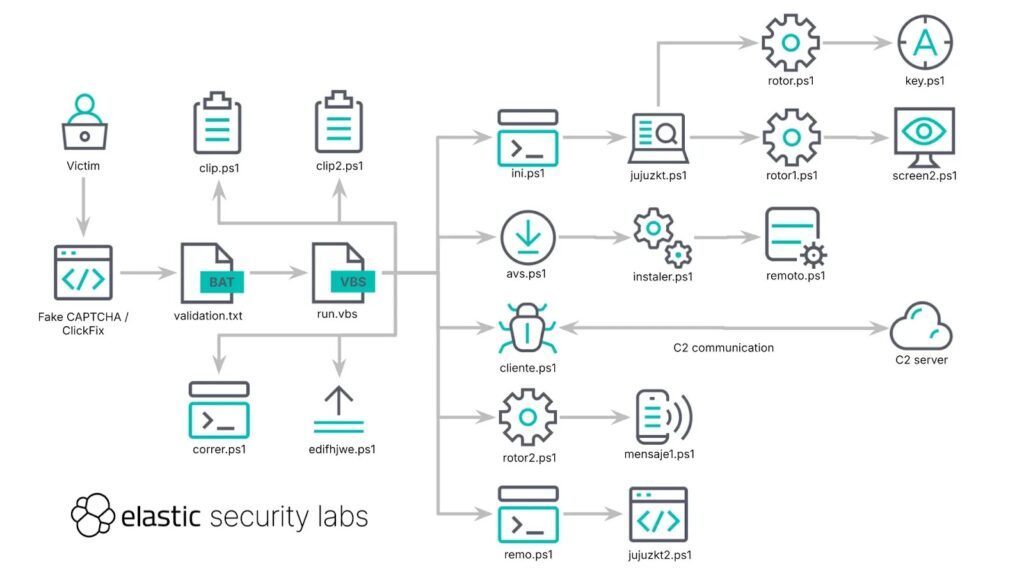
- The first-stage script starts the SCMBANKER installation chain.
The first-stage script hides behind a fake update screen
After execution, the batch script opens Microsoft Edge in kiosk mode and displays a fake Windows Update screen. This gives the malware time to download and install the rest of the toolkit while the victim waits.
The script also pressures the user for administrator approval. Elastic said it repeatedly relaunches itself with elevated privileges until the victim accepts the UAC prompt.
That combination creates a simple but effective flow: the victim believes the system is updating, while the malware gains the permissions and time it needs to complete installation.
SCMBANKER downloads its toolkit with bitsadmin
Once elevated, SCMBANKER uses Windows tools to retrieve additional scripts and binaries. Elastic observed the malware pulling files into the public user directory.
One key utility in the chain is bitsadmin. Microsoft’s bitsadmin documentation describes it as a command-line tool for creating download or upload jobs and monitoring their progress.
Attackers often abuse trusted administrative tools because they already exist on Windows systems. The MITRE ATT&CK BITS Jobs technique explains that adversaries can use BITS to download, execute, and clean up malicious code.
| Component | Reported purpose |
|---|---|
| validation.txt | First-stage batch payload |
| run.vbs | Master launcher for the toolkit |
| cliente.ps1 | Command-and-control beacon |
| jujuzkt.ps1 | Banking activity monitor |
| jujuzkt2.ps1 | Browser redirect module |
| clip.ps1 and clip2.ps1 | Clipboard hijacking modules |
| avs.ps1 | Remote Utilities downloader |
Persistence uses Run keys and startup folders
SCMBANKER does not disappear after the first command runs. Elastic said the toolkit installs persistence through a registry Run key and startup folder entries that relaunch run.vbs when the user signs in.
The MITRE ATT&CK Registry Run Keys and Startup Folder technique explains that attackers can place programs in these locations so they execute automatically during logon.
SCMBANKER also uses a RunOnce marker to write an infection timestamp. That gives operators a way to track when the victim machine first joined the campaign.
A human operator watches for banking activity
REF6045 stands out because it does not fully automate the fraud workflow. Elastic described it as an operator-assisted campaign where a person watches infected machines and decides when to escalate.
The banking monitor checks visible window titles for bank names and financial-service keywords. When it finds a match, it alerts the operator and starts a screenshot workflow.
This lets the attacker wait until a victim opens a useful session. The operator can then choose whether to collect screenshots, redirect the browser, push a vishing overlay, replace clipboard data, or install remote access software.
The toolkit can redirect browsers and launch phishing pages
SCMBANKER includes a browser redirect module that only activates against victims selected by the operator. This makes the fraud more targeted than a simple mass phishing page.
When the victim’s public IP appears in the operator’s targeting list, the redirect module watches for configured banking or financial windows. It can then place a phishing URL on the clipboard, focus the browser address bar, paste the URL, and load the fake page.
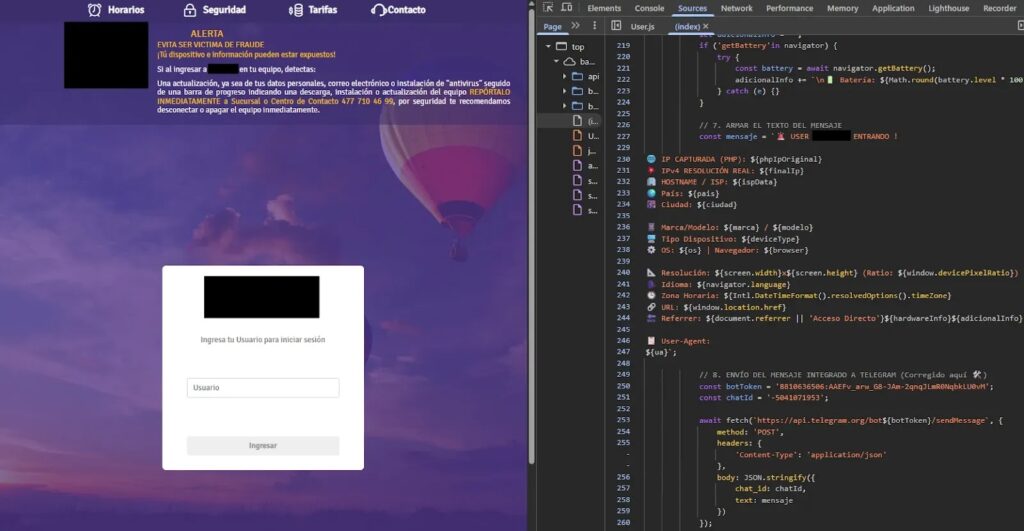
Elastic observed a phishing destination tied to BanBajio branding. The phishing page also collected browser and device details and sent the profile through Telegram, giving the operator more context for live follow-up.
Clipboard hijacking focuses on payment redirection
SCMBANKER’s clipboard modules focus on financial data rather than broad credential theft. Elastic said one module checks for 18-digit CLABE account numbers, while another checks for 16-digit card numbers.
The MITRE ATT&CK Clipboard Data technique describes how attackers can collect or monitor clipboard contents because users often copy sensitive data during normal activity.
In this campaign, the clipboard logic can replace copied account or card values with attacker-controlled values. That creates a direct path to payment diversion if the victim pastes the altered data into a banking portal.
Vishing overlays push victims toward live scams
The toolkit also includes a vishing engine. When activated, it can lock the screen behind a fake bank warning and push the victim to call a number or interact with the operator.
Elastic described two overlay behaviors. One creates a topmost window that keeps returning to the foreground. Another creates a softer lock screen that resists closing, moving, or minimizing.
This matters because banking fraud often works best when malware and social engineering support each other. The malware gives the operator context, while the phone call gives the operator a way to manipulate the victim in real time.
Remote access gives attackers full control
For higher-value victims, REF6045 can deploy Remote Utilities Host, a legitimate remote-administration product that the attacker configures for silent callback access.
MITRE’s Remote Access Software technique explains that adversaries may abuse legitimate remote tools to control compromised systems while blending with normal administrative software.
Elastic said SCMBANKER uses scripts to download the installer, gain administrator approval, install it silently, hide the implant directory, and remove the normal uninstall entry. That gives the operator hands-on control when screenshots, overlays, and redirects are not enough.
AI-assisted coding artifacts appear in the toolkit
Elastic also found signs that large language models helped write the malware. The researchers pointed to descriptive function names, heavy explanatory comments, document-like section dividers, leftover artifacts, and Spanish prompting patterns.
The report says the toolkit was not generated autonomously. Instead, the operator appears to have used a model to build much of the functionality and then applied manual obfuscation afterward.
That detail matters because SCMBANKER is not especially polished. Even so, it gives attackers a working fraud platform with screenshots, redirects, clipboard theft, vishing overlays, updates, keylogging remnants, and remote access installation.
Attacker mistakes exposed the operation
Elastic said the operation suffered from poor server hygiene. Researchers found open directories, an exposed web-root archive, and an unauthenticated editor tied to live targeting files.
Those mistakes helped reveal the toolkit, infrastructure, and targeting logic. They also showed that the same ClickFix delivery pattern appeared across multiple hosts.
The Elastic analysis says the shared delivery patterns, overlapping PowerShell files, and SCM-branded panels suggest kit reuse or related deployments by the same operator set.
Indicators of compromise
Elastic published several indicators tied to the campaign. Defenders should treat them as starting points for hunting, then combine them with behavior-based detection because infrastructure and hashes can change quickly.
| Type | Indicator | Description |
|---|---|---|
| IPv4 | 68.211.161[.]46 | ClickFix and file host |
| IPv4 | 216.250.112[.]100 | ClickFix and file host |
| IPv4 | 185.242.246[.]169 | REF6045 C2 |
| Domain | ratonvaquero2026[.]online | ClickFix and file host |
| Domain | monteviral2026.duckdns[.]org | ClickFix and file host |
| Domain | osogransd[.]online | ClickFix and file host |
| Domain | negratomasa2026[.]online | REF6045 C2 |
| Domain | gestionmontelavaria2026[.]online | REF6045 C2 |
| Domain | ssinvestigaciones[.]com | ClickFix post-CAPTCHA tracking endpoint |
| Domain | bancaporinternetbbmx[.]online | BanBajio phishing page |
| SHA-256 | 554f1aefeb698995501751328c2f9fe93f02a680679fba3dd15f1ed93d46bf1b | validation.txt first-stage batch payload |
| SHA-256 | ff3555154e91e42490cc722b6c7f3c4c91654b7ef53a35d0719ffb89accf1b27 | run.vbs master launcher |
| SHA-256 | 526287a40aad1b218228cdd1f459ad3b93f858585048347644d597c6ab19515a | cliente.ps1 C2 beacon |
| SHA-256 | 685d29ce8a550feb3a9e1d1c5926ec5e927615cf34aab62c108a812a1eb6737c | jujuzkt.ps1 banking activity monitor |
| SHA-256 | eea08fbf3720d638af1d313d3ce369708b77d7891379d5c5871dd7f36667ed0c | clip.ps1 CLABE clipboard hijacker |
| SHA-256 | 70140aa236d630a7d5ed08be3dafcccea9a8b0eec6dadf8c1cf1b96d8f608609 | clip2.ps1 card-number clipboard hijacker |
| SHA-256 | 32d981b3e7c36aa7030cfd9ee412bff742e00b36c39c80634b2681f89de4a487 | hosts.msi Remote Utilities installer |
What defenders should monitor
Security teams should look for Windows Run activity that launches command shells or scripts after a browser session visits a suspicious verification page.
They should also monitor suspicious bitsadmin jobs, PowerShell scripts launched from public directories, registry Run key changes, and unexpected Remote Utilities installations.
The Microsoft bitsadmin reference can help defenders understand expected tool behavior, while the MITRE BITS Jobs page explains why this Windows feature often appears in intrusion chains.
- Block or warn on clipboard-to-Windows-Run command patterns.
- Alert on curl output piped directly into cmd.exe.
- Monitor bitsadmin downloads into public user directories.
- Watch for suspicious PowerShell scripts launched by VBS files.
- Detect new registry Run key values tied to hidden scripts.
- Investigate browser redirects to newly registered banking domains.
- Alert on unexpected Remote Utilities Host installation or configuration changes.
Users should never run commands from CAPTCHA pages
The user-facing advice is simple. A real Google verification page, CAPTCHA, or bank security check will not ask users to open Windows Run, paste a command, and press Enter.
Users who see this instruction should close the page immediately, avoid copying anything from it, and report the link to their bank or IT team. They should also run a security scan if they already followed the steps.
The Clipboard API has legitimate uses, but ClickFix campaigns abuse clipboard writes to preload commands that users later execute themselves.
Why Mexican financial services are the focus
SCMBANKER focuses heavily on Mexico’s financial ecosystem. That includes retail banks, business banking portals, fintechs, payment processors, cryptocurrency services, investment platforms, SAT-related services, and telecom providers.
This broad targeting suggests the operators want multiple paths to money movement, not just banking credentials. Clipboard hijacking, phishing redirects, vishing overlays, and remote access all support that goal.
The MITRE Clipboard Data technique is especially relevant here because replacing CLABE or card numbers can turn an ordinary copy-and-paste action into a payment redirection attempt.
SCMBANKER shows how crude malware can still cause damage
Elastic described the toolkit as messy and full of copy-paste logic, but that does not make it harmless. The operation already has the components needed to track victims, identify financial activity, and escalate against valuable targets.
The campaign also shows how fraud operators can use AI-assisted scripting to build practical malware faster, even without high-end engineering skills.
The biggest risk comes from the live operator model. Once SCMBANKER flags a useful banking session, the attacker can choose the fraud method that best fits the victim in front of them.
Detection needs behavior, not just IoCs
Hashes and domains help during early response, but REF6045-style campaigns can change infrastructure quickly. Defenders need detection logic that follows the behavior.
Useful signals include fake verification pages, Windows Run execution, curl piped into cmd.exe, downloads through bitsadmin, VBS launchers, PowerShell modules in unusual directories, Run key persistence, screenshot capture, clipboard replacement, and remote access software abuse.
The MITRE persistence mapping and remote access software mapping both fit the REF6045 workflow and help defenders translate the campaign into practical detection coverage.
FAQ
REF6045 is the name Elastic Security Labs uses for an operator-assisted banking fraud operation targeting customers in Mexico’s financial ecosystem through ClickFix-style fake verification pages.
SCMBANKER is a PowerShell-based malware toolkit used in the REF6045 campaign. It can monitor banking sessions, capture screenshots, redirect browsers, manipulate clipboard data, show vishing overlays, and deploy remote access software.
The fake verification page tricks victims into opening Windows Run, pasting a command copied to the clipboard, and executing it. That command downloads and runs the first-stage SCMBANKER payload.
The campaign focuses on Mexican financial users, including customers of banks, business banking portals, fintech services, payment processors, cryptocurrency exchanges, investment platforms, SAT services, and telecom providers.
Users should never run commands from CAPTCHA, Google verification, browser warning, or bank security pages. Real verification pages do not ask users to open Windows Run and paste commands.


Read our disclosure page to find out how can you help VPNCentral sustain the editorial team Read more


Improve this guide


User forum
0 messages