
Hackers Use Real Academic Event Materials to Infect Researchers With RokRAT


 10 min. read
  Published on

Hackers are using information from a real academic event to infect researchers and related professionals with RokRAT malware.
The targeted phishing campaign, named Operation Capsule Vault, delivers a malicious ISO disk image through Dropbox. The file contains an executable disguised as a PDF and displays a genuine-looking event document while installing malware in the background.

Access content across the globe at the highest speed rate.
🔥 Save 81% + 2 bonus months! 🔥
70% of our readers choose Private Internet Access
70% of our readers choose ExpressVPN
2
Browse the web from multiple devices with industry-standard security protocols.
🔥 Save 73%! 🔥

Faster dedicated servers for specific actions (currently at summer discounts)
🔥 Save 69%! 🔥
Researchers linked the operation to APT37, a North Korean cyber-espionage group also known as ScarCruft and Reaper. The campaign shows how attackers can turn publicly available conference details into convincing phishing material.
Operation Capsule Vault targets academic researchers
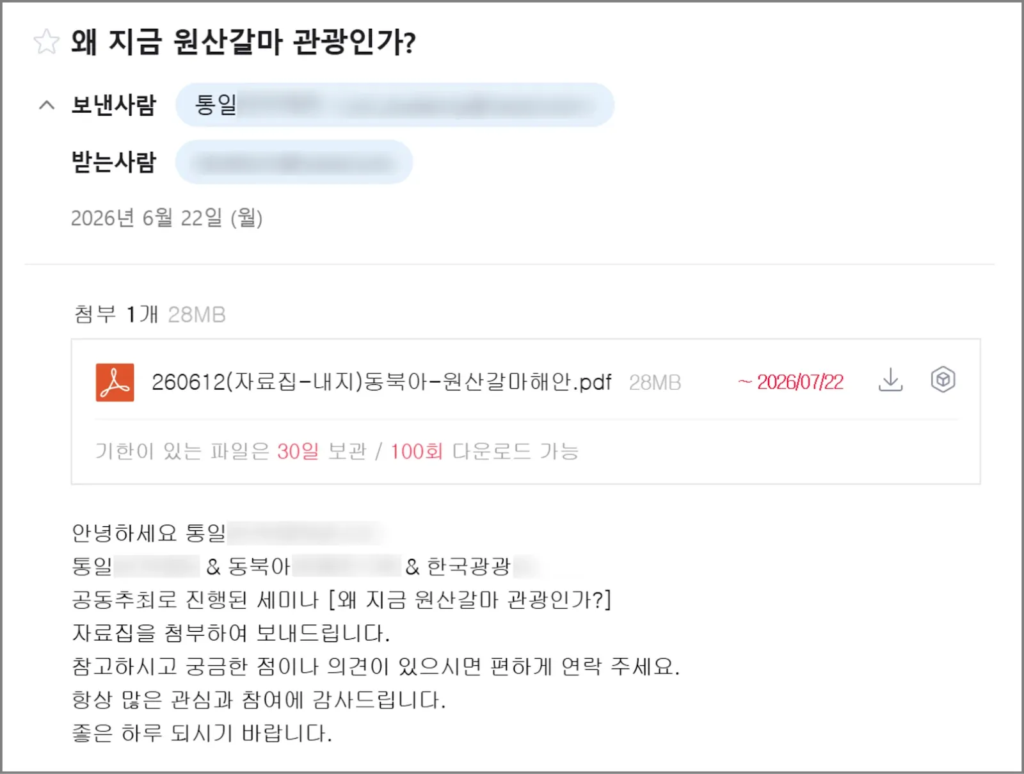
The phishing emails claim to provide materials connected to the Wonsan Kalma Tourism Forum, an academic event held in Seoul on June 9.
Attackers copied legitimate event details and impersonated a separate organization involved in the academic or professional community. This gave the message enough context to resemble a routine seminar notice.
According to the Genians threat analysis, the campaign received the name Operation Capsule Vault because one executable container held both the visible lure document and the hidden malicious components.
| Campaign detail | Observed activity |
|---|---|
| Campaign name | Operation Capsule Vault |
| Likely threat group | APT37 |
| Malware | RokRAT |
| Target audience | Researchers and academic professionals |
| Delivery service | Dropbox |
| Initial file | ISO disk image |
| Disguised payload | PIF executable presented as a PDF |
Real event details make the phishing email convincing
The attackers did not invent a fictional seminar. They reused information associated with a real event, including its topic, timing, and related documents.
This approach makes the email more difficult to identify as phishing. A recipient who knows about the event may consider the download relevant before checking the sender or file type.
The message directs the victim to a Dropbox-hosted ISO image instead of attaching a normal PDF. Cloud-hosted links may also pass through email systems that focus heavily on executable attachments.
- The email refers to a real academic event.
- The message impersonates a separate professional organization.
- The Dropbox link appears to provide seminar materials.
- The ISO filename resembles a conference booklet.
- The visible document contains genuine event-related information.
The ISO file hides an executable behind a document icon
After downloading the ISO image, the victim sees a file that appears to be a PDF document. However, the file is a Windows PIF executable.
Windows may hide extensions for known file types by default. A filename such as seminar-material.pdf.pif can therefore appear as seminar-material.pdf, particularly when the attacker also assigns it a document icon.
Opening the file launches malicious code rather than a standard PDF reader. The executable then displays the expected event document to reduce suspicion while the infection continues.
- The victim receives an academic-themed phishing email.
- The email directs the victim to a Dropbox download.
- The victim downloads and mounts an ISO image.
- A PIF executable appears to be a PDF document.
- Opening the file displays the legitimate-looking event material.
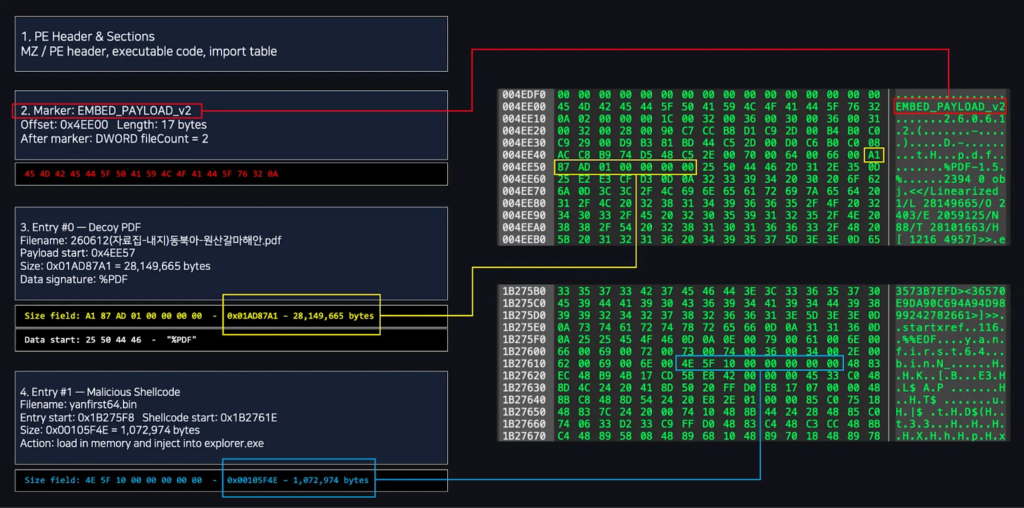
- The loader restores and executes shellcode in memory.
- RokRAT is injected into explorer.exe.
The legitimate document serves as a decoy
The malicious program contains a genuine-looking document connected to the academic event. It opens that material after execution, giving the victim the content promised in the email.
This decoy does not indicate that the download is safe. The malware loader begins running before or while the document appears.
Researchers also found a mismatch in the document’s creation information. Its metadata suggested that attackers prepared or modified the file at a time inconsistent with an authentic event handout.
RokRAT is injected into Windows Explorer
The loader reconstructs shellcode in memory and injects the RokRAT payload into explorer.exe, the Windows process responsible for the desktop, taskbar, and File Explorer interface.
Running inside explorer.exe can make the malware less obvious in a basic process list. It also avoids leaving a clearly named RokRAT process running separately.
MITRE documents APT37’s use of process injection and notes that the group has previously injected RokRAT into legitimate Windows processes.
| Attack stage | Technique |
|---|---|
| Initial access | Spear-phishing email using academic event details |
| Payload delivery | Dropbox-hosted ISO image |
| Masquerading | PIF executable disguised as a PDF |
| Defense evasion | Legitimate document displayed as a decoy |
| Payload execution | Shellcode restored in memory |
| Process injection | RokRAT injected into explorer.exe |
RokRAT uses cloud services for command and control
After execution, RokRAT collects information about the infected computer and prepares its cloud-based communication channels.
The analyzed variant supports Dropbox, pCloud, and Yandex. The malware can use separate cloud accounts or channels to receive commands and upload information stolen from the victim.
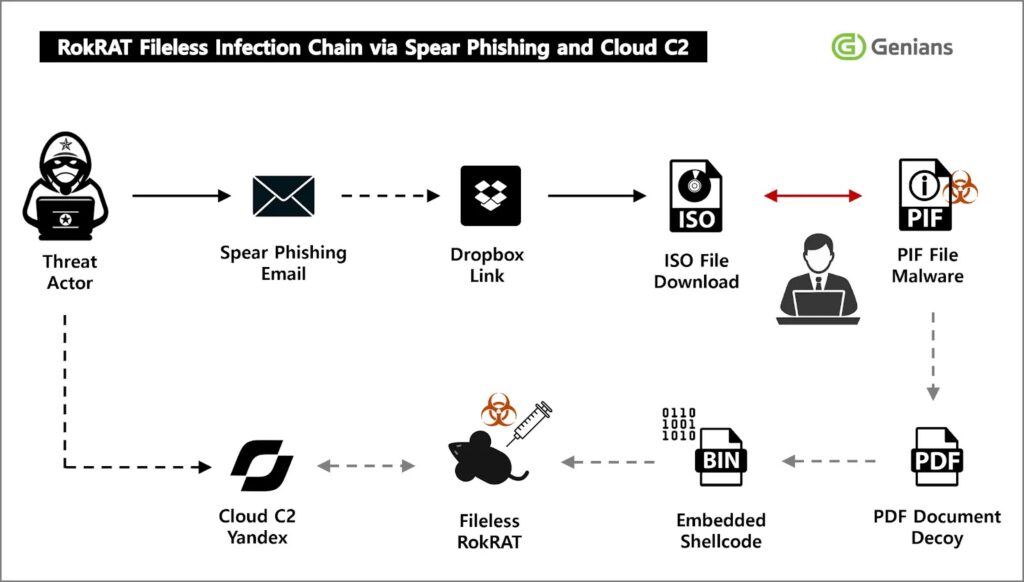
The MITRE RokRAT profile identifies it as a cloud-based Windows remote access tool associated with APT37. Cloud services can help malicious traffic blend with ordinary encrypted web activity.
- Dropbox can deliver the original malicious ISO.
- Dropbox may also support later malware communications.
- pCloud can provide command-and-control storage.
- Yandex can act as another cloud communication channel.
- Different accounts may separate commands from stolen data.
What RokRAT can do on an infected computer
RokRAT gives its operators broad access to the compromised Windows system. It can profile the device, search for files, monitor running software, and execute commands remotely.
The malware can also capture screenshots and enumerate connected or available drives. These capabilities allow operators to study the victim’s work and identify documents worth stealing.
Collected information can move through the supported cloud services. Using established providers reduces the need for attackers to maintain an obvious command-and-control domain.
- Collect system and user information
- List running processes
- Enumerate files and drives
- Capture screenshots
- Download additional files
- Upload stolen information
- Execute operator-issued commands
- Delete selected artifacts
The malware can remove evidence
Operation Capsule Vault includes cleanup functions designed to remove selected files after the malware completes part of its activity.
RokRAT can delete temporary files and artifacts placed in the Windows Startup folder after receiving the appropriate command from its operators.
This does not guarantee that the attack leaves no evidence. Endpoint telemetry, cloud access records, email logs, downloaded ISO files, and process-injection events may still expose the infection.
Why researchers link the campaign to APT37
Researchers connected the operation to the broader RokRAT family through code similarities, command handling, process injection, cloud communication, and other technical characteristics.
The choice of victims and Korean-language academic content also matches targeting patterns associated with APT37. However, analysts generally avoid basing attribution on one file or infrastructure indicator alone.
MITRE describes APT37 as a North Korean state-sponsored cyber-espionage group that has primarily targeted South Korea while also operating in several other countries.
| Attribution factor | Why it matters |
|---|---|
| Malware family | RokRAT has a documented history of use by APT37 |
| Targeting | The campaign focuses on Korean academic and professional interests |
| Cloud communication | RokRAT commonly uses legitimate cloud services |
| Process injection | The payload runs inside a legitimate Windows process |
| Code similarities | The variant shares behavior with previously analyzed RokRAT samples |
Academic organizations face a growing phishing risk
Researchers frequently receive invitations, seminar notices, paper requests, grant information, and conference materials from people outside their organization.
This open communication model gives attackers many plausible reasons to send files or cloud links. Public event pages also provide names, schedules, organizations, and documents that can improve phishing messages.
An email does not need spelling mistakes or an obviously fake story to be malicious. Operation Capsule Vault uses accurate professional details because they make the lure more effective.
How organizations can detect Operation Capsule Vault
Email and endpoint security systems should flag unexpected ISO downloads, especially when an email describes the file as a document package or conference booklet.
Security teams should also check for executable files carrying document icons or double extensions. PIF, SCR, LNK, EXE, and similar formats should not be treated as ordinary office documents.
Endpoint tools can monitor for code injection into explorer.exe following the mounting of an ISO image. Unusual connections to Dropbox, pCloud, or Yandex from explorer.exe also deserve investigation.
- Monitor cloud links in unsolicited academic emails.
- Block or quarantine ISO files from untrusted sources.
- Show complete file extensions on managed Windows devices.
- Alert when PIF files use PDF names or icons.
- Inspect process injection involving explorer.exe.
- Correlate cloud traffic with the process that generated it.
- Review unusual access to Dropbox, pCloud, and Yandex.
- Preserve suspicious event documents and their metadata.
Users should verify event materials independently
Researchers should confirm unexpected seminar files through an official event website or a known organizer before opening them.
Replying directly to the suspicious message does not provide reliable verification because the attacker controls the sender account. Recipients should use a separately obtained address or phone number.
Users should also inspect the downloaded file type before opening it. A conference booklet should normally arrive as a PDF or office document, not as an ISO image or executable.
- Check whether the sender address matches the claimed organization.
- Visit the event’s official website separately.
- Contact a known organizer through a trusted channel.
- Avoid mounting unexpected ISO images.
- Enable the display of full filename extensions.
- Report the message to the security team.
What to do after opening the malicious file
A user who opened the file should disconnect the device from the network and contact the organization’s security team immediately.
Closing the visible document does not stop RokRAT because the payload may already run inside explorer.exe. Deleting the ISO file also does not remove malware loaded into memory or additional artifacts placed on the system.
Investigators should preserve the phishing email, Dropbox URL, ISO image, executable, process history, and network logs before rebuilding or cleaning the computer.
- Isolate the affected endpoint.
- Terminate malicious injected activity through approved response tools.
- Collect volatile memory when possible.
- Review explorer.exe for suspicious injected modules.
- Search for recently mounted ISO images and PIF files.
- Check cloud access logs and browser history.
- Reset credentials used on the infected computer.
- Rebuild the device when complete removal cannot be confirmed.
Cloud traffic needs process-level context
Organizations generally cannot block every connection to Dropbox, pCloud, or Yandex without disrupting legitimate work. The stronger approach links network traffic to endpoint behavior.
A browser uploading a user-selected document differs from explorer.exe communicating with several cloud services immediately after a suspicious executable runs.
The documented RokRAT behavior includes cloud-based communication, file collection, screenshots, process discovery, process injection, and deletion of artifacts.
Operation Capsule Vault relies on trust, not a software flaw
The campaign does not require a newly disclosed Windows vulnerability. It depends on persuading the recipient to download and execute a disguised file.
The genuine academic content strengthens that social-engineering technique. Victims see the expected seminar document, even though malicious activity has already started.
The second reference to the Genians security research reinforces the campaign’s central lesson: professional context and authentic public information can make a malicious email appear routine.
Academic institutions should combine user training with restrictions on disk images and executable formats. They should also monitor process injection and cloud communications instead of relying only on malicious-domain blocklists.
Public event information will remain easy for attackers to collect. Organizations must therefore validate the files and behavior behind a message rather than trusting it because the event details are accurate.
FAQ
Operation Capsule Vault is a targeted phishing campaign that uses materials from a real academic event to deliver RokRAT malware through a cloud-hosted ISO image.
The victim receives a link to a Dropbox-hosted ISO file. Inside it, a PIF executable appears to be a PDF and displays a real event document while loading RokRAT in the background.
RokRAT can collect system details, enumerate files and drives, list processes, capture screenshots, execute commands, and upload stolen data through cloud services.
The analyzed malware supports Dropbox, pCloud, and Yandex for delivering files, receiving commands, or uploading collected information.
They should verify unexpected event materials through an official website or known organizer, avoid unrequested ISO files, and check full filename extensions before opening downloads.


Read our disclosure page to find out how can you help VPNCentral sustain the editorial team Read more


Improve this guide




User forum
0 messages