
SpyGlace Attacks Abuse GitHub, GitLab, and Other Trusted Services


 9 min. read
  Published on
APT-C-60 has launched new SpyGlace attacks that use trusted developer platforms and cloud services to conceal malware downloads from network security tools.
The campaign targets organizations in Japan through spear-phishing emails. Victims receive a malicious archive directly or follow a Proton Drive link that leads to a RAR file containing a Windows shortcut.

Access content across the globe at the highest speed rate.
🔥 Save 81% + 2 bonus months! 🔥
70% of our readers choose Private Internet Access
70% of our readers choose Private Internet Access
2
Browse the web from multiple devices with industry-standard security protocols.
🔥 Save 73%! 🔥

Faster dedicated servers for specific actions (currently discounted)
🔥 Save 69%! 🔥
Opening the LNK file starts a multistage infection chain that uses legitimate Windows and developer tools. The attackers then download SpyGlace components through services such as GitHub, GitLab, jsDelivr, and Codeberg.
APT-C-60 returns with updated SpyGlace attacks
JPCERT/CC identified the campaign while investigating continued APT-C-60 activity against Japanese organizations.
The threat group has used SpyGlace in attacks since at least 2024. Its latest operation changes parts of the initial delivery process and expands the online infrastructure used to host malicious components.
Researchers observed SpyGlace versions 3.1.15, 3.1.17, and 3.1.18. They found no major functional differences between the recent variants and previously analyzed versions.
| Campaign detail | Finding |
|---|---|
| Threat group | APT-C-60 |
| Malware | SpyGlace |
| Primary targets | Organizations in Japan |
| Initial access | Spear-phishing emails and Proton Drive links |
| Malicious attachment | RAR archive containing an LNK file |
| Abused services | GitHub, GitLab, jsDelivr, Codeberg, and StatCounter |
Malicious LNK file launches mshta.exe
The attack begins when a recipient opens the Windows shortcut inside the archive. The LNK file copies itself and launches mshta.exe, a legitimate Windows component capable of executing HTML application content and scripts.
APT-C-60 hides JavaScript inside the shortcut and uses mshta.exe to run it. This technique lets the attackers abuse a trusted Windows binary instead of placing an obvious script interpreter in the original archive.
MITRE ATT&CK tracks this behavior as signed binary proxy execution through Mshta. Security products may allow mshta.exe because Windows includes it, making its parent process and command-line activity important detection signals.
- The victim opens a RAR archive received through email or Proton Drive.
- A malicious LNK file copies itself and starts mshta.exe.
- Hidden JavaScript downloads a file called contributing1.txt.
- The script decodes and extracts the downloaded content.
- A legitimate copy of git.exe starts another malicious script.
- Several file fragments rebuild an additional downloader.
- Later downloaders and loaders retrieve and execute SpyGlace.
Attackers use git.exe during the infection
The extracted files include a legitimate copy of git.exe. The malicious script uses it to launch another stage of the infection rather than relying only on conventional Windows command tools.
The next script combines several database files to reconstruct a downloader. That downloader retrieves more components before the final SpyGlace payload runs.
Using legitimate programs can reduce the number of obviously malicious executables in the chain. It can also make process activity resemble normal developer work when defenders inspect individual events without wider context.
GitHub and GitLab traffic hides malware downloads
APT-C-60 hosts attack components on GitHub, GitLab, Codeberg, and the jsDelivr content delivery network. These services handle large volumes of legitimate development traffic each day.
Many organizations allow access to code-hosting platforms because developers, automated build tools, and business applications depend on them. Blocking the entire domain could disrupt normal work.
The attackers exploit that trust by placing encoded files and malware components inside repositories. Connections to these services may appear harmless unless defenders identify the process, user action, and downloaded content behind them.
- GitHub hosted attacker-controlled repositories and files.
- GitLab provided additional repository infrastructure.
- Codeberg hosted more malicious project content.
- jsDelivr delivered files from attacker-controlled repositories.
- Proton Drive delivered some initial phishing archives.
- StatCounter infrastructure appeared in observed campaign activity.
Trusted services make simple domain blocking less effective
A request to GitHub or jsDelivr does not automatically indicate malicious activity. However, a shortcut launching mshta.exe and downloading encoded content from one of these services creates a much stronger warning signal.
Security teams should evaluate the entire sequence instead of approving traffic solely because it reaches a familiar domain. Process ancestry, command lines, downloaded file types, and the source email provide essential context.
The SpyGlace campaign shows why defenders should combine network controls with endpoint monitoring. Trusted domains can still host attacker-controlled content, even when the service provider itself remains uncompromised.
SpyGlace uses a long staged delivery chain
The campaign does not download the final malware immediately after the victim opens the shortcut. It passes through JavaScript, encoded text, extracted utilities, database fragments, downloaders, and loaders.
This structure gives APT-C-60 several opportunities to change individual components without replacing the original phishing attachment. The group can also remove repositories or redirect later stages when researchers discover them.
MITRE classifies the retrieval of malicious tools and payloads as ingress tool transfer. Defenders should monitor unexpected downloads initiated by script engines, system utilities, and developer tools.
| Stage | Observed activity |
|---|---|
| Delivery | Phishing email, Proton Drive link, or attached archive |
| Initial execution | LNK file starts mshta.exe |
| Script execution | Hidden JavaScript downloads and decodes content |
| Tool abuse | Legitimate git.exe launches another script |
| Downloader assembly | Multiple database fragments reconstruct a downloader |
| Payload delivery | Developer platforms host later components |
| Final execution | A loader runs SpyGlace |
Why LNK files inside archives remain dangerous
Windows shortcuts can contain command-line arguments and launch system utilities. Attackers often place them inside archives because Windows may not show the full command when a user views the file.
An LNK file can also use a document-style icon or misleading filename. This makes it look like an ordinary report, notice, spreadsheet, or business document.
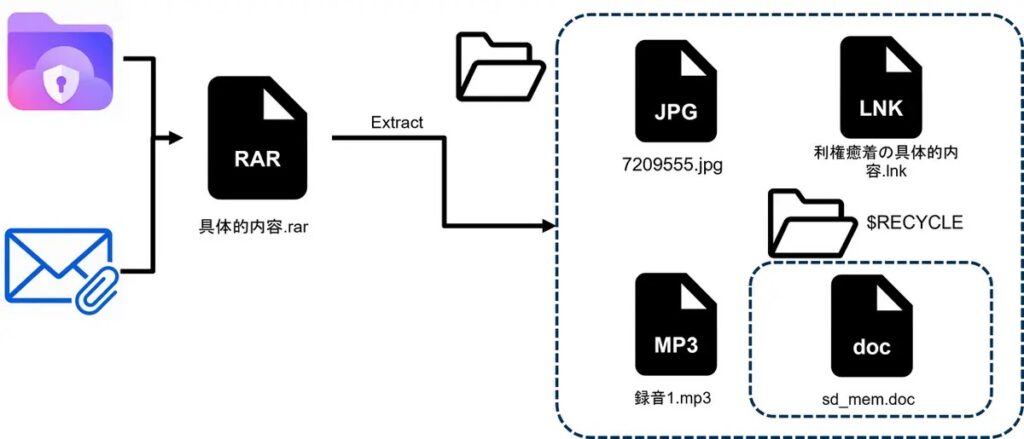
The campaign follows a spear-phishing attachment pattern in which attackers tailor a message and include a file designed to trigger malicious execution.
How organizations can detect SpyGlace activity
Email systems should flag or quarantine external archives containing LNK files. Organizations that do not need Windows shortcuts through email should consider blocking them entirely.
Endpoint tools should alert when an LNK file starts mshta.exe, especially from a Downloads, temporary, or extracted archive directory. They should also investigate git.exe running outside approved developer workflows.
Network teams should identify which process initiates connections to code-hosting platforms. A browser visiting a project page differs significantly from mshta.exe or an unknown script downloading encoded files.
- Monitor LNK files extracted from RAR and ZIP archives.
- Alert when shortcut files launch mshta.exe.
- Record mshta.exe command lines and parent processes.
- Investigate git.exe running from temporary or unusual folders.
- Inspect downloads of TXT, DB, DAT, TMP, and encoded files from repositories.
- Review Proton Drive links received from unknown senders.
- Monitor newly created scripts and reconstructed executables.
- Correlate repository traffic with email and endpoint events.
Behavioral monitoring can catch changing infrastructure
Indicators such as IP addresses, repository names, email senders, and file hashes can help teams find known campaign activity. However, APT-C-60 can replace those indicators quickly.
The more durable detection opportunity comes from the infection behavior. Opening an unexpected shortcut, starting mshta.exe, running hidden JavaScript, launching git.exe, and retrieving encoded files creates a recognizable sequence.
JPCERT/CC’s threat research also shows that the group continues refining previously successful methods rather than relying on a newly disclosed software vulnerability.
Recommended response for suspected infections
Organizations that detect related activity should isolate the affected endpoint and preserve its email, process, file, and network records. Removing the original shortcut alone will not remove components downloaded later in the chain.
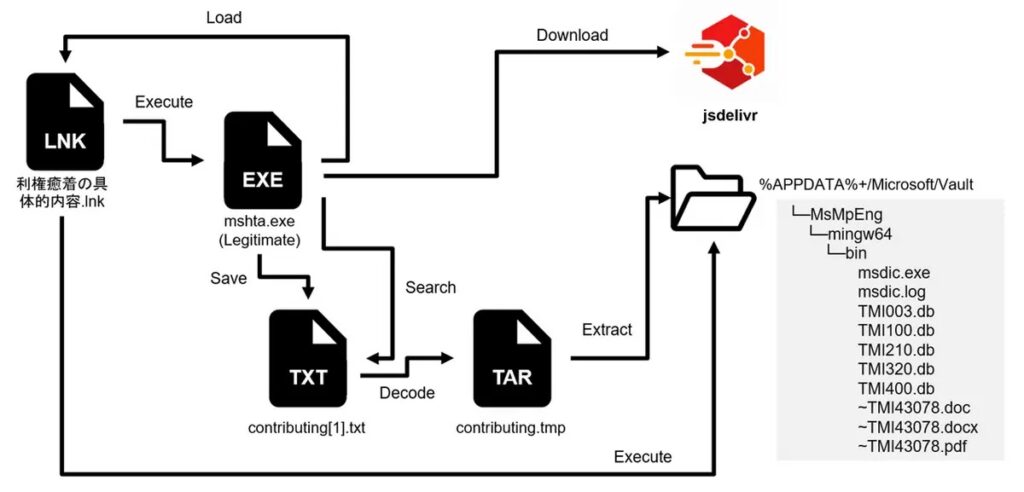
Investigators should search for unexpected script files, temporary payloads, copied Git utilities, encoded database fragments, and connections to the campaign’s command-and-control servers.
Teams should also examine other devices that received the same email or accessed the same cloud-storage link. A successful spear-phishing campaign may target several employees within one organization.
- Disconnect the affected device from the network.
- Preserve the phishing email and archive for investigation.
- Collect the LNK file, scripts, downloaders, loaders, and final payload.
- Review process activity involving mshta.exe and git.exe.
- Search network logs for connections to observed repositories and servers.
- Check other mailboxes for matching senders, subjects, links, and attachments.
- Reset credentials used on the affected system when compromise is confirmed.
- Rebuild the endpoint from a trusted image when complete removal cannot be verified.
Trusted platforms require context-aware security
The SpyGlace campaign does not depend on compromising GitHub, GitLab, jsDelivr, or Codeberg. It relies on attacker-controlled accounts and repositories hosted through legitimate services.
This distinction matters because blocking every trusted development platform may not provide a practical defense. Organizations need policies that account for the user, device, process, and type of content being retrieved.
Monitoring suspicious Mshta execution can expose the beginning of the chain, while detecting unexpected payload transfers can reveal later stages.
Security awareness also remains important. Employees should treat unexpected cloud-storage links and shortcut files as high-risk, particularly when they arrive in compressed archives.
Blocking known campaign indicators can support an immediate response, but defenders should not rely on static lists alone. APT-C-60 can create new repositories, sender accounts, payload files, and command servers quickly.
Controls built around the phishing attachment technique, suspicious Windows utility use, and unusual developer-platform downloads provide broader protection as the campaign changes.
FAQ
SpyGlace is malware used by the APT-C-60 threat group in targeted attacks. Recent versions include SpyGlace 3.1.15, 3.1.17, and 3.1.18.
The attack begins with a spear-phishing email containing an archive or a Proton Drive link. The archive holds a malicious Windows LNK file that starts the infection chain.
The group has used GitHub, GitLab, jsDelivr, Codeberg, Proton Drive, and other legitimate online services to host or deliver attack components.
The malicious LNK file launches mshta.exe to execute hidden JavaScript. Because Windows includes mshta.exe, its use can blend with trusted system activity unless defenders inspect its parent process and commands.
Teams should monitor archives containing shortcuts, LNK files that launch mshta.exe, unusual git.exe activity, hidden scripts, and encoded downloads from developer platforms.


Read our disclosure page to find out how can you help VPNCentral sustain the editorial team Read more


Improve this guide



User forum
0 messages