
Microsoft 365 Device Code Phishing Lets Hackers Hijack MFA-Approved Sessions


 8 min. read
  Published on
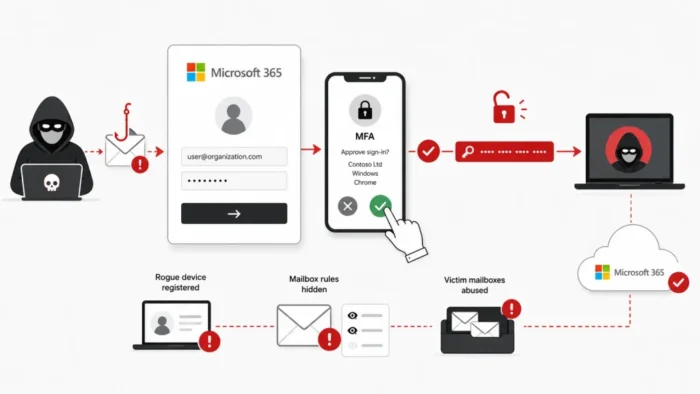
Hackers are abusing Microsoft’s legitimate device-code sign-in process to hijack Microsoft 365 accounts protected by multi-factor authentication. Victims enter a genuine code on Microsoft’s real website, complete MFA, and unknowingly authorize the attacker’s device.
The campaign documented by Trend Micro researchers does not require a fake Microsoft login page or direct password theft. Microsoft sends the resulting access and refresh tokens to the device that originally requested the code, which the attacker controls.

Access content across the globe at the highest speed rate.
70% of our readers choose Private Internet Access
70% of our readers choose ExpressVPN

Browse the web from multiple devices with industry-standard security protocols.

Faster dedicated servers for specific actions (currently at summer discounts)
Those tokens can provide access to Outlook, cloud files, and other services available through the compromised account. Attackers may also register devices, conceal malicious activity with mailbox rules, and distribute more phishing messages from a trusted address.
How Microsoft 365 device code phishing works
The OAuth 2.0 device authorization grant supports devices that cannot offer a convenient browser-based login experience. Smart TVs, shared displays, command-line applications, and conference-room equipment can use this process.
Normally, the device requests a temporary user code from Microsoft. The user opens a separate browser, enters that code, signs in, and approves access. The requesting device polls Microsoft until authentication finishes and then receives the authorized tokens.
During a phishing attack, the criminal starts this process from an attacker-controlled system. The victim receives the corresponding code through a fake document invitation, meeting request, or account-verification message.
| Stage | Legitimate process | Phishing process |
|---|---|---|
| Code request | A trusted device requests the code | The attacker’s system requests the code |
| User action | The user enters the code for their device | The user enters a code supplied through a lure |
| Authentication | The user signs in and completes MFA | The user signs in and completes MFA normally |
| Token delivery | Microsoft sends tokens to the trusted device | Microsoft sends tokens to the attacker-controlled client |
| Result | The intended device gains access | The attacker gains an authenticated Microsoft 365 session |
Why MFA does not stop this attack
The attack does not intercept the victim’s password or MFA response. Instead, it manipulates the user into authorizing the wrong device. Microsoft sees a valid code, valid credentials, and a successful MFA challenge.
After approval, the attacker receives an access token for immediate account activity. A refresh token may allow the attacker to request new access tokens after the original one expires, subject to Microsoft Entra policies and token revocation.
Microsoft’s device-code documentation confirms that the client initiating the request polls the token endpoint while the user completes authentication elsewhere. This separation between the client and the browser creates the opportunity exploited by the phishing campaign.
Attackers build trust before sending the code
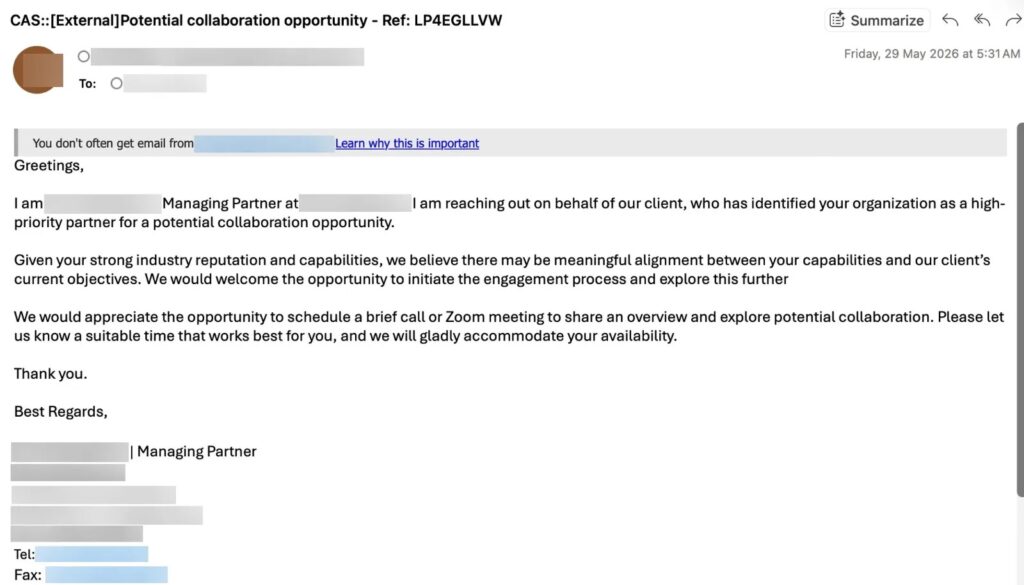
Trend Micro observed an attacker impersonating a law-firm partner and exchanging friendly messages with a target. The attacker introduced the malicious request only after establishing a believable business conversation.
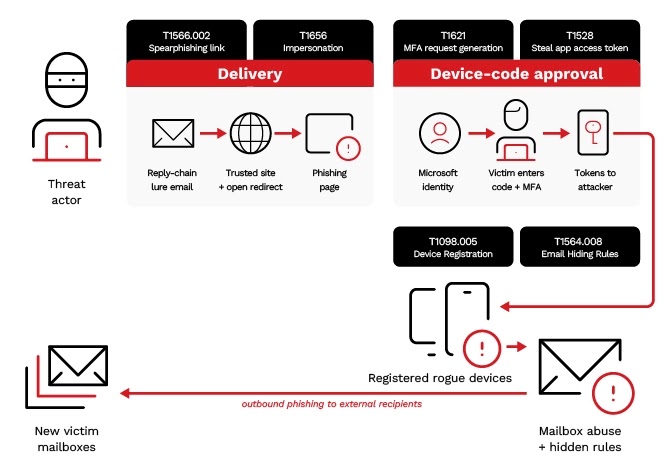
The link passed through a Google Sites page, compromised redirectors, and a fake human-verification step. The final page resembled a business document portal and displayed a code for the victim to enter on Microsoft’s legitimate sign-in service.
This approach gives the victim fewer conventional phishing warnings. The Microsoft domain and authentication page are genuine, while the deception concerns who requested the code and why.
The observed delivery chain included:
- A sender impersonating a trusted legal or business contact
- Messages designed to establish rapport before presenting a link
- Google Sites pages used as trusted-looking intermediaries
- Open redirectors that obscured the final destination
- A fake human-verification page intended to hinder automated analysis
- A document portal that supplied an attacker-generated device code
What attackers can do after stealing the tokens
In one case described in Trend Micro’s investigation, suspicious access appeared from another country within hours of the victim approving the code. The attacker subsequently registered multiple devices and changed mailbox settings.
The operator created a hidden inbox rule that diverted replies and non-delivery reports. This helped conceal phishing messages sent from the compromised mailbox and reduced the chance that the victim would notice responses from external contacts.
The account takeover could expose any Microsoft 365 resource permitted by the stolen tokens and the user’s assigned privileges. Potential consequences include:
- Reading and searching Outlook messages
- Accessing files stored in SharePoint or OneDrive
- Sending phishing messages from a trusted mailbox
- Creating rules that hide replies and security warnings
- Registering attacker-controlled devices
- Targeting colleagues, customers, and business partners
- Maintaining access while refresh tokens remain valid
Device code phishing is not a new Microsoft vulnerability
The technique abuses an intended authentication feature rather than exploiting a software flaw. Microsoft previously documented similar activity involving Storm-2372, an actor that used device-code lures to capture tokens and access email and cloud data.
In its Storm-2372 analysis, Microsoft said attackers generated legitimate device codes and persuaded targets to enter them on a genuine authentication page. Microsoft found no product vulnerability enabling those attacks.
That earlier campaign used messaging and meeting-themed lures, sometimes after attackers built rapport with their targets. The latest findings show that criminals continue adapting the same underlying method to legal, document-sharing, and account-verification scenarios.
Warning signs administrators should investigate
Endpoint monitoring may not detect the initial account takeover because the victim uses a legitimate browser and Microsoft authentication service. Administrators need to correlate identity, device, mailbox, and geographic activity.
Microsoft Entra sign-in logs can identify device-code activity through authentication protocol filters. Administrators should establish which teams legitimately use this flow and investigate unexplained events involving other users.
| Warning sign | Why it matters |
|---|---|
| Unexpected device-code authentication | The user may have entered a code supplied by an attacker |
| Microsoft Authentication Broker activity from an unfamiliar location | The attacker may be using tokens through a legitimate Microsoft client identity |
| Several device registrations in a short period | The operator may be establishing persistent access |
| New hidden or unusual inbox rules | The attacker may be concealing replies and security notifications |
| Impossible-travel or unfamiliar-country alerts | The token may have been used from attacker infrastructure |
| Large numbers of outbound messages | The compromised mailbox may be distributing additional phishing lures |
Microsoft’s earlier device code phishing research also found attackers using Microsoft Graph to search compromised mailboxes for sensitive terms and extract relevant emails.
How organizations can block device code phishing
Organizations that do not need device-code authentication should block it through Microsoft Entra Conditional Access. Microsoft describes the flow as high risk and recommends allowing it only for necessary, documented use cases.
Administrators can first deploy the policy in report-only mode to identify legitimate usage. They can then block the flow broadly while creating narrow exceptions for specific users, applications, devices, or trusted network locations.
Microsoft’s Conditional Access guidance recommends applying the restriction to all users and resources where possible, while excluding emergency access accounts and other carefully reviewed exceptions.
- Audit existing device-code sign-ins through Microsoft Entra logs.
- Identify applications and teams with a documented business requirement.
- Create a report-only Conditional Access policy for device code flow.
- Review unexpected sign-ins and validate necessary exceptions.
- Enable the blocking policy after confirming its scope.
- Limit device registration and require managed devices for sensitive resources.
- Monitor mailbox rules, outbound email volume, and unusual geographic access.
- Revoke active sessions and refresh tokens when compromise is suspected.
The same Microsoft policy instructions let administrators target the device code flow through the Authentication Flows condition. Organizations should test the configuration before enforcement to avoid disrupting legitimate equipment or legacy tools.
What users should do with unexpected device codes
Users should never enter a device code simply because it appears in an email, chat message, document portal, or meeting invitation. They should initiate the sign-in from the device they intend to connect and confirm that the displayed application matches their action.
An unexpected request to enter, copy, or read out a code should be treated as a phishing attempt. Users should stop the process and report the message to their security team without approving the request.
If someone has already entered a suspicious code, administrators should revoke the user’s sessions, review registered devices, inspect mailbox rules, examine recent sign-ins, and investigate access to Microsoft Graph, Outlook, SharePoint, and OneDrive.
Indicators of compromise
Trend Micro associated the following domains, paths, endpoints, and IP addresses with the documented campaign. The indicators are defanged to prevent accidental access.
| Type | Indicator |
|---|---|
| Sender or impersonation domain | rlcounsel[.]com |
| Sender or impersonation domain | cholaw-kr[.]co |
| Lure page | sites.google[.]com/view/businessprofileoverview |
| Lure page | sites.google[.]com/corporateprofiledetails |
| Lure page | sites.google[.]com/profileportfoliodetailsdata |
| Open redirector | eusei[.]com/dir/redirects.php |
| Open redirector | cineuropa[.]org/nll.aspx |
| Open redirector | zrdesignlabo[.]com/st-manager/click/track |
| Phishing endpoint | up88qope1z[.]hlpadditives[.]com |
| Phishing endpoint | zr6dgshpvf[.]flosli[.]com |
| Phishing endpoint | profileupdate-collaboration[.]stefan-dufva[.]workers[.]dev |
| Attacker IP address | 104.219.238[.]253 |
| Attacker IP address | 43.165.1[.]42 |
| Attacker IP address | 40.124.130[.]50 |
| Attacker IP address | 18.118.111[.]82 |
| Attacker IP address | 83.136.210[.]246 |
FAQ
Attackers do not technically break MFA. They trick the victim into completing MFA for an attacker-controlled device, which then receives valid access and refresh tokens.
The attack can succeed without stealing the password. The victim enters credentials and completes MFA on Microsoft’s genuine website, while Microsoft sends the approved tokens to the attacker’s client.
Organizations can restrict or block device code flow through Microsoft Entra Conditional Access. Administrators should audit legitimate use first and permit only narrow, documented exceptions.
They should contact their security team immediately. Administrators should revoke sessions, inspect registered devices and mailbox rules, and investigate recent Microsoft 365 and Microsoft Graph activity.


Read our disclosure page to find out how can you help VPNCentral sustain the editorial team Read more


Improve this guide
User forum
0 messages