
Apple pushes lock screen alerts to older iPhones as web-based exploit risk grows


 5 min. read
  Published on
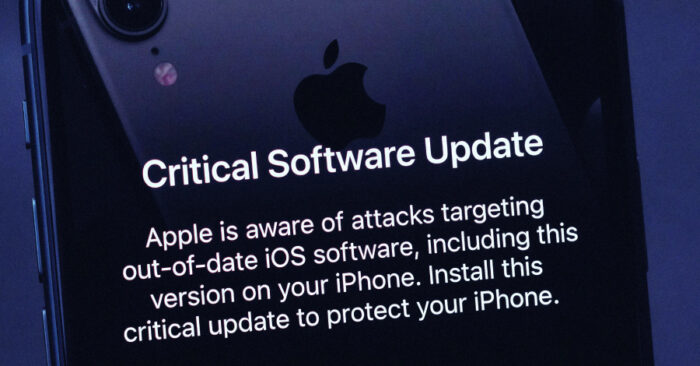
Apple has started sending lock screen alerts to iPhones and iPads running older software, warning users that attackers are actively targeting outdated iOS and iPadOS versions. The message tells users to install a critical update because Apple is aware of attacks aimed at devices that have not moved to newer releases.
This is a rare step, and it shows Apple views the threat as serious enough to reach people directly on their devices instead of relying only on standard update prompts. Apple’s support guidance says devices on current, updated versions of iOS 15 through iOS 26 are already protected, and it specifically notes that Apple released iOS 15 and iOS 16 updates on March 11, 2026, to extend protection to older hardware that cannot run the latest major version.
The warning also lines up with recent reporting around web-based iPhone exploit kits such as Coruna and DarkSword. Public research has shown that these kits can target older Apple software through malicious websites, raising fears that advanced mobile exploits are spreading beyond narrow espionage use.
Why Apple is taking this unusual step
Apple published a support page on March 19 titled “Update iOS to protect your iPhone from web attacks.” In that notice, the company said users with older iOS versions should update to protect their data and highlighted that recent software updates extended coverage to devices that cannot move to the newest release train.
A few days later, MacRumors reported that Apple had gone further by sending lock screen notifications to devices still running older software. The alert text shown in that report says Apple is aware of attacks targeting out-of-date iOS software, including the version on the recipient’s iPhone.
That sequence matters because it shows a clear escalation. First Apple posted public guidance, then it began sending direct warnings to affected users. This suggests Apple believes many people still have vulnerable devices in active use.
What Apple says users should do
| Action | Verified guidance |
|---|---|
| Update the device | Apple says users with older iOS versions should update to protect their data. |
| Older devices still supported | Apple says updated versions of iOS 15 and iOS 16 released on March 11, 2026 extended protection to older hardware. |
| Stay on current software | Apple’s security releases page tracks the latest security updates and rapid responses. |
| Extra protection for high-risk users | Lockdown Mode remains available for users facing elevated spyware risk. |
The exploit kits behind the concern
Recent reporting has tied the current concern to exploit frameworks that attack iPhones through the web. Apple’s March 19 support page did not name every campaign in technical detail, but follow-on reporting connected the warning to Coruna and DarkSword, two kits that researchers say can compromise devices through malicious websites when users stay on older versions.
Coruna has drawn particular attention because Kaspersky says it is a maintained evolution of the Operation Triangulation framework, not just a bundle of recycled public exploits. DarkSword has also alarmed researchers after samples leaked publicly, making it easier for more actors to adopt sophisticated iPhone exploitation.
The broader risk is simple. If advanced exploit kits become easier to reuse, older iPhones and iPads become much more attractive targets because they no longer receive the same level of built-in protection as fully updated devices. That appears to be the core reason Apple is now using urgent on-device warnings. This is an inference supported by Apple’s support note and recent reporting on exploit-kit leaks.
Lockdown Mode gets renewed attention
Apple also made a fresh point about Lockdown Mode this week. In a statement reported by TechCrunch, Apple said it is not aware of any successful mercenary spyware attacks against a Lockdown Mode-enabled Apple device.
That statement does not mean every threat disappears once the feature is on. It does show Apple still sees Lockdown Mode as its strongest defense for people at high risk, such as journalists, activists, political figures, executives, and others who may face targeted spyware campaigns.
For everyday users, the main advice remains much simpler. Update the device first. Lockdown Mode is a fallback for people who cannot update right away or who face unusually advanced threats.
Quick steps for users
- Open Settings, then tap General, then Software Update.
- Install the latest available update for your device, including iOS 15 or iOS 16 security updates if you use older supported hardware.
- If you face higher risk and your device supports it, consider enabling Lockdown Mode in Settings, then Privacy & Security, then Lockdown Mode.
- Treat unexpected links and web prompts with extra caution until the device is fully updated. This advice follows from Apple’s warning about web-based attacks.
FAQ
Apple is warning that attackers are targeting iPhones and iPads running outdated iOS and iPadOS versions through web-based attacks.
Users with older versions of iOS and iPadOS, especially iOS 17 and earlier according to reporting, appear to be receiving them.
Apple says devices running the latest updated versions of iOS 15 through iOS 26 are already protected against the web-attack issue described in its support note.
Apple says it released iOS 15 and iOS 16 security updates on March 11, 2026, to protect older supported devices that cannot update to the latest major release.


Read our disclosure page to find out how can you help VPNCentral sustain the editorial team Read more


Improve this guide



User forum
0 messages