
Bluekit phishing kit turns domain setup, 2FA lures, and session hijacking into one dashboard


 6 min. read
  Published on
Bluekit is a newly identified phishing kit that brings fake site creation, domain setup, credential theft, session capture, Telegram alerts, and AI-assisted campaign drafting into one operator panel.
Varonis Threat Labs found that the kit is still under development, but it already advertises more than 40 website templates and features designed to make phishing campaigns easier to run.

Access content across the globe at the highest speed rate.
🔥 Save 81% + 2 bonus months! 🔥
70% of our readers choose Private Internet Access
70% of our readers choose Private Internet Access
2
Browse the web from multiple devices with industry-standard security protocols.
🔥 Save 73%! 🔥

Faster dedicated servers for specific actions (currently discounted)
🔥 Save 69%! 🔥
The biggest risk is not simple password theft. Bluekit can collect cookies, local storage data, and live session details after a victim logs in, which can help attackers bypass standard two-factor authentication.
What Bluekit does
Older phishing kits often required attackers to combine several tools. One tool handled a fake login page, another handled domains, another sent alerts, and another tried to collect session data.
Bluekit changes that workflow by putting those features inside a single dashboard. Operators can create phishing pages, connect or buy domains, manage captured logs, configure redirects, and receive stolen data through Telegram.
The kit supports templates for major email, cloud, developer, social media, retail, and crypto services. Varonis said examples included iCloud, Apple ID, Gmail, Outlook, Hotmail, Yahoo, ProtonMail, GitHub, Twitter, Zoho, Zara, and Ledger.
At a glance
| Item | Details |
|---|---|
| Threat name | Bluekit |
| Threat type | Phishing kit with session hijacking features |
| Researcher | Varonis Threat Labs |
| Templates advertised | 40-plus website templates |
| Default exfiltration channel | Telegram |
| Key risk | Session theft that can bypass standard 2FA |
| Status | Still under active development |
Why session hijacking makes Bluekit more dangerous
Many phishing attacks try to steal only usernames and passwords. Bluekit goes further by tracking what happens after a victim logs in.
Varonis found that Bluekit’s target details panel stored repeated cookie dumps, local storage data, session state, and a live view of the victim’s post-login activity.
This matters because a valid session token can let an attacker impersonate a logged-in user. If the attacker captures the session after a 2FA check, the account may be exposed even when the password alone is not enough.
Bluekit features seen by researchers
- More than 40 phishing website templates
- Automated domain purchase and registration
- Support for two-factor authentication lures
- Telegram and browser notifications
- Antibot cloaking
- Geolocation emulation
- Spoofing options
- Redirect controls
- Device filters
- Proxy settings
- Cookie and local storage capture
- Optional AI Assistant, voice cloning, and mail sender add-ons
How the operator panel works
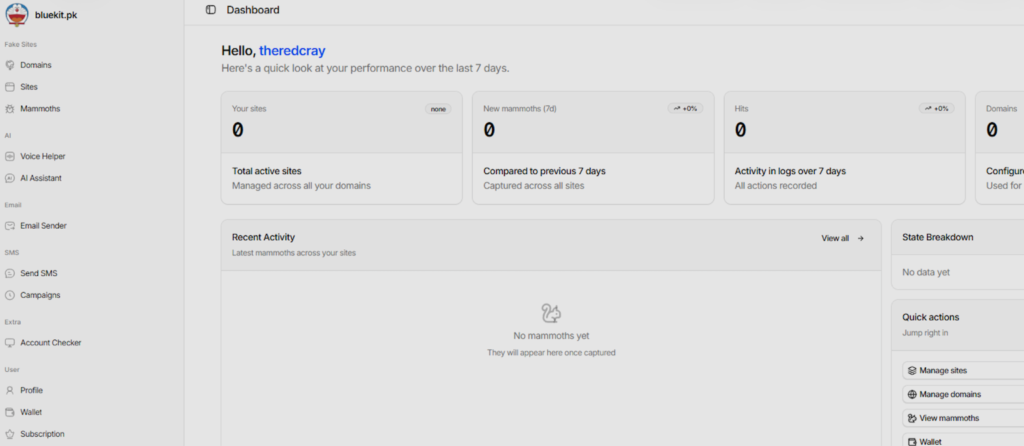
Varonis gained access to Bluekit and reviewed the operator dashboard, site creation flow, captured data panels, and AI Assistant.
The site builder lets an operator choose a domain, select a target brand, pick a mode, and configure how the phishing page behaves. The same panel also exposes options for login detection, redirects, anti-analysis checks, spoofing, and device filtering.
This level of control shows why Bluekit is more than a basic credential harvesting page. It is closer to a phishing operations platform that handles setup, delivery support, post-login tracking, and stolen data management.
The AI Assistant is still limited
Bluekit also includes an AI Assistant panel with several listed model options. Varonis saw an abliterated Llama model as the default, along with listed options for GPT-4.1, Claude Sonnet 4, Gemini, and DeepSeek variants.
During testing, Varonis could use only the default Llama model. The other commercial model options appeared in the interface, but they required additional configuration.
The AI Assistant did not produce a finished phishing campaign during the test. It generated a structured campaign draft with placeholders, which still required manual cleanup before use.
Why defenders should care now
SecurityWeek reported that Varonis had not tied Bluekit to a live campaign at the time of its analysis. That does not make the kit harmless.
Varonis said the feature set is evolving quickly, and continued development could make Bluekit more useful in future campaigns. Tools like this can reduce the technical barrier for less skilled attackers.
For companies, the main lesson is clear. Standard 2FA helps, but it does not fully stop phishing kits that capture active sessions after authentication.
What organizations should watch for
- Newly registered domains that imitate employee login portals or major cloud services
- Suspicious login attempts from unexpected countries or proxy networks
- Repeated session token reuse from new devices or locations
- Unusual OAuth grants or third-party app permissions
- Login flows that ask users to re-enter 2FA codes outside a normal access path
- Traffic patterns connected to Telegram-based exfiltration
- Lookalike domains targeting executives, finance staff, developers, or administrators
How to reduce the risk
Organizations should move high-value accounts to phishing-resistant authentication. Hardware security keys and passkeys based on FIDO standards give stronger protection than SMS codes or one-time passwords.
Security teams should also monitor active sessions, not only passwords. If a user logs in from one country and the same session appears somewhere else soon after, that should trigger review.
Companies should also review domain filtering, browser isolation, conditional access rules, and session revocation workflows. Fast response matters because attackers can use stolen sessions quickly after a victim signs in.
Practical defense checklist
- Use phishing-resistant MFA for administrators and high-risk users.
- Block newly registered and suspicious lookalike domains where possible.
- Review session logs for impossible travel and unusual token reuse.
- Require reauthentication for sensitive actions such as password changes and payment updates.
- Audit OAuth app permissions and remove suspicious grants.
- Train employees to inspect login domains before entering credentials.
- Use browser protection tools that can detect credential submission to fake pages.
- Keep incident response steps ready for session revocation and forced sign-out.
What this means for phishing defense
Bluekit shows where phishing kits are heading. Attackers want fewer separate tools, faster setup, and better access to session data after login.
The kit also shows why companies should not measure phishing risk only by stolen passwords. Cookies, local storage, and active session tokens can be just as valuable.
Defenders need controls that protect the full login lifecycle. That means stronger authentication, better domain blocking, browser-level protection, session monitoring, and quick revocation when suspicious activity appears.
FAQ
Bluekit is a phishing kit that combines fake website creation, domain setup, credential capture, session tracking, Telegram alerts, and AI-assisted campaign drafting in one panel.
Bluekit can capture session data after a victim completes login. If attackers steal a valid session token, they may bypass standard 2FA checks tied only to the login step.
Varonis saw templates for services such as iCloud, Apple ID, Gmail, Outlook, Hotmail, Yahoo, ProtonMail, GitHub, Twitter, Zoho, Zara, and Ledger.
Yes. Bluekit includes an AI Assistant panel, but Varonis found that it generated campaign drafts with placeholders rather than polished phishing campaigns.


Read our disclosure page to find out how can you help VPNCentral sustain the editorial team Read more


Improve this guide




User forum
0 messages