
BlueNoroff uses fake Zoom meetings and fileless PowerShell to target crypto firms


 8 min. read
  Published on
BlueNoroff, a financially motivated subgroup of North Korea’s Lazarus Group, has been linked to a new campaign targeting cryptocurrency and Web3 professionals through fake Zoom meetings.
The campaign uses manipulated Calendly invites, typo-squatted Zoom links, fake meeting pages, ClickFix clipboard tricks, and fileless PowerShell malware to compromise Windows systems.

Access content across the globe at the highest speed rate.
70% of our readers choose Private Internet Access
70% of our readers choose ExpressVPN

Browse the web from multiple devices with industry-standard security protocols.

Faster dedicated servers for specific actions (currently at summer discounts)
Arctic Wolf says one observed attack moved from the first malicious link click to full system compromise in under five minutes. The same intrusion gave attackers persistent access to the victim’s device for more than 66 days.
What happened
The attack starts with spear phishing. The attacker impersonates a legal or business professional in the fintech space and sends the target a Calendly invitation.
After the victim accepts the meeting, the attacker changes the calendar event. A legitimate-looking meeting link is replaced with a typo-squatted Zoom URL that closely resembles a real Zoom meeting page.
When the victim opens the fake link, the browser loads a self-contained fake Zoom interface. The page shows fake participants, looping video, and meeting elements designed to convince the victim that the call is real.
At a glance
| Item | Details |
|---|---|
| Threat actor | BlueNoroff |
| Parent group | Lazarus Group |
| Other tracked names | APT38, Sapphire Sleet, Stardust Chollima |
| Main targets | Web3, cryptocurrency, fintech, CEOs, founders, and executives |
| Initial lure | Calendly invite and fake Zoom meeting link |
| Main technique | ClickFix clipboard injection |
| Malware method | Fileless PowerShell C2 implant |
| Observed compromise speed | Under five minutes from click to full compromise |
| Observed persistence | More than 66 days in one investigated case |
How the fake Zoom lure works
The fake Zoom page does not redirect the user to a real video conferencing platform. Instead, it runs a browser-based page that imitates the look and feel of a Zoom or Microsoft Teams meeting.
The page can show fake participant tiles and recycled footage from earlier victims. This creates a more believable meeting scene and makes the target less likely to suspect a scam.
The same page can also access the victim’s camera feed during the fake meeting flow. That stolen footage can later become material for future lures against other victims.
The ClickFix trick
After the victim joins the fake meeting, the page shows an overlay claiming that the user’s SDK is outdated. The page then asks the victim to run a command to fix the issue.
The victim may see harmless-looking diagnostic commands on the screen. However, the malicious page intercepts the clipboard action and replaces the copied text with a hidden PowerShell command.
If the victim pastes and runs that command in Windows Run, PowerShell, or Terminal, the malware starts. The attack works because the user believes they copied a normal troubleshooting command.
Attack chain
| Step | What happens | Why it matters |
|---|---|---|
| 1 | Target receives a Calendly invite | The invitation looks like a normal business meeting |
| 2 | The calendar event is modified | A real-looking meeting link is replaced with a fake Zoom URL |
| 3 | Victim opens the fake meeting page | The page shows fake participants and meeting visuals |
| 4 | A fake SDK update prompt appears | The user is pushed toward a ClickFix command |
| 5 | The clipboard is replaced with a PowerShell payload | The victim unknowingly runs the malicious command |
| 6 | Fileless PowerShell malware runs | The attacker gains remote access and starts data theft |
What the PowerShell payload does
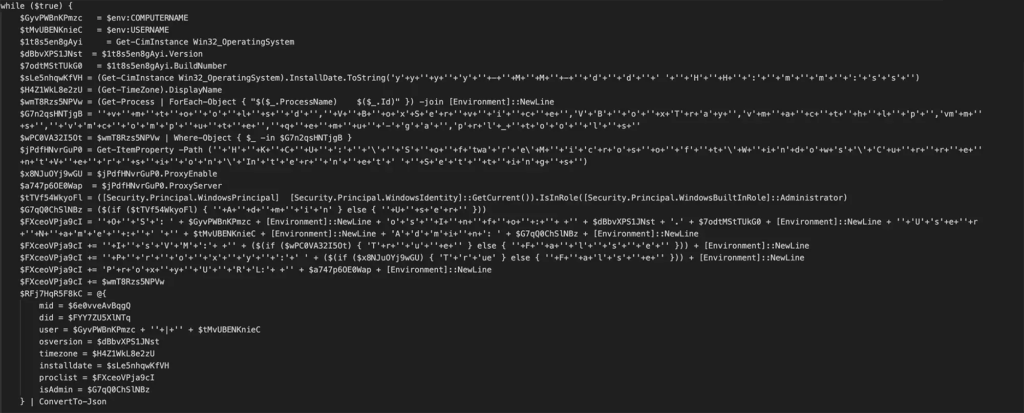
The injected PowerShell command downloads an obfuscated second-stage script from attacker infrastructure. The payload is saved to the user’s Temp folder as chromechip.log.
The file then runs in a hidden PowerShell window. It creates a C2 beacon that checks in with attacker infrastructure every five seconds.
The implant collects system details such as hostname, username, operating system version, timezone, running processes, admin status, proxy settings, and virtual machine indicators.
Persistence and stolen data
The attackers use a Startup shortcut named Chrome Update - Certificated.lnk to maintain access after reboot. The shortcut runs a bootstrap payload called chrome-debug-data001.log, which reloads chromechip.log.
This creates a boot-persistent chain. Each time the user logs in, the shortcut can restart the PowerShell beacon and reconnect the device to the attacker.
The campaign also includes credential theft, browser data collection, Telegram session theft, screenshot capture, and live webcam collection. Arctic Wolf says the attacker later added Telegram Bot API-based screenshot exfiltration.
What attackers are trying to steal
- Browser-stored passwords
- Session cookies
- Telegram session data
- Cryptocurrency wallet-related data
- OAuth tokens
- API keys
- SSH keys
- Screenshots
- Webcam footage
- System and process details
AI-assisted lures and reused victim footage
The campaign stands out because it uses a self-reinforcing lure pipeline. Each successful compromise can provide new videos, images, Telegram sessions, and personal data for future attacks.
Arctic Wolf found more than 950 files on attacker infrastructure, including fake meeting media, edited video assets, images, and project files. Some files carried AI-generation markers, while others used footage and images stolen from real victims.
This approach makes later attacks harder to spot. A victim may see a familiar person or a convincing business contact inside a fake meeting environment.
Who is being targeted
The campaign is focused on people who may control or access cryptocurrency assets. That includes founders, CEOs, executives, investors, developers, and Web3 employees.
Arctic Wolf identified at least 100 targets across more than 20 countries and five regions. The United States accounted for the largest share of identified targets at 41%.
The same research found that 80% of identified targets worked in cryptocurrency, blockchain finance, or adjacent investment sectors. CEOs and founders represented 45% of the identified target set.
Known infrastructure and artifacts
| Indicator type | Examples |
|---|---|
| Dropped file | %TEMP%\chromechip.log |
| Persistence file | %USERPROFILE%\chrome-debug-data001.log |
| Startup shortcut | Chrome Update - Certificated.lnk |
| C2 IP | 83[.]136[.]208[.]246 |
| Payload server | 83[.]136[.]209[.]22 |
| Additional IP | 104[.]145[.]210[.]107 |
| Observed domains | uu03webzoom[.]us, check02id[.]com, thriddata[.]com |
Why fileless PowerShell matters
Fileless PowerShell makes detection harder because much of the attack runs through trusted Windows tools instead of a normal malware executable.
The campaign uses hidden PowerShell windows, obfuscated scripts, in-memory execution, and runtime C# compilation. These techniques reduce obvious file artifacts and can bypass simple antivirus checks.
That is why PowerShell Script Block Logging and Module Logging are important. They can help defenders capture the command content even when attackers try to hide it through obfuscation.
What users should do now
- Verify meeting links through a second channel before joining calls with new contacts.
- Do not run terminal, Run dialog, or PowerShell commands from meeting pages.
- Treat fake SDK update prompts as suspicious.
- Check whether a Zoom or Teams URL uses a real official domain.
- Watch for meetings that suddenly replace Google Meet links with lookalike Zoom links.
- Report suspicious Calendly invites to the security team.
- Enable multi-factor authentication on Telegram, email, cloud, and crypto accounts.
What security teams should do
Security teams should prioritize users in crypto, Web3, fintech, investment, and executive roles. These groups match the campaign’s targeting pattern.
Teams should also check endpoints for chromechip.log, chrome-debug-data001.log, and the Startup shortcut named Chrome Update - Certificated.lnk.
Any affected device should be isolated quickly. Teams should revoke browser sessions, Telegram sessions, OAuth tokens, API keys, SSH keys, and cryptocurrency wallet credentials accessible from that device.
Defender checklist
| Area | What to check |
|---|---|
| PowerShell logs | Enable Script Block Logging and Module Logging |
| Persistence | Remove Chrome Update - Certificated.lnk from the Startup folder |
| Files | Delete %TEMP%\chromechip.log and %USERPROFILE%\chrome-debug-data001.log after evidence collection |
| Network | Block known C2 IPs and fake Zoom domains |
| Credentials | Rotate passwords, API keys, SSH keys, OAuth tokens, and wallet-related secrets |
| Telegram | Terminate active sessions and enable two-factor authentication |
| User training | Teach staff that real video platforms do not require terminal commands to fix meetings |
Why this matters
This campaign shows how crypto-focused attackers are blending social engineering, AI-assisted media, stolen victim footage, and fileless malware into one fast attack chain.
The fake meeting approach works because it abuses normal business behavior. Calendly invites, Zoom links, troubleshooting prompts, and quick meeting fixes all feel familiar to busy executives and founders.
For Web3 and cryptocurrency companies, the risk goes beyond one infected laptop. A compromised executive or developer device can expose wallets, exchange access, source code, cloud accounts, and investor communications.
FAQ
BlueNoroff is a financially motivated subgroup of North Korea’s Lazarus Group. It is also tracked as APT38, Sapphire Sleet, and Stardust Chollima.
The campaign mainly targets cryptocurrency, Web3, fintech, blockchain finance, CEOs, founders, executives, and people with access to digital assets or wallet infrastructure.
The attacker sends a Calendly invite, replaces the meeting link with a typo-squatted Zoom URL, displays a fake meeting interface, then uses a fake SDK update prompt to push a ClickFix command.
ClickFix is a social engineering technique that tricks users into copying and running commands that appear to fix a technical problem. In this campaign, the fake page replaces copied text with a malicious PowerShell payload.


Read our disclosure page to find out how can you help VPNCentral sustain the editorial team Read more


Improve this guide

User forum
0 messages