
Fake Google ads target GoDaddy ManageWP users in credential phishing campaign


 5 min. read
  Published on
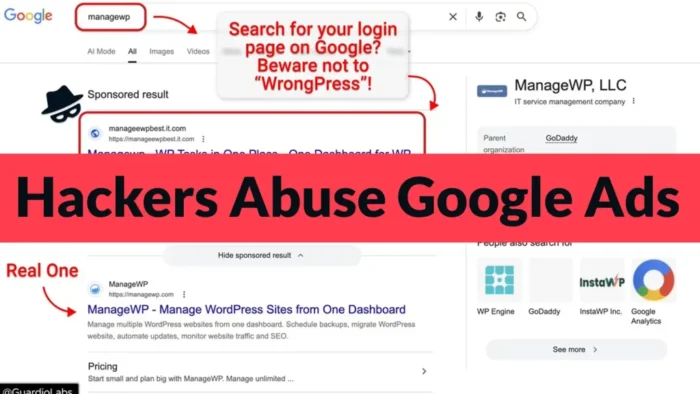
Hackers are abusing Google Ads to target ManageWP users with a fake sponsored search result that leads to a cloned login page. The campaign tries to steal usernames, passwords, and two-factor authentication codes from people who manage WordPress sites through the GoDaddy-owned platform.
The attack is dangerous because ManageWP accounts often control many websites from one dashboard. If attackers take over one account, they may gain access to several client or business sites at once.

Access content across the globe at the highest speed rate.
70% of our readers choose Private Internet Access
70% of our readers choose ExpressVPN

Browse the web from multiple devices with industry-standard security protocols.

Faster dedicated servers for specific actions (currently at summer discounts)
The phishing campaign was reported after researchers found a malicious Google sponsored result appearing above the real ManageWP result for the search term “managewp.” Users who clicked the ad landed on a fake page built to look like the official ManageWP login screen.
How the ManageWP phishing attack works
The campaign does not rely on a simple fake form that stores passwords for later. It uses an adversary-in-the-middle method, which means the phishing page works as a live proxy between the victim and the real ManageWP service.
When a victim enters a username and password, the attacker forwards those details to the real ManageWP platform in real time. The victim then sees a fake prompt for a two-factor authentication code.
If the victim enters that code, the attacker can use it during the same login session. This weakens normal app-based 2FA because the attacker does not need to break the code. They only need to trick the user into entering it on the fake page.
At a glance
| Detail | What it means |
|---|---|
| Target | ManageWP users, including agencies, developers, and companies managing WordPress sites |
| Attack method | Fake Google sponsored result leading to a cloned ManageWP login page |
| Technique | Adversary-in-the-middle phishing that can capture passwords and 2FA codes |
| Data at risk | ManageWP login credentials, active sessions, and access to connected WordPress sites |
| Main risk | One stolen dashboard login can expose many websites at once |
Why ManageWP accounts are valuable targets
ManageWP lets users manage multiple WordPress websites from a single dashboard. This makes it useful for freelancers, agencies, and businesses, but it also makes each account more valuable to attackers.
The official ManageWP site says more than two million websites are managed through the platform. The ManageWP Worker plugin page on WordPress.org also shows that the plugin has more than one million active installations.
This scale explains why attackers are targeting ManageWP logins instead of going after single WordPress sites one by one. A successful account takeover could let them push malicious changes, create new admin users, redirect traffic, or collect data from connected websites.
Why the fake ad is hard to spot
The attack starts at a point many users trust: Google Search. Someone looking for the ManageWP login page may click the first sponsored result without checking the destination closely.
That habit creates an easy opening. The fake result can look legitimate at a glance, especially when it appears above the real website. Once the user reaches the cloned login page, the visual design may not raise immediate suspicion.
Google Ads policy does not allow phishing or fake websites that pretend to be trusted brands to collect personal information. Still, this campaign shows how attackers continue to abuse sponsored results before detection and removal.
What ManageWP users should do now
- Do not use sponsored search results to open ManageWP or other admin dashboards.
- Bookmark the official ManageWP login page and use that bookmark every time.
- Check the browser address bar before entering any login details.
- Review ManageWP account activity for unknown logins or unusual changes.
- Rotate passwords if there is any chance someone entered credentials on a fake page.
- Keep 2FA enabled, but understand that live phishing can still steal one-time codes.
- Limit dashboard access to users who need it.
- Review connected WordPress sites for new admin accounts, suspicious plugins, redirects, or code changes.
2FA still matters, but it is not enough here
Two-factor authentication remains an important account protection layer. ManageWP’s own guide says 2FA adds a six-digit code requirement to the dashboard login process.
However, adversary-in-the-middle phishing is built to capture that code while it is still valid. This means users need safer login habits in addition to 2FA.
The strongest protection starts before the login page loads. Users should type the official address directly, use a saved bookmark, and avoid ads for admin portals, hosting panels, password managers, crypto wallets, email dashboards, and other sensitive services.
What website owners should check after a suspected compromise
Website owners and agencies should treat a suspicious ManageWP login as a broader WordPress security incident. The risk may extend beyond the dashboard account if attackers used access to modify connected sites.
Start with the ManageWP account, then check each important website connected to it. Look for changes that attackers commonly make after account takeover.
- Unknown WordPress administrator accounts
- New plugins or themes you did not install
- Changed homepage, login, or checkout behavior
- Unexpected redirects to other domains
- Modified .htaccess, wp-config.php, or theme files
- Unusual scheduled tasks or hidden PHP files
- New users added to ManageWP or client sites
FAQ
Users should avoid sponsored search results for login pages, bookmark the official ManageWP login page, check the browser address carefully, and review account activity regularly.
It is a phishing campaign where attackers use a fake Google sponsored result to send ManageWP users to a cloned login page. The page captures login details and two-factor authentication codes in real time.
It can bypass normal one-time 2FA codes if the victim enters the code on the fake page. The attacker uses the code immediately through a live proxy session.
Web developers, WordPress agencies, freelancers, and businesses that manage many WordPress sites through one ManageWP dashboard face the highest risk.


Read our disclosure page to find out how can you help VPNCentral sustain the editorial team Read more


Improve this guide

User forum
0 messages