
Fake Income Tax Assessment Pages Push Windows Malware in India


 8 min. read
  Published on
A new Windows malware campaign is targeting users in India through fake Income Tax assessment pages. The operation, tracked as TAX#TRIDENT, uses realistic tax notice lures to make victims download files that look official but install remote access tools on their systems.
The campaign does not appear to depend on a Windows security flaw. Instead, it relies on social engineering. Attackers create urgency around tax assessments, penalty notices, and official-looking documents, then use that pressure to convince users to open ZIP files, scripts, or installer packages.

Access content across the globe at the highest speed rate.
🔥 Save 81% + 2 bonus months! 🔥
70% of our readers choose Private Internet Access
70% of our readers choose Private Internet Access
2
Browse the web from multiple devices with industry-standard security protocols.
🔥 Save 73%! 🔥

Faster dedicated servers for specific actions (currently discounted)
🔥 Save 69%! 🔥
Security researchers say TAX#TRIDENT is notable because it can shift between several delivery methods while keeping the same Indian tax theme. That makes it harder for defenders to stop the campaign by blocking only one domain, filename, or file hash.
What is TAX#TRIDENT?
TAX#TRIDENT is a phishing-led malware campaign that impersonates Indian Income Tax communication. It targets Windows systems and uses fake assessment pages to deliver malicious files.
The attack starts with a page that appears to offer an income tax assessment order or related notice. When the victim clicks the download button, the campaign moves into one of several infection paths.
Two paths install a signed remote management client known as ClientSetup. A third path uses script stages to silently install a ManageEngine UEMS agent and connect the device to attacker-controlled infrastructure.
At a glance
| Detail | What it means |
|---|---|
| Campaign name | TAX#TRIDENT |
| Main target | Windows users in India |
| Lure | Fake Indian Income Tax assessment pages and notices |
| Delivery methods | ZIP files, VBScript downloaders, and PHP-looking script endpoints |
| Payload behavior | Remote access, persistence, system monitoring, and endpoint-management enrollment |
| Main risk | Attackers can gain durable access to an infected Windows device |
How the fake tax pages work
One infection route starts with a fake Indian Income Tax page hosted on a suspicious domain. The page presents a download button for what looks like an official assessment letter.
The downloaded file is a ZIP archive named like a tax document. Inside, however, is a signed Windows executable. Once launched, it installs a remote management client and creates persistence on the machine.
The attacker also embeds a server address inside the installer filename. This lets the payload read its own name and use that value for configuration. It is a simple trick, but it helps the attacker rotate infrastructure without heavily changing the malware.
Three infection chains, one tax lure
Securonix found three separate paths linked to the campaign. Each one starts with the same tax-themed deception, but the technical delivery changes after the victim interacts with the lure.
- The first chain uses a fake tax page, a ZIP archive, and a signed ClientSetup executable.
- The second chain uses a VBScript file named Assessment_Order.vbs, shows a decoy tax image, and installs the same ClientSetup payload in the background.
- The third chain uses a PHP-looking URL that returns script content, stages files from cloud storage, lowers User Account Control prompts, and installs a ManageEngine UEMS agent silently.
This flexibility gives the attackers more room to adapt. If one domain or file path gets blocked, another delivery route can still remain active.
Why signed tools make the attack harder to spot
The campaign stands out because it abuses signed and legitimate-looking software. Many users and some security tools treat signed files as safer than unsigned malware, but this campaign shows why that assumption can fail.
In the ClientSetup branches, the installer creates hidden directories, drops configuration files, adds services, and starts outbound communication with attacker infrastructure. It can also place a fake svchost.exe in a non-standard location, which may confuse quick manual checks.
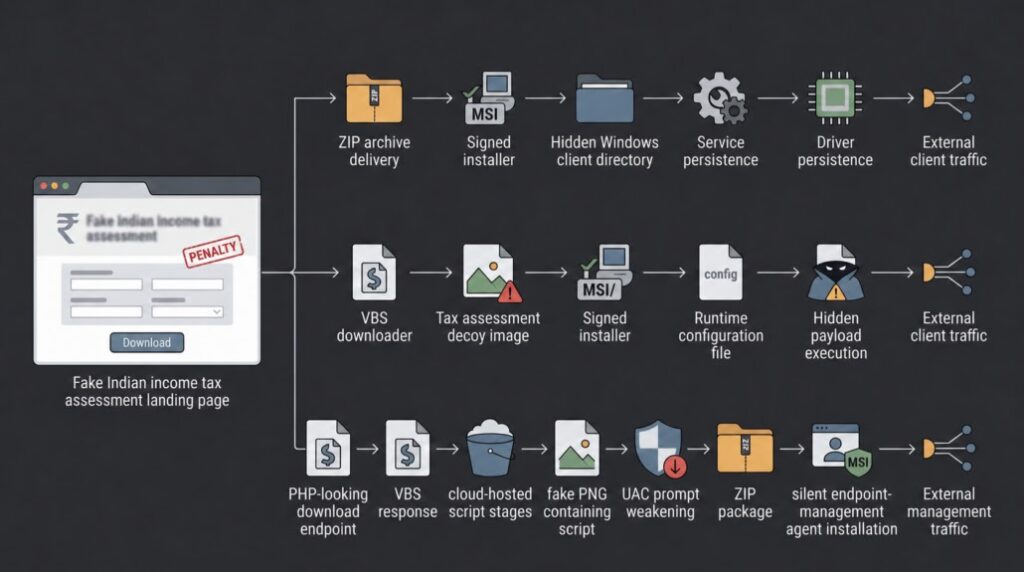
The ManageEngine branch creates another challenge. ManageEngine UEMS is a real endpoint management product, but the campaign installs the agent through suspicious script stages and points it toward an attacker-controlled server. In that context, a legitimate agent becomes part of the attack chain.
Who is most at risk?
The lure can affect any Windows user who receives a fake tax link, but some groups face higher risk. Tax-related notices can look plausible to people who handle compliance, payroll, finance, HR, legal, and executive work.
Attackers often choose tax themes because users may feel pressure to act quickly. A message about an assessment, penalty, refund, or missing document can push people into downloading files before checking the source.
The Income Tax Department warns that phishing messages may direct users to fake websites that look similar to legitimate government pages. It also advises users not to open attachments or click links in suspicious messages claiming to come from the department.
Warning signs users should watch for
- Unexpected income tax notices sent through unknown domains.
- Messages that pressure users to download assessment orders immediately.
- ZIP files, VBS files, or executable installers sent as tax documents.
- Websites that imitate official tax pages but use strange domain names.
- Files with IP addresses inside the filename.
- Requests to enter passwords, banking details, card details, or other sensitive data.
Users should visit the official Income Tax portal directly instead of clicking links from emails, messages, or third-party websites. If a notice looks suspicious, they should verify it through official channels before opening any attachment.
What security teams should monitor
Defenders should not rely only on domains, filenames, or hashes. TAX#TRIDENT changes infrastructure and delivery routes, so behavior-based detection matters more.
Security teams should look for scripts running from public or unusual folders, fake image files that execute as scripts, and svchost.exe running outside its normal Windows path. They should also monitor new services and drivers created after a user opens a suspicious tax document.
Useful signals include YTSysConfig files, unexpected ManageEngine UEMS services, UAC policy changes, suspicious msiexec activity, and outbound traffic to unapproved remote management servers.
Key indicators mentioned by researchers
| Indicator type | Example | Why it matters |
|---|---|---|
| Fake domain | zyisykm.shop | Used as a fake Indian Income Tax assessment page |
| ZIP file | Assessment Letter.zip | Disguises the malicious download as a document package |
| Script file | Assessment_Order.vbs | Runs a downloader chain while showing a decoy tax image |
| Fake process path | svchost.exe outside standard Windows locations | Can indicate masquerading by the ClientSetup branch |
| Registry behavior | ConsentPromptBehaviorAdmin set to 0 | May show UAC prompt weakening before payload installation |
| Remote management traffic | Unapproved ClientSetup or UEMS connections | Can reveal attacker-controlled management access |
How users can stay safe
Users should avoid downloading tax files from unsolicited links. They should also avoid opening ZIP, VBS, EXE, or MSI files that arrive through email, messaging apps, or unknown websites.
Anyone who receives a suspicious Income Tax message should not reply, click links, or open attachments. The safer option is to visit the official portal manually and check whether the notice appears in the account.
If a user already clicked a suspicious link or opened a file, they should disconnect the device from the network, report the incident to their IT team, and change important passwords from a separate trusted device.
How to report suspicious tax messages
The Income Tax Department says users can forward fake Income Tax websites or suspicious messages to its reporting address. It also advises users to share phishing reports with CERT-In when needed.
If an e-filing account appears compromised, users should report the issue to the police or cybercrime authorities first. They should also gather details such as the suspected date and time of misuse, what activity looked suspicious, and any relevant account information.
The main takeaway is simple: a tax notice should not require users to download an executable file or run a script. If a tax document arrives through an unexpected link, verify it before opening anything.
FAQ
TAX#TRIDENT is a malware campaign that uses fake Indian Income Tax assessment pages to trick Windows users into downloading malicious files. Researchers found that it can use ZIP files, VBScript downloaders, and script-based delivery paths.
The reported campaign does not rely on a Windows software flaw. It uses social engineering, fake tax pages, and malicious downloads to make users run the payload themselves.
Fake tax pages work because tax notices often create urgency. Users may open a file quickly if they believe it relates to an assessment, penalty, refund, or compliance issue.
Users should not click links, open attachments, or enter personal details. They should visit the official Income Tax portal directly and report suspicious messages through official reporting channels.
Security teams should monitor suspicious script execution, unusual svchost.exe paths, unexpected UEMS or remote management services, UAC policy changes, YTSysConfig files, and outbound traffic to unapproved management servers.


Read our disclosure page to find out how can you help VPNCentral sustain the editorial team Read more


Improve this guide




User forum
0 messages