
Fake Microsoft Teams downloads are spreading ValleyRAT malware


 6 min. read
  Published on
Hackers are using fake Microsoft Teams download websites to trick Windows users into installing ValleyRAT, a remote access trojan that can spy on infected systems and steal sensitive data.
The campaign was found by K7 Security Labs and appears to have started in mid-April 2026. The attackers created websites that look like Microsoft’s official Teams download page, then used those pages to deliver a trojanized installer instead of a safe app.

Access content across the globe at the highest speed rate.
70% of our readers choose Private Internet Access
70% of our readers choose ExpressVPN

Browse the web from multiple devices with industry-standard security protocols.

Faster dedicated servers for specific actions (currently at summer discounts)
The attack is dangerous because it does not immediately look suspicious to the victim. The installer can also place a real copy of Microsoft Teams on the machine, which helps hide the malware activity running in the background.
How the fake Microsoft Teams attack works
The infection starts when a user lands on a fake Teams download site. K7 researchers named domains including teams-securecall[.]com and teamszs[.]com as part of the campaign.
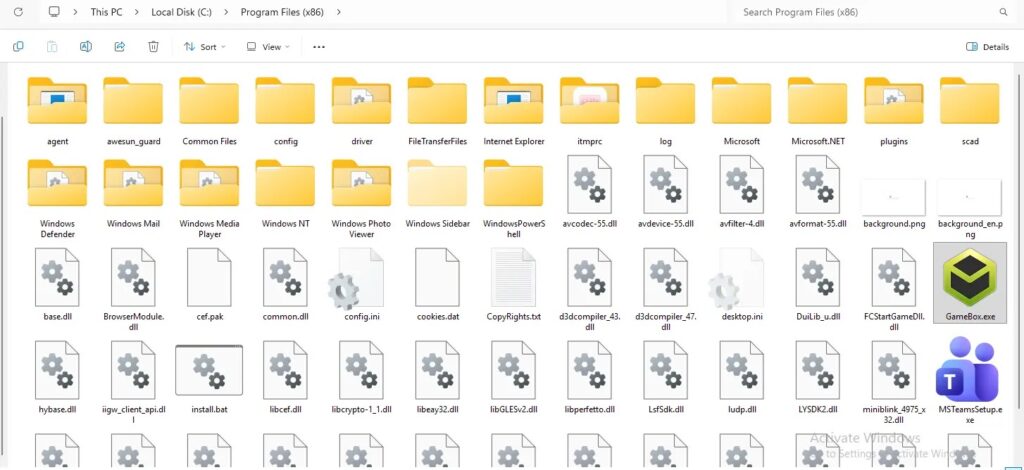
After clicking the download button, the user receives a compressed archive. When extracted and launched, it runs a malicious NSIS-based installer. Instead of simply installing Teams, the package drops several hidden components on the device.
The malware chain abuses a legitimate Tencent executable called GameBox.exe to load a malicious DLL named utility.dll. This DLL sideloading method helps the attack blend in with normal software behavior and makes detection harder.
Why the installer looks convincing
The attackers rely on trust. Many users search for popular business apps through a browser and may not check the domain carefully before downloading. A fake Teams page can look familiar enough to pass a quick glance.
K7 also found that the installer includes a legitimate Teams setup component and creates a desktop shortcut. This means the victim may believe the installation worked normally while ValleyRAT is already being deployed in the background.
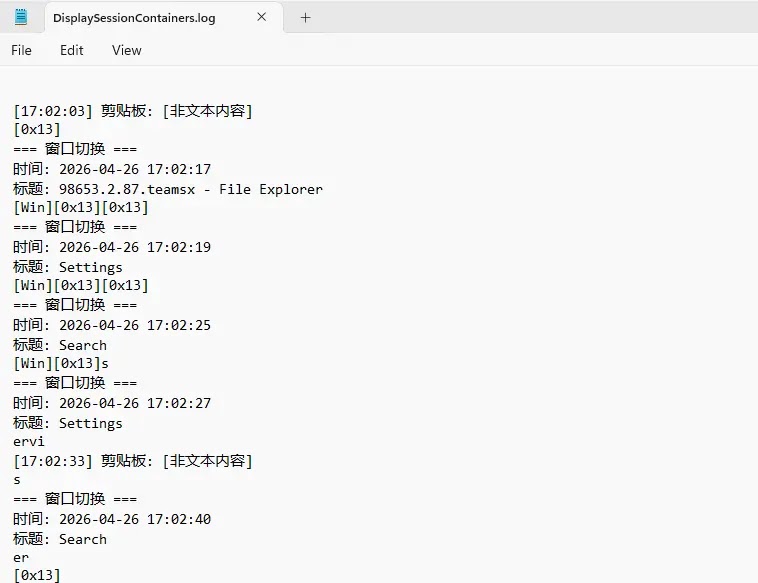
The campaign also used Chinese language artifacts and log data. K7 said those indicators suggest a likely link to threat activity originating from China, and the researchers connected the operation to SilverFox APT activity.
| Attack stage | What happens | Why it matters |
|---|---|---|
| Fake website | Users are sent to a lookalike Microsoft Teams download page. | The page builds trust by copying a familiar brand. |
| Trojanized archive | The victim downloads a zip file containing a malicious installer. | The malware arrives through a file that appears to be a normal app download. |
| DLL sideloading | GameBox.exe loads the malicious utility.dll file. | This helps the payload run through a legitimate executable. |
| Persistence | A service named _CCGDAT is created to start automatically. | The malware can return after reboot. |
| Spying activity | ValleyRAT monitors clipboard data, logs keystrokes, and contacts a C2 server. | Attackers can steal data and maintain remote access. |
ValleyRAT hides its payload in memory
The malware uses several steps to avoid easy detection. K7 found that the installer runs PowerShell commands to add exclusions in Windows Defender for its working folder and malicious DLL.
It also hides copied files by changing system attributes. The core payload, called user.dat, is stored in AES-encrypted form and decrypted in memory during execution.
The loader then injects shellcode into the current process. Later, a third-stage payload is fetched from the attacker’s command and control server in XOR-encrypted form, then decrypted in memory.
What ValleyRAT can steal
Once active, ValleyRAT can monitor clipboard activity, which may expose copied passwords, wallet addresses, tokens, or other private data. It can also log keystrokes and store collected information locally before sending it to the attacker.
The malware maintains outbound communication with its command and control infrastructure. K7 listed 103[.]215[.]77[.]17 as the observed C2 IP address in this campaign.
Because the third-stage payload is fetched live, the attacker can potentially change what the malware delivers later. That gives the campaign more flexibility if defenders block a specific file or component.
- Download Microsoft Teams only from Microsoft’s official website or Microsoft Store.
- Avoid app download links shared on social media or unfamiliar websites.
- Check the website address before downloading business software.
- Do not run compressed installers from unknown sources.
- Watch for unexpected PowerShell activity or new Defender exclusions.
- Use endpoint protection that can detect suspicious behavior, not just known files.
Indicators linked to the campaign
K7 published several indicators tied to the fake Teams campaign. Security teams can use these indicators for detection, blocking, and threat hunting, although attackers may rotate infrastructure after public reporting.
| Type | Indicator | Description |
|---|---|---|
| Domain | teams-securecall[.]com | Fake Microsoft Teams distribution site |
| Domain | teamszs[.]com | Fake Microsoft Teams distribution site |
| IP address | 103[.]215[.]77[.]17 | ValleyRAT command and control server |
| File name | 98653.2.87.teamsx.zip | Trojanized archive delivered to victims |
| File name | Utility.dll | Malicious DLL used in the sideloading chain |
| File name | User.dat | AES-encrypted shellcode payload |
Why this matters for businesses
Microsoft Teams is widely used in workplaces, which makes it an attractive lure for attackers. Employees may download the app during onboarding, device setup, remote work, or after joining a new organization.
This campaign shows why software download hygiene still matters. Even when the final app appears to install correctly, a malicious installer can quietly set up persistence, weaken protection settings, and deploy a remote access trojan.
For companies, the priority should be prevention and monitoring. Managed app deployment, application allowlisting, restricted PowerShell use, and alerts for Defender exclusions can reduce the risk from fake installer campaigns.
FAQ
ValleyRAT is a remote access trojan that can let attackers monitor infected systems, steal data, log keystrokes, and communicate with a command and control server.
Attackers are creating lookalike Microsoft Teams download websites. These sites deliver a trojanized archive that runs a malicious installer and deploys ValleyRAT in the background.
In this campaign, researchers found that the installer can include a legitimate Teams component and create a desktop shortcut. This helps the attack look normal to the victim while malware runs silently.
Users should download Teams only from Microsoft’s official website or the Microsoft Store. They should avoid download links from social media posts, ads, unknown domains, or compressed files from untrusted sources.


Read our disclosure page to find out how can you help VPNCentral sustain the editorial team Read more


Improve this guide


User forum
0 messages