
Fake screenshot links used to infect Web3 support teams with multi-stage malware


 6 min. read
  Published on
A targeted malware campaign is hitting Web3 customer support staff through fake screenshot links sent in live chat conversations. Instead of exploiting a software flaw, the attackers pose as customers, send what looks like a harmless image link, and rely on the support agent to open a disguised executable that starts a multi-stage infection chain.
ZeroShadow says the activity is linked with moderate confidence to APT-Q-27, also known as GoldenEyeDog, a financially motivated group with a documented history of targeting gambling and cryptocurrency organizations. The firm says this campaign marks a shift from older watering-hole and trojanized software tactics toward direct social engineering of front-line support teams.
The campaign surfaced after 1inch flagged suspicious activity in its support queue. According to ZeroShadow, multiple requests arrived from different accounts and rotating IP addresses, but they all followed the same pattern: a short link presented as a screenshot from a confused customer asking for help with a transaction.
How the attack starts
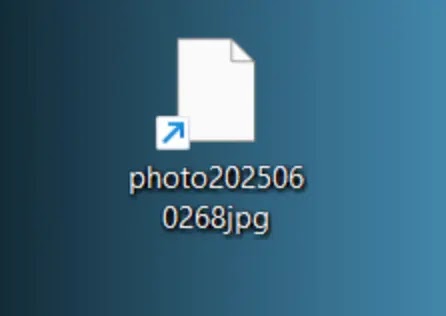
The lure is simple. A support agent receives a link that appears to point to a screenshot and includes “Google”-style wording that helps it look familiar. Clicking it downloads a file whose name looks like an image. On many Windows systems, the real extension stays hidden by default, so the file can appear harmless even though it is actually executable.
ZeroShadow says the downloaded file uses the .pif format, an older Windows executable type that many users would not recognize as dangerous. When opened, it shows what looks like a broken webpage or failed image, while malware installation begins quietly in the background.
That approach matters because it targets routine support behavior. The attacker does not need a browser exploit or a software bug. The victim only needs to believe they are opening a screenshot from a customer.
What happens after execution
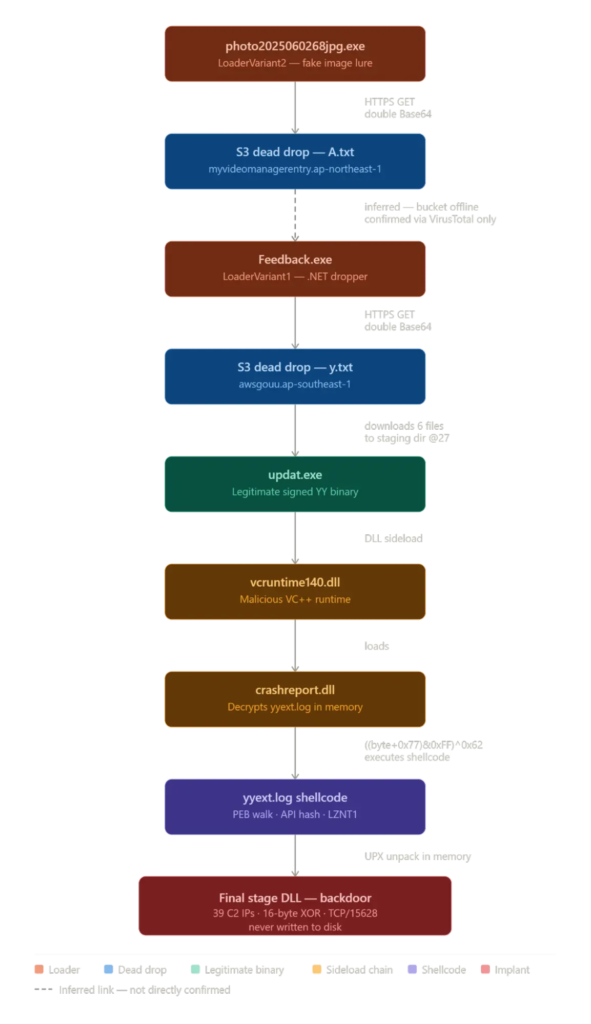
ZeroShadow says the first-stage lure reaches out to an AWS S3 bucket and retrieves a manifest file that contains URLs for the next payloads. That setup lets the attackers rotate infrastructure without changing the initial malware sample, which gives them flexibility if part of the operation gets blocked or reported.
The next package includes a legitimate signed binary from the YY platform called updat.exe, along with malicious DLLs. When the signed binary runs from the staging folder, Windows loads the attacker’s DLLs from the local directory first. This DLL sideloading step lets the malware execute under cover of a trusted file.
ZeroShadow says one malicious component reads an encrypted file named yyext.log, decrypts it in memory, and launches shellcode without dropping a final payload to disk. The shellcode then decompresses the final backdoor in memory, which reduces the file artifacts defenders would normally hunt for.
Why this campaign stands out
This operation goes after a weak point that many companies overlook: human support workflows. Web3 firms often run live chat support for users dealing with transactions, wallets, or account issues. That creates an ideal opening for attackers who can convincingly pose as frustrated customers and slip in a fake screenshot.
The malware chain also shows planning. ZeroShadow describes a staged delivery model, AWS dead drops, DLL sideloading, in-memory execution, persistence, and defense-evasion changes. That is more advanced than a basic chat-borne downloader.
Attribution remains measured. ZeroShadow says it traced the tooling and infrastructure back to APT-Q-27 with moderate confidence, not absolute certainty. That distinction matters and should stay in the reporting.
Key technical details
| Item | Details |
|---|---|
| Threat group | APT-Q-27 / GoldenEyeDog |
| Target profile | Web3 customer support staff |
| Initial lure | Fake screenshot link in live support chat |
| Initial file type | .pif executable disguised as an image |
| Staging method | AWS S3 manifest and follow-on payload retrieval |
| Execution technique | DLL sideloading via legitimate updat.exe |
| Final implant behavior | Memory-resident backdoor |
| C2 behavior | 37 hardcoded servers over TCP port 15628 |
| Persistence | Registry startup value SystemUpdats |
| Service name used | Windows Eventn |
Source: ZeroShadow research.
Persistence and stealth tricks
ZeroShadow says the final implant communicates with 37 hardcoded command-and-control servers over TCP port 15628. It also registers itself as a Windows service named Windows Eventn, a misspelled name designed to blend into normal Windows service listings.
The researchers also say the malware disables User Account Control through three separate registry keys. In addition, the loader writes a registry startup value called SystemUpdats, another deliberate misspelling meant to look routine at a glance.
The staging directory reportedly imitates the Windows Update cache path, and each installation includes a hardcoded @27 tag in the directory name. ZeroShadow says that string can serve as a reliable hunting clue during incident response.
What defenders should do now
- Enable visible file extensions on all Windows workstations so disguised
.piffiles stand out. - Block outbound traffic on TCP port 15628 where feasible and review connections to known campaign infrastructure.
- Monitor for the registry value
SystemUpdatsand for unusual service creation tied toWindows Eventn. - Hunt for staging directories that mimic Windows Update paths and contain the
@27marker. - Alert on simultaneous changes to all three UAC-related registry keys, which ZeroShadow says no legitimate software should do in this pattern.
- Train support teams to treat unsolicited screenshot links and “can you check this transaction?” chats as potential malware lures. This training recommendation is an inference from the campaign’s initial access method.
FAQ
ZeroShadow links the activity with moderate confidence to APT-Q-27, also known as GoldenEyeDog, a financially motivated group that has targeted gambling and crypto-related organizations.
Victims receive a file disguised as a screenshot, but ZeroShadow says it is actually a .pif executable. On Windows systems with hidden extensions, it can look like a normal image file.
The campaign delivers a multi-stage, memory-resident backdoor through AWS-hosted staging, DLL sideloading, and in-memory decryption and execution.
They regularly handle user complaints, transaction questions, and screenshot-based troubleshooting. That makes live chat support a strong social engineering entry point. This explanation follows from ZeroShadow’s description of how the campaign worked against 1inch support staff.
ZeroShadow highlights TCP port 15628 traffic, the Windows Eventn service name, the SystemUpdats registry value, UAC registry tampering, and staging paths with the @27 marker.


Read our disclosure page to find out how can you help VPNCentral sustain the editorial team Read more


Improve this guide



User forum
0 messages