
Fake TronLink Chrome extension steals crypto wallet credentials from users


 6 min. read
  Published on
A malicious Chrome extension impersonating TronLink has been used to steal crypto wallet credentials from TRON users.
Security researchers at SlowMist found that the extension used brand impersonation, remote phishing content, and anti-analysis tricks to collect mnemonic phrases, private keys, keystore files, and passwords.

Access content across the globe at the highest speed rate.
70% of our readers choose Private Internet Access
70% of our readers choose ExpressVPN

Browse the web from multiple devices with industry-standard security protocols.

Faster dedicated servers for specific actions (currently at summer discounts)
The campaign is especially risky because the fake extension appeared convincing inside the Chrome Web Store. It used a visually deceptive name, minimal permissions, and a store listing that showed more than one million users and a 4.5-star rating.
How the fake TronLink extension worked
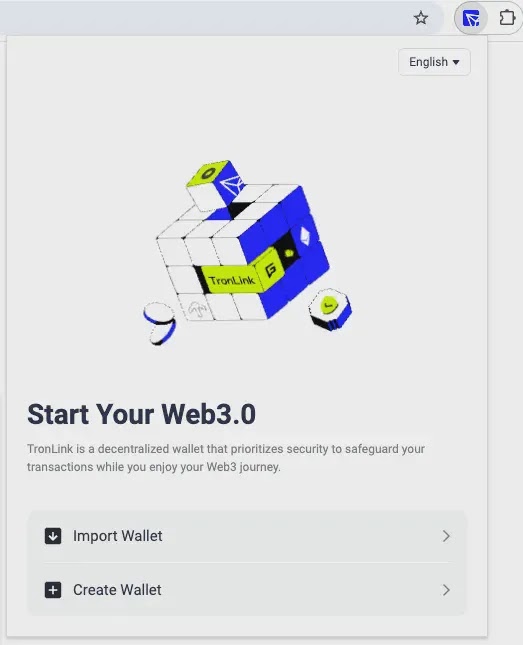
The attack used a two-layer structure. The Chrome extension acted as the outer shell, while the actual credential theft happened through a remote phishing page loaded inside the extension popup.
After installation, the extension checked whether its remote server was available. If the server responded, the popup loaded a fake TronLink wallet interface inside an iframe.
This design allowed attackers to change the phishing page remotely without pushing a new extension update. It also made static extension review less effective because the most dangerous behavior lived outside the extension package.
At a glance
| Item | Details |
|---|---|
| Target | TRON wallet users |
| Impersonated brand | TronLink |
| Extension type | Chrome MV3 extension |
| Main technique | Remote iframe loading with a fake wallet interface |
| Stolen data | Mnemonic phrases, private keys, keystore files, passwords, and wallet import details |
| Exfiltration method | Same-origin APIs and Telegram Bot forwarding |
Why the extension looked trustworthy
SlowMist reported that the malicious listing displayed more than one million users and a 4.5-star rating with hundreds of reviews. These values were tied to the Chrome Web Store item ID, not forged inside the extension code.
That suggests the attackers may have gained control of an existing extension listing and then changed the name, icon, and description to impersonate TronLink.
The extension also used Unicode bidirectional control characters and Cyrillic lookalike letters to make its name resemble the official TronLink brand. This kind of visual spoofing can trick users who quickly scan the extension name before installing it.
What data the phishing page collected
The remote page copied the appearance of the TronLink Wallet web interface. Once users interacted with the fake wallet import flow, it captured highly sensitive wallet recovery data.
The phishing page collected mnemonic phrases, private keys, keystore file contents, keystore passwords, and import passwords. It also recorded generated mnemonic phrases when users tried to create a new wallet through the fake interface.
After collection, the data was sent to a backend endpoint and then forwarded to attacker-controlled accounts through the Telegram Bot API. For victims, this means any wallet information entered into the extension should be treated as compromised.
Indicators of compromise
| Type | Indicator | Description |
|---|---|---|
| Domain | tronfind-api[.]tronfindexplorer[.]com | Remote UI loading and credential theft backend |
| Domain | trx-scan-explorer[.]org | Redirect target for Russian-region users |
| URL | hxxps://tronfind-api[.]tronfindexplorer[.]com/api/data/words | Credential exfiltration endpoint |
| URL | hxxps://tronfind-api[.]tronfindexplorer[.]com/api/visitor/track | Visitor tracking endpoint |
| Telegram chat ID | 8334454422 | Reported account receiving stolen credentials |
| Chrome extension ID | ekjidonhjmneoompmjbjofpjmhklpjdd | Malicious extension ID reported by SlowMist |
| MD5 | ce612d027e631d6633582227eb29002f | Reported malicious extension file hash |
| SHA1 | 94d651b42355f2b0765a7435e5a5927623807225 | Reported malicious extension file hash |
Anti-analysis tricks made detection harder
The phishing site included several mechanisms designed to slow down researchers and automated analysis tools. It blocked right-click menus, disabled text selection, intercepted developer tools shortcuts, cleared console output, and disabled printing.
It also used visitor tracking and blocking checks. If the page identified traffic that appeared suspicious or automated, it could redirect the visitor to a blank page.
SlowMist also found geographic redirection logic. Users with Russian language or time zone indicators were redirected to another domain, which suggests the operators used region-based filtering to manage exposure.
What affected users should do now
Anyone who installed the fake extension should remove it from Chrome immediately. Users should also clear extension-related site data and browser storage to remove local markers left behind by the extension.
If a user entered a mnemonic phrase, private key, keystore file, or password into the fake popup, they should assume the wallet is compromised. The safest step is to create a new wallet on a trusted device and move assets to the new wallet as soon as possible.
Changing a password alone will not protect a wallet if the mnemonic phrase or private key was exposed. Those values can give attackers direct access to the wallet.
- Remove the fake extension from Chrome.
- Clear site data and local storage tied to the suspicious extension.
- Create a new wallet on a trusted device if any recovery data was entered.
- Move funds away from the exposed wallet.
- Do not reuse the exposed mnemonic phrase, private key, or keystore file.
- Verify the official TronLink extension ID before installing.
How organizations can reduce browser extension risk
Security teams should block the malicious domains across DNS, proxy, and endpoint tools. They should also search for traffic to the reported API paths used for credential theft and visitor tracking.
Enterprises should audit installed browser extensions and look for unapproved wallet tools, remote iframe loading, suspicious host permissions, and brand spoofing patterns.
Chrome Enterprise policies can help administrators block unapproved extensions or allow only trusted extensions. This approach reduces the chance that users install malicious tools from compromised or deceptive listings.
Why this campaign matters
The campaign shows how attackers can combine trusted browser stores, extension reputation, remote content loading, and crypto wallet impersonation into a single theft chain.
It also shows why install counts and star ratings cannot serve as the only trust signals. If attackers take over an existing listing, they may inherit credibility that users and automated systems already trust.
Crypto wallet users should verify extension IDs, install only from official project pages, and avoid entering seed phrases into any browser interface unless they have confirmed the tool’s authenticity.
FAQ
It was a malicious Chrome MV3 extension that impersonated TronLink and loaded a remote phishing wallet interface to steal sensitive crypto wallet credentials.
The phishing page collected mnemonic phrases, private keys, keystore files, keystore passwords, import passwords, and wallet recovery details entered by users.
The extension used Unicode and Cyrillic lookalike characters to mimic the TronLink name. SlowMist also reported that the listing showed inherited Chrome Web Store reputation signals, including a large user count and high rating.
Users should remove the extension, clear related browser data, and create a new wallet on a trusted device if they entered any mnemonic phrase, private key, keystore file, or password.
No. If a seed phrase or private key was exposed, the old wallet should be treated as compromised. Users should move funds to a new wallet created with a new recovery phrase.


Read our disclosure page to find out how can you help VPNCentral sustain the editorial team Read more


Improve this guide




User forum
0 messages