
Hackers Exploit GitHub Actions to Backdoor AsyncAPI npm Packages With Miasma RAT


 8 min. read
  Published on
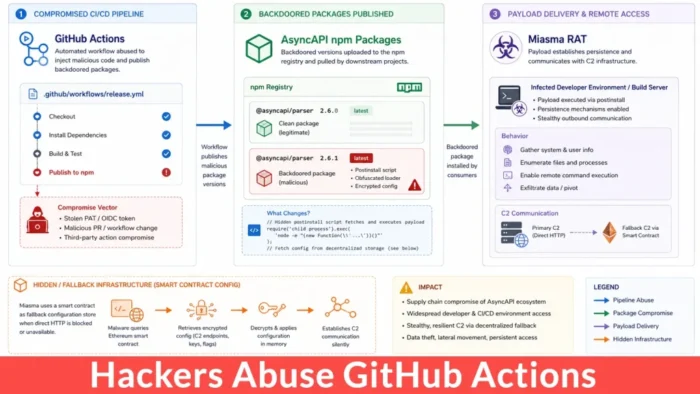
Hackers compromised AsyncAPI’s release process and published five malicious npm versions that delivered a Miasma-associated remote access trojan. The attack exposed developer computers, CI/CD runners, container builds, and other systems that imported the affected packages on July 14, 2026.
The attackers exploited an unsafe GitHub Actions workflow, stole a personal access token belonging to the AsyncAPI automation account, and pushed malicious commits into two official repositories. Legitimate release workflows then published the altered code through AsyncAPI’s trusted npm namespace.

Access content across the globe at the highest speed rate.
🔥 Save 81% + 2 bonus months! 🔥
70% of our readers choose Private Internet Access
70% of our readers choose Private Internet Access
2
Browse the web from multiple devices with industry-standard security protocols.
🔥 Save 73%! 🔥

Faster dedicated servers for specific actions (currently discounted)
🔥 Save 69%! 🔥
The four package names attract about 2.9 million weekly downloads, according to the Cato CTRL threat brief. That figure shows the packages’ potential reach, but it does not represent confirmed infections or unique users.
Which AsyncAPI npm Versions Contained Malware?
The incident affected four AsyncAPI packages and five versions. Attackers released two malicious versions of @asyncapi/specs, including a prerelease and a stable release.
| Package | Malicious version | Injected file |
|---|---|---|
@asyncapi/generator | 3.3.1 | lib/templates/config/validator.js |
@asyncapi/generator-helpers | 1.1.1 | src/utils.js |
@asyncapi/generator-components | 0.7.1 | lib/utils/ErrorHandling.js |
@asyncapi/specs | 6.11.2-alpha.1 | index.js |
@asyncapi/specs | 6.11.2 | index.js |
StepSecurity’s incident analysis says npm removed all five versions from the registry on July 14. Fresh dependency resolutions should no longer select them, but existing lockfiles, package caches, container layers, and internal artifact repositories may still contain the malicious files.
Teams should not assume that an installation caused an infection. The malicious code ran when an application, build process, or development tool imported the affected module. Investigators must therefore establish whether a system only downloaded a package or actually loaded it.
How the GitHub Actions Attack Worked
The attackers first targeted a workflow that used the pull_request_target event. This event can access the base repository’s token and secrets because GitHub expects it to run trusted code from the default branch.
The workflow broke that trust boundary by executing attacker-controlled pull request content in the privileged environment. According to GitHub’s pull_request_target security guidance, this pattern creates a “pwn request” vulnerability when a workflow checks out untrusted code and then runs its scripts, tests, dependencies, or configuration files.
The malicious pull request never needed a merge. Its code ran inside the workflow and exposed a personal access token linked to asyncapi-bot. The attackers used that token to push directly to release-connected branches in the asyncapi/generator and asyncapi/spec-json-schemas repositories.
Trusted Publishing Gave the Packages Valid Provenance
AsyncAPI’s release workflows responded to the unauthorized commits and published the compromised packages through npm’s GitHub OIDC integration. The attackers did not steal an npm publishing token or create a lookalike package.
The resulting packages carried valid provenance attestations because the official repositories and authorized workflows produced them. The attestations correctly identified the build path, but they could not determine whether an attacker had pushed the source commit.
Microsoft’s AsyncAPI compromise analysis reports that the release process published all five versions in about 90 minutes. This timeline highlights a limitation of provenance: it can confirm where a package came from without proving that every input to the workflow remained trustworthy.
Miasma Executed When Applications Imported the Packages
The malicious packages did not declare common npm lifecycle hooks such as preinstall, install, or postinstall. As a result, controls that focus only on installation scripts could miss the attack.
Normal require() or import activity triggered the injected loader. The loader started a hidden, detached Node.js process, downloaded an encrypted second-stage file named sync.js from IPFS, and stored it in a directory that resembled a legitimate Node.js application folder.
The malware used different paths on major operating systems:
- Windows:
%LOCALAPPDATA%\NodeJS\sync.js - Linux:
~/.local/share/NodeJS/sync.js - macOS:
~/Library/Application Support/NodeJS/sync.js
What the Miasma-Associated RAT Can Do
The decrypted runtime identified itself as M-RED-TEAM v6.4 and used the campaign label miasma-train-p1. Researchers found active command-and-control, persistence, file transfer, remote shell, proxy, and data-return functions.
The framework also contained credential-harvesting and propagation modules. However, the configuration examined during this incident left several of those functions disabled. For that reason, the Cato Networks assessment describes the payload as a Miasma-associated RAT instead of claiming that every affected system received a self-spreading worm or active credential stealer.
The RAT created persistence through platform-specific methods. It could add a Windows registry Run value, create a Linux user-level systemd service, or modify shell startup files on macOS.
Decentralized Channels Made the Malware More Resilient
The malware contacted a central server but also supported several fallback communication methods. These included Ethereum smart contracts, Nostr relays, BitTorrent DHT, libp2p, and IPFS.
An Ethereum contract acted as an updateable source for command-and-control configuration. This approach allowed the operator to change endpoints without modifying or republishing the compromised npm packages.
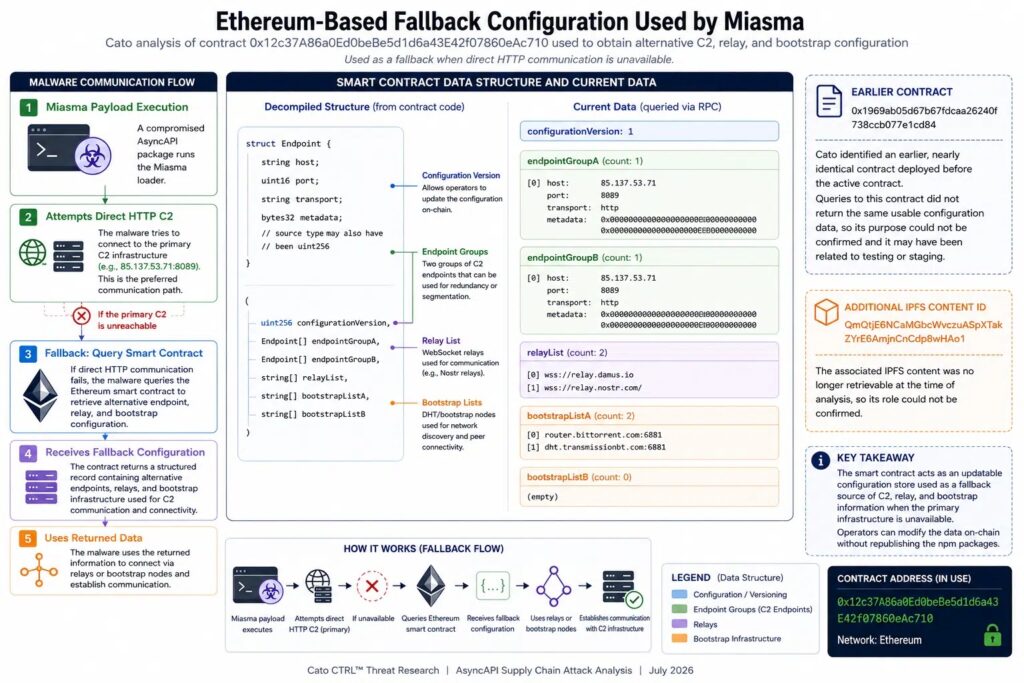
Security teams should use network indicators alongside file, process, package, and persistence evidence. Attackers can replace IP addresses, public gateways, or decentralized configuration data faster than defenders can update simple blocklists.
How to Check for AsyncAPI Package Exposure
Organizations should review direct and transitive dependencies because @asyncapi/specs appears inside several AsyncAPI tools. An application may have received the package even when developers did not add it directly.
Start by checking package manifests, lockfiles, npm and Yarn caches, CI artifacts, container images, internal registries, and software bills of materials for the five malicious versions.
- Determine whether a build or application imported an affected package.
- Search endpoints for
sync.jsinside NodeJS-named directories. - Review process telemetry for detached or hidden Node.js processes.
- Check for unexpected IPFS downloads and connections to the known command server.
- Inspect Windows Run keys, Linux user services, and macOS shell startup files.
- Rebuild affected projects and reusable runner images from known-good dependencies.
Credentials May Need Immediate Rotation
If an affected system imported a malicious package, responders should treat credentials available to that system as potentially exposed. Developer workstations and CI runners often hold source-control tokens, deployment keys, cloud credentials, SSH keys, registry access, and signing permissions.
The Microsoft mitigation guidance recommends removing the affected versions, clearing dependency caches, hunting for the persisted payload, and rotating accessible credentials from a clean device.
Teams should prioritize these credential types:
- GitHub personal access tokens, deploy keys, and workflow secrets
- npm and other package-registry tokens
- AWS, Azure, and Google Cloud credentials
- SSH private keys and Git credentials
- Kubernetes configuration and container-registry credentials
- Browser passwords, cookies, and active session tokens
How Development Teams Can Secure GitHub Actions
Repository owners should audit every workflow that uses pull_request_target. The event can support safe tasks such as labeling or commenting, but it becomes dangerous when a privileged job runs code from an untrusted pull request.
GitHub recommends keeping pull request code out of privileged jobs, restricting token permissions, isolating trusted and untrusted workflow stages, and applying approval controls. Teams should also protect release branches and require review for workflow changes.
- Set the default
GITHUB_TOKENpermission to read-only. - Grant write permissions only to the jobs that need them.
- Do not execute pull request code in jobs that can access secrets.
- Use protected environments for publishing and deployment.
- Require approval before release workflows access sensitive credentials.
- Monitor bot accounts for unusual branches, commits, and repository access.
- Alert on unexpected npm publication events and dist-tag changes.
The incident also shows why teams should evaluate provenance as one security signal rather than a complete trust decision. Reviewers must verify source commits, identities, branch protections, workflow definitions, and release behavior together.
Key Indicators of Compromise
| Type | Indicator | Purpose |
|---|---|---|
| IP address | 85.137.53[.]71 | Command-and-control infrastructure on ports 8080, 8081, and 8091 |
| File | sync.js | Second-stage payload stored in a NodeJS-named directory |
| Windows persistence | miasma-monitor | HKCU Run value |
| Linux persistence | miasma-monitor.service | User-level systemd service |
| IPFS CID | Qmet4fhsAaWMBUxNDfREHwgiyDeSWy4YSYs9wiKUW5jGyf | Reported second-stage payload |
| Ethereum contract | 0x12c37A86a0Ed0beBe5d1d6a43E42f07860eAc710 | Fallback command-and-control configuration |
| Ethereum contract | 0x1969ab05d67b67fdcaa26240f738ccb077e1cd84 | Related backup contract |
| Publisher identity | npm-oidc-no-reply@github[.]com | Legitimate OIDC identity that published the unauthorized releases |
Security teams should not block common services such as IPFS or Ethereum RPC endpoints without assessing business use. Instead, combine the indicators with process lineage, package versions, file paths, persistence events, and the July 14 exposure window.
StepSecurity’s remediation report confirms that removing a package alone does not remove an implant that already ran. Responders must also investigate the host, terminate malicious processes, remove persistence, rotate secrets, and rebuild affected development assets.
FAQ
The incident affected @asyncapi/generator 3.3.1, @asyncapi/generator-helpers 1.1.1, @asyncapi/generator-components 0.7.1, and @asyncapi/specs versions 6.11.2-alpha.1 and 6.11.2.
The attackers exploited an unsafe pull_request_target workflow, stole a personal access token belonging to an AsyncAPI bot account, and used it to push malicious commits into release-connected branches.
Researchers found no evidence that the attackers stole an npm publishing token. Legitimate GitHub Actions workflows used npm OIDC trusted publishing to release the compromised packages.
Not necessarily. The malicious loader ran when software imported the affected module. Teams must determine whether a system only downloaded the package or loaded it during a build, application run, or documentation task.
No. The malicious packages did not rely on npm installation hooks. The loader ran during normal module import, so the ignore-scripts option did not prevent execution.
Remove the malicious version, clear package caches, search for sync.js and suspicious Node.js processes, remove persistence, inspect network activity, rebuild affected assets, and rotate credentials from a clean device.


Read our disclosure page to find out how can you help VPNCentral sustain the editorial team Read more


Improve this guide




User forum
0 messages