
How to Watch Kubi on Netflix in the US with a VPN (2026)


 15 min. read
  Published on

Kubi (2023), the Japanese historical drama directed by Takeshi Kitano, is available on Netflix Japan. The movie, also known by its Japanese title 首, follows a deadly power struggle involving Oda Nobunaga and rival samurai during Japan’s Sengoku period. The film stars Takeshi Kitano, Hidetoshi Nishijima, and Ryo Kase. You can find it on the official Netflix Japan page for Kubi, which currently lists the film.
However, Kubi is not available on Netflix US as of October 2026. American viewers searching for the movie will not find it in their regular Netflix catalog. Private Internet Access, ExpressVPN, and NordVPN all offer Japanese VPN server locations, allowing users to establish connections with Japanese IP addresses. These services have different server choices, protocols, and streaming features.

Access content across the globe at the highest speed rate.
🔥 Save 81% + 2 bonus months! 🔥
70% of our readers choose Private Internet Access
70% of our readers choose Private Internet Access
2
Browse the web from multiple devices with industry-standard security protocols.
🔥 Save 73%! 🔥

Faster dedicated servers for specific actions (currently discounted)
🔥 Save 69%! 🔥
However, connecting to a Japanese VPN server does not guarantee that Netflix will display or play Kubi. Netflix detects some VPN connections and may restrict viewers to movies with worldwide licensing. The company’s official VPN policy explains these limitations. VPN users must also follow their provider’s terms and Netflix’s applicable conditions.
How to watch Kubi on Netflix with a VPN
Netflix Japan currently lists Kubi, but viewers connecting from the United States should understand that a VPN does not automatically provide access to Japan’s Netflix catalog. If your VPN provider and Netflix permit the connection, the following steps explain how to check availability.
- Choose a VPN service. Private Internet Access ranks first in our comparison for its documented Japanese server options, followed by ExpressVPN and NordVPN. Review each service’s restrictions before subscribing.
- Download the official VPN application for your Windows PC, Mac, smartphone, or another supported device. Install it and sign in.
- Open the VPN server list and select Japan. Choose a Japanese location supported by your provider rather than relying on automatic worldwide server selection.
- Fully close Netflix, including any browser tabs or applications running in the background.
- After establishing the VPN connection, reopen the Netflix website or application.
- Sign in using your existing Netflix account. You do not need to create another account simply to connect through a VPN.
- Search for Kubi. You can also try its Japanese title, 首, if the English title does not appear.
- If Netflix displays the movie and permits playback, select it and start watching. If the movie remains unavailable or Netflix reports a VPN error, follow Netflix’s guidance and applicable service terms.
Netflix Japan identifies Kubi as a 2023 historical drama. Its listing includes Japanese original audio and Japanese subtitles. Other language options may differ according to the Netflix interface, account, device, and the version of the title page you access.
You can check the Netflix Japan listing for Kubi to confirm the title, cast, description, and currently displayed language options. The official page does not guarantee that Netflix will offer the same movie to an account connecting through a VPN from another country.
Netflix frequently changes its licensing agreements, so regional availability can change without notice. For that reason, checking the title before purchasing a VPN subscription is sensible.
Best VPNs for watching Kubi on Netflix
Private Internet Access, ExpressVPN, and NordVPN all provide Japanese VPN connections. They differ in the number of documented locations, connection protocols, and streaming-related features.
The following comparison uses the providers’ official server directories. It describes available connections rather than promising that any VPN will unlock Netflix Japan.
| VPN | Server locations in Japan | Option to try first |
|---|---|---|
| Private Internet Access (Editor’s Choice) | JP Tokyo and JP Streaming Optimized | JP Tokyo for permitted connections; use the streaming-optimized location according to PIA’s restrictions |
| ExpressVPN | Tokyo, Osaka, Shibuya, and Yokohama | Tokyo, followed by Osaka |
| NordVPN | Tokyo and Osaka, with more than 130 Japanese servers advertised | Automatically selected Japan server |
Every service in this comparison offers a Japanese IP address, but VPN connection availability and Netflix movie availability are separate matters. Netflix may detect and restrict VPN connections regardless of which provider or Japanese server you choose.
1. Private Internet Access
Private Internet Access (PIA) is our Editor’s Choice for its straightforward Japanese server selection, dedicated streaming-optimized location, and flexible connection settings. Its official server directory lists two Japanese options: JP Tokyo and JP Streaming Optimized.
PIA is particularly useful for users who want to manage their connection manually rather than depend entirely on automatic server selection. However, its streaming policy creates an important limitation for anyone seeking to access another country’s Netflix catalog.
According to the official PIA server directory, users can select JP Tokyo as a regular Japanese connection or JP Streaming Optimized for streaming-related performance improvements.
For permitted use, JP Tokyo is a sensible starting point because it represents the provider’s standard Japanese location. The streaming-optimized option offers another connection profile, although its purpose is improving legitimate streaming performance rather than guaranteeing access to regional Netflix libraries.
To find a Japanese server, open the PIA application, select the VPN SERVER section, and search for Japan. Choose JP Tokyo from the location list and establish your connection.
If you want to locate the streaming-optimized server, search for the word streaming in PIA’s server selection screen. This displays the available specialized connections, including the Japanese option.
PIA also supports WireGuard and OpenVPN. WireGuard is a practical first choice when connection speed and efficiency matter. OpenVPN provides additional configuration flexibility, including transport and port options, which can help when particular networks interfere with VPN connections.
You can change protocols through the application’s Settings menu. If the VPN connection becomes unstable, disconnect, select another supported protocol, and reconnect. PIA’s WireGuard documentation explains how to configure the protocol across compatible platforms.
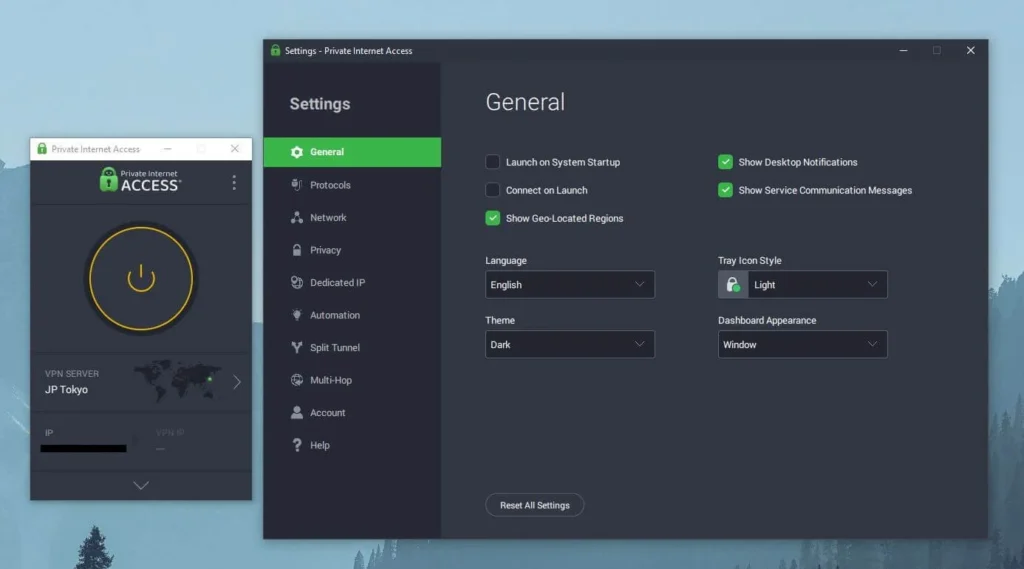
PIA also publishes information about physical and virtual server locations. Virtual servers assign IP addresses associated with one country while routing traffic through infrastructure located elsewhere. Japan does not appear among the virtual country locations in PIA’s current published directory, so its Japanese options should not be confused with explicitly listed virtual locations such as India.
Users experiencing connection problems can also clear cached browser data, update the VPN app, or check whether a browser extension interferes with the connection. If a website fails to load, trying another browser can help identify a local configuration issue.
PIA’s official streaming guide states that customers must select a server matching the country where they currently reside. It also explicitly prohibits using PIA to circumvent geographic restrictions imposed by content providers.
Consequently, although PIA offers Japanese servers and useful streaming features, users in the United States should not treat the service as authorization to bypass Netflix Japan’s geographical restrictions. Its Japanese server options are best understood as privacy and connection tools for permitted use.
2. ExpressVPN
ExpressVPN provides more Japanese location choices than the other services in this comparison. Its official directory lists Tokyo, Osaka, Shibuya, and Yokohama, giving users four distinct locations within Japan.
These choices are useful when network conditions vary between cities. Users can select a location manually rather than rely entirely on the application’s default recommendation.
According to ExpressVPN’s Japan server information, the provider offers Japanese connections through these four locations. Its Japan infrastructure also includes high-capacity server options.
Tokyo is a reasonable initial selection for a Japanese VPN connection. If the route experiences congestion or unstable performance, Osaka is another documented option. Yokohama and Shibuya provide additional alternatives.
To connect, open ExpressVPN, access the VPN Locations menu, and search for Japan. Choose your preferred Japanese city and establish the connection.
ExpressVPN also offers Smart Location, which recommends a server based on factors such as latency, speed, and distance. However, automatic recommendations may select a country other than Japan. Users who specifically require a Japanese IP address should choose Japan manually.
The provider supports Lightway, WireGuard, and OpenVPN, depending on the application and operating system. Lightway emphasizes quick connection establishment and efficient operation, while WireGuard and OpenVPN provide alternative protocols.
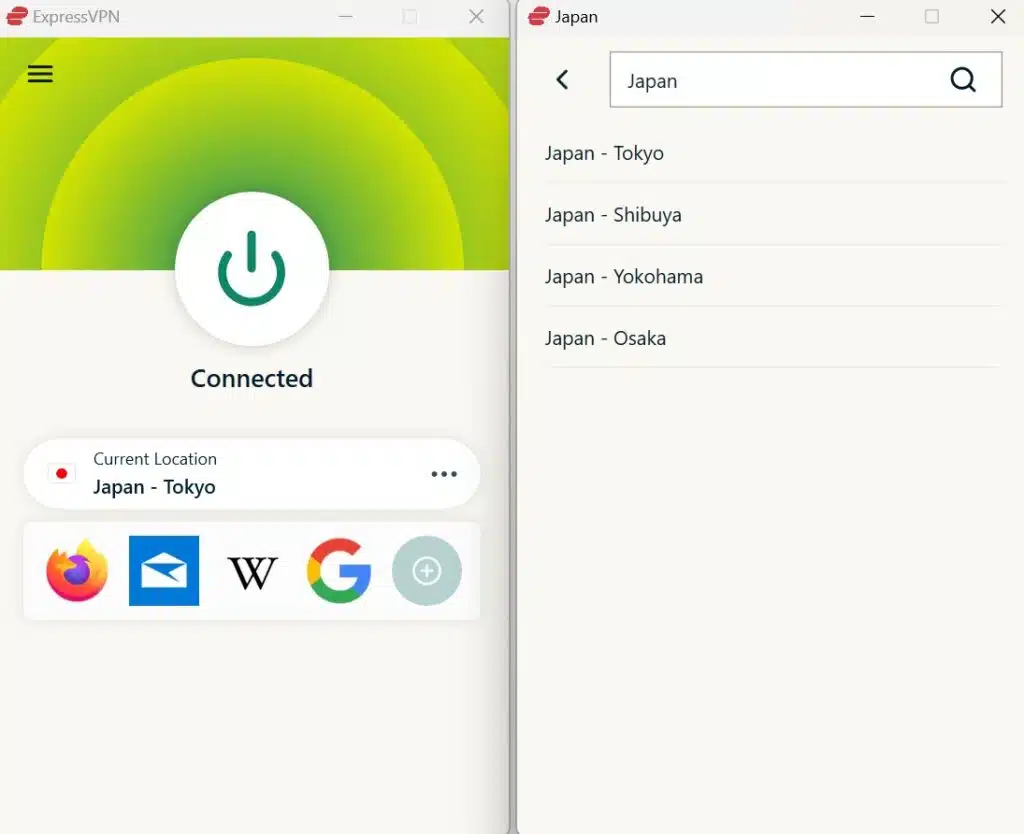
Its official server directory identifies protocol availability for individual locations, making it useful when a particular device does not support every connection method.
ExpressVPN also distinguishes physical servers from virtual locations. Its published virtual server directory does not classify the four Japanese locations as virtual. That differs from countries such as India, where the provider uses servers physically hosted in other countries.
For video streaming, connection stability matters as much as maximum speed. A fast server will not necessarily deliver smooth playback if the underlying internet connection is unreliable, the destination service restricts VPN traffic, or the route experiences congestion.
If connection performance declines, users can select another Japanese location, switch to a supported protocol, or contact ExpressVPN support. These actions may address network problems but cannot guarantee that Netflix will display regionally licensed titles.
ExpressVPN users must also respect applicable content licensing and platform restrictions. Netflix can recognize VPN traffic and limit access even when the VPN successfully assigns a Japanese IP address.
3. NordVPN
NordVPN is another option for establishing a secure Japanese connection. Its official Japan server page advertises more than 130 servers and identifies Tokyo and Osaka as Japanese destination choices.
The provider offers automatic server selection, making it convenient for users who prefer not to choose an individual server every time they connect.
According to NordVPN’s Japan server page, users can select Japan on the map or find it in the country list. The application can then connect to an available Japanese server.
For a straightforward setup, open NordVPN, search for Japan, and connect using the recommended server. If you need more control, open the country selection options and choose an available Japanese city or specific server.
Tokyo is one documented location, while Osaka offers another option. Users should check the application for currently available servers because individual server assignments can change.
NordVPN uses NordLynx, its WireGuard-based VPN protocol, to provide efficient encrypted connections. Its applications also offer automatic protocol selection, allowing the software to choose among supported connection methods.
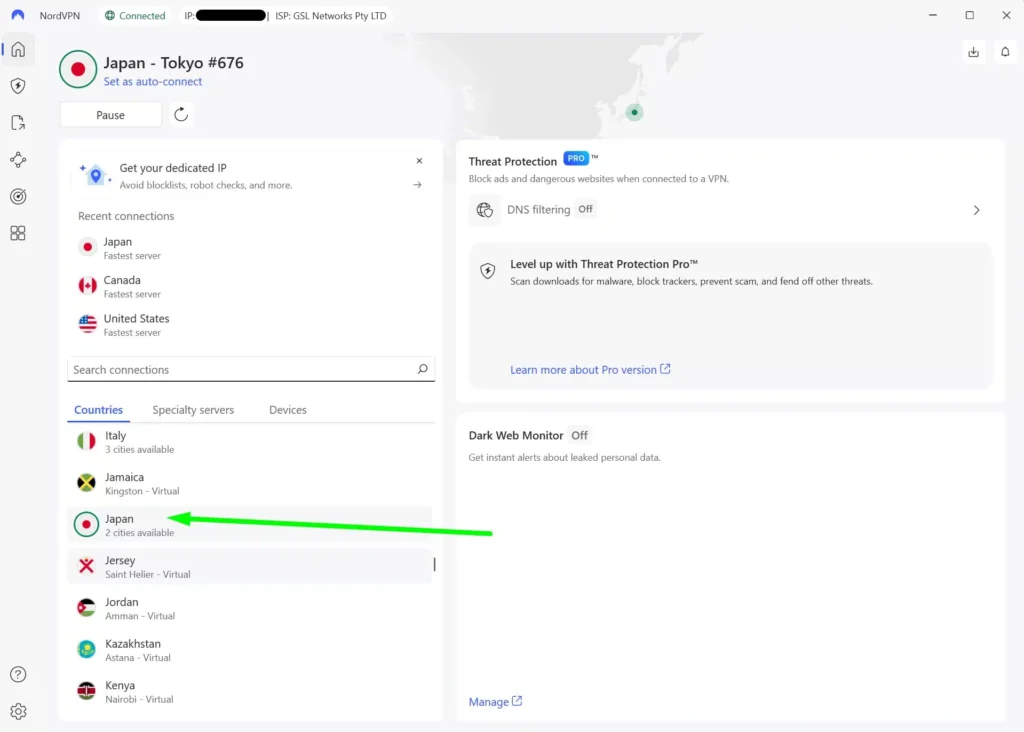
NordVPN’s other useful feature is SmartPlay. According to the company’s official SmartPlay documentation, this technology combines VPN security and DNS-related functionality to support private streaming.
SmartPlay activates automatically when users connect through a NordVPN application. You do not need to install another extension, change a separate SmartPlay setting, or manually activate the feature.
However, SmartPlay does not override Netflix’s licensing agreements. It also does not guarantee that users outside Japan can watch Kubi through Netflix Japan.
For troubleshooting, users can disconnect and reconnect, choose another Japanese server, or test a different supported VPN protocol. If the connection remains unstable, NordVPN’s automatic recommendation may help identify another suitable server.
As with the other providers, Netflix can restrict movie availability after detecting VPN traffic. A successful NordVPN connection only establishes a Japanese network endpoint; it does not confirm permission to access Japan’s licensed streaming catalog.
What to do if Kubi does not appear
If Kubi does not appear in Netflix search results, several factors could explain the problem. Netflix may recognize the VPN, your profile settings may hide certain titles, or regional licensing may prevent access. Browser cookies and outdated application data can also complicate troubleshooting.
For permitted VPN connections, try these eight checks in order:
- Close Netflix completely, including open browser tabs and background application processes.
- Disconnect from your current VPN server.
- Reconnect to Japan using a permitted connection supported by your VPN provider.
- Try another available server or location within Japan if your original connection experiences technical problems.
- Clear Netflix-related cookies and browser cache to remove outdated session information.
- Open an incognito or private browser window to check whether existing browser data causes the problem.
- Reopen Netflix and sign in using your existing account credentials.
- Search for Kubi again, including the Japanese title 首, and check whether Netflix permits access.
Private Internet Access users can compare JP Tokyo with the documented JP Streaming Optimized location for permitted use. However, PIA’s policy prohibits bypassing content providers’ geographical restrictions, so US users should not switch locations for that purpose.
ExpressVPN users have Tokyo, Osaka, Shibuya, and Yokohama available for legitimate connection troubleshooting. Changing between these cities can help diagnose network problems, but Netflix may recognize all four connections as VPN traffic.
NordVPN users can select another available Japanese server or let the application choose a recommended server. Changing servers may improve routing or connection stability, but it does not guarantee access to Kubi.
Also check your Netflix profile’s maturity rating and language preferences. These settings sometimes prevent movies from appearing in search results even when Netflix offers them in the viewer’s region.
Netflix’s missing-title troubleshooting guide explains that licensing restrictions, VPN detection, maturity controls, and language preferences can all affect movie visibility.
If Netflix detects the VPN or displays an access error, follow its recommendation to disconnect the VPN. Do not assume that repeatedly changing servers will resolve a regional licensing restriction.
Netflix may detect the VPN
A VPN changes the public IP address that websites and streaming services see. When you connect to a Japanese VPN location, websites may identify the connection as originating from Japan rather than your physical location in the United States.
However, Netflix does not determine movie availability solely from the country associated with your IP address. The service also applies licensing rules, account-related restrictions, and VPN detection systems.
Netflix explains that VPN users may only see movies and shows licensed worldwide. This means that Kubi can appear in Netflix Japan’s regular catalog without appearing to every viewer connected through a Japanese VPN server.
Some users may encounter missing search results, unavailable-title notices, or playback errors. Others may see a reduced Netflix catalog while their VPN remains active.
The company’s VPN support documentation recommends turning off the VPN when it prevents access to content available in the viewer’s region.
Private Internet Access, ExpressVPN, and NordVPN cannot independently change Netflix’s streaming rights. Their Japanese server networks should not be mistaken for guaranteed access to the Japanese Netflix library.
Can you use a Netflix ad-supported plan with a VPN?
No. Netflix explicitly states that its ad-supported experience does not support VPN connections.
If you use an ad-supported Netflix subscription while connected through a VPN, you may receive a playback error or a message asking you to disable the VPN. Netflix may identify the connection as coming from a proxy or VPN service.
According to Netflix’s guidance for VPN-related errors on ad-supported plans, disconnecting the VPN is the recommended solution.
An ad-free Netflix subscription avoids this particular plan restriction, but it does not eliminate regional licensing controls or VPN detection.
In other words, changing to an ad-free plan does not guarantee that a US subscriber can access Kubi on Netflix Japan. Users should confirm ordinary regional availability and review the streaming service’s rules before making subscription changes.
Does changing the VPN location change your Netflix account?
Connecting through a Japanese VPN server does not automatically change your Netflix username, password, profiles, subscription, or billing information.
A VPN primarily changes how websites identify the network connection. Your Netflix account continues to use its existing credentials and subscription details.
However, Netflix offers different catalogs in different countries because studios and distributors license movies by region. The service also maintains rules about when subscribers can change their account country.
Netflix’s account country guidance states that subscribers generally cannot change their account country unless they move to another country.
Netflix may also recognize a VPN connection and restrict the displayed catalog to titles available worldwide.
For Kubi specifically, the Japanese Netflix listing does not mean that changing a VPN location will change your Netflix account into a Japanese subscription.
US viewers can also check the current US streaming options for Kubi on JustWatch. At the time of our October 2026 check, JustWatch did not list an available US streaming provider.
Which VPN should you use?
Private Internet Access is our Editor’s Choice for its documented JP Tokyo and JP Streaming Optimized connections, flexible WireGuard and OpenVPN settings, and straightforward server selection. However, its official policy prohibits circumventing content providers’ geographic restrictions and directs customers to connect to a server in their current country. That restriction matters for US viewers considering a Japanese connection specifically to access Netflix content.
ExpressVPN offers the widest documented Japanese city selection among these three providers, with Tokyo, Osaka, Shibuya, and Yokohama available. NordVPN offers more than 130 Japanese servers, automatic connection selection, NordLynx, and SmartPlay. Both provide practical tools for secure Japanese connections, although neither can guarantee Netflix playback.
Kubi (2023) currently appears in Netflix Japan’s catalog but not Netflix US. Its official Japanese Netflix page and independent streaming listings support that availability. Nevertheless, regional licensing, VPN detection, Netflix subscription restrictions, and VPN provider terms can prevent access from the United States. No VPN connection guarantees that Kubi will appear or play.
Kubi (2023) is available on Netflix Japan as of October 2026. The official Japanese Netflix page lists the movie, while Netflix US does not currently offer it.
Kubi is not currently available on Netflix US. Although VPN providers offer Japanese connections, Netflix may detect VPN traffic and restrict access to titles with worldwide licensing. Connecting to Japan does not guarantee playback.
Private Internet Access ranks first for its JP Tokyo and JP Streaming Optimized locations, followed by ExpressVPN and NordVPN. However, PIA prohibits circumventing geographical content restrictions, and none of these VPNs guarantees Netflix Japan access.
Check Netflix’s title availability, profile maturity settings, and language preferences. If you use a permitted VPN connection, you can also check your connection and clear outdated browser data. Netflix recommends disabling a VPN when VPN detection causes access problems.
No. Netflix does not support VPN connections on its ad-supported experience. Disconnect the VPN if Netflix displays a related playback error. Ad-free plans avoid this specific limitation but remain subject to regional licensing and VPN detection.


Read our disclosure page to find out how can you help VPNCentral sustain the editorial team Read more


Improve this guide




User forum
0 messages