
How to Watch Patria on Netflix in the US with a VPN (2026)


 18 min. read
 Published on

Patria (2014), also known as 1914: The Western Front, is available in the Romanian Netflix catalog. The Dutch historical war drama follows Arthur Knaap, a Dutch-Indonesian man who joins the French Foreign Legion during World War I. Starring Timothy Flohr, Tijs Huys, and Marie-Claire Vugts, the film explores the harsh realities of trench warfare. Netflix Romania lists the movie under the localized title În țara nimănui, which you can find on the official Netflix Romania movie page. The listing includes Dutch audio and English, Romanian, French, German, Hungarian, and Spanish subtitles.
Patria is not currently available through Netflix US. JustWatch US lists the film under 1914: The Western Front, with streaming options outside Netflix. Meanwhile, JustWatch Romania confirms that Netflix offers the movie. Private Internet Access, ExpressVPN, and NordVPN all provide Romanian VPN connections, giving users several options for establishing an encrypted connection with a Romanian IP address.

Access content across the globe at the highest speed rate.
🔥 Save 81% + 2 bonus months! 🔥
70% of our readers choose Private Internet Access
70% of our readers choose Private Internet Access
2
Browse the web from multiple devices with industry-standard security protocols.
🔥 Save 73%! 🔥

Faster dedicated servers for specific actions (currently discounted)
🔥 Save 69%! 🔥

However, using a VPN does not guarantee access to Patria on Netflix Romania. Netflix may detect VPN connections and restrict the available catalog to movies and shows with worldwide streaming rights. VPN provider terms can also prohibit circumventing regional restrictions. Before attempting playback, review Netflix’s official VPN policy and the applicable terms of your VPN service.
How to watch Patria on Netflix with a VPN
If you want to check whether your Netflix account offers Patria through a Romanian connection, follow these steps. Make sure your intended use complies with Netflix’s rules and your VPN provider’s terms.
- Choose a VPN provider. Private Internet Access is the Editor’s Choice for its documented Romanian connections, followed by ExpressVPN and NordVPN. Check each provider’s streaming restrictions before proceeding.
- Download the VPN application from the provider’s official website, install it on your Windows PC, Mac, smartphone, or another supported device, and sign in.
- Open the VPN server selector and choose Romania. PIA lists Romania and RO Streaming Optimized, ExpressVPN provides a Romania location, and NordVPN offers servers in Bucharest. Only use a location when your provider permits the intended activity.
- Fully close Netflix, including any open browser tabs or background Netflix applications.
- Reopen Netflix after the VPN establishes its connection.
- Sign in using your existing Netflix account and select the appropriate viewing profile.
- Search for Patria. If the film does not appear, try 1914: The Western Front, Patria / No Man’s Land, or the Romanian title În țara nimănui.
- Open the movie’s details page and start playback if Netflix displays the title and permits access through your account and connection.
Patria has several titles across international streaming catalogs. Netflix Romania uses În țara nimănui, while JustWatch US identifies the film as 1914: The Western Front. Searching for the alternate titles can help distinguish the correct production from unrelated movies and documentaries.
In particular, do not confuse this 2014 drama with the 2019 Mexican documentary Patria, which explores Mexico’s nineteenth-century history. The movie covered here focuses on Arthur Knaap and his experiences during World War I.
You can also visit the Romanian Netflix listing for Patria directly. The official page identifies the film and displays its available language information, but Netflix may show a different result depending on your location, account, and VPN status.
If the movie does not appear after connecting, do not assume the VPN connection failed. Netflix can recognize VPN traffic and limit access to regional content. A successful Romanian VPN connection only establishes a network location; it does not override Netflix’s licensing rules.
Best VPNs for watching Patria on Netflix
The following comparison covers the officially documented Romanian server locations of Private Internet Access, ExpressVPN, and NordVPN. These options provide Romanian IP connectivity, but their features and location-selection methods differ.
| VPN | Server locations in Romania | Option to try first |
|---|---|---|
| Private Internet Access (Editor’s Choice) | Romania, RO Streaming Optimized | Romania for permitted connections; RO Streaming Optimized only when provider terms allow |
| ExpressVPN | Romania, with physically hosted servers in the country | Romania |
| NordVPN | Bucharest, with 29 officially listed Romanian servers | Automatically selected Bucharest server |
These providers offer connection encryption, location selection, and protocol controls. However, none can guarantee that Netflix will display or play Patria through a Romanian VPN connection.
1. Private Internet Access
Private Internet Access is the Editor’s Choice in this comparison because it offers two clearly documented Romanian connection options, supports WireGuard and OpenVPN, and provides manual controls for network troubleshooting. Its server directory makes it straightforward to identify standard and streaming-optimized locations.
According to the official PIA server directory, the provider offers two Romanian entries: Romania and RO Streaming Optimized.
The standard Romania entry provides a Romanian VPN connection for general privacy and compatible online services. The RO Streaming Optimized entry is a separate location intended for streaming performance.
PIA does not identify a specific Romanian city in its application location list. Therefore, users should look for the exact Romania and RO Streaming Optimized names rather than searching for an undocumented city-specific server.
There is also an important restriction. PIA’s official streaming guidance states that users should connect to a server in the country where they are physically located. It explicitly prohibits using the service to circumvent geographic restrictions imposed by content providers.
Consequently, US readers should not interpret RO Streaming Optimized as permission to bypass Netflix’s regional licensing rules. PIA’s Editor’s Choice position here reflects its technical configuration options, not guaranteed or authorized cross-border Netflix access.
To connect through PIA, launch the application and open the VPN SERVER selector. Search for Romania to locate the two available entries. Choose the appropriate server and click the connection button.
The official PIA streaming guide also explains how to find specialized locations. Users can enter “streaming” in the server search field and review the available streaming-optimized entries. PIA instructs customers to select a streaming location that complies with their actual country and the content provider’s terms.
For regular privacy use involving Romanian services, the standard Romania connection is a reasonable starting point. Users physically located in Romania who need a streaming-optimized connection can consider RO Streaming Optimized when their intended use complies with applicable terms.
PIA supports WireGuard and OpenVPN. WireGuard offers an efficient connection method that can help maintain responsive performance. OpenVPN provides an alternative when local network restrictions or compatibility problems interfere with WireGuard.
If the connection behaves unexpectedly, disconnect PIA, open Settings, select Protocols, and switch between WireGuard and OpenVPN. Reconnect afterward and test whether ordinary websites load correctly.
PIA explains these controls in its connection troubleshooting documentation.
PIA also publishes information about virtual server locations. A virtual location gives users an IP address associated with one country while the underlying hardware operates elsewhere.
Romania does not appear as a virtual destination in PIA’s current virtual server directory. Interestingly, PIA identifies Bucharest, Romania, as the physical hosting location for its virtual Ukraine connection.
This confirms that PIA uses infrastructure in Romania, but it does not establish the exact hardware location of every server available through its Romanian entries. Users should rely on the provider’s published location information rather than assuming that all endpoints operate in a particular city.
For streaming performance, the distance between your device and the VPN server matters. Connecting from the US to Romania introduces additional network distance, which can increase latency and affect connection stability.
WireGuard may reduce protocol overhead, but internet congestion, local Wi-Fi performance, server load, and the original streaming service also influence playback quality. A streaming-optimized server cannot eliminate these factors.
If a website fails to load while PIA is connected, try a different browser, clear relevant cookies, update the VPN application, or check whether PIA MACE interferes with the site’s scripts. PIA documents these troubleshooting methods.
However, ordinary connection troubleshooting differs from overcoming Netflix’s geographic restrictions. Netflix may recognize VPN traffic even when the connection works perfectly. PIA’s terms prohibit geographic circumvention, and users must follow those restrictions.
2. ExpressVPN
ExpressVPN is the second option because it provides Romanian VPN connections through physically hosted infrastructure and supports several connection protocols.
The official ExpressVPN server directory lists Romania as an available location. Unlike some countries where ExpressVPN publishes several selectable city entries, the directory does not identify multiple Romanian city locations.
Therefore, Romania is the appropriate server location to select in the application. Users should not assume that ExpressVPN offers separate Bucharest, Cluj-Napoca, or Iași options unless the provider adds them to its official directory.
To connect, open ExpressVPN and sign in. Select the server location field, find Romania in the European country list, and establish the connection. The application should indicate when the VPN connection becomes active.
ExpressVPN also offers Smart Location, which automatically chooses a suitable server based on factors such as latency, distance, and download performance. However, Smart Location does not necessarily select Romania.
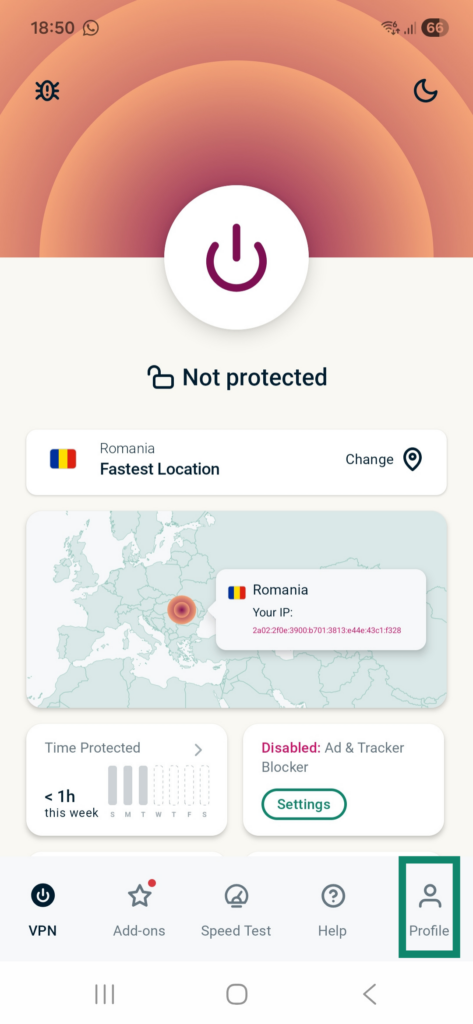
If you specifically need a Romanian IP address for a permitted activity, select Romania manually instead of relying on automatic location selection.
ExpressVPN’s Romania server page explicitly states that its Romanian VPN servers are physically located within the country.
This distinction matters because some VPN providers offer virtual locations that assign an IP address from one country while hosting the underlying equipment somewhere else.
ExpressVPN also maintains an official virtual server location guide. Romania does not appear on its published virtual location list, which aligns with the provider’s statement that its Romanian infrastructure operates physically within the country.
For connection protocols, the official server directory lists Lightway UDP, Lightway TCP, WireGuard, OpenVPN UDP, and OpenVPN TCP as available for Romania. IKEv2 also appears as supported on compatible platforms.
Lightway UDP provides a practical starting point for general connection performance. Lightway TCP offers an alternative when network conditions interfere with UDP traffic.
WireGuard provides another modern connection option, while OpenVPN remains useful for compatibility and restrictive network environments. ExpressVPN currently limits its WireGuard option to supported Windows, Android, and iOS applications.
Users should check their application version because protocol availability can differ by device.
ExpressVPN does not publish a specific Romanian server count in its country directory. The presence of a Romania location should not be interpreted as a particular number of physical servers or available IP addresses.
For troubleshooting, first confirm that ExpressVPN reports an active connection. If websites fail to load, reconnect to Romania and test another supported protocol.
If the application offers a fresh server connection within the same Romanian location, reconnecting may help resolve ordinary network instability. However, ExpressVPN does not document multiple Romanian city choices in its current public directory.
ExpressVPN’s Romania page also warns customers not to use its service to bypass copyright restrictions. Users must comply with the provider’s terms and the content services they access.
Most importantly, ExpressVPN cannot guarantee access to the Romanian Netflix catalog. Netflix can identify VPN connections and restrict regional titles even when users successfully connect to physically hosted Romanian servers.
3. NordVPN
NordVPN is the third provider in this comparison. It offers Romanian VPN servers in Bucharest, automatic server selection, NordLynx, and its integrated SmartPlay feature.
According to the official NordVPN Romania server page, the provider currently advertises 29 Romanian servers.
NordVPN identifies Bucharest as its Romanian city location. Its global server directory also lists Romania as having one selectable city.
Unlike ExpressVPN’s country-only listing, NordVPN provides the Romanian city name and an official server count. However, the count can change as NordVPN expands or modifies its network.
To establish a Romanian connection, open the NordVPN application and find Romania in the country list or on the map. Select Romania, and the application will automatically choose an available server.
NordVPN says its server-selection algorithm considers location and connection requirements when recommending a server.
If you want more manual control, open the server options for Romania. On supported interfaces, users can choose an individual server rather than relying on the default recommendation.
Since NordVPN currently documents Bucharest as its only Romanian city, troubleshooting should focus on selecting another server within Bucharest rather than switching to an undocumented Romanian city.

NordVPN also offers a dedicated IP option in Bucharest. However, a dedicated IP is a separate paid feature and is not necessary for a standard VPN connection. Buying a dedicated IP also does not guarantee access to Netflix regional content.
NordVPN’s primary connection technology is NordLynx, which builds on the WireGuard protocol. The provider designed NordLynx to deliver efficient encrypted connections while maintaining privacy protections.
Users can find more information in NordVPN’s NordLynx documentation.
NordLynx is a sensible default for users who prioritize connection efficiency. However, changing protocols cannot force Netflix to provide access to a regionally licensed movie.
Another relevant feature is SmartPlay. NordVPN combines VPN encryption and DNS-related technologies to support private access to streaming services.
According to the official NordVPN SmartPlay guide, SmartPlay activates automatically whenever users establish a connection through the NordVPN application.
Users do not need to install another application, change DNS settings manually, or activate a separate SmartPlay switch.
SmartPlay differs from a standalone SmartDNS service because it operates as part of the encrypted VPN connection. It changes the visible IP address and handles DNS-related operations while preserving VPN protection.
NordVPN primarily presents SmartPlay as a way to access familiar content securely, particularly while traveling. It does not guarantee that Netflix will provide access to every regional catalog or movie.
If a Romanian server experiences poor performance, try reconnecting through NordVPN’s automatic selection system or manually choosing another available Bucharest server.
Users can also test their regular internet connection, update the NordVPN application, and compare supported protocols to identify network problems.
Although NordVPN advertises 29 Romanian servers, server quantity alone does not determine whether Netflix will display Patria. Netflix’s VPN detection and licensing controls remain independent of NordVPN’s connection technology.
What to do if Patria does not appear
Patria may not appear in Netflix search because of regional licensing, VPN recognition, profile restrictions, or changes to streaming availability. Start with basic troubleshooting while respecting the service and VPN provider terms.
- Close Netflix completely, including browser tabs and any Netflix application running in the background.
- Disconnect from the VPN using its application.
- Reconnect to Romania if your provider’s terms and the intended activity permit that connection.
- Try another available Romanian server or permitted location if the current connection experiences technical problems.
- Clear Netflix cookies and the relevant browser cache to eliminate outdated website information.
- Open an incognito or private browsing window to check whether saved browser data contributes to the problem.
- Reopen Netflix and sign in using your existing account.
- Search for Patria again, including its alternate titles 1914: The Western Front, Patria / No Man’s Land, and În țara nimănui.
Private Internet Access users can compare the standard Romania connection with RO Streaming Optimized only when their location and intended use satisfy PIA’s streaming policy. The provider prohibits circumventing geographic restrictions, so a US viewer should not treat the Romanian streaming location as permission to bypass Netflix’s rules.
ExpressVPN users can reconnect to the Romania location and compare Lightway or another supported protocol if the issue involves unstable connectivity. ExpressVPN does not publish alternative Romanian city entries in its current directory.
NordVPN users can allow automatic Romanian server selection or manually choose another available Bucharest server. Its official server page explains how to select an individual connection.
Movie titles also matter. Netflix Romania identifies the film as În țara nimănui, while JustWatch US calls it 1914: The Western Front. Searching for Patria alone may return unrelated productions, including the 2019 documentary about Mexican history.
Netflix’s missing movie troubleshooting guide explains that titles can disappear because of regional rights, profile maturity settings, language preferences, or VPN recognition.
Check whether your Netflix profile permits mature titles. Netflix Romania classifies Patria for viewers aged 18 and older, so profile restrictions may affect whether it appears.
Changing servers will not necessarily solve the problem. Netflix may restrict its catalog to globally licensed titles when it recognizes VPN traffic. If Netflix asks you to disconnect the VPN, follow the service’s instructions.
Netflix may detect the VPN
A VPN creates an encrypted connection between your device and a remote server. Websites generally see the VPN server’s public IP address instead of the IP address assigned by your internet provider.
For example, connecting to a Romanian server can make your network connection appear to originate from Romania. However, this does not automatically establish eligibility for Romanian streaming licenses.
Netflix uses geographic licensing agreements to determine which movies and shows it can offer in different countries.
According to Netflix’s VPN support documentation, users who connect through a VPN may see only titles for which Netflix has worldwide streaming rights.
Consequently, a Romanian VPN connection does not guarantee that Patria will appear in search results or play successfully.
Netflix may recognize VPN-associated IP addresses and restrict access to regional titles. Users might encounter missing movies, unavailable-title messages, or playback errors.
The provider’s policy may also require users to disconnect their VPN to see content available in their actual region.
PIA, ExpressVPN, and NordVPN cannot change Netflix’s licensing agreements. Their encryption protocols, server capacities, and location choices do not guarantee that Netflix will grant access to Patria.
Can you use a Netflix ad-supported plan with a VPN?
No. Netflix explicitly states that its ad-supported experience does not support VPN connections.
This restriction applies to VPN connections regardless of the server location. Connecting through Romania, the United States, or another country can trigger a VPN-related playback error on an ad-supported account.
Netflix documents error E121 and messages indicating that a VPN or proxy connection is active.
The official Netflix ad-supported VPN troubleshooting page explains that users should disconnect their VPN when they encounter this restriction.
Ad-free subscriptions avoid that specific limitation, but they do not eliminate Netflix’s general VPN detection or regional licensing restrictions.
Therefore, upgrading to an ad-free plan does not guarantee access to Patria through a Romanian VPN server.
Does changing the VPN location change your Netflix account?
No. Changing your VPN location does not automatically modify your Netflix account credentials, subscription plan, billing details, password, or viewing profiles.
When you connect to a Romanian VPN server, your existing account remains the same. The VPN changes the public IP address associated with the network connection rather than converting your account into a Romanian membership.
Netflix may display different titles according to geographic licensing, account settings, and whether it detects a VPN.
A VPN connection also does not automatically change your account’s billing country or payment method.
If Patria does not appear on Netflix US, consider the film’s existing US viewing options.
JustWatch US lists Patria as 1914: The Western Front and identifies Amazon Prime Video among its streaming options. It also lists other viewing methods, including free ad-supported services and digital rentals or purchases.
These legitimate US options may offer a more straightforward way to watch the film without depending on regional Netflix availability or VPN compatibility.
Which VPN should you use?
Private Internet Access is the Editor’s Choice for its officially documented Romania and RO Streaming Optimized connections, WireGuard and OpenVPN support, and straightforward server-selection controls. Its virtual server documentation also provides additional transparency about infrastructure. However, PIA expressly prohibits circumventing geographic restrictions and instructs streaming users to select a location matching their physical country. That restriction limits its suitability for US viewers attempting to access Netflix Romania.
ExpressVPN provides physically hosted Romanian servers and supports Lightway UDP, Lightway TCP, WireGuard, and OpenVPN on compatible devices. NordVPN offers 29 Romanian servers in Bucharest, automatic server selection, NordLynx, and SmartPlay, which activates automatically within the application. Both services provide Romanian IP connectivity and useful network troubleshooting options, but neither guarantees access to Patria through Netflix.
Patria (2014), also known as 1914: The Western Front and În țara nimănui, has a verified Netflix Romania listing, while JustWatch US identifies non-Netflix viewing options. Netflix licensing restrictions, VPN detection, subscription limitations, and individual VPN provider terms all affect playback. A successful Romanian VPN connection does not guarantee that viewers in the United States can watch the movie through Netflix.
Romania has Patria (2014) on Netflix under the localized title În țara nimănui. JustWatch Romania also lists Netflix as a streaming provider. Availability can change.
Patria is unavailable on Netflix US, but Netflix Romania lists the film. A Romanian VPN connection does not guarantee playback. Check Netflix’s VPN policy and your VPN provider’s terms. JustWatch US also lists other streaming options under 1914: The Western Front.
Private Internet Access is the Editor’s Choice for its Romania and RO Streaming Optimized locations. However, PIA prohibits circumventing geographic restrictions. ExpressVPN and NordVPN also provide Romanian servers, but none guarantees Netflix access.
Restart Netflix, check your profile’s maturity settings, and search for Patria, 1914: The Western Front, or În țara nimănui. Review ordinary connection problems and permitted VPN settings. Netflix may hide regional titles when it detects a VPN.
No. Netflix does not support VPN connections with its ad-supported experience. Netflix recommends disconnecting the VPN when related errors occur. Ad-free plans avoid this specific restriction, but Netflix may still limit regional content when it detects a VPN.


Read our disclosure page to find out how can you help VPNCentral sustain the editorial team Read more


Improve this guide




User forum
0 messages