
How to Watch Rise of the Footsoldier: Part II on Netflix in the US with a VPN (2026)


 18 min. read
  Published on

Rise of the Footsoldier: Part II (2015) is available on Netflix UK. Written and directed by Ricci Harnett, the British crime drama follows Carlton Leach as he struggles with the aftermath of the notorious Essex gangland murders. Harnett also stars alongside Luke Mably, Steven Berkoff, and Coralie Rose. The official Netflix UK page for Rise of the Footsoldier Part II identifies the correct movie, with English original audio and English subtitles.
Rise of the Footsoldier: Part II is not currently available on Netflix US. American viewers can watch it through other authorized streaming services, while Netflix UK maintains a separate subscription listing. Private Internet Access, ExpressVPN, and NordVPN all provide UK VPN connections, including documented servers in London and Manchester. However, using these connections does not automatically grant access to Netflix UK’s regional movies.

Access content across the globe at the highest speed rate.
🔥 Save 81% + 2 bonus months! 🔥
70% of our readers choose Private Internet Access
70% of our readers choose Private Internet Access
2
Browse the web from multiple devices with industry-standard security protocols.
🔥 Save 73%! 🔥

Faster dedicated servers for specific actions (currently discounted)
🔥 Save 69%! 🔥
Netflix can recognize VPN traffic and may restrict viewers to movies and television shows that it licenses worldwide. The company also does not support VPN viewing on ad-supported experiences. Its official Netflix VPN policy explains these restrictions. Before connecting, check your VPN provider’s terms and remember that a British IP address does not guarantee playback.
How to watch Rise of the Footsoldier: Part II on Netflix with a VPN
Netflix UK lists the movie as Rise of the Footsoldier Part II, without the colon used by some streaming directories. The following steps explain how to check its availability while connected to a UK VPN server, provided the activity complies with Netflix and your VPN provider’s terms.
- Choose a VPN provider. Private Internet Access is our first recommendation, followed by ExpressVPN and NordVPN.
- Download the VPN application from the provider’s official website and install it on your computer, smartphone, or compatible device.
- Open the VPN server selector and connect to the United Kingdom using an officially documented location.
- Fully close Netflix, including any open browser tabs or background applications.
- Reopen the Netflix website or application after the VPN connection has been established.
- Sign in using your existing Netflix account and confirm that your subscription supports VPN connections.
- Search for Rise of the Footsoldier Part II or use Netflix title ID 80175912.
- If the movie appears and Netflix permits playback, select Play. If access is restricted, disconnect the VPN and check authorized alternatives.
The official British Netflix listing identifies the film as a 2015 action-oriented crime drama with an 18 age rating.
Its description follows Carlton Leach after the deaths of his closest friends, as his position in the criminal underworld becomes increasingly unstable and his personal life deteriorates.
Netflix UK lists English original audio and English subtitles. The official page also indicates that the film supports offline downloads, although actual downloading depends on the subscription, device, and regional licensing.
There is no separate localized title to search for in the United Kingdom. However, some catalogs use Rise of the Footsoldier: Part II while Netflix uses Rise of the Footsoldier Part II.
Be careful not to select the original Rise of the Footsoldier (2007), Rise of the Footsoldier 3: The Pat Tate Story (2017), or one of the later installments.
Netflix UK’s public listing establishes that the movie appears in its catalog. It does not establish that Netflix will allow playback through a US-based VPN connection.
Best VPNs for watching Rise of the Footsoldier: Part II on Netflix
Private Internet Access, ExpressVPN, and NordVPN all offer British VPN locations, but their city selections and connection features differ.
| VPN | Server locations in the United Kingdom | Option to try first |
|---|---|---|
| Private Internet Access (Editor’s Choice) | UK London, UK Manchester, UK Southampton, UK Tottenham, UK Streaming Optimized | UK London for ordinary privacy connections; UK Streaming Optimized for eligible local streaming |
| ExpressVPN | UK – Docklands, UK – East London, UK – London, UK – Manchester, UK – Midlands, UK – Tottenham, UK – Wembley | UK – London |
| NordVPN | Edinburgh, Glasgow, London, Manchester | Automatic United Kingdom server selection |
These locations come from official VPN server directories. ExpressVPN’s published virtual-server directory does not mark its UK destinations as virtual, while NordVPN supports automatic selection across its British network.
Neither city selection nor a streaming-optimized server guarantees access to Netflix. Private Internet Access also prohibits circumventing geographic restrictions imposed by content providers.
1. Private Internet Access
Private Internet Access, or PIA, is our Editor’s Choice for its configurable VPN applications, multiple UK locations, and clearly documented streaming restrictions.
PIA’s official server directory, updated October 15, 2026, identifies five British choices: UK London, UK Manchester, UK Southampton, UK Tottenham, and UK Streaming Optimized.
The provider also offers WireGuard and OpenVPN, a kill switch, and split tunneling on supported platforms.
Which PIA UK server should you choose?
UK London is a sensible first choice when you need a standard encrypted connection through the United Kingdom.
UK Manchester and UK Southampton provide alternatives for comparing network stability and routing.
UK Tottenham is another documented location, giving users an additional option within the London area.
PIA also lists UK Streaming Optimized, a specialized location intended for eligible streaming connections.
However, PIA’s official policy requires customers to select a streaming server in their current country. It expressly prohibits using its service to circumvent geographic restrictions imposed by streaming providers.
That means American viewers should not regard UK Streaming Optimized as permission to bypass Netflix’s regional licensing rules.
How to select a UK server in PIA
PIA allows users to choose individual locations through its desktop and mobile applications.
- Open the PIA application and sign in.
- Select the VPN SERVER section.
- Find United Kingdom in the location list.
- Expand the country to display its available servers.
- Choose UK London for an ordinary encrypted connection.
- Activate the VPN and confirm that the connection succeeds.
- For permitted streaming while physically in the UK, select UK Streaming Optimized if the service and provider terms allow it.
You can verify the exact server names through the official PIA server location directory.
Physical and virtual UK server locations
PIA operates physical and virtual servers across its international network.
A physical VPN location uses hardware in the country associated with the connection. A virtual location may assign an IP address from one country while routing traffic through hardware in another.
PIA’s current UK directory names London, Manchester, Southampton, Tottenham, and its streaming-optimized option, but it does not publish a hardware address for each endpoint.
Users should not assume that a location label establishes the precise physical address of every server.
PIA maintains separate virtual server documentation explaining how these locations work.
Review that information if physical hosting or network jurisdiction is important to your requirements.
WireGuard, OpenVPN, and performance
PIA supports WireGuard and OpenVPN, two established technologies for encrypting internet traffic.
WireGuard offers a relatively streamlined connection design and is a practical starting point when responsiveness matters.
OpenVPN provides another option when device or network compatibility becomes a problem.
PIA’s kill switch helps protect against unencrypted traffic if the VPN connection unexpectedly drops.
Split tunneling allows supported applications to use different network paths. For example, an application that experiences VPN restrictions may use your ordinary connection while other applications remain protected.
This can resolve certain compatibility issues but does not change Netflix’s regional licensing rights.
For video streaming, a stable connection is essential. High latency, packet loss, and temporary network interruptions can affect playback even when an internet speed test reports sufficient bandwidth.
PIA streaming troubleshooting and restrictions
If an authorized streaming service stops working, determine whether the VPN connection itself remains active.
Try opening another website. If general browsing works, restart the streaming application and remove outdated cookies or cache.
PIA recommends disconnecting and reconnecting, updating its application, and selecting an appropriate location for permitted streaming.
For ordinary connectivity problems, compare UK London, UK Manchester, and UK Southampton.
However, changing British servers cannot guarantee that Netflix will display Rise of the Footsoldier: Part II.
PIA’s official streaming guide explains its troubleshooting process and geographic restriction policy.
2. ExpressVPN
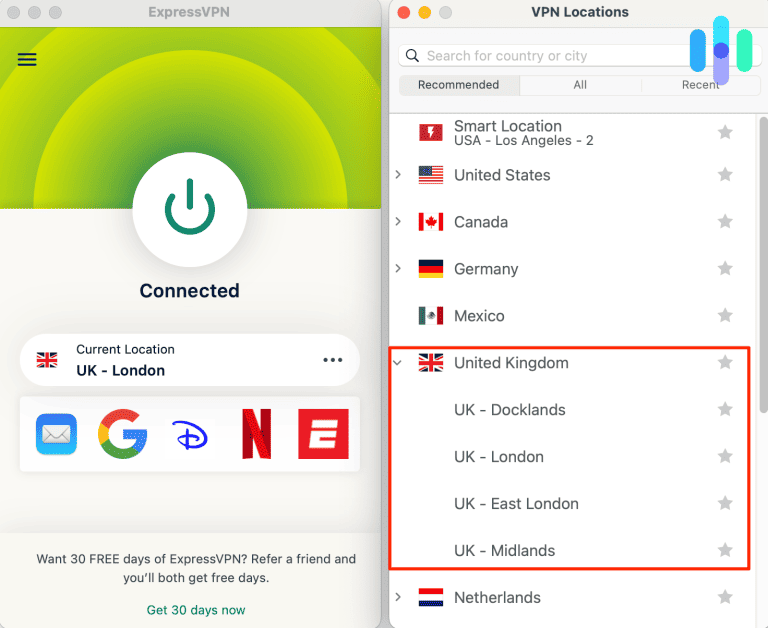
ExpressVPN offers seven documented UK server locations, giving users several choices within London and elsewhere in England.
Its official directory lists UK – Docklands, UK – East London, UK – London, UK – Manchester, UK – Midlands, UK – Tottenham, and UK – Wembley.
Supported connection protocols include Lightway UDP, Lightway TCP, WireGuard, OpenVPN UDP, OpenVPN TCP, and IKEv2, according to the provider’s current server directory.
Which ExpressVPN UK server should you select?
UK – London is a sensible first choice for a manually selected British VPN connection.
UK – East London and UK – Docklands provide documented alternatives in the London area.
UK – Wembley and UK – Tottenham offer additional choices, while UK – Manchester provides a northern English endpoint.
UK – Midlands is another option for users who want a different British network location.
Choosing a different city may help resolve ordinary network instability, but there is no verified evidence that any of these locations reliably provides access to Rise of the Footsoldier: Part II through Netflix.
How to connect using ExpressVPN
ExpressVPN allows users to select UK cities and locations through its application.
- Open ExpressVPN and sign in.
- Open the VPN location selector.
- Search for United Kingdom.
- Select UK – London.
- Activate the VPN connection.
- If ordinary network performance is unstable, compare UK – East London or UK – Docklands.
- Choose UK – Manchester or UK – Midlands when another British endpoint is appropriate.
The official ExpressVPN server directory lists these destinations.
The company’s London VPN location guide also explains how users can choose between British server locations.
Lightway, WireGuard, and OpenVPN
ExpressVPN supports Lightway, WireGuard, and OpenVPN on its current UK locations.
Lightway aims to maintain encrypted connections efficiently and respond to network changes.
WireGuard provides another lightweight protocol option, while OpenVPN offers broad compatibility.
ExpressVPN generally recommends automatic protocol selection for ordinary users.
Manual protocol changes are more useful when troubleshooting a connection that repeatedly fails or becomes unstable.
However, the encryption protocol does not determine whether Netflix licenses a movie for a particular user or connection.
Changing from Lightway to WireGuard cannot guarantee that Netflix will stop identifying the VPN.
Physical and virtual UK locations
ExpressVPN operates both physical and virtual server infrastructure across its global network.
Its official virtual-location directory identifies countries whose IP addresses are provided through hardware hosted elsewhere.
The listed British destinations do not appear among those virtual-location exceptions.
ExpressVPN explains that its nonvirtual locations use infrastructure physically located in the associated country.
Therefore, its public documentation supports treating the UK destinations as British-hosted rather than assigning them an unverified foreign hosting country.
The official ExpressVPN virtual server guide provides additional details.
ExpressVPN streaming troubleshooting
If Netflix fails while ExpressVPN is connected, first check whether ordinary websites load.
If the VPN otherwise works, restart Netflix and ensure that its application or your browser is updated.
Clear outdated cookies when previous browser sessions appear to affect account behavior.
For connection stability problems, compare London, East London, Docklands, and Manchester.
ExpressVPN also allows supported protocol changes when a network has compatibility problems.
However, neither changing the server nor switching protocols guarantees access to Netflix UK’s regional movies.
Netflix may detect the connection and display only content licensed worldwide.
3. NordVPN
NordVPN provides British VPN servers, automatic location selection, NordLynx, and SmartPlay functionality.
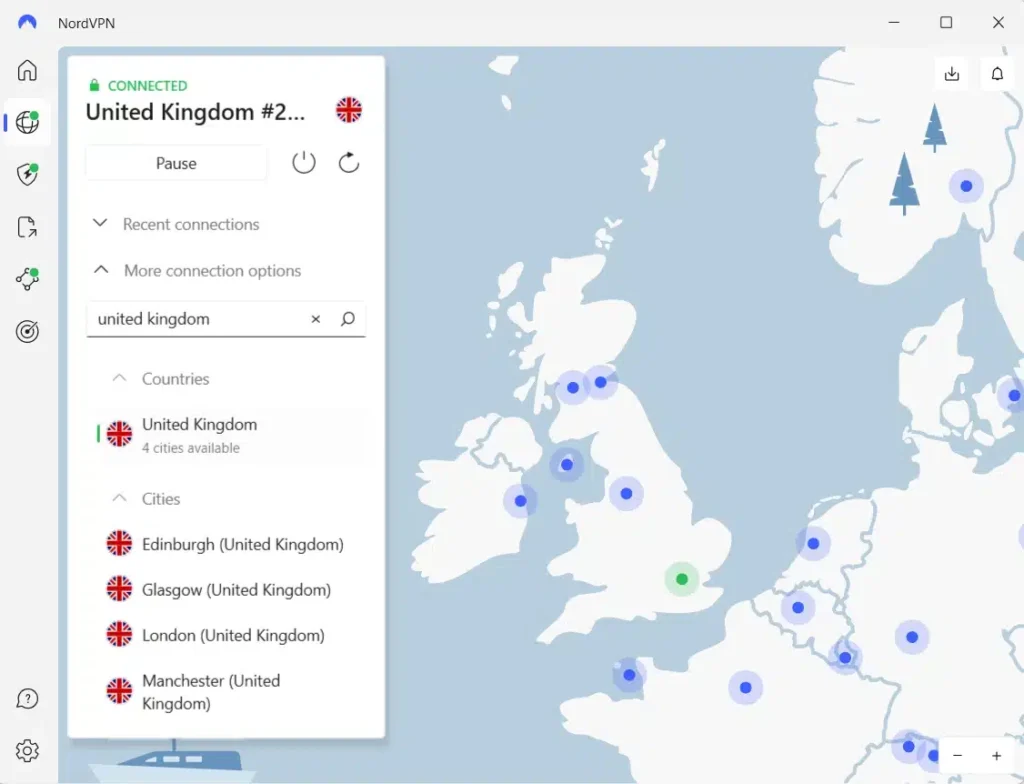
Its official UK server page identifies Edinburgh, Glasgow, London, and Manchester as available cities.
The company currently advertises more than 440 UK servers on its country page, although this figure may change as the network expands.
Which NordVPN UK server should you choose?
For most users, choosing United Kingdom and allowing NordVPN to select an available server automatically is the simplest approach.
Automatic selection reduces unnecessary manual configuration.
If you need an individual city, NordVPN documents Edinburgh, Glasgow, London, and Manchester.
These locations offer alternatives in Scotland and England for ordinary privacy and networking needs.
However, no official NordVPN documentation establishes that a particular UK city guarantees access to this movie on Netflix.
How to select a UK NordVPN server
NordVPN supports automatic country selection and manual city selection.
- Open NordVPN and sign in.
- Search for United Kingdom in the country list.
- Select the country to connect automatically.
- Confirm that the VPN reports a successful connection.
- To choose a city manually, open the location menu beside United Kingdom.
- Select Edinburgh, Glasgow, London, or Manchester.
- For ordinary connection instability, reconnect or choose another documented server.
The official NordVPN UK server page confirms the cities and provides connection instructions.
NordLynx and network performance
NordLynx is NordVPN’s WireGuard-based VPN protocol.
It provides encrypted connections while aiming to maintain efficient network performance.
For ordinary browsing and compatible streaming, NordLynx offers a practical default.
Actual performance depends on internet speed, network congestion, routing, and the selected server.
Choosing a server closer to your physical location can sometimes reduce latency, although individual results vary.
Even a stable, high-speed connection does not guarantee access to Netflix UK’s movie catalog.
How NordVPN SmartPlay works
NordVPN includes SmartPlay, which combines VPN encryption with DNS-related functionality.
According to the provider, SmartPlay activates automatically whenever a user connects through its VPN application.
There is no separate SmartPlay application to install or manual activation step to complete.
SmartPlay can help maintain a secure connection when watching supported content.
However, it does not guarantee access to Rise of the Footsoldier: Part II through a UK VPN server.
Netflix’s licensing and VPN detection systems remain applicable.
Read NordVPN’s official SmartPlay explanation for details.
NordVPN streaming troubleshooting
If a streaming application fails, start by checking normal internet access.
Restart the affected application and confirm that NordVPN is updated.
For ordinary connection problems, reconnect automatically or manually select another documented UK city.
London, Manchester, Edinburgh, and Glasgow provide several choices for comparing network stability.
However, if Netflix recognizes the connection as a VPN, changing cities may not restore the regional catalog.
Neither SmartPlay nor NordLynx can override Netflix’s licensing restrictions.
What to do if Rise of the Footsoldier: Part II does not appear
The movie may be missing from Netflix because of regional licensing, VPN detection, outdated browser data, or account restrictions. These steps can help diagnose connection problems, but they cannot guarantee access to Netflix UK.
- Close Netflix completely, including all browser tabs and background applications.
- Disconnect from your VPN.
- Reconnect to the United Kingdom if your intended use complies with the VPN provider’s terms.
- Try another documented British server or location to diagnose general connection instability.
- Clear Netflix cookies and your browser cache.
- Open a private or incognito browser window.
- Reopen Netflix and sign in to your existing account.
- Search for Rise of the Footsoldier Part II, using its complete title or Netflix title ID 80175912.
Private Internet Access offers UK London, UK Manchester, UK Southampton, UK Tottenham, and UK Streaming Optimized. Its streaming policy requires connections in the user’s current country and prohibits circumventing geographic content restrictions.
ExpressVPN users can compare London, East London, Docklands, Wembley, Tottenham, Midlands, and Manchester when troubleshooting ordinary network problems.
NordVPN users can reconnect automatically or manually choose Edinburgh, Glasgow, London, or Manchester.
Netflix UK calls the movie Rise of the Footsoldier Part II, while JustWatch uses Rise of the Footsoldier: Part II. Both refer to the 2015 film directed by Ricci Harnett.
Netflix may also hide titles because of profile maturity settings, language preferences, regional licenses, or VPN recognition.
The official Netflix missing-title troubleshooting guide explains these possibilities.
If the movie remains unavailable, check an authorized US streaming service rather than repeatedly changing VPN servers.
Netflix may detect the VPN
A VPN routes internet traffic through another server, changing the public IP address that websites see.
However, having a British IP address does not automatically provide access to Netflix UK’s full catalog.
Netflix can detect some VPN or proxy connections and apply content restrictions.
According to its official policy, viewers using VPNs may only see titles licensed worldwide.
That means Rise of the Footsoldier: Part II could disappear from Netflix search results even when the VPN reports a successful UK connection.
Netflix may also display a proxy-related playback error.
These restrictions can affect Private Internet Access, ExpressVPN, and NordVPN regardless of the selected city or protocol.
The providers supply encrypted network connections, but they cannot guarantee access to individual Netflix titles.
For more information, read the official Netflix VPN guidance.
Can you use a Netflix ad-supported plan with a VPN?
No. Netflix states that its ad-supported experiences do not support VPN connections.
If you use an ad-supported Netflix subscription while connected through a VPN, the service may display a playback error.
Netflix recommends disconnecting the VPN to resolve this restriction.
The limitation applies regardless of whether the VPN server is in the United Kingdom or another country.
Ad-free subscriptions avoid this particular restriction, but Netflix may still recognize VPN connections and limit regionally licensed movies.
Therefore, switching to an ad-free plan does not guarantee access to Rise of the Footsoldier: Part II through a British VPN server.
Netflix explains these limitations in its VPN and ad-supported viewing documentation.
Does changing the VPN location change your Netflix account?
No. Selecting a UK server in a VPN application does not automatically change your Netflix password, email address, profiles, billing country, or payment method.
The VPN changes the public IP address associated with your connection, not your subscription account.
Netflix maintains different movie catalogs because studios and distributors license content separately across countries.
Consequently, a movie can appear in Netflix UK’s catalog while remaining unavailable through Netflix US.
However, Netflix may recognize the VPN and restrict the titles displayed instead of providing the complete British library.
American viewers can check current US streaming options for Rise of the Footsoldier: Part II.
JustWatch identifies Amazon Prime Video as a subscription option and Amazon Prime Video Free with Ads as an ad-supported alternative. It also lists digital rentals and purchases through Amazon Video, Apple TV Store, and Fandango at Home.
These authorized US services may provide a more straightforward viewing experience than relying on a foreign Netflix catalog.
Which VPN should you use?
Private Internet Access is our Editor’s Choice because it offers configurable settings, WireGuard and OpenVPN support, and five documented British locations: UK London, UK Manchester, UK Southampton, UK Tottenham, and UK Streaming Optimized. However, PIA prohibits using its service to circumvent geographic streaming restrictions and requires streaming connections to match the user’s current country. Choose it for permitted privacy and networking activities rather than guaranteed Netflix UK access.
ExpressVPN provides seven named UK locations, including London, East London, Docklands, Manchester, Midlands, Tottenham, and Wembley, along with Lightway, WireGuard, and OpenVPN support. NordVPN offers Edinburgh, Glasgow, London, and Manchester, automatic server selection, NordLynx, and SmartPlay. Both services provide useful British connections, but neither guarantees access to individual Netflix movies.
Rise of the Footsoldier: Part II (2015) appears on Netflix UK’s official title page and in current British streaming listings, while Netflix US does not offer it. Netflix licensing rules, VPN detection, subscription restrictions, and VPN provider terms can prevent playback through an international connection. American viewers should also consider authorized US streaming services before subscribing to a VPN specifically for this movie.
Netflix UK lists Rise of the Footsoldier: Part II (2015) on its official title page. JustWatch UK also identifies Netflix as a streaming provider, and New on Netflix UK reports that the movie returned on August 10, 2026. Actual playback through a VPN has not been independently tested.
Rise of the Footsoldier: Part II is not currently on Netflix US. Netflix UK lists the movie, but connecting through a British VPN server does not guarantee access because Netflix may restrict regional titles when it detects VPN traffic. American viewers can also check Amazon Prime Video and authorized rentals.
Private Internet Access is our first recommendation for its configurable privacy features and documented UK locations in London, Manchester, Southampton, and Tottenham, plus UK Streaming Optimized. ExpressVPN and NordVPN also offer British servers. None guarantees Netflix playback, and PIA prohibits circumventing streaming geographic restrictions.
Search for the 2015 movie under Rise of the Footsoldier Part II, confirm the release year, and check Netflix profile restrictions. Restart Netflix, clear outdated browser data, and disconnect any VPN causing catalog restrictions. If the movie remains unavailable, use an authorized US streaming or rental provider.
No. Netflix does not support VPN viewing on its ad-supported experiences. Disconnect the VPN if Netflix displays a related playback error. Ad-free subscriptions avoid this specific restriction, but Netflix may still restrict regional titles when it identifies VPN traffic.


Read our disclosure page to find out how can you help VPNCentral sustain the editorial team Read more


Improve this guide




User forum
0 messages