
How to Watch Step Up on Netflix in the US with a VPN (2026)


 16 min. read
 Published on

Step Up (2006), the romantic dance drama starring Channing Tatum and Jenna Dewan, is available on Netflix Norway in 2026. Directed by Anne Fletcher, the movie follows Tyler Gage, a rebellious teenager who discovers his talent for dance after meeting a promising ballet student at an elite performing arts school. The official Netflix Norway page confirms the movie’s listing, including original English audio and subtitle options.
However, Step Up is not currently available through Netflix US. American viewers can rent or purchase the movie through services such as Amazon Video and Apple TV, but Netflix does not include it in its US subscription catalog. Private Internet Access, ExpressVPN, and NordVPN all offer Norwegian VPN connections, although their server selection, connection protocols, and streaming features differ.

Access content across the globe at the highest speed rate.
🔥 Save 81% + 2 bonus months! 🔥
70% of our readers choose Private Internet Access
70% of our readers choose Private Internet Access
2
Browse the web from multiple devices with industry-standard security protocols.
🔥 Save 73%! 🔥

Faster dedicated servers for specific actions (currently discounted)
🔥 Save 69%! 🔥

A VPN changes the public IP address visible to Netflix, but connecting to Norway does not guarantee access to its regional library. Netflix may detect VPN connections and limit viewers to movies with worldwide streaming rights. The company’s official VPN support guidance explains these restrictions. Users must also follow their VPN provider’s terms and applicable content licensing rules.
How to watch Step Up on Netflix with a VPN
Netflix Norway currently lists Step Up, and all three VPN providers offer Norwegian IP addresses. If your VPN provider and Netflix permit the intended connection, you can check whether the movie appears through a Norwegian server.
- Choose a VPN provider. Private Internet Access is our first recommendation for its flexible connection settings, followed by ExpressVPN and NordVPN. Review the provider’s streaming restrictions before proceeding.
- Download and install the official VPN application on your Windows PC, Mac, Android phone, iPhone, tablet, or compatible streaming device.
- Connect to Norway. PIA provides a standard Norway location, ExpressVPN offers Oslo servers, and NordVPN provides Norwegian connections through Oslo.
- Close Netflix completely, including open browser tabs and any streaming applications running in the background.
- Reopen Netflix after the VPN connection becomes active.
- Sign in using your existing Netflix account and normal login credentials.
- Search for Step Up (2006). Confirm that the result features Channing Tatum and Jenna Dewan rather than one of the movie’s sequels.
- Start playback if Netflix displays the movie and your subscription, location, and applicable terms permit access.
You can also open the Netflix Norway listing for Step Up directly. The page identifies the original 2006 movie and includes Channing Tatum, Jenna Dewan, Damaine Radcliff, Mario, and Rachel Griffiths among its cast members.
Netflix Norway lists English as the original audio language. Available subtitles include English, Norwegian, and Ukrainian, making the Norwegian listing suitable for English-speaking viewers who prefer the original soundtrack.
The movie runs approximately 104 minutes and follows Tyler Gage as he develops a relationship with aspiring dancer Nora Clark. It combines street dancing, ballet, romance, and a story about pursuing opportunities despite difficult circumstances.
Netflix Norway also lists the movie as available for offline downloads on supported devices. However, download eligibility depends on your Netflix account, device, and applicable geographic restrictions.
Keep in mind that Netflix may still display an unavailable-title message when it recognizes a VPN. A working Norwegian IP address does not automatically guarantee access to Netflix Norway.
Best VPNs for watching Step Up on Netflix
Private Internet Access, ExpressVPN, and NordVPN all provide Norwegian VPN connections. However, their available locations, server infrastructure, and connection features differ.
| VPN | Server locations in Norway | Option to try first |
|---|---|---|
| Private Internet Access (Editor’s Choice) | Norway, standard country-level location | Norway, where provider terms permit |
| ExpressVPN | Oslo, physical servers | Oslo |
| NordVPN | Oslo, with 91 Norwegian servers listed | Automatically selected Norway server |
PIA does not currently publish a separate Norway Streaming Optimized location or multiple Norwegian city choices. ExpressVPN identifies Oslo as its physical Norwegian server destination, while NordVPN lists 91 servers and identifies Oslo as its Norwegian city.
All three providers offer Norwegian IP addresses, but Netflix determines which regional titles viewers can access. None guarantees that Step Up will appear or play through a US Netflix account.
1. Private Internet Access
Private Internet Access is our Editor’s Choice because it offers flexible VPN configuration, supports WireGuard and OpenVPN, and provides an officially documented Norwegian server location.
According to the official PIA server directory, Norway is available as a standard VPN destination.
Unlike countries such as Sweden, Denmark, and Finland, PIA does not currently list a separate streaming-optimized location for Norway.
This means users should select the standard Norway entry rather than searching for a specialized Norwegian streaming server that the provider does not officially document.
How to connect to Norway with PIA
Open the Private Internet Access application and select the VPN SERVER section.
Search for Norway in the location list and select the available destination. Return to the main application window and activate the VPN.
Wait until PIA confirms that the connection is active.
PIA does not publish multiple selectable Norwegian cities in its current server directory. Therefore, users should choose the standard Norway location rather than searching for undocumented destinations.
For permitted streaming activity within Norway, the standard country-level connection is the appropriate documented option.
If the connection experiences ordinary technical problems, restart PIA, reconnect to Norway, or check the available connection protocols.
Are PIA’s Norwegian servers physical or virtual?
PIA operates both physical VPN infrastructure and virtual server locations around the world.
With a virtual location, the provider assigns an IP address associated with one country while routing network traffic through physical hardware in another.
Norway does not appear in PIA’s current published virtual server directory.
PIA explains that most of its locations use physical infrastructure within the same country as the assigned IP address. Therefore, Norway falls outside its documented cross-border virtual locations.
However, PIA does not specify a Norwegian hardware-hosting city in the documentation reviewed. Users who need exact infrastructure details should confirm them with the provider.
Physical hosting can influence routing and latency, but it does not guarantee that Netflix will accept a VPN connection.
WireGuard and OpenVPN performance
PIA supports WireGuard and OpenVPN, allowing users to choose between different VPN protocols.
WireGuard is generally a sensible starting point for video streaming because its lightweight design can reduce connection overhead.
OpenVPN provides an alternative when certain devices or networks experience compatibility problems.
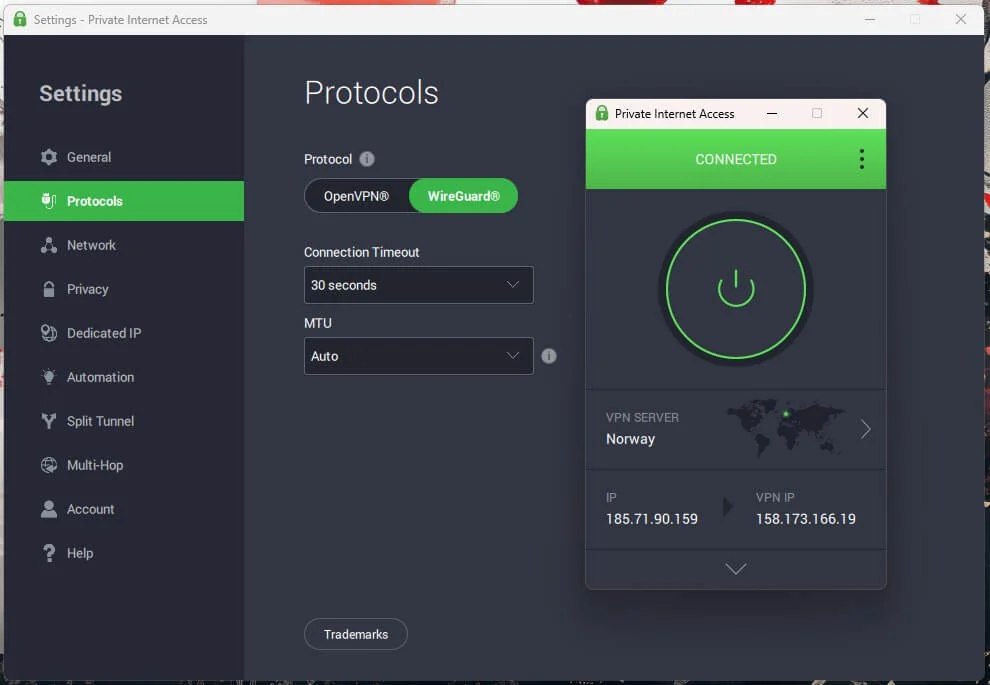
For American viewers, connecting to Norway introduces additional network distance compared with using a nearby US server. This may increase latency, although sustained bandwidth and connection stability matter more for smooth video playback.
If the VPN becomes slow, update PIA, restart the application, or switch between supported protocols.
Clearing outdated browser cookies may also resolve ordinary session problems, although it cannot override Netflix’s regional licensing restrictions.
Important PIA streaming restrictions
PIA’s official streaming policy includes an important limitation.
According to its streaming guidance, customers should connect to a VPN server matching the country where they are physically present.
The provider explicitly prohibits using its service to circumvent geographic restrictions imposed by content providers.
Consequently, US viewers should not use PIA’s Norwegian location to bypass Netflix’s regional licensing restrictions.
PIA remains useful for permitted privacy and streaming activities, but the availability of its Norwegian server does not override the company’s usage terms.
2. ExpressVPN
ExpressVPN is another option for users who need a Norwegian IP address. Its applications provide straightforward server selection, multiple protocols, and built-in connection protection features.
According to ExpressVPN’s official Norway server page, the provider operates physical servers in Oslo.
Oslo is the documented Norwegian destination. ExpressVPN does not list separate Norwegian city options such as Bergen, Trondheim, or Stavanger.
How to connect to Norway with ExpressVPN
Open the ExpressVPN application and select the VPN location picker.
Search for Norway and choose the available destination. The provider identifies Oslo as its Norwegian server location.
Activate the connection and wait for ExpressVPN to confirm that the VPN is active.
ExpressVPN also offers Smart Location, which automatically recommends a server based on network conditions.
However, Smart Location may choose a country other than Norway. Select Norway manually when you specifically need a Norwegian IP address for an authorized activity.
The application also includes features such as a kill switch and DNS leak protection, which help prevent accidental exposure of your ordinary IP address during connection problems.
Lightway, WireGuard, and OpenVPN
ExpressVPN supports several connection protocols on its Norwegian servers.
According to the official ExpressVPN server directory, the Norway location supports:
- Lightway UDP
- Lightway TCP
- WireGuard
- OpenVPN UDP
- OpenVPN TCP
- IKEv2 on compatible devices
Lightway UDP is a sensible starting point for ordinary streaming because it emphasizes efficient connections and responsiveness.
Lightway TCP can provide an alternative when a network interferes with UDP traffic.
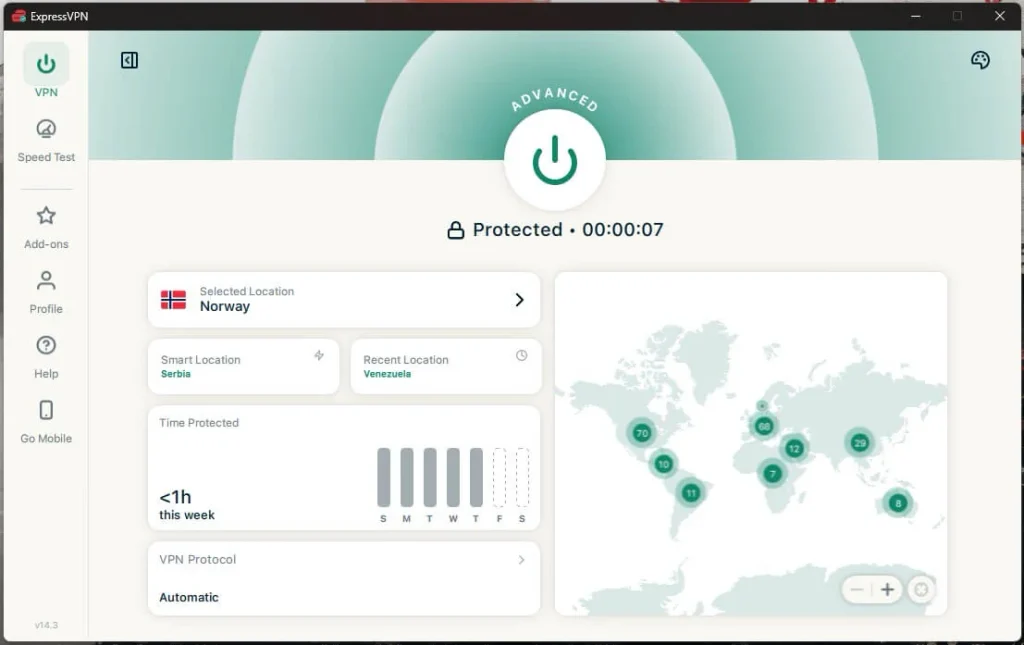
OpenVPN offers another established protocol for troubleshooting compatibility problems, while WireGuard provides a lightweight option on supported applications.
ExpressVPN currently lists WireGuard support on compatible Windows, Android, and iOS applications. Available protocols may differ depending on the operating system and application version.
Are ExpressVPN’s Norway servers physical?
ExpressVPN maintains both physical infrastructure and virtual VPN server locations worldwide.
Its virtual server documentation explains that some countries receive local IP addresses through hardware hosted elsewhere.
However, Norway does not appear on ExpressVPN’s published virtual location list.
The company’s Norway server page explicitly identifies its Oslo infrastructure as physical servers.
This means ExpressVPN provides Norwegian IP addresses through infrastructure hosted within Norway rather than a documented cross-border virtual location.
Physical hosting may help maintain predictable routing, but actual connection performance still depends on network congestion, internet speed, and the selected protocol.
What if ExpressVPN does not work with Netflix?
First, check whether the VPN connection works normally by opening another website.
If ordinary browsing works but Netflix does not display Step Up, Netflix may be applying regional licensing restrictions or recognizing the VPN.
For general connection problems, restart ExpressVPN, reconnect to Norway, or switch between Lightway and OpenVPN.
You can also update the application or clear outdated browser cookies.
Since ExpressVPN does not document additional Norwegian city options, users should not rely on undocumented server destinations.
These changes may resolve ordinary network problems, but they cannot guarantee access to Netflix Norway’s regional movie catalog.
3. NordVPN
NordVPN offers Norwegian VPN servers in Oslo and supports automatic server selection, NordLynx, and SmartPlay.
According to NordVPN’s official Norway server page, the provider currently lists 91 servers in the country.
Oslo is the documented Norwegian location. NordVPN does not list additional Norwegian city choices in the country-specific server information reviewed.
NordVPN’s country page does not identify a separate foreign hardware-hosting location for Oslo. However, it also does not provide physical hosting details for individual servers.
How to connect to Norway with NordVPN
Open the NordVPN application and search for Norway in the country list.
Select Norway or choose its location pin on the interactive map.
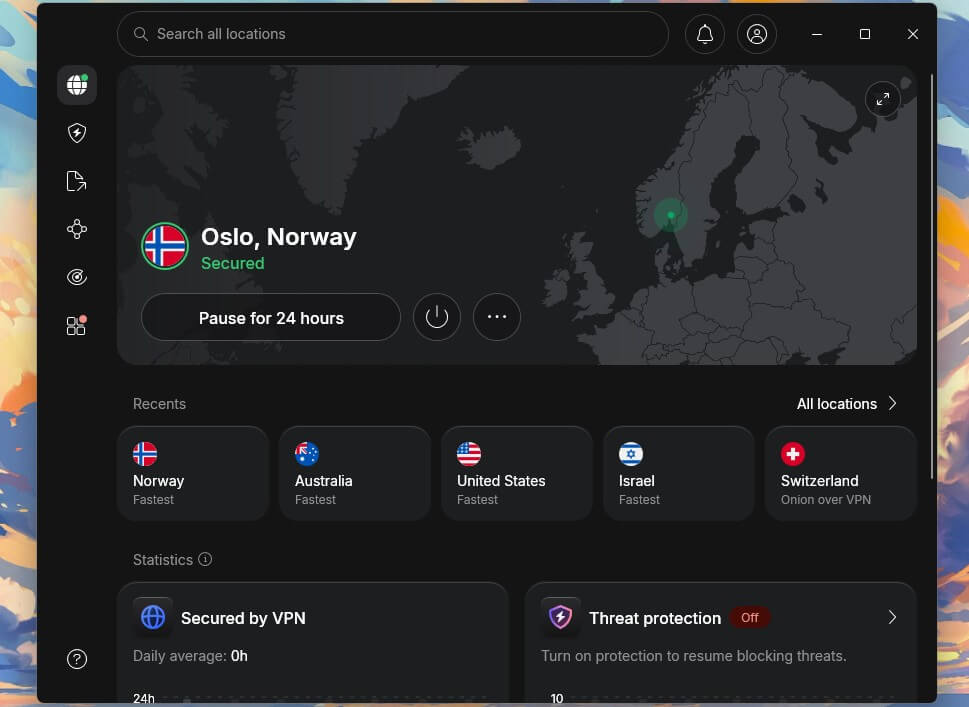
NordVPN will automatically select an available server based on its connection algorithm.
Alternatively, users can choose another available Norwegian server from the application when troubleshooting ordinary connection problems.
Because Oslo is NordVPN’s documented Norwegian city, changing servers does not require choosing an unsupported city name.
NordLynx and SmartPlay
NordVPN uses NordLynx, a VPN protocol based on WireGuard technology.
NordLynx aims to provide efficient encrypted connections with relatively low overhead. It is a suitable starting point for everyday streaming activity.
NordVPN also includes SmartPlay, which combines VPN encryption with DNS-related functionality.
According to the company’s official SmartPlay documentation, the feature activates automatically whenever users establish a NordVPN connection.
You do not need to install another application, change DNS settings manually, or enable SmartPlay separately.
SmartPlay helps users access permitted content privately while protecting their connection.
However, SmartPlay does not guarantee access to Netflix Norway. Netflix may still recognize the VPN and restrict regionally licensed movies.
NordVPN performance and troubleshooting
If your Norwegian VPN connection becomes unstable, disconnect and reconnect through NordVPN.
The application can automatically select another available server, or you can manually choose one from the Norwegian server list.
NordLynx is a good starting point for performance. OpenVPN provides another option when network compatibility problems occur.
NordVPN also provides specialty connections such as Double VPN and Onion Over VPN, but these are not necessary for ordinary video streaming and may introduce additional latency.
Connection quality depends on international routing, your internet provider, and server conditions.
If Netflix works normally but Step Up does not appear, the problem may involve geographic licensing restrictions rather than VPN performance.
What to do if Step Up does not appear
Netflix may hide Step Up even when its Norwegian catalog includes the movie. Possible causes include VPN recognition, geographic licensing restrictions, profile settings, and outdated browser sessions.
Where Netflix and your VPN provider permit the intended activity, the following steps can help identify ordinary technical problems.
- Close Netflix completely, including open browser tabs and streaming applications.
- Disconnect from your current VPN connection.
- Reconnect to Norway using a connection permitted by your provider.
- Try another available Norwegian server or location if your provider offers one and the current connection has technical problems.
- Clear Netflix cookies and your browser cache to remove outdated session information.
- Open a private or incognito browser window to test Netflix without existing cookies or extensions.
- Reopen Netflix and sign in using your existing account credentials.
- Search for Step Up (2006) again and confirm that the movie starring Channing Tatum and Jenna Dewan appears.
PIA users can reconnect to the standard Norway location or change connection protocols. PIA does not publish separate Norwegian city choices or a Norway Streaming Optimized location.
ExpressVPN users can reconnect to Oslo, restart the application, or switch between supported protocols.
NordVPN users can select another available Oslo server or allow the application to choose automatically.
These changes may resolve connection instability, but they cannot guarantee access to Netflix Norway’s regional catalog.
Netflix’s missing movie troubleshooting guide explains that licensing restrictions, VPN detection, profile maturity settings, and language preferences can affect which titles appear.
Make sure you search for the original Step Up (2006), not Step Up 2: The Streets (2008), Step Up 3D (2010), Step Up Revolution (2012), or Step Up: All In (2014).
The original movie uses the same title in Norway and the United States, so no alternate localized title is necessary.
Netflix may detect the VPN
A VPN routes internet traffic through a remote server and changes the public IP address visible to websites and streaming platforms.
For example, connecting to a Norwegian VPN server generally gives your connection an IP address associated with Norway.
However, Netflix can recognize IP addresses belonging to commercial VPN providers.
Netflix licenses movies separately across different countries, which explains why Step Up appears in Norway’s catalog but not Netflix US.
According to Netflix’s VPN viewing policy, viewers using VPN connections may see only movies and television shows that Netflix licenses worldwide.
Consequently, a US viewer connecting to Norway may still be unable to find Step Up.
Netflix may hide the movie from search results or display an unavailable-title warning when playback begins.
These restrictions apply independently of the VPN provider’s server count, connection speed, or privacy features.
No VPN provider can guarantee that a Norwegian IP address will provide access to Step Up through a US Netflix account.
Can you use a Netflix ad-supported plan with a VPN?
No. Netflix does not support VPN connections for viewers using an ad-supported subscription experience.
If Netflix detects a VPN or proxy on an ad-supported plan, it may display error code E121 or ask the viewer to disconnect from the VPN.
The company’s official VPN error guidance explains this restriction.
Netflix recommends turning off the VPN rather than changing server locations.
An ad-free Netflix subscription avoids this specific limitation.
However, ad-free plans do not guarantee access to international Netflix catalogs. Netflix may still recognize VPN connections and restrict regional titles.
Therefore, upgrading to an ad-free subscription solely to access Step Up through a Norwegian VPN connection does not guarantee playback.
Does changing the VPN location change your Netflix account?
No. Connecting to Norway through a VPN changes the public IP address visible to Netflix, but it does not automatically modify your account details.
Your email address, password, subscription plan, billing information, and existing profiles remain unchanged.
Netflix maintains separate regional catalogs because streaming rights vary between countries.
However, using a Norwegian IP address does not formally convert your US Netflix account into a Norwegian subscription.
Netflix may continue applying geographic licensing restrictions when it recognizes VPN traffic.
If you prefer to watch the movie without international streaming uncertainty, check the current US streaming options for Step Up.
JustWatch currently lists digital rental and purchase options through Amazon Video, Apple TV Store, and Fandango at Home. The movie is not currently available through Netflix US.
These authorized US services provide a more predictable viewing option when Netflix restricts access through international VPN connections.
Which VPN should you use?
Private Internet Access is our first recommendation because it offers an officially documented Norway location, flexible connection settings, and WireGuard and OpenVPN support. However, PIA does not currently list a separate streaming-optimized Norwegian server, and its terms explicitly prohibit circumventing geographic restrictions. Users must follow that policy.
ExpressVPN offers physical Oslo servers with Lightway, WireGuard, and OpenVPN support on compatible devices. NordVPN provides 91 Norwegian servers, identifies Oslo as its Norwegian location, and includes NordLynx and automatically activated SmartPlay. Both services offer useful connection features, but neither guarantees access to regional Netflix movies.
Step Up (2006) is currently listed on Netflix Norway but not Netflix US. Although all three VPN providers offer Norwegian connections, Netflix’s licensing agreements, VPN detection systems, and provider terms can prevent playback. American viewers who cannot access the movie through Netflix can use authorized US rental and purchase services instead.
Step Up (2006) is available on Netflix Norway as of November 2026. The official Netflix Norway page confirms the movie, and Norwegian streaming guides independently list Netflix.
Netflix US does not currently carry Step Up, while Netflix Norway lists the movie. PIA, ExpressVPN, and NordVPN provide Norwegian connections, but Netflix may restrict VPN access. Viewers must follow their VPN provider’s terms and applicable licensing rules.
Private Internet Access is our first recommendation for its Norway server location and flexible connection protocols. ExpressVPN offers physical servers in Oslo, while NordVPN lists 91 Norwegian servers. PIA prohibits circumventing geographic restrictions, and no VPN guarantees Netflix access.
Confirm that you are searching for Step Up (2006), restart Netflix, check your profile settings, and troubleshoot your connection where permitted. Netflix may hide regional titles when detecting VPN traffic, so changing servers cannot guarantee access.
No. Netflix does not support VPN connections on ad-supported plans. Ad-free subscriptions avoid that specific restriction, but Netflix may still recognize VPN traffic and limit regional content.


Read our disclosure page to find out how can you help VPNCentral sustain the editorial team Read more


Improve this guide




User forum
0 messages