
How to Watch The Garfield Movie on Netflix in the US with a VPN (2026)


 18 min. read
  Published on

The Garfield Movie (2024), the animated family comedy directed by Mark Dindal, is available on Netflix in Australia as of October 2026. Featuring Chris Pratt as Garfield, Samuel L. Jackson as his long-lost father Vic, and Hannah Waddingham as Jinx, the movie follows the famous orange cat on an unexpected outdoor adventure involving a high-stakes dairy heist. The official Netflix Australia page for The Garfield Movie lists the film with English original audio, English audio description, and several subtitle languages.
Unfortunately, The Garfield Movie is not currently available through Netflix US. American subscribers can watch it through Hulu or rent it from digital retailers, but Netflix Australia offers another regional subscription option. Private Internet Access (PIA), ExpressVPN, and NordVPN all operate Australian VPN server locations, including major cities such as Sydney, Melbourne, Brisbane, Adelaide, and Perth. These services let users establish Australian VPN connections, although connecting to an Australian server does not automatically provide access to the country’s Netflix catalog.

Access content across the globe at the highest speed rate.
🔥 Save 81% + 2 bonus months! 🔥
70% of our readers choose Private Internet Access
70% of our readers choose Private Internet Access
2
Browse the web from multiple devices with industry-standard security protocols.
🔥 Save 73%! 🔥

Faster dedicated servers for specific actions (currently discounted)
🔥 Save 69%! 🔥
Netflix actively detects VPN connections and may limit subscribers to movies and television shows with worldwide streaming rights. According to Netflix’s official VPN policy, changing your apparent network location does not guarantee access to region-specific titles. VPN providers also impose usage restrictions, so subscribers should review the applicable policies before attempting to stream content licensed for another country.
How to watch The Garfield Movie on Netflix with a VPN
If you already subscribe to Netflix, you can check how the service behaves while using an Australian VPN connection. The following steps explain the process, although actual playback depends on Netflix’s licensing rules, VPN detection, and the terms of the services involved.
- Choose a VPN provider. Private Internet Access is our Editor’s Choice for its Australian server selection and streaming-optimized location. ExpressVPN comes second, followed by NordVPN. Review each provider’s usage restrictions before proceeding.
- Download and install the VPN application from the provider’s official website. Choose the version for your Windows computer, Mac, Android device, iPhone, or another supported platform.
- Connect to Australia using an officially documented server location. PIA offers Sydney, Melbourne, Brisbane, Adelaide, Perth, Woolloomooloo, and Australia Streaming Optimized. ExpressVPN and NordVPN also provide several Australian connections.
- Close Netflix completely. Exit the application or close every browser tab containing Netflix to avoid reusing an existing session.
- Reopen Netflix after establishing the VPN connection. The streaming service will evaluate the connection and determine which content it permits.
- Sign in using your existing Netflix account credentials. Connecting through a VPN does not require creating another Netflix account or changing your subscription.
- Search for The Garfield Movie (2024). Select the animated adventure starring Chris Pratt rather than Garfield, the 2004 live-action film featuring Bill Murray.
- If Netflix displays The Garfield Movie and permits playback, select Play. If the title does not appear or Netflix reports a VPN-related error, follow the service’s official instructions.
The distinction between an Australian VPN address and access to Netflix Australia’s catalog is important. A VPN changes the public IP address that websites see, but Netflix can recognize VPN traffic and enforce geographic licensing restrictions.
You can confirm the film’s regional listing through the The Garfield Movie page on Netflix Australia. The page identifies the 2024 release, its principal cast, and its audio and subtitle options. The documented audio languages include English original audio, English audio description, Greek, French, Italian, and Vietnamese. Subtitles include English, Italian, Vietnamese, and Simplified and Traditional Chinese.
The movie retains its original English title in Australia. If you search by name, make sure you select the 2024 animated movie directed by Mark Dindal, not the 2004 live-action adaptation.
The official Netflix Australia page currently displays the film without an unavailability warning. However, older indexed versions of the page have shown such a warning, and a publicly accessible Netflix listing does not guarantee playback through a VPN.
Best VPNs for watching The Garfield Movie on Netflix
Private Internet Access, ExpressVPN, and NordVPN all provide Australian server connections. We compared their officially documented locations, streaming-related features, connection protocols, and infrastructure. The ranking reflects their connection options rather than any verified ability to unlock The Garfield Movie.
| VPN | Server locations in Australia | Option to try first |
|---|---|---|
| Private Internet Access (Editor’s Choice) | Adelaide, Brisbane, Melbourne, Perth, Sydney, Woolloomooloo, Australia Streaming Optimized | Australia Streaming Optimized for authorized Australian streaming |
| ExpressVPN | Adelaide, Brisbane, Melbourne, Perth, Sydney, Sydney – 2, Woolloomooloo | Australia – Sydney |
| NordVPN | Adelaide, Brisbane, Melbourne, Perth, Sydney | Australia automatic connection or Sydney |
These locations appear in the VPN providers’ official server directories. They may change as the companies expand or maintain their networks. A working Australian VPN connection does not guarantee access to Netflix Australia’s regional movie library.
1. Private Internet Access
Private Internet Access is our Editor’s Choice because it combines a broad selection of Australian VPN locations with a dedicated streaming-optimized option and customizable connection settings. Its features make it useful for protecting internet traffic while watching content that users have permission to access.
According to PIA’s official server location directory, updated October 15, 2026, the company offers AU Adelaide, AU Brisbane, AU Melbourne, AU Perth, AU Sydney, AU Woolloomooloo, and Australia Streaming Optimized.
The Australia Streaming Optimized option is particularly relevant for subscribers who want a private connection while streaming locally licensed content.
PIA designs its specialized streaming locations to support video performance and compatibility with supported streaming services. Its official Australia VPN page also highlights Australian servers and streaming compatibility.
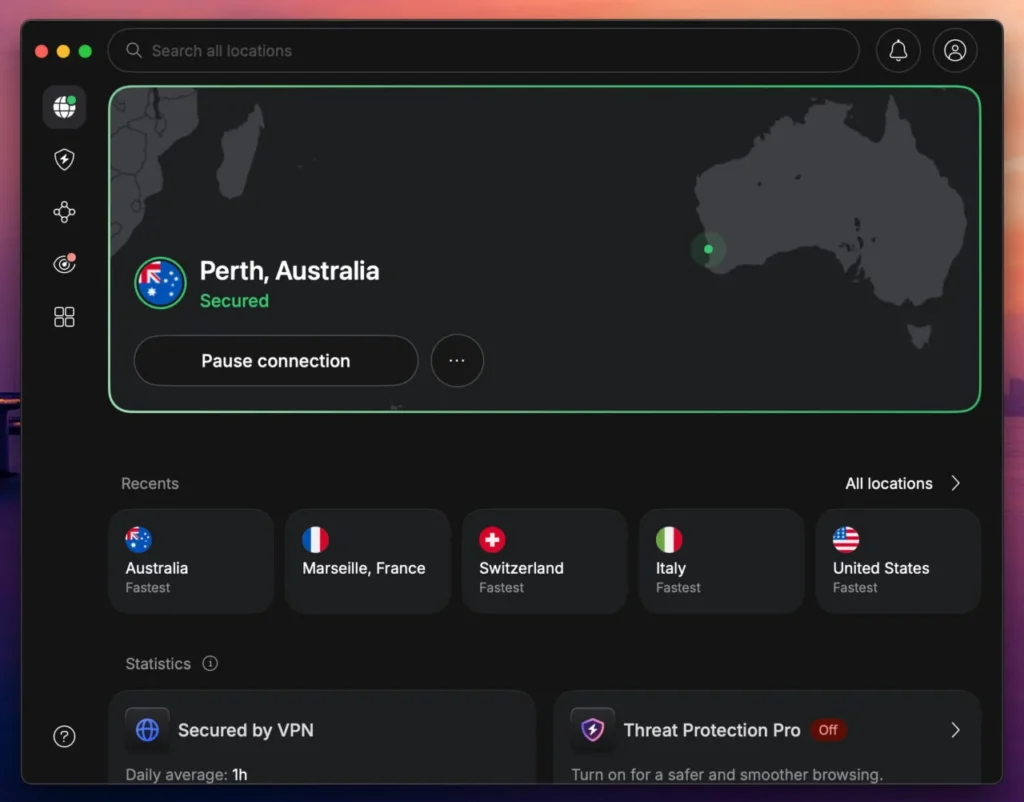
For users physically located in Australia, Australia Streaming Optimized is a sensible first choice when maintaining VPN protection during authorized local streaming.
To find the connection, open the PIA application and select the VPN SERVER section. Type “streaming” into the search field and locate Australia Streaming Optimized. Select the server and wait for the application to confirm the connection.
You can also select a regular Australian server. Sydney is a convenient starting point for users who specifically need an Australian IP address, while Melbourne provides another major-city option.
Brisbane, Adelaide, and Perth offer additional geographic choices. Woolloomooloo provides another documented Sydney-area location.
These connections may deliver different speeds depending on network congestion, distance, and routing. Users should not assume that every Australian location provides identical performance.
For video streaming, consistent download speed matters more than achieving the lowest possible latency. Animated movies can still experience buffering when the connection suffers from congestion or insufficient bandwidth.
PIA supports WireGuard and OpenVPN. WireGuard uses a lightweight architecture that aims to reduce protocol overhead while maintaining encrypted connections.
It is generally worth trying first when performance matters. OpenVPN offers an established alternative and can provide better compatibility on certain networks.
Users can change protocols through the PIA application’s connection settings. However, a faster VPN protocol does not override Netflix’s geographic licensing rules.
Another important consideration is physical versus virtual server hosting.
Virtual VPN locations provide IP addresses associated with a particular country while operating on physical hardware elsewhere. This allows VPN providers to offer broader coverage in countries where local infrastructure may not meet their technical or privacy requirements.
According to PIA’s official virtual server documentation, Australia does not appear among its listed virtual-location exceptions.
PIA explains that most locations outside that list use physical servers in their advertised countries. Its Australian network therefore falls under its locally hosted infrastructure rather than a documented arrangement that supplies Australian IP addresses through hardware in another country.
Physical hosting can help when performance and infrastructure location matter, but it does not prevent Netflix from recognizing VPN connections.
If you experience an ordinary VPN connection problem, PIA recommends clearing browser cookies and cached information, disconnecting and reconnecting, and keeping the VPN application updated.
These steps can correct technical problems but cannot force Netflix to make a regionally restricted movie available.
There is also an important service restriction. PIA’s official streaming policy instructs customers to select a server matching the country where they are physically located.
PIA expressly prohibits using its service to circumvent geographic restrictions imposed by content providers. Therefore, its Australian servers should not be presented as a permitted or guaranteed method of accessing Netflix Australia from the United States.
PIA remains our Editor’s Choice for its documented Australian infrastructure, protocol flexibility, and streaming-performance features, subject to those restrictions.
2. ExpressVPN
ExpressVPN is our second recommendation because it offers several Australian server locations, multiple connection protocols, and applications that make switching between destinations straightforward.
According to the official ExpressVPN server directory, the company provides seven Australian locations: Adelaide, Brisbane, Melbourne, Perth, Sydney, Sydney – 2, and Woolloomooloo.
These options cover several major Australian cities, allowing users to compare network performance without relying on a single server location.
Sydney is a practical first choice when an Australian IP address is required for an authorized purpose.
ExpressVPN also provides Sydney – 2 and Woolloomooloo, giving users additional choices in the Sydney area. Melbourne, Brisbane, Adelaide, and Perth offer alternatives in other parts of Australia.
To connect manually, open the ExpressVPN application and select the VPN location menu. Search for Australia, expand the available locations, and select your preferred destination.
You can also choose Australia without specifying a city, allowing ExpressVPN to select a suitable server within that country.
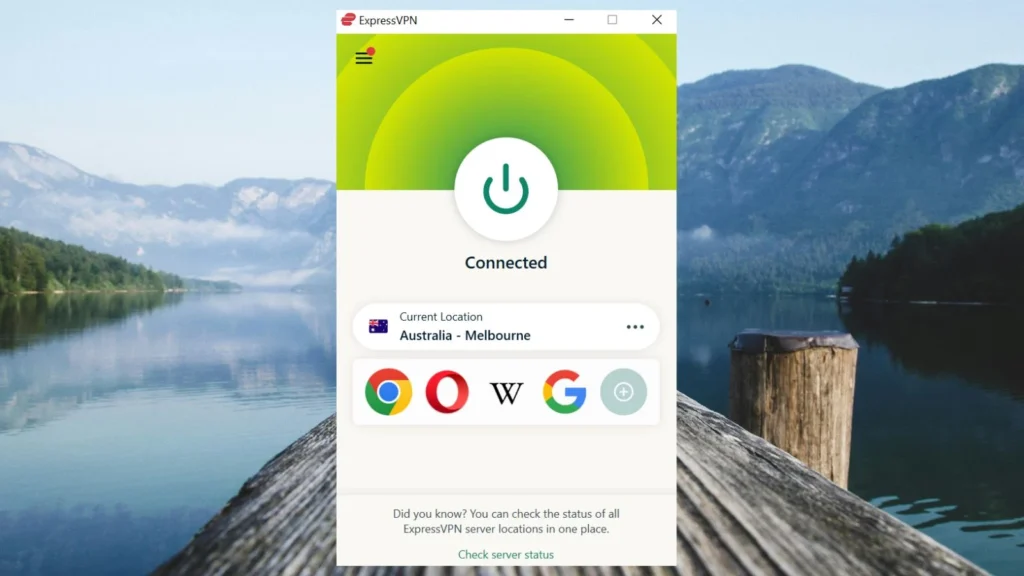
Its broader Smart Location feature may recommend a server outside Australia depending on your physical location and network conditions. Select Australia manually if you specifically need an Australian connection.
The company’s server directory documents support for Lightway UDP, Lightway TCP, WireGuard, OpenVPN UDP, OpenVPN TCP, and IKEv2 across its listed Australian locations, although protocol availability can differ by device.
Lightway UDP offers an efficient connection method when the network is stable. Lightway TCP can be useful when packet loss or unstable routing affects the connection.
WireGuard provides another lightweight alternative, while OpenVPN offers established compatibility across many platforms.
ExpressVPN can also select a connection protocol automatically. This may be preferable for users who do not want to adjust technical settings manually.
Physical server locations are another important consideration.
According to ExpressVPN’s official virtual server documentation, Australia does not appear among its virtual-location exceptions.
ExpressVPN states that server locations outside that list use physical infrastructure within the advertised country. Its Australian connections therefore fall under its physically hosted network.
This means the documented Australian locations are not merely Australian IP addresses routed through servers physically hosted in another country.
However, physical hosting does not automatically guarantee better speeds or regional Netflix access. Performance still depends on the user’s internet connection, network routing, server load, and device capabilities.
For ordinary VPN connection problems, try another Australian location, update the application, or let ExpressVPN choose an appropriate protocol.
If Sydney becomes unstable, Sydney – 2 and Woolloomooloo provide documented alternatives. Melbourne or Brisbane may also be useful when comparing connection performance.
These steps can help diagnose networking problems, but they do not guarantee that Netflix will display The Garfield Movie.
Netflix may identify ExpressVPN traffic and restrict the available catalog. ExpressVPN also instructs users to respect streaming-provider terms, copyright rules, and applicable laws.
For additional information, consult ExpressVPN’s official server selection guidance.
3. NordVPN
NordVPN is our third recommendation. It combines a substantial Australian server network with automatic location selection, NordLynx, and SmartPlay.
According to NordVPN’s official Australia server page, the company currently lists 237 Australian VPN servers across five locations.
Those locations are Adelaide, Brisbane, Melbourne, Perth, and Sydney. The published count can change as NordVPN expands or maintains its infrastructure.
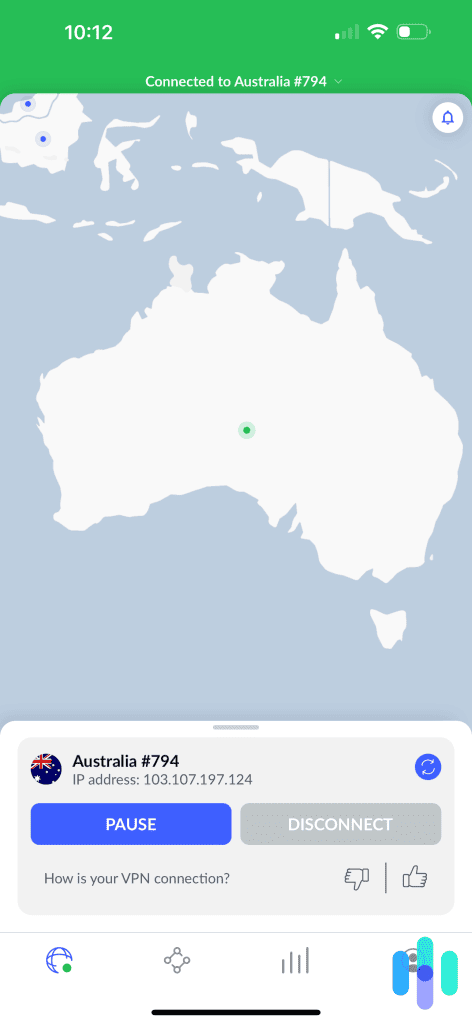
For an automatic connection, open the NordVPN application and select Australia from the country list or map.
NordVPN’s server-selection system can choose an appropriate Australian server based on the available connection options.
If you prefer a particular city, open the country options and select Adelaide, Brisbane, Melbourne, Perth, or Sydney.
NordVPN documents using the three-dot menu beside Australia on supported application interfaces to choose a specific city.
Sydney offers a straightforward first location when an Australian IP address is necessary. Melbourne provides another major-city option, while Brisbane, Adelaide, and Perth expand the selection.
The closest location may provide lower latency, although connection performance depends on network routing and congestion as well as physical distance.
NordVPN supports NordLynx, its VPN protocol based on WireGuard technology.
NordLynx aims to deliver efficient encrypted connections with relatively low performance overhead. This can be useful for bandwidth-intensive activities such as high-resolution video streaming.
Nevertheless, NordLynx does not guarantee uninterrupted playback. Internet speed, server congestion, wireless connectivity, and streaming-provider restrictions can still affect the viewing experience.
NordVPN also includes SmartPlay, a feature intended to support private streaming connections.
According to NordVPN’s official SmartPlay documentation, SmartPlay combines VPN encryption with DNS-related technologies.
The feature activates automatically when users connect through a NordVPN application. It does not require a separate installation, browser extension, or manual activation.
SmartPlay differs from SmartDNS. SmartDNS changes DNS handling but does not encrypt traffic in the same way as an ordinary VPN connection. SmartPlay operates alongside the VPN and provides encryption and public IP address protection.
However, SmartPlay does not provide additional Netflix licensing rights or guarantee access to regionally restricted content.
NordVPN’s Australian server page documents country-level and city-level connections. It does not establish that every advertised city uses a specific physical data center or that a server can bypass Netflix’s VPN detection.
If a connection becomes unstable, users can reconnect, choose another Australian city, or allow NordVPN to select a server automatically.
Checking for application updates and comparing supported protocols can also help identify ordinary connectivity problems.
NordVPN provides several Australian connection options, but Netflix can still recognize VPN traffic and restrict movies such as The Garfield Movie.
As with other VPN providers, users must comply with copyright requirements and the applicable streaming-service terms.
What to do if The Garfield Movie does not appear
If The Garfield Movie does not appear in Netflix search results, the problem could involve stored session information, regional licensing, profile restrictions, or Netflix’s VPN detection.
The following steps help identify ordinary browser and connectivity problems. They cannot guarantee access to content that Netflix restricts geographically.
- Close Netflix completely, including open browser tabs and background application sessions.
- Disconnect from the VPN and verify that your ordinary internet connection works correctly.
- Reconnect to the selected Australian location if your intended activity complies with the VPN provider’s terms.
- Try another officially documented server or location within Australia if the VPN connection itself is unstable.
- Clear Netflix cookies and relevant browser cache information to remove outdated session data.
- Open an incognito or private browser window to test Netflix without previously stored cookies.
- Reopen Netflix and sign in using your existing account credentials.
- Search for The Garfield Movie (2024) again and check whether Netflix displays the correct animated film.
Private Internet Access offers Adelaide, Brisbane, Melbourne, Perth, Sydney, Woolloomooloo, and Australia Streaming Optimized. However, PIA requires compliance with geographic restrictions and instructs users to select a server matching their physical country.
ExpressVPN provides Adelaide, Brisbane, Melbourne, Perth, Sydney, Sydney – 2, and Woolloomooloo. These locations offer alternatives when diagnosing ordinary connection performance problems.
NordVPN offers Adelaide, Brisbane, Melbourne, Perth, and Sydney. Users can select a city manually or allow the application to choose an Australian server automatically.
Changing servers may improve routing or connection stability, but it cannot guarantee that Netflix will permit a regional movie to appear.
You should also verify the movie’s title and release year. The Garfield Movie (2024) is an animated production featuring Chris Pratt as Garfield, Samuel L. Jackson as Vic, and Hannah Waddingham as Jinx.
It is different from Garfield (2004), the live-action and computer-animated film featuring Bill Murray as the voice of Garfield. The movies have separate streaming listings and potentially different regional rights.
Netflix provides additional information in its official missing-title troubleshooting guide. The company lists regional licensing, VPN detection, profile maturity settings, and language preferences among the reasons why a movie might not appear.
Although The Garfield Movie is suitable for family audiences, profile maturity settings can still affect which titles appear, particularly when users access Netflix through child profiles.
If Netflix recognizes your VPN and restricts the catalog to globally licensed titles, the service recommends turning off the VPN.
Netflix may detect the VPN
A VPN routes your internet traffic through a remote server and changes the public IP address visible to websites.
Connecting to an Australian VPN location can make ordinary internet traffic appear to originate from Australia. However, Netflix does not automatically provide access to its complete Australian catalog simply because a connection uses an Australian IP address.
Streaming rights differ across countries because studios and distributors negotiate territory-specific licensing agreements.
The Garfield Movie can therefore appear on Netflix Australia while another streaming platform holds the relevant subscription rights in the United States.
Netflix also identifies VPN traffic. According to Netflix’s official VPN guidance, subscribers using VPN connections may only see titles with worldwide streaming rights.
Consequently, Netflix might hide The Garfield Movie from search results or display a playback error even when a VPN application reports a successful Australian connection.
Private Internet Access, ExpressVPN, and NordVPN cannot guarantee that Netflix will provide access to every regionally licensed movie. VPN connectivity and streaming authorization remain separate considerations.
Can you use a Netflix ad-supported plan with a VPN?
No. Netflix states that its ad-supported experience does not support VPN connections.
Subscribers using an advertising-supported Netflix plan may encounter playback errors or find that streaming does not work while the VPN remains connected.
Netflix recommends disconnecting the VPN to restore normal playback.
This restriction applies regardless of whether you use Private Internet Access, ExpressVPN, or NordVPN.
An ad-free Netflix subscription avoids the specific restriction associated with its advertising-supported experience. However, it does not eliminate geographic licensing limitations or Netflix’s broader VPN detection.
Therefore, upgrading to an ad-free Netflix plan does not guarantee that The Garfield Movie will appear when connecting through an Australian VPN server.
For the current rules, consult Netflix’s official VPN support documentation.
Does changing the VPN location change your Netflix account?
No. Connecting to an Australian VPN server does not automatically change your Netflix account’s registered country, subscription plan, email address, password, profiles, or billing information.
A VPN primarily changes the public IP address visible to online services. Your existing Netflix credentials remain the same.
However, Netflix offers different movie and television catalogs across countries because streaming rights depend on agreements with studios and distributors.
Even when Netflix recognizes an Australian IP address, the service may identify the VPN connection and limit viewing to globally licensed content.
This means changing your apparent IP location does not automatically grant the same viewing rights as a subscriber accessing Netflix normally within Australia.
For American viewers who simply want to watch The Garfield Movie, JustWatch US lists current streaming alternatives.
As of October 2026, the movie is available through Hulu in the United States. Subscribers with access to that service may be able to watch the film without purchasing a separate VPN.
The movie is also available for digital rental or purchase through services including Amazon Video, Apple TV Store, and Fandango At Home. Additional rental options may appear on other platforms.
Streaming availability and rental prices can change, so confirm the current offer before subscribing or paying for the movie.
These domestic viewing options may provide a more predictable experience than purchasing a VPN specifically to access a film that Netflix could restrict.
Which VPN should you use?
Private Internet Access is our Editor’s Choice because it offers documented Australian server locations in Adelaide, Brisbane, Melbourne, Perth, Sydney, and Woolloomooloo, along with Australia Streaming Optimized. Its WireGuard and OpenVPN support provides flexibility for different devices and network conditions. However, PIA expressly prohibits circumventing geographic content restrictions and recommends connecting to a server matching the user’s physical country. Its Australian infrastructure should not be treated as a guaranteed or permitted way to access Netflix Australia from the United States.
ExpressVPN offers seven Australian locations, including Sydney, Sydney – 2, Woolloomooloo, Melbourne, Brisbane, Adelaide, and Perth. Its Lightway, WireGuard, and OpenVPN protocols provide several connection options. NordVPN lists 237 Australian servers across Adelaide, Brisbane, Melbourne, Perth, and Sydney, alongside NordLynx and automatically enabled SmartPlay. Both providers offer Australian connections, but neither can guarantee access to Netflix’s regional catalog.
The Garfield Movie (2024) appears on Netflix Australia as of October 2026, while current US streaming listings do not include Netflix. However, regional catalogs can change, and Netflix’s licensing rules, VPN detection, and provider terms mean an Australian VPN connection does not guarantee playback. Before purchasing a VPN specifically for this movie, check the current Netflix listing and consider Hulu or another licensed US viewing option.
The Garfield Movie (2024) is available on Netflix Australia as of October 2026. Its official Australian Netflix page lists English original audio, English audio description, and several subtitle languages.
The Garfield Movie is not currently part of Netflix US. Although VPN providers offer Australian connections, Netflix may restrict regional titles when detecting a VPN. Hulu and digital rental services provide US viewing alternatives.
Private Internet Access is our first recommendation for its Australian server selection and Australia Streaming Optimized option, followed by ExpressVPN and NordVPN. PIA prohibits circumventing geographic restrictions, and no VPN guarantees Netflix access.
Restart Netflix, check your profile settings, and search for the 2024 animated movie starring Chris Pratt rather than Garfield (2004). Netflix may hide regionally licensed titles when detecting a VPN and recommends disconnecting it if restrictions appear.
No. Netflix does not support VPN connections with its ad-supported experience. An ad-free plan avoids that specific restriction, but Netflix may still detect VPN connections and restrict regional movies.


Read our disclosure page to find out how can you help VPNCentral sustain the editorial team Read more


Improve this guide



User forum
0 messages