
How to Watch While Aya Was Sleeping on Netflix in the US with a VPN (2026)


 19 min. read
  Published on

While Aya Was Sleeping (2016) is a Bulgarian drama directed by Cvetodar Markov, starring Stefan Denolyubov, Aya Mutafchieva, Emil Emilov, and Julian Vergov. The film follows a theater actor whose professional and personal frustrations reach a breaking point after he learns that a television star will replace him. The movie, originally titled Докато Ая спеше, has an active listing on Netflix United Kingdom, with Bulgarian original audio and English subtitles.
Unfortunately, While Aya Was Sleeping is not currently available through Netflix US. American viewers can rent or purchase the movie through other platforms, but the British Netflix catalog lists it as part of its subscription library. Private Internet Access, ExpressVPN, and NordVPN all offer UK VPN connections, although connecting to a British server does not automatically make the movie accessible from the United States.

Access content across the globe at the highest speed rate.
🔥 Save 81% + 2 bonus months! 🔥
70% of our readers choose Private Internet Access
70% of our readers choose Private Internet Access
2
Browse the web from multiple devices with industry-standard security protocols.
🔥 Save 73%! 🔥

Faster dedicated servers for specific actions (currently discounted)
🔥 Save 69%! 🔥
Netflix may detect VPN connections and limit viewers to titles with worldwide streaming rights. In addition, regional availability can change, and some third-party catalog histories conflict with the current Netflix UK listing. According to Netflix’s official VPN policy, using a VPN can reduce the selection of movies and television programs available through your account. VPN connections therefore cannot guarantee access to While Aya Was Sleeping.
How to watch While Aya Was Sleeping on Netflix with a VPN
If you want to check whether Netflix permits access to While Aya Was Sleeping through your subscription, follow these steps. Make sure your intended VPN use complies with Netflix’s policies and your VPN provider’s restrictions.
- Choose a VPN provider. Private Internet Access is our first recommendation for UK connectivity, followed by ExpressVPN and NordVPN. Review each service’s streaming terms before proceeding.
- Download and install the VPN application from your chosen provider’s official website. Open the application and sign in with your VPN account.
- Connect to a server in the United Kingdom where your intended activity is permitted. PIA offers UK London and UK Streaming Optimized, ExpressVPN lists UK London and several alternatives, and NordVPN supports connections through four British cities.
- Fully close Netflix, including browser tabs and any application sessions that may still run in the background.
- Reopen the Netflix website or application after the VPN connection has finished establishing.
- Sign in to your existing Netflix account and select your preferred profile. Changing your VPN connection does not require creating a new Netflix account.
- Search for While Aya Was Sleeping. You can also try its original Bulgarian title, Докато Ая спеше, if the English title does not appear.
- Start playback if Netflix displays the movie and permits access through your current subscription and connection.
While Aya Was Sleeping tells the story of Aya, a seven-year-old girl who spends considerable time at the theater where her father, Asen, works as an actor. After Aya falls asleep one evening, tensions escalate among the theater company. Asen discovers that a television personality named Boyan will replace him in an upcoming production, triggering an argument that develops into a physical confrontation.
The film examines artistic ambition, professional disappointment, family relationships, and the emotional pressure of working in theater. Its intimate setting and character-driven story distinguish it from conventional mainstream dramas.
The official Netflix UK page for While Aya Was Sleeping lists Bulgarian original audio and subtitles in Bulgarian, English, Spanish, French, Polish, and Portuguese. Netflix also identifies the title as available for offline downloads on supported devices.
However, a public Netflix title page does not guarantee playback for every visitor. Your account’s location, Netflix’s licensing agreements, and VPN detection may affect whether the movie appears in search results or starts playing.
Best VPNs for watching While Aya Was Sleeping on Netflix
Private Internet Access, ExpressVPN, and NordVPN provide connections in the United Kingdom. Their official server directories identify different cities and specialized connection options.
| VPN | Server locations in the United Kingdom | Option to try first |
|---|---|---|
| Private Internet Access (Editor’s Choice) | UK London, UK Manchester, UK Southampton, UK Tottenham, UK Streaming Optimized | UK Streaming Optimized for authorized UK streaming, or UK London for general connections |
| ExpressVPN | UK Docklands, UK East London, UK London, UK Manchester, UK Midlands, UK Tottenham, UK Wembley | UK London |
| NordVPN | Edinburgh, Glasgow, London, Manchester | Automatic UK selection or London |
All three providers offer British IP addresses through their UK connections. However, server availability does not guarantee access to the British Netflix catalog. Netflix may identify VPN traffic and limit the titles that appear.
Private Internet Access also expressly prohibits using its service to circumvent geographic restrictions imposed by content providers. Its UK streaming-optimized servers are intended for authorized streaming connections, not bypassing Netflix’s regional licensing rules.
1. Private Internet Access
Private Internet Access is our Editor’s Choice because it offers a dedicated UK streaming-optimized location, several British cities, and flexible connection settings. Its applications support WireGuard and OpenVPN, allowing users to prioritize speed, compatibility, or connection stability.
According to the official PIA server location directory, subscribers can select UK London, UK Manchester, UK Southampton, UK Tottenham, and UK Streaming Optimized.
These locations provide several options for establishing a British VPN connection where the intended activity complies with the provider’s terms.
Which PIA UK server should you choose?
PIA recommends connecting to a streaming-optimized server in the country where you are physically located. For viewers in the United Kingdom who want to protect an authorized streaming session, UK Streaming Optimized is the natural starting point.
Open the PIA application and select VPN SERVER to display the available locations. Type streaming into the search box and choose UK Streaming Optimized. Return to the main screen and select the connection button.
For general privacy protection or other permitted activities requiring a UK connection, UK London is another option. PIA also lists Manchester, Southampton, and Tottenham.
If your first location has unusually high latency, compare the other available British servers. The application displays latency measurements that can help identify responsive connections.
However, geographical proximity does not always determine performance. Network congestion, your internet provider, and the VPN protocol can also affect connection speeds.
WireGuard and OpenVPN performance
PIA supports two major VPN protocols: WireGuard and OpenVPN.
WireGuard generally offers efficient performance with relatively low connection overhead. For streaming and other bandwidth-intensive activities, it is a sensible option to test when speed matters.
OpenVPN provides more configuration flexibility. You can select different transport settings, including UDP and TCP, on compatible devices.
UDP usually prioritizes performance, while TCP may provide better compatibility on networks that interfere with certain types of traffic.
To switch protocols, open the PIA application’s Settings menu and select Protocols. Choose WireGuard or OpenVPN, reconnect, and compare the results.
PIA’s desktop protocol settings guide explains these options in more detail.
Changing protocols may improve a slow or unstable connection, but it cannot override restrictions that Netflix applies to region-specific titles.
Does PIA use virtual UK servers?
PIA operates both physical and virtual server locations. A physical location normally has its server infrastructure and registered IP address in the same country.
A virtual location assigns an IP address associated with the chosen country while routing traffic through hardware physically hosted somewhere else.
The United Kingdom does not appear in PIA’s current published list of virtual server locations. Therefore, the company does not identify its standard UK endpoints as virtual-country locations in that documentation.
You can check the distinction in PIA’s virtual server documentation.
Server infrastructure can change, so consult the provider’s current documentation and application before relying on any particular location.
Streaming troubleshooting and limitations
If PIA encounters problems with an authorized streaming service, start by confirming that the VPN connection works normally with other websites.
For connection problems, PIA recommends clearing browser cookies and cache, restarting the application, and reconnecting to the appropriate server.
Updating the PIA application may also resolve issues with outdated connection settings. If performance remains poor, try switching between WireGuard and OpenVPN.
However, Netflix can identify VPN connections and restrict its catalog. A successful British VPN connection does not guarantee that While Aya Was Sleeping will appear.
PIA’s official streaming guidance also contains an important restriction. The company expressly prohibits using its service to circumvent geographic restrictions imposed by content providers.
PIA instructs customers to connect to a streaming server that matches their physical country. Therefore, viewers in the United States should not use PIA to bypass Netflix’s British catalog restrictions.
Its UK locations remain useful for permitted UK connections and authorized streaming, but the streaming-optimized label does not imply guaranteed access to region-restricted Netflix movies.
2. ExpressVPN
ExpressVPN offers another extensive selection of UK VPN locations. It allows users to connect to individual British destinations and supports several modern VPN protocols.
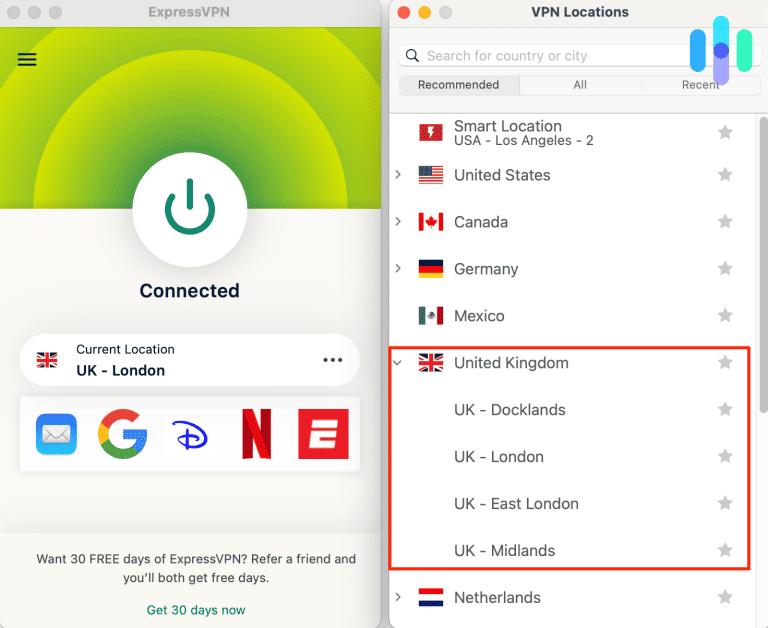
The official ExpressVPN server directory identifies seven British locations: UK Docklands, UK East London, UK London, UK Manchester, UK Midlands, UK Tottenham, and UK Wembley.
These choices provide flexibility for users who need a UK connection for permitted services or general privacy protection.
Which ExpressVPN UK server should you select?
UK London is a practical starting point when you specifically need a British connection. It appears in the provider’s official server directory and supports the major available protocols on compatible devices.
Open the ExpressVPN application and select the location picker. Search for United Kingdom, choose UK London, and connect.
If you experience connection problems, UK Docklands and UK East London provide nearby alternatives. You can also try Manchester, Midlands, Tottenham, or Wembley.
ExpressVPN includes Smart Location, which automatically recommends a server based on connection factors such as distance, latency, and download speed.
However, Smart Location may select a country other than the UK. Manual selection is more appropriate when an authorized service specifically requires a British connection.
Lightway, WireGuard, and OpenVPN
ExpressVPN lists support for Lightway UDP, Lightway TCP, WireGuard, OpenVPN UDP, and OpenVPN TCP at its UK locations. Protocol availability varies by platform and application version.
Lightway is ExpressVPN’s proprietary VPN protocol. The company designed it to establish encrypted connections efficiently and maintain stability when network conditions change.
WireGuard offers another lightweight option. OpenVPN remains available for people who need different compatibility settings or work with networks that interfere with some VPN connections.
For most users, ExpressVPN recommends automatic protocol selection. The application can choose an appropriate connection method based on the current environment.
If you encounter connection drops or slow downloads, testing a different supported protocol may help.
Keep in mind that higher download speeds do not necessarily improve access to a regional Netflix movie. Netflix may still recognize the VPN and restrict its available content.
Are ExpressVPN UK locations virtual?
ExpressVPN distinguishes physical server locations from virtual ones. Most of its locations operate in the country associated with their registered IP addresses.
Virtual server locations use hardware in another country while assigning an IP address associated with the selected destination.
The United Kingdom does not appear in ExpressVPN’s published virtual server location list. The company states that locations absent from this list use physical servers in their specified countries.
Some virtual server destinations for other countries use UK-based hardware. For example, ExpressVPN documents an India virtual location hosted in the United Kingdom.
That does not make the India location equivalent to a UK connection. Its registered IP address still corresponds to India.
When you need a British IP address, select a server explicitly listed under the United Kingdom.
ExpressVPN streaming troubleshooting
For permitted streaming sessions, ExpressVPN recommends checking the connection, restarting the application, and trying another server when technical problems occur.
You can also change the protocol if the network experiences instability. Lightway UDP or WireGuard may provide better performance in some environments, while a TCP-based option may be useful on restrictive networks.
If Netflix recognizes the VPN, however, changing servers may not restore a region-specific movie.
Netflix controls which titles are available to individual accounts and can limit playback when it detects VPN traffic.
ExpressVPN offers several British locations, but it cannot guarantee that While Aya Was Sleeping will appear on Netflix for American viewers.
3. NordVPN
NordVPN offers UK servers in multiple cities, along with automatic connection recommendations, NordLynx, and its integrated SmartPlay feature.
According to NordVPN’s official UK server page, the company operates more than 440 servers in the United Kingdom.
Its published British locations include Edinburgh, Glasgow, London, and Manchester.
This network gives users several choices when they need an encrypted UK connection for permitted activities.
Which NordVPN UK location should you choose?
London is a reasonable starting point when selecting a British connection manually. However, NordVPN also offers automatic server recommendations based on its available network.
Open the NordVPN application and find the United Kingdom in the country list. Select it to establish a connection to a recommended server.
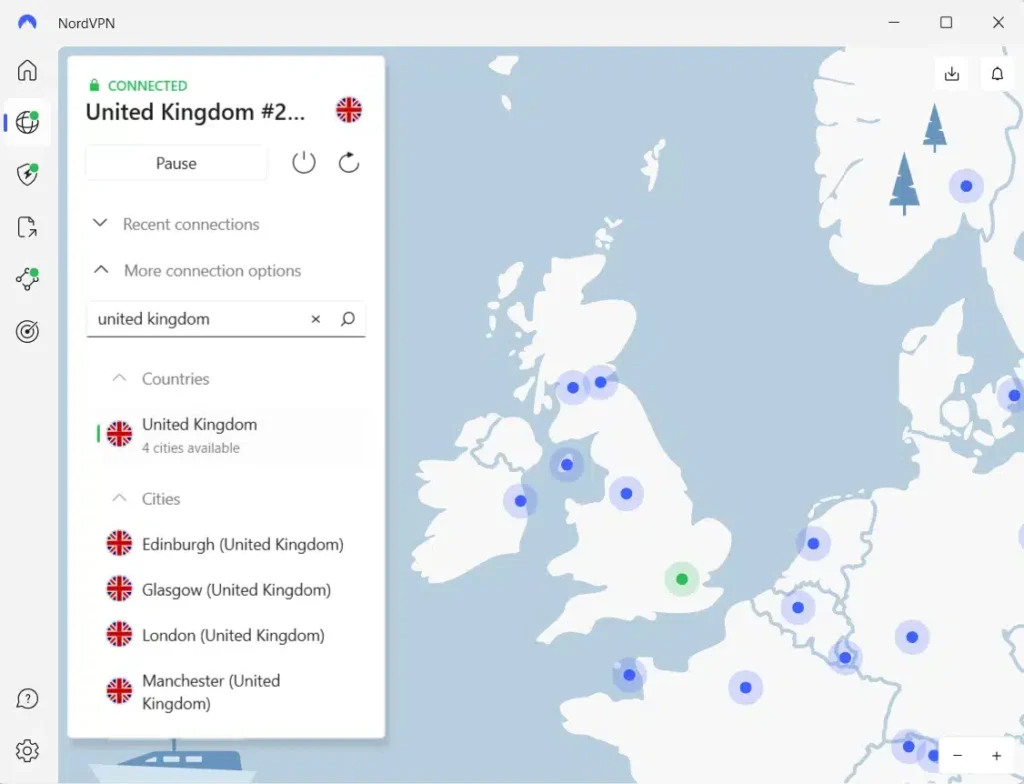
To choose a city manually, open the additional location options next to the United Kingdom and select Edinburgh, Glasgow, London, or Manchester.
Manual selection is useful when one location has high latency or connection instability.
NordVPN can also recommend servers automatically, so selecting a specific city is not necessary for ordinary privacy protection.
Changing cities may improve network performance, but it does not guarantee access to Netflix’s British movie catalog.
NordLynx and streaming performance
NordVPN uses NordLynx, a protocol built around WireGuard technology. It focuses on efficient encrypted connections and reduced overhead.
For streaming, NordLynx can help maintain consistent performance when your internet connection has sufficient bandwidth.
However, actual download speeds depend on several factors, including distance from the server, your internet service provider, network congestion, and the capabilities of your device.
If NordLynx encounters compatibility problems, NordVPN allows you to switch to another supported protocol through its application settings.
A faster connection can reduce buffering, but it cannot overcome Netflix’s licensing restrictions.
How NordVPN SmartPlay works
NordVPN includes SmartPlay, a feature that combines VPN encryption with DNS-related technology to support private streaming.
According to NordVPN’s official SmartPlay documentation, SmartPlay activates automatically whenever users establish a connection through a NordVPN application.
You do not need to install a separate application or enable additional settings.
SmartPlay differs from a standalone SmartDNS service because it operates alongside NordVPN’s encrypted connection and IP address protection.
NordVPN positions SmartPlay as a tool for accessing your regular streaming content privately, including when traveling.
However, automatic SmartPlay activation does not guarantee that Netflix will display region-restricted movies.
Netflix can still detect VPN traffic and restrict content to titles with worldwide licensing rights.
What if NordVPN does not work with Netflix?
First, verify that your NordVPN connection works normally by loading a website unrelated to Netflix.
If the connection is unstable, restart NordVPN or select another appropriate server. When you need a permitted UK connection, compare London, Manchester, Edinburgh, and Glasgow.
You can also change the VPN protocol or reconnect using the automatic server recommendation.
If Netflix displays a VPN warning, follow its official support instructions. Depending on your subscription and location, you may need to disconnect the VPN to access your regular regional catalog.
NordVPN’s UK network and SmartPlay feature provide useful connection options, but neither guarantees playback of While Aya Was Sleeping from the United States.
What to do if While Aya Was Sleeping does not appear
Netflix search results can vary depending on geographic licensing, account settings, and VPN recognition. Even though While Aya Was Sleeping has an official UK title page, it may remain unavailable through your account.
If you are using a VPN for permitted streaming and encounter connection or catalog problems, follow these steps:
- Close Netflix completely, including any active browser tabs or streaming applications.
- Disconnect from the VPN to reset the existing connection.
- Reconnect to the appropriate country, using a United Kingdom location only when the connection complies with the relevant terms.
- Try another server or city in the same country if the original connection experiences technical problems.
- Clear Netflix cookies and your browser cache to remove outdated session information.
- Open an incognito or private browser window to test Netflix without existing cookies and saved browser data.
- Reopen Netflix and sign in with your normal account credentials.
- Search for While Aya Was Sleeping or its Bulgarian title, Докато Ая спеше.
For PIA, the documented UK options are London, Manchester, Southampton, Tottenham, and UK Streaming Optimized. Remember that PIA explicitly prohibits using its service to circumvent geographic restrictions imposed by content providers.
ExpressVPN offers UK Docklands, East London, London, Manchester, Midlands, Tottenham, and Wembley. NordVPN provides connections through Edinburgh, Glasgow, London, and Manchester.
These locations can help troubleshoot permitted connections, but changing servers does not necessarily change Netflix’s decision about movie availability.
If you still cannot find the film, consult Netflix’s official missing-title troubleshooting guide.
Netflix explains that movies may disappear because of regional licensing, VPN detection, language settings, or profile maturity restrictions.
Make sure you are searching for the correct movie. While Aya Was Sleeping is a 2016 Bulgarian drama directed by Cvetodar Markov. Its original title is Докато Ая спеше, which may appear in regional listings.
If Netflix continues to hide the film, the problem may reflect licensing restrictions rather than a technical issue with your VPN. No server change or browser adjustment guarantees access.
Netflix may detect the VPN
A VPN routes your internet connection through a remote server and changes the public IP address that websites see.
For example, connecting to a London VPN server may cause an IP-based location check to identify your connection as British, even when you are physically located elsewhere.
However, Netflix does not necessarily grant access to its entire UK catalog simply because a connection uses a British IP address.
The company licenses movies and television programs for different markets. Some titles have worldwide distribution rights, while others are available only in particular countries.
Netflix may recognize VPN connections and restrict the available catalog to titles that have worldwide streaming rights.
This can result in missing movies, unexpected search results, or playback errors.
Netflix explains these limitations in its official support documentation about watching through a VPN.
Private Internet Access, ExpressVPN, and NordVPN can establish British connections, but none controls Netflix’s licensing decisions or guarantees access to While Aya Was Sleeping.
Can you use a Netflix ad-supported plan with a VPN?
No. Netflix does not support VPN connections when viewers use its ad-supported experience.
The restriction applies regardless of the VPN service, selected country, or connection protocol.
If Netflix detects a VPN on an ad-supported plan, you may encounter error E121 or a message asking you to turn off the VPN or proxy.
Netflix recommends disconnecting the VPN to restore playback.
Ad-free Netflix subscriptions do not have this specific ad-supported VPN restriction. However, Netflix may still recognize a VPN connection and limit the available catalog.
Therefore, upgrading to an ad-free plan does not guarantee that While Aya Was Sleeping will become accessible from the United States.
For additional details, see Netflix’s official guidance on VPN errors with ad-supported plans.
Does changing the VPN location change your Netflix account?
No. Connecting through a VPN server in another country does not automatically change your Netflix account credentials, subscription, profiles, passwords, or billing information.
Your VPN changes the public IP address visible to online services. It does not permanently transfer your Netflix account to another country.
However, Netflix content libraries differ between regions because licensing rights vary.
Netflix can also detect VPN connections and limit available titles, even when the selected IP address belongs to a country where a particular movie appears in the catalog.
If While Aya Was Sleeping remains unavailable through Netflix US, you can check current US streaming, rental, and purchase options for While Aya Was Sleeping.
JustWatch US lists Amazon Video and the Apple TV Store as rental and purchase options. These services may provide a more straightforward way for American viewers to watch the movie without relying on international Netflix access.
Which VPN should you use?
Private Internet Access is our Editor’s Choice for UK connectivity because it offers five documented British locations, including UK Streaming Optimized, and supports WireGuard and OpenVPN. These features provide flexibility for secure connections and authorized streaming. However, PIA expressly prohibits circumventing geographic restrictions, so its UK servers should not be used to bypass Netflix’s US licensing limitations.
ExpressVPN offers seven documented UK server locations, including London, Manchester, Docklands, and Wembley, with support for Lightway, WireGuard, and OpenVPN on compatible devices. NordVPN operates more than 440 UK servers across Edinburgh, Glasgow, London, and Manchester, with NordLynx and automatically enabled SmartPlay. Both offer useful privacy features, although Netflix may still limit access when it detects VPN traffic.
While Aya Was Sleeping (2016) has an official Netflix United Kingdom listing, while current US streaming information identifies rental and purchase options rather than Netflix subscription access. Some catalog histories report conflicting UK availability, so viewers should confirm the title before relying on it. Licensing changes, VPN detection, subscription restrictions, and provider terms mean that connecting to a British VPN server cannot guarantee playback from the United States.
While Aya Was Sleeping (2016) has an official Netflix United Kingdom listing with Bulgarian original audio and English subtitles. JustWatch UK also lists Netflix streaming, although an older catalog history reports conflicting availability.
While Aya Was Sleeping is not currently listed in the Netflix US subscription catalog. Although VPN providers offer UK servers, Netflix may restrict regional titles when it detects VPN connections. US viewers can also check Amazon Video and the Apple TV Store for rental or purchase options.
Private Internet Access is our first choice for UK connectivity because it offers five British locations, including UK Streaming Optimized. ExpressVPN and NordVPN are alternatives. PIA prohibits circumventing geographic restrictions, and no VPN provider guarantees Netflix playback.
Search for While Aya Was Sleeping or its original Bulgarian title, Докато Ая спеше. Check Netflix’s regional availability and profile settings. If you use a VPN for permitted streaming, restart Netflix and troubleshoot the connection. Netflix may still restrict regional movies when it detects VPN traffic.
No. Netflix does not support VPN connections on ad-supported plans. Disconnect the VPN if Netflix displays a related playback error. Ad-free plans avoid this specific restriction, but Netflix can still detect VPN connections and limit access to regional movies.


Read our disclosure page to find out how can you help VPNCentral sustain the editorial team Read more


Improve this guide



User forum
0 messages