
How to Watch Zift on Netflix in the US with a VPN (2026)


 15 min. read
 Published on

Zift (2008) is currently available on Netflix in the United Kingdom. Directed by Javor Gardev, this Bulgarian crime thriller stars Zachary Baharov, Tanya Ilieva, and Vladimir Penev. The film follows a man known as Moth who leaves prison and encounters a dramatically changed communist-era Sofia. Its original Bulgarian title is Дзифт. The official Netflix UK page for Zift confirms the movie, its original Bulgarian audio, and available subtitles.
Zift is not currently available through a Netflix US subscription. American viewers can find the movie through services including AMC+, Sundance Now, and Philo, but Netflix US does not list it among its subscription offerings. The United Kingdom has a verified Netflix listing, and Private Internet Access, ExpressVPN, and NordVPN all offer UK server connections. These services can provide a British IP address, although that does not guarantee access to the UK Netflix catalog.

Access content across the globe at the highest speed rate.
🔥 Save 81% + 2 bonus months! 🔥
70% of our readers choose Private Internet Access
70% of our readers choose Private Internet Access
2
Browse the web from multiple devices with industry-standard security protocols.
🔥 Save 73%! 🔥

Faster dedicated servers for specific actions (currently discounted)
🔥 Save 69%! 🔥

Using a VPN does not guarantee that Netflix will let you watch Zift from the United States. Netflix may recognize VPN traffic and limit access to titles with worldwide streaming rights. Its official VPN support policy explains these restrictions and confirms that ad-supported Netflix experiences do not support VPN connections. You must also follow Netflix’s terms and the VPN provider’s usage restrictions.
How to watch Zift on Netflix with a VPN
Netflix UK currently lists Zift, but whether you can watch it depends on licensing, account eligibility, VPN detection, and your VPN provider’s terms. The following steps explain how to check the listing using an existing Netflix account where VPN use is permitted.
- Choose a VPN provider. Private Internet Access is our Editor’s Choice for its documented UK server options, followed by ExpressVPN and NordVPN. Review the provider’s streaming restrictions before connecting.
- Download and install the VPN application from the provider’s official website. Open the application, create or sign in to your VPN account, and complete the setup.
- Connect to the United Kingdom if the provider’s terms and your circumstances permit it. All three VPN services offer UK locations, but PIA prohibits using its service to circumvent geographic content restrictions.
- Fully close Netflix. Exit the browser or quit the Netflix application rather than leaving it running in the background.
- Reopen Netflix after establishing your VPN connection. Allow the application or website to reload before searching.
- Sign in using your existing Netflix account credentials. A VPN connection does not require you to create another Netflix account.
- Search for Zift. Look for the 2008 Bulgarian movie directed by Javor Gardev. You can also identify it by its original title, Дзифт.
- Start playback if Netflix displays the movie and your account, location, and applicable service terms permit access.
The Netflix UK listing identifies Bulgarian as the movie’s original audio language. Its subtitle options include Bulgarian, English, Spanish (Spain), French, Polish, and Portuguese (Portugal). English-speaking viewers should select English subtitles because Netflix does not list an English audio track on this page.
You can open the Zift listing on Netflix UK directly to confirm the movie’s identity and language options. The film runs approximately 92 minutes and combines crime, drama, and film noir elements.
Remember that changing your apparent network location does not automatically provide permission to access another Netflix catalog. If Zift does not appear, Netflix may have recognized the VPN or restricted the title under its licensing agreements.
Best VPNs for watching Zift on Netflix
All three providers have officially documented UK server locations. The main differences involve their location choices, connection protocols, and streaming-related features. The table below identifies available UK connections, not guaranteed ways to access Zift.
| VPN | Server locations in the United Kingdom | Option to try first |
|---|---|---|
| Private Internet Access (Editor’s Choice) | UK London, UK Manchester, UK Southampton, UK Streaming Optimized | UK Streaming Optimized for permitted streaming while physically in the UK, subject to PIA’s geographic restriction policy |
| ExpressVPN | London, East London, Docklands, Wembley, Manchester, Midlands, Tottenham | UK London |
| NordVPN | London, Manchester, Edinburgh, Glasgow | United Kingdom automatic server selection |
VPN server availability does not guarantee Netflix access. Netflix can recognize VPN connections, restrict regional titles, or display playback errors even when the connection works correctly.
1. Private Internet Access
Private Internet Access is our Editor’s Choice because it offers multiple documented UK locations, a streaming-optimized connection, and support for WireGuard and OpenVPN. These features provide useful flexibility for secure browsing and permitted streaming. However, PIA explicitly prohibits circumventing geographic restrictions imposed by content providers, so customers must not use its servers to bypass Netflix’s regional licensing rules.
According to the official PIA server directory, the United Kingdom has four connection options: UK London, UK Manchester, UK Southampton, and UK Streaming Optimized.
For users physically located in the United Kingdom, UK Streaming Optimized is the sensible starting point for permitted Netflix streaming. PIA instructs customers to choose streaming connections that match their actual country rather than using the service to circumvent geographic restrictions.
To locate this server, open the PIA application and select the VPN SERVER section. Type “streaming” into the search field and select UK Streaming Optimized. Activate the connection through the application’s power button.
PIA’s other UK locations can help troubleshoot ordinary connection problems. UK London provides a straightforward city option, while Manchester and Southampton offer alternatives if a particular connection experiences high latency or instability.
PIA distinguishes physical server locations from virtual locations. A virtual server may provide an IP address for one country while operating its hardware in another. The United Kingdom does not appear in PIA’s published virtual server location list. However, that document does not identify every individual UK server’s physical hosting address.
For connection performance, PIA supports WireGuard and OpenVPN. WireGuard offers a lightweight protocol that generally works well for bandwidth-intensive activities, while OpenVPN provides additional connection settings that may help on restrictive networks.
PIA’s WireGuard setup guide explains how to change protocols. On supported desktop and mobile applications, open Settings, select Protocols, and choose WireGuard. Reconnect afterward to apply the change.
When a connection becomes slow, check your internet speed without the VPN, then compare it with the connected speed. Server distance, network congestion, and routing can affect performance. OpenVPN may offer a useful alternative when WireGuard has difficulty connecting.
If Netflix or another permitted streaming service fails to load, try clearing browser cookies, restarting the application, and updating PIA. The company’s official streaming guide recommends these troubleshooting measures.
PIA’s policy remains an important limitation. The company prohibits using its service to access content in violation of copyright laws or to circumvent content providers’ geographic restrictions. Its UK servers satisfy the technical coverage requirement for this comparison, but that does not authorize bypassing Netflix’s restrictions from the United States.
2. ExpressVPN
ExpressVPN ranks second because it provides seven officially documented UK locations, multiple connection protocols, and manual server selection. These features offer flexibility for users who want a secure connection to British websites and services where permitted.
The ExpressVPN server directory lists Docklands, East London, London, Manchester, Midlands, Tottenham, and Wembley.
London is a practical first choice when selecting a UK location manually. ExpressVPN also allows users to choose the United Kingdom without specifying a city, letting the application select a suitable connection according to network conditions.
To connect manually, open ExpressVPN, select the server location menu, search for United Kingdom, and choose London. Once connected, the application will indicate that the VPN is active.
For ordinary connection troubleshooting, ExpressVPN offers East London, Docklands, Wembley, Manchester, Midlands, and Tottenham as alternatives. These locations may provide different network routes, but changing servers cannot guarantee access to Netflix’s regional catalog.
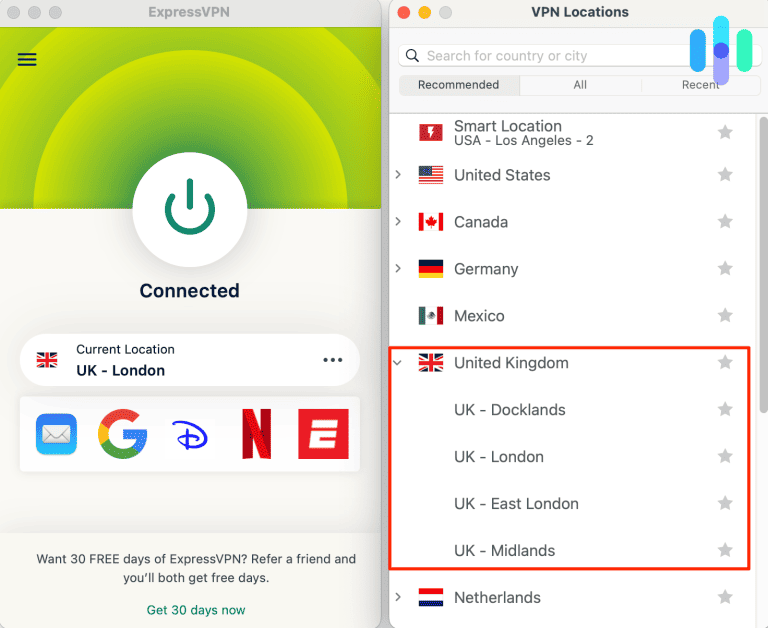
ExpressVPN supports Lightway UDP, Lightway TCP, WireGuard, and OpenVPN on compatible devices. Its connection troubleshooting guide recommends Automatic protocol selection first. If the VPN cannot connect, users can try other supported protocols.
Protocol availability varies by device. The official server directory shows multiple protocol options for its UK locations, but the installed application determines which choices are available on a particular operating system.
ExpressVPN also publishes a virtual server location directory. Some international locations use servers physically hosted in another country. For example, its Indian virtual locations may use infrastructure in the United Kingdom or Singapore.
The United Kingdom itself does not appear on ExpressVPN’s virtual-location list. ExpressVPN states that locations outside that list have hardware physically hosted in the advertised country. Therefore, its listed UK locations qualify as UK-hosted under the company’s documentation.
Connection speed depends on server load, distance, internet performance, and protocol selection. Using Lightway or WireGuard may improve efficiency on supported devices, but neither protocol changes Netflix’s licensing requirements.
If Netflix displays a VPN-related error, follow Netflix’s support recommendations. ExpressVPN cannot guarantee that any particular UK server will make Zift accessible from the United States.
3. NordVPN
NordVPN is the third option in this comparison. Its UK network includes several city locations, automatic server selection, NordLynx, and SmartPlay technology.
According to NordVPN’s official UK server page, the company currently lists 821 servers across four UK cities: London, Manchester, Edinburgh, and Glasgow. Server totals can change as NordVPN adjusts its network.
The easiest way to connect is to open the NordVPN application and select the United Kingdom from the country list or map. NordVPN automatically chooses a suitable available server.
Users can also select a specific UK city. On supported desktop applications, open the location options beside United Kingdom and choose London, Manchester, Edinburgh, or Glasgow. Manual selection can help diagnose unstable connections or investigate network routing.
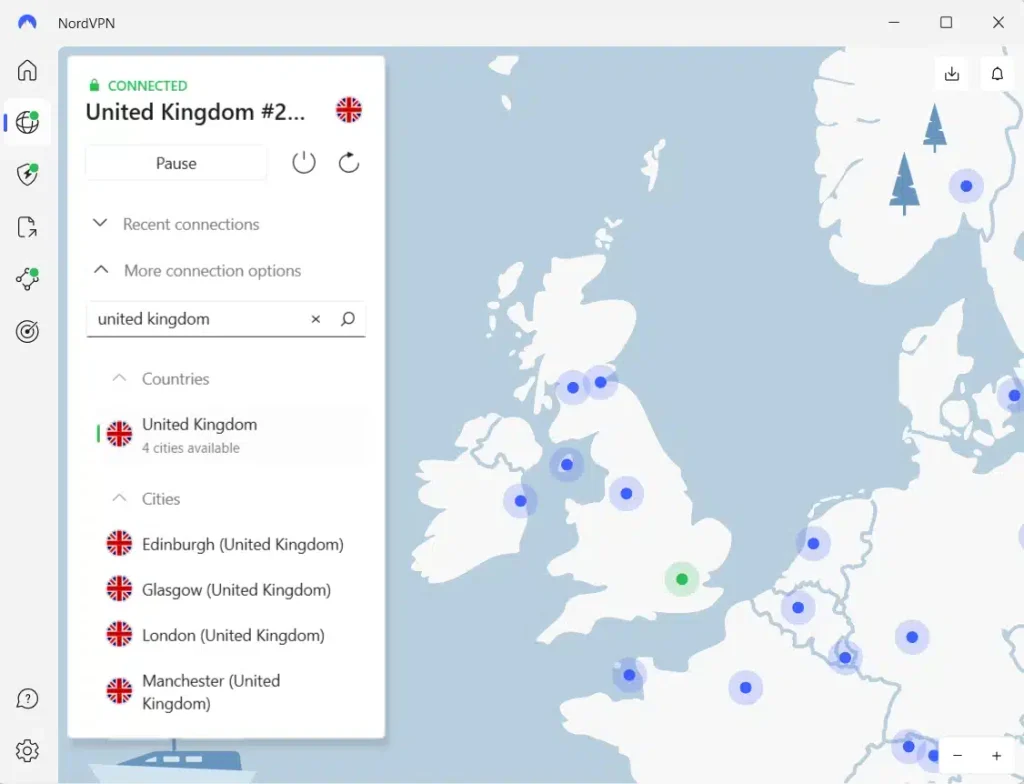
NordVPN uses NordLynx, a protocol built around WireGuard technology. Its official NordLynx documentation describes its focus on efficient encrypted connections and reduced performance overhead.
NordVPN also offers SmartPlay, which combines VPN protection with DNS-related technology. According to its SmartPlay documentation, this feature activates automatically whenever a user connects through a NordVPN application.
You do not need to configure SmartPlay separately. It works alongside the VPN connection to support private streaming access to content users are authorized to watch. However, SmartPlay cannot guarantee that Netflix will display Zift through a UK connection.
If NordVPN experiences connection problems, try another UK city, return to automatic server selection, or review the active connection protocol. NordLynx may help maintain efficient performance on supported devices.
A large server network offers more connection choices, but server count alone does not determine Netflix access. Netflix may detect VPN traffic, limit regional movies, or prevent playback regardless of the selected NordVPN server.
What to do if Zift does not appear
If Zift does not appear in Netflix search results, check whether Netflix is loading correctly and whether your profile permits mature content. VPN recognition, licensing restrictions, profile settings, and outdated browser data can all affect availability.
- Close Netflix completely. Exit the browser or quit the application rather than leaving the streaming session active.
- Disconnect from the VPN using the application’s connection controls.
- Reconnect to the United Kingdom only when your VPN provider’s terms and Netflix’s rules permit the connection.
- Try another server or location in the same country to investigate connection problems. Changing servers does not guarantee access to Zift.
- Clear Netflix cookies and browser cache to remove outdated website data.
- Open an incognito or private browser window to test Netflix without stored browsing information.
- Reopen Netflix and sign in with your existing account credentials.
- Search for Zift again. You can also identify the movie by its original Bulgarian title, Дзифт.
Private Internet Access users can investigate ordinary connection problems through UK London, UK Manchester, and UK Southampton. UK Streaming Optimized is available for permitted streaming while physically in the United Kingdom. PIA prohibits using its service to bypass geographic content restrictions.
ExpressVPN users can select London, East London, Docklands, Wembley, Manchester, Midlands, or Tottenham. A different location may improve network stability, but it cannot guarantee that Netflix will permit regional playback.
NordVPN users can choose London, Manchester, Edinburgh, or Glasgow. The automatic UK connection option can also select a server according to current network conditions.
Netflix UK identifies the movie as Zift, while JustWatch records its original title as Дзифт. Search for the English title first, then check the cast and release year if the results appear ambiguous.
Netflix explains additional reasons for missing titles in its missing movie troubleshooting guide. These include regional licensing, VPN connections, maturity restrictions, and profile language settings.
If Netflix recognizes a VPN, it may display only globally licensed titles or generate a playback error. Changing servers does not guarantee a solution. Netflix recommends disconnecting VPN services when they interfere with playback.
Netflix may detect the VPN
A VPN routes internet traffic through a remote server, changing the public IP address that websites see. Connecting to a UK VPN location may cause websites to associate your traffic with the United Kingdom instead of the United States.
However, a British IP address does not automatically provide access to every movie in Netflix UK’s catalog. Netflix uses territorial licensing agreements and may recognize traffic from VPN services.
Its VPN support policy explains that VPN users may see only movies and shows available worldwide. Consequently, Zift may remain absent even when a VPN reports an active UK connection.
Netflix may also display a VPN or proxy error. Its VPN error guide recommends disconnecting the VPN if these problems occur.
Private Internet Access, ExpressVPN, and NordVPN cannot control Netflix’s licensing agreements or detection systems. Their UK server networks do not guarantee access to Zift.
Can you use a Netflix ad-supported plan with a VPN?
No. Netflix does not support VPN connections for ad-supported streaming experiences. Users may encounter playback errors when attempting to stream while connected to a VPN.
Netflix explains this restriction in its ad-supported VPN troubleshooting guide. The company recommends disconnecting the VPN when it causes playback problems, including error E121.
Ad-free subscriptions avoid this specific plan restriction, but Netflix may still detect VPN connections and restrict regional titles. An ad-free plan does not guarantee access to Zift through Netflix UK from the United States.
Does changing the VPN location change your Netflix account?
No. Changing your VPN server does not automatically change your Netflix account credentials, profiles, passwords, payment details, or billing country. It changes the public IP address associated with your internet connection.
Netflix maintains different catalogs because studios and distributors license movies for different territories. Its account country documentation explains that changing your account’s registered country generally requires moving to another country.
Netflix may also restrict the available catalog when it recognizes a VPN. Your account can remain unchanged while the service displays fewer titles.
American viewers who want an alternative can check the current US streaming options for Zift. JustWatch lists AMC+, Sundance Now, and Philo among subscription services, along with Apple TV Store rental and purchase options. Check availability before subscribing.
Which VPN should you use?
Private Internet Access remains our Editor’s Choice because it documents UK London, UK Manchester, UK Southampton, and UK Streaming Optimized, along with WireGuard and OpenVPN support. These features provide connection flexibility for privacy and permitted streaming. However, PIA expressly prohibits circumventing content providers’ geographic restrictions, making that limitation essential when considering Netflix titles unavailable in the United States.
ExpressVPN offers seven documented UK locations, including London, East London, Docklands, Wembley, Manchester, Midlands, and Tottenham. It supports Lightway and other protocols on compatible devices. NordVPN offers 821 UK servers across London, Manchester, Edinburgh, and Glasgow, along with NordLynx and automatically enabled SmartPlay. Both providers offer useful connectivity features, but neither guarantees Netflix regional access.
Zift (2008), also known by its original Bulgarian title Дзифт, currently has a verified Netflix listing in the United Kingdom. Netflix US does not currently list the film as a subscription offering. However, streaming through a VPN from the United States is not guaranteed. Netflix’s licensing restrictions, VPN detection, subscription requirements, and VPN provider terms determine whether access and playback are permitted.
Zift (2008) is currently available on Netflix in the United Kingdom. The official Netflix UK page and JustWatch UK confirm its listing. The movie’s original Bulgarian title is Дзифт.
Zift is not currently available through Netflix US, but Netflix UK lists the movie. VPN providers offer UK connections, although Netflix may detect VPNs and restrict regional titles. Follow Netflix’s rules and your VPN provider’s terms, or use an authorized US streaming alternative.
Private Internet Access is our Editor’s Choice for its documented UK locations and streaming-optimized option, followed by ExpressVPN and NordVPN. However, PIA prohibits bypassing geographic content restrictions, and no VPN guarantees access to Zift.
Restart Netflix, check your profile settings, and clear outdated browser data. Search for Zift or its original title, Дзифт. Netflix may hide regional titles when it detects a VPN, and changing servers does not guarantee access.
No. Netflix does not support VPN connections with ad-supported streaming experiences. Disconnect the VPN if Netflix displays a related error. Ad-free subscriptions avoid that specific restriction, but Netflix may still detect VPNs and limit regional movies.


Read our disclosure page to find out how can you help VPNCentral sustain the editorial team Read more


Improve this guide




User forum
0 messages