
Keep Aware report says enterprise browsers have become a major blind spot for AI, data loss, and phishing


 5 min. read
  Published on

The browser now handles far more than web pages, and that shift is creating a growing security gap for enterprises. According to Keep Aware’s newly released 2026 State of Browser Security Report, browsers have become the main workspace for AI tools, SaaS activity, and sensitive data handling, yet many organizations still secure them as if they were just another web access layer.
The report argues that 2025 marked a turning point for AI in the browser. Keep Aware says AI-native browsers, embedded copilots, and standalone generative AI tools moved from niche experimentation into everyday business use, which means more enterprise data now flows through browser sessions than many security teams can actually inspect.
One caveat matters here: the figures come from Keep Aware’s own customer telemetry and sponsored report summary, not from an independently audited public dataset. Keep Aware says its broader browser security research relies on anonymized console data from current customers, and its earlier 2025 report said the research used one year of customer data plus some metrics from a recent 30-day period.
What the report says changed in 2025
Keep Aware says 41% of end users interacted with at least one AI web tool, and the average employee used 1.91 AI tools. In the company’s view, that makes browser-level visibility more important because employees increasingly draft content, analyze data, write code, and conduct research inside AI interfaces that live in ordinary browser tabs.

The report also says governance has not kept pace with usage. Employees often switch between corporate and personal accounts in the same browser, which can place sensitive company data into tools and sessions that sit outside normal enterprise oversight.
Key findings from the report
| Finding | What Keep Aware says |
|---|---|
| AI tool adoption | 41% of end users interacted with at least one AI web tool, averaging 1.91 AI tools per employee |
| Sensitive data destination | 54% of sensitive inputs went to corporate accounts, while 46% went to personal or unverified work accounts |
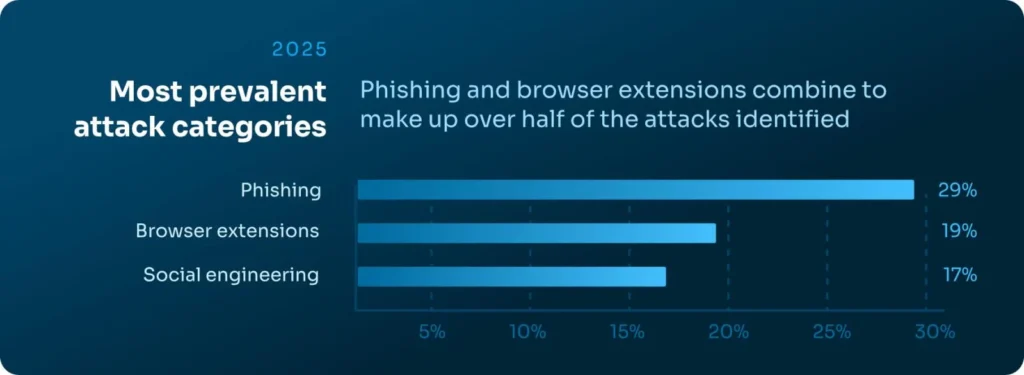
| Most common browser attack categories | Phishing at 29%, suspicious or malicious extensions at 19%, and social engineering at 17% |
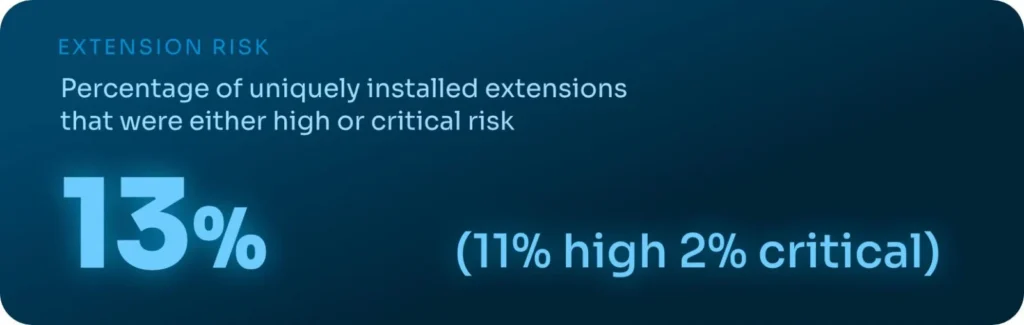
| Extension exposure | 13% of uniquely installed extensions were labeled High or Critical risk |
| Phishing infrastructure trend | Phishing domains had a median age of more than 18 years, according to the report |
Those numbers support the report’s main thesis: the problem is no longer just which app an employee opens. It is also which account they use, what data they type or paste into a session, and what browser-side code runs while they do it.
Why the “trusted app” model breaks down
One of the more useful takeaways in the report is its challenge to a common enterprise assumption: if a company sanctions an app like Google Workspace, Slack, Box, or SharePoint, then the data risk is under control. Keep Aware says that assumption misses a big part of the problem because the same app may be accessed through personal identities or unverified work accounts inside the same browser.
That means traditional application-based blocking does not always solve the issue. A browser session can still expose sensitive data through pasted text, typed inputs, file uploads, or AI prompts even when the destination platform looks familiar and approved.
Browser attacks are shifting around older controls
Keep Aware says attackers continue to move into the browser because it sits beyond the reach of many traditional defenses. The report says modern campaigns increasingly rely on chained redirects, cloaking, CAPTCHA gates, and conditional logic so automated scanners do not see the same malicious content that a human victim sees in the live session.
The company’s own website frames the same argument more broadly. Keep Aware says the browser remains a blind spot for real-time threat detection, data leakage, phishing, malicious extensions, and AI-driven misuse, and it positions its product around visibility inside the browser itself rather than only at the network or endpoint layer.
Why extension risk still stands out
Extensions remain one of the easiest ways to place privileged code into a user’s browsing session. Keep Aware says 13% of uniquely installed extensions in its telemetry fell into the High or Critical risk category, and it argues that marketplace labels and “productivity” branding often hide broad permissions tied to tabs, cookies, storage, and web requests.
That fits the company’s product messaging as well. Keep Aware says extension management and risk assessment remain a core part of its browser security platform.
What security teams should take from this
- Review browser sessions as a primary security surface, not just a delivery channel for SaaS.
- Track account context inside sanctioned apps, especially personal versus corporate identities.
- Inspect typed, pasted, and uploaded data in browser workflows if policy and tooling allow it.
- Audit installed extensions continuously rather than relying on one-time approvals.
- Expect more AI-related policy drift because employees now use multiple AI tools in normal browser sessions.
FAQ
The report says the browser has become the most important and least protected control point in many enterprises, especially as AI tools and browser-native workflows become mainstream.
Yes. Keep Aware says its browser security reporting draws from anonymized data collected through its customer console, at least in its published report methodology for the prior report.
Keep Aware says 41% of end users interacted with at least one AI web tool and that employees used an average of 1.91 AI tools each.


Read our disclosure page to find out how can you help VPNCentral sustain the editorial team Read more


Improve this guide




User forum
0 messages