
Malicious OAuth Approval Can Give Attackers Persistent Access to Salesforce Data


 12 min. read
  Published on
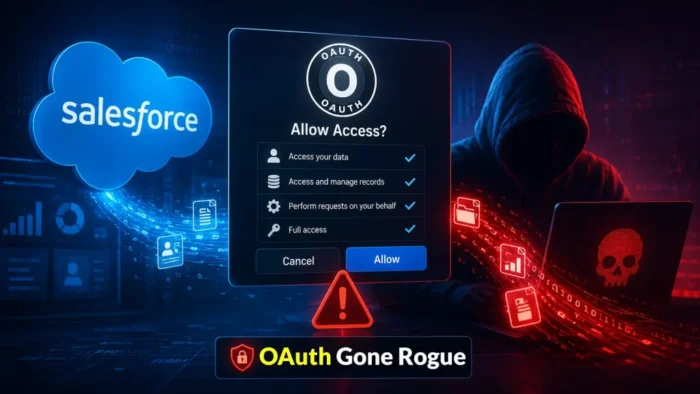
A Salesforce user who approves an attacker-controlled OAuth application can give it continuing access to CRM data under the user’s existing permissions. The attacker may then query records, export information, and use Salesforce APIs without repeatedly entering the employee’s password.
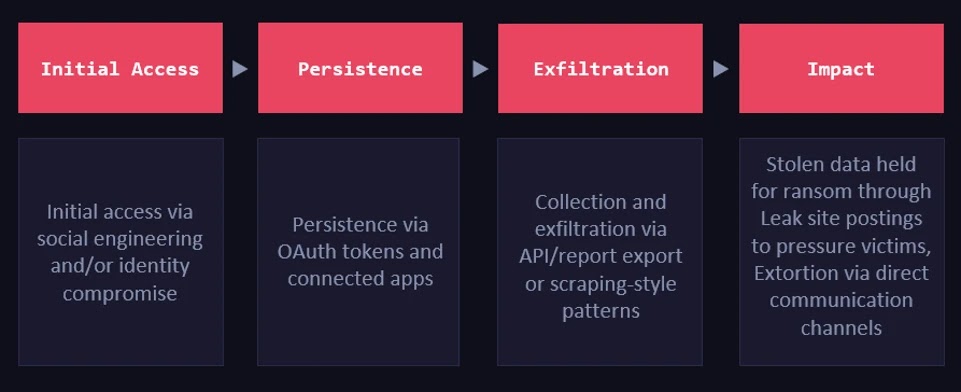
Microsoft observed this technique in campaigns conducted between mid-2025 and mid-2026 using tradecraft associated with ShinyHunters. Attackers posed as IT support staff and guided employees through the approval of a malicious connected application disguised as a legitimate Salesforce Data Loader tool.

Access content across the globe at the highest speed rate.
🔥 Save 81% + 2 bonus months! 🔥
70% of our readers choose Private Internet Access
70% of our readers choose ExpressVPN
2
Browse the web from multiple devices with industry-standard security protocols.
🔥 Save 73%! 🔥

Faster dedicated servers for specific actions (currently at summer discounts)
🔥 Save 69%! 🔥
The activity did not exploit a vulnerability in Salesforce. According to Microsoft Security Research, the attackers abused legitimate OAuth authorization, trusted third-party integrations, and permissions that organizations had already granted.
How One OAuth Approval Creates Salesforce Access
OAuth allows an application to act on a user’s behalf without receiving that user’s password. The authorization screen lists the access requested by the application, such as identity information, API access, or permission to perform actions while the user is offline.
If the employee approves the request, Salesforce issues tokens that the connected application can use within the approved scopes. The application also inherits the effective access of the user who granted consent.
Depending on the granted scopes, token type, session policy, and connected-app configuration, access may continue after the original browser session ends. It remains available until the token expires, an administrator revokes it, the application’s access is removed, or another security policy invalidates the session.
| OAuth stage | What happens | Security consequence |
|---|---|---|
| Application request | A connected app asks the user for defined OAuth scopes | The consent screen becomes a security decision |
| User approval | The employee authorizes the application | The app receives access linked to that user |
| Token use | The app calls Salesforce APIs | Activity may resemble normal integration traffic |
| Continued access | A valid token or refresh capability remains available | The attacker may retain access without another password prompt |
| Revocation | An administrator removes the app or token | Further token-based access should stop |
Attackers Impersonated IT Support
Microsoft said the voice-phishing campaign began in mid-2025. Attackers called employees while pretending to represent an organization’s IT or technical-support team.
The callers directed victims through Salesforce’s connected-app authorization process. In several confirmed cases, they presented an attacker-controlled application as a legitimate Salesforce Data Loader utility.
Once the user approved the application, the attackers could make API calls on that person’s behalf. Microsoft observed capabilities that included enumerating Salesforce instances, maintaining access to CRM data, and potentially moving toward other SaaS platforms when exposed credentials supported it.
Why MFA Does Not Automatically Stop OAuth Consent Abuse
Multi-factor authentication helps protect the sign-in process, but it does not make every action performed after authentication safe. A user who has completed MFA can still authorize a malicious application.
The attacker does not need to steal the employee’s password or defeat MFA if the employee willingly completes the OAuth consent workflow. The resulting token represents an authorized application relationship.
This makes employee verification procedures essential. Staff should never approve a Salesforce connected app because an unsolicited caller, chat message, or email instructs them to do so.
What Attackers Can Access Through the Connected App
The application’s reach depends on both the requested OAuth scopes and the Salesforce permissions of the approving user. A low-privilege user does not automatically grant administrative access, but many business users can still view valuable customer and operational records.
Microsoft observed attackers performing discovery, bulk queries, and large-scale collection of CRM data. Targeted records included account details, contacts, and service case information.
The malicious application may also expose a broader business picture by connecting customer identities, support records, sales activity, partner information, and internal notes.
- Customer names and contact information
- Account and opportunity records
- Sales history and commercial discussions
- Support cases and case descriptions
- Partner and supplier information
- Internal notes and custom CRM objects
- Credentials or tokens accidentally stored in records
- Information useful for follow-up phishing or extortion
Approved Application Traffic Can Evade Sign-In Alerts
Traditional identity monitoring often focuses on passwords, interactive logins, impossible travel, unfamiliar devices, or repeated authentication failures. OAuth abuse can bypass much of that visibility because the application uses a token granted through a legitimate authorization flow.
API calls made through an approved connected application may resemble normal integration activity. The attacker may not create a new interactive login for every query or export.
Security teams therefore need application attribution, token context, API telemetry, and Salesforce event data. Login monitoring alone cannot fully reveal what an authorized application does after consent.
Trusted SaaS Integrations Created a Second Attack Path
Microsoft also documented supply-chain attacks involving vendors whose products already connected to customer Salesforce environments. Instead of persuading each customer’s employee to approve a new application, attackers targeted credentials and tokens held by trusted integration providers.
In August 2025, compromised Salesloft Drift credentials exposed connection secrets that supported OAuth-token use across customer Salesforce instances. A later campaign targeted Gainsight-published applications and used trusted external connections for continuing API access.
Microsoft also connected the broader pattern to a June 2026 incident at Klue. In its security incident update, Klue said an attacker compromised a legacy credential associated with an integration service, obtained OAuth tokens, and accessed data in some connected customer environments, including Salesforce.
| Intrusion route | Initial access | Resulting risk |
|---|---|---|
| Malicious app consent | Employee approves an attacker-controlled connected app | API access under the employee’s permissions |
| Trusted vendor compromise | Attacker steals integration credentials or OAuth tokens | Access to multiple connected customer environments |
| Overprivileged guest access | Public Experience Cloud permissions expose unintended objects or fields | Unauthenticated querying of CRM information |
Experience Cloud Guest Access Is a Separate Risk
Salesforce has separately warned about attacks targeting overly permissive Experience Cloud guest-user configurations. Public Experience Cloud sites can provide anonymous visitors with a shared guest profile for information intended to be publicly available.
According to the Salesforce guest-access advisory, attackers have used a modified version of Aura Inspector to scan public sites and extract information where customers granted guest profiles excessive object, record, field, or API permissions.
This issue also does not represent an inherent Salesforce vulnerability. It arises when a customer configuration makes more data publicly accessible than intended. Administrators should handle it separately from malicious OAuth consent and compromised vendor tokens.
Why Dormant OAuth Apps Remain Dangerous
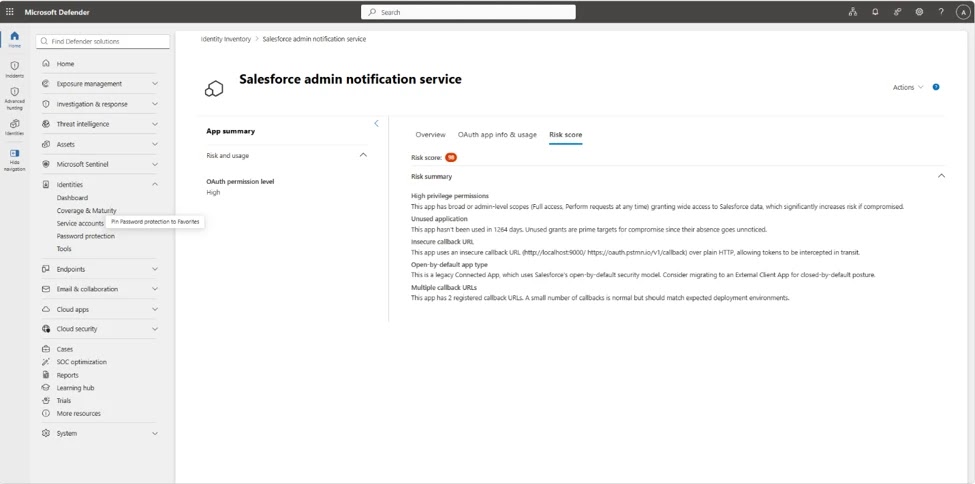
Organizations often retain connected applications after projects, pilots, and vendor relationships end. Those dormant applications may keep sensitive permissions even when employees no longer use them.
Microsoft’s new Salesforce posture capabilities can identify applications that have remained inactive for extended periods, including periods of 90 days or more. Inactivity should trigger a review, not an automatic assumption that an application remains safe or necessary.
Security teams should remove obsolete applications, revoke unused grants, and require owners to justify powerful scopes. Every approved integration increases the number of identities and tokens that can reach Salesforce data.
How to Detect Malicious Salesforce OAuth Activity
Defenders should monitor what connected applications do after authorization. High API volume, unexpected report exports, new network locations, unfamiliar application identifiers, and access to unusual CRM objects can indicate abuse.
The Microsoft campaign report recommends correlating connected-app identity, OAuth scopes, user identity, session information, API activity, IP address, user agent, and accessed Salesforce objects.
Salesforce also recommends proactive log review. Its data breach prevention guidance highlights Event Monitoring for tracking logins, API calls, report exports, configuration changes, and unusual data access.
- New or unfamiliar connected applications
- Apps requesting broad API or offline-access scopes
- Consent granted shortly after an unsolicited support call
- Connected-app activity from a new IP address
- API calls to objects the user does not normally access
- Sudden increases in SOQL queries or API usage
- Large report exports and bulk data downloads
- Activity outside normal business hours
- Tokens associated with inactive or retired integrations
- Guest-user requests targeting unexpected CRM objects
Confirmed Indicators From the Updated Microsoft Report
Microsoft’s current report retains four IP addresses associated with the Klue-related investigation. Only the first address has a specific public description in the advisory.
An IP match should support an investigation rather than serve as proof of compromise by itself. Security teams should correlate it with Salesforce API activity, connected-app identity, affected user accounts, object access, and the relevant date range.
The two previously listed addresses in the 103.75.11.0/24 range should not be treated as malicious indicators from this campaign because Microsoft removed them after determining that they belonged to a security researcher.
| Indicator | Type | Published context |
|---|---|---|
138.226.246.94 | IP address | Used by the Klue integration to query Salesforce CRM data on June 11, 2026 |
212.86.125.24 | IP address | Retained in Microsoft’s updated IoC list without a specific public description |
213.111.148.90 | IP address | Retained in Microsoft’s updated IoC list without a specific public description |
94.154.32.160 | IP address | Retained in Microsoft’s updated IoC list without a specific public description |
How Administrators Should Respond to a Suspicious OAuth App
Administrators should act quickly when they find an unfamiliar connected application or OAuth grant. Resetting the user’s password alone may not invalidate every application token or trusted integration.
The response should address the application, tokens, sessions, affected identities, data access, and any downstream SaaS services reached with exposed credentials.
- Identify the connected application, its owner, client identifier, scopes, and approving users.
- Block or remove the suspicious application from the Salesforce organization.
- Revoke OAuth tokens and terminate related sessions.
- Review API, report-export, query, and object-access events.
- Determine which accounts, contacts, cases, reports, and custom objects the app accessed.
- Search for application activity from unfamiliar IP addresses and user agents.
- Reset affected credentials and rotate any secrets found in Salesforce records.
- Review other SaaS platforms for use of the same credentials or integration tokens.
- Preserve relevant logs and evidence before completing cleanup.
- Notify legal, privacy, compliance, and affected business teams when required.
How to Reduce Salesforce OAuth Risk
Organizations should restrict who can authorize connected applications and require administrative review for apps requesting powerful scopes. Application names and logos should never serve as the only proof that a tool is legitimate.
Connected apps should receive the minimum access required for their business function. Administrators should also review refresh-token policies, permitted users, IP restrictions, session duration, and the ongoing need for offline access.
Employee training should explain that an OAuth approval can grant access comparable to handing an application a durable credential. Staff should verify support requests through an established internal channel before following instructions involving Salesforce permissions.
- Require approval for new connected applications
- Limit application authorization to approved users
- Apply least-privilege OAuth scopes
- Review apps inactive for 90 days or more
- Remove integrations when vendor relationships end
- Use short token lifetimes where business requirements allow
- Monitor connected-app activity rather than only interactive logins
- Verify IT support requests through known contact methods
- Maintain an owner and business justification for every integration
- Test token-revocation and incident-response procedures
Experience Cloud Guest Permissions Need Their Own Review
Organizations operating public Experience Cloud sites should audit the guest user profile and remove access to objects and fields that anonymous visitors do not require.
The Salesforce security recommendations include setting external defaults to private, enabling secure guest-user record access, disabling public APIs when unnecessary, restricting user visibility, and reviewing field-level security.
Salesforce identifies disabling guest access to public APIs as a high-impact measure when the site does not require that functionality. Administrators should also inspect Aura event logs for requests targeting unexpected objects, sudden query spikes, and activity from unfamiliar networks.
OAuth Governance Must Cover Third-Party Vendors
Reviewing employee-approved applications addresses only one part of the problem. Trusted vendors can also hold OAuth tokens and connection secrets that reach large numbers of customer environments.
Organizations should ask vendors how they store tokens, protect legacy integration credentials, monitor unauthorized API use, revoke customer access, and notify customers after a security incident.
Klue said it revoked affected credentials and tokens, removed unauthorized code, disabled potentially affected integrations, and notified impacted customers. The Klue incident disclosure illustrates how one compromised integration service can create downstream exposure across several connected platforms.
Persistent Access Ends Only When Trust Is Removed
OAuth access is not necessarily permanent, but it can outlast the interaction that created it. A victim may end the phone call, close the browser, or change a password while the application token remains usable under the organization’s token and session policies.
Security teams must revoke the application relationship and investigate what the app did while authorized. They should not treat password resets as a complete response to OAuth compromise.
Salesforce customers can improve detection by combining application inventory, permission reviews, Event Monitoring, API analysis, third-party risk management, and employee verification procedures. Salesforce’s monitoring guidance recommends correlating API activity with user access and setting alerts for excessive requests, unusual integrations, and activity outside normal hours.
FAQ
Yes. An approved connected application can receive tokens that allow it to call Salesforce APIs under the user’s permissions. Access can continue until the token expires or administrators revoke the token, application, or related session.
No. Microsoft and Salesforce said the observed activity abused legitimate OAuth relationships, compromised third-party integrations, social engineering, and customer-configured permissions rather than an inherent Salesforce platform vulnerability.
Attackers impersonated IT support personnel during voice-phishing calls and guided employees through an OAuth consent process. The malicious connected application was presented as a legitimate Salesforce Data Loader tool.
A password change alone may not revoke every application token. Administrators should remove or block the connected app, revoke its OAuth tokens, terminate related sessions, and review the app’s API activity.
Defenders should monitor unfamiliar connected apps, broad OAuth scopes, new IP addresses, unusual API volume, large report exports, unexpected object queries, inactive integrations, and guest-user requests targeting data that should not be public.
Microsoft’s updated advisory retains 138.226.246.94, 212.86.125.24, 213.111.148.90, and 94.154.32.160. Two addresses previously associated with Aura activity were removed after Microsoft identified them as belonging to a security researcher.


Read our disclosure page to find out how can you help VPNCentral sustain the editorial team Read more


Improve this guide




User forum
0 messages