
Microsoft confirms Remote Desktop warning display bug after April 2026 Windows update


 6 min. read
  Published on
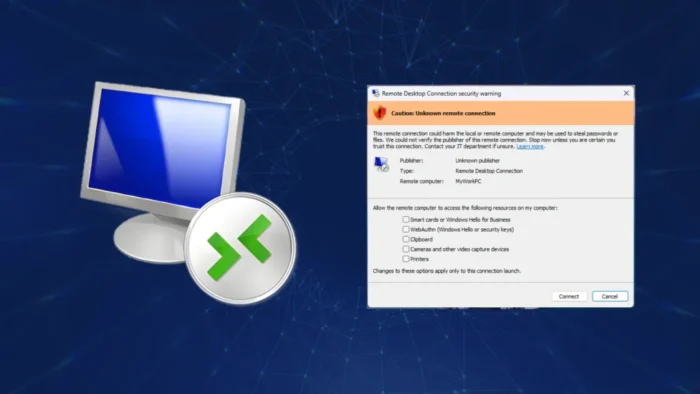
Microsoft has confirmed a Windows issue that can cause new Remote Desktop security warnings to display incorrectly after the April 2026 security updates. The problem affects systems using multiple monitors with different display scaling settings, such as one screen set to 100% and another set to 125%.
The warning may show overlapping text or partially hidden buttons, which can make the Remote Desktop prompt harder to read or use. This matters because Microsoft added these warnings to help users understand the risks before opening Remote Desktop Protocol files.

Access content across the globe at the highest speed rate.
70% of our readers choose Private Internet Access
70% of our readers choose ExpressVPN

Browse the web from multiple devices with industry-standard security protocols.

Faster dedicated servers for specific actions (currently at summer discounts)
The issue affects the new security dialogs introduced with the April 2026 updates for supported Windows versions. Microsoft says it will fix the bug in a future Windows update, but it has already shared temporary workarounds for affected users.
Why the Remote Desktop warning matters
Starting with the April 2026 security update, the Remote Desktop Connection app now shows additional warnings when users open .rdp files. These dialogs appear before the connection starts and show details such as the remote computer address and requested local resource access.
Microsoft added the warnings because RDP files can create real security risks. A malicious .rdp file can connect a victim to an attacker-controlled remote system and expose local resources such as the clipboard, drives, printers, smart cards, or camera.
The change also relates to CVE-2026-26151, a Windows Remote Desktop spoofing vulnerability. NVD describes the flaw as insufficient UI warning of dangerous operations in Windows Remote Desktop, allowing an unauthorized attacker to perform spoofing over a network.
What goes wrong on affected systems
The display bug appears when a PC uses more than one monitor with different scaling values. In that setup, the Remote Desktop warning window may not render correctly.
Microsoft says users may see overlapping text or buttons that appear partly hidden. That can make the warning difficult to read, and it may also make it harder to select the right option before connecting.
This creates a usability problem around a security feature. The warning exists to make users stop, review the remote destination, and decide which local resources to share. If the dialog becomes hard to read, users may approve a connection without fully understanding what the .rdp file is requesting.
At a glance
| Item | Details |
|---|---|
| Issue | Remote Desktop security warning may display incorrectly |
| Trigger | Multiple monitors with different display scaling values |
| Example setup | One display at 100%, another at 125% |
| Visible problem | Overlapping text or partially hidden buttons |
| Affected feature | New warning dialogs when opening .rdp files |
| Introduced with | April 2026 Windows security updates |
| Security context | CVE-2026-26151 Remote Desktop spoofing issue |
| Temporary fix | Use the same scaling value on all monitors |
| Permanent fix | Microsoft says a future Windows update will address it |
Which Windows updates are affected
Microsoft’s known issue text appears across multiple April 2026 update pages. This includes Windows 11 updates such as KB5083769 and KB5083768, along with other supported Windows releases.
BleepingComputer reported that the issue affects all supported Windows versions, including Windows 11, Windows 10, and Windows Server updates released in April 2026.
For Windows 11 users, the issue is tied to April 2026 cumulative updates that introduced the new RDP warning behavior. Microsoft’s own update notes list the multi-monitor scaling problem and explain how users can work around it until a permanent fix arrives.
Microsoft’s workaround
Microsoft recommends setting the same display scaling value on every monitor. Users can do this from Windows Display settings.
Open <strong>Settings</strong>, go to <strong>System</strong>, then select <strong>Display</strong>. Choose each monitor and set the same value under <strong>Scale & layout</strong>.
Microsoft also says users can use keyboard navigation if the warning is difficult to select with a mouse. Press <strong>Tab</strong> to move through the options, then press <strong>Spacebar</strong> to select the highlighted option.
What admins should tell users
IT teams should warn users not to ignore Remote Desktop warnings, even if the dialog looks broken. The warning still provides important information about the remote computer and local resources requested by the .rdp file.
Users should check the remote address before connecting. They should also avoid opening unexpected .rdp files, especially from email, chat apps, ticket comments, or unknown download links.
For managed environments, admins may want to standardize display scaling on multi-monitor workstations until Microsoft releases the fix. This is especially useful for help desk teams, administrators, developers, and remote workers who open RDP files often.
Why this is more than a visual bug
The issue does not appear to break Remote Desktop itself, but it affects a warning designed to stop unsafe connections. That makes it more important than a normal interface glitch.
Attackers can abuse RDP files in phishing campaigns because users often treat them like simple connection shortcuts. Microsoft’s guidance warns that malicious RDP files can share local resources with a remote system controlled by an attacker.
The new warning system reduces that risk by asking users to review the connection first. Until the rendering bug is fixed, users on mixed-DPI setups need to slow down and check the prompt carefully.
What users should do now
- Set the same display scaling value on all monitors.
- Use <strong>Tab</strong> and <strong>Spacebar</strong> if buttons are hard to click.
- Do not open unexpected
.rdpfiles. - Check the remote computer address before connecting.
- Leave local resource sharing disabled unless it is needed.
- Report suspicious RDP files to IT or security teams.
- Install future Windows updates when Microsoft releases the fix.
FAQ
It is a Windows issue where new Remote Desktop security warning dialogs can show overlapping text or partially hidden buttons on systems with multiple monitors using different display scaling values.
Microsoft introduced the new warning dialogs with the April 2026 security update. They appear when users open Remote Desktop .rdp files.
Microsoft added them to warn users about the risks of .rdp files, including unwanted sharing of local resources such as drives, clipboard, printers, smart cards, and cameras.
Microsoft says it will address the issue in a future Windows update. For now, users can set the same display scaling value on all monitors or use keyboard navigation inside the warning dialog.


Read our disclosure page to find out how can you help VPNCentral sustain the editorial team Read more


Improve this guide

User forum
0 messages