
Microsoft Defender false positive flags DigiCert root certificates as malware


 5 min. read
  Published on
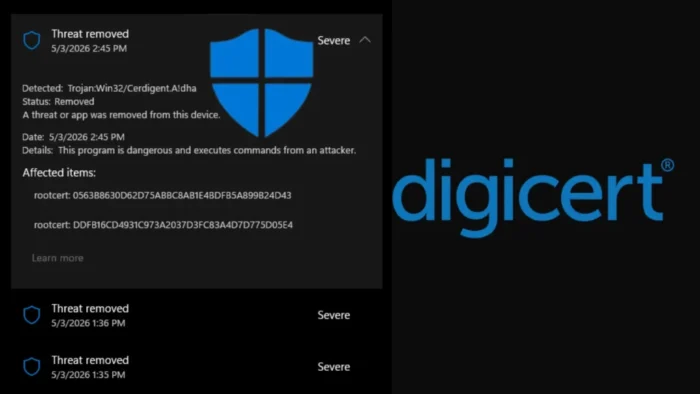
Microsoft Defender incorrectly flagged legitimate DigiCert root certificates as malware, triggering high-severity Trojan:Win32/Cerdigent.A!dha alerts across Windows environments.
The issue came from a Microsoft Defender security intelligence update, not from a compromise of the affected DigiCert root certificates. Microsoft later updated the detection logic and told customers to move to Security Intelligence version 1.449.430.0 or later.

Access content across the globe at the highest speed rate.
70% of our readers choose Private Internet Access
70% of our readers choose ExpressVPN

Browse the web from multiple devices with industry-standard security protocols.

Faster dedicated servers for specific actions (currently at summer discounts)
DigiCert also confirmed that its certificates remain secure and trustworthy. The company said certificates wrongly removed by Defender should return automatically after users update Microsoft Defender.
What happened
The false positive centered on the detection name Trojan:Win32/Cerdigent.A!dha. Microsoft’s own threat page lists the detection as published on April 30, 2026, and Microsoft’s change log shows it in Security Intelligence update version 1.449.424.0.
Administrators started reporting that Defender detected DigiCert certificate store entries as malware. In some cases, Defender also removed the affected entries from the Windows AuthRoot trust store.
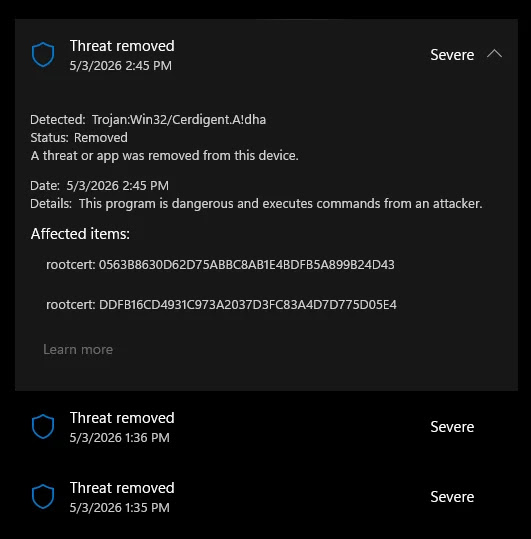
Microsoft later said it added detections after reports of compromised certificates, but it determined that false positive alerts had triggered by mistake. The company said it suppressed and cleaned up alerts for customer environments.
At a glance
| Item | Details |
|---|---|
| Detection name | Trojan:Win32/Cerdigent.A!dha |
| Product | Microsoft Defender Antivirus and Microsoft Defender for Endpoint |
| Issue type | False positive detection |
| Affected items | DigiCert root certificate entries in the Windows certificate store |
| Microsoft fix | Security Intelligence version 1.449.430.0 or later |
| User action | Update Defender and verify certificate restoration if needed |
Which DigiCert certificates triggered the alerts
Reports tied the Defender alerts to two DigiCert root certificates. The first was DigiCert Assured ID Root CA, with SHA1 fingerprint 0563B8630D62D75ABBC8AB1E4BDFB5A899B24D43.
The second was DigiCert Trusted Root G4, with SHA1 fingerprint DDFB16CD4931C973A2037D3FC83A4D7D775D05E4. DigiCert lists both fingerprints in its official root certificate documentation.
These root certificates help Windows and applications validate trusted TLS and code-signing chains. Removing them can create warnings or failures when software or services depend on those trust paths.
Why administrators noticed the issue quickly
Certificate-store detections cause immediate concern because root certificates sit at the foundation of Windows trust decisions. A real malicious root certificate can allow traffic interception or make unsafe software appear trusted.
That explains why Defender treated the detection seriously. However, this case involved legitimate DigiCert roots, so security teams had to separate real certificate abuse from a detection mistake.
The timing also added confusion because DigiCert separately disclosed a limited code-signing certificate incident in April 2026. DigiCert said that event involved a limited number of misissued code-signing certificates, which it revoked, and said there was no evidence of broader customer or system impact.
What Microsoft and DigiCert said
Microsoft said Defender added detections after reports of compromised certificates, then updated the alert logic after it found that false positives had triggered. Microsoft also advised customers to update to Security Intelligence version 1.449.430.0 or later.
DigiCert said the Defender alerts came from a Microsoft security intelligence update and did not indicate a DigiCert root certificate compromise.
DigiCert also said no action is required beyond keeping Microsoft Defender fully updated. The company added that certificates incorrectly removed by Defender should be restored after the update.
How to check affected systems
Administrators can first confirm that Microsoft Defender has received the corrected security intelligence update. They should check for version 1.449.430.0 or a later version.
Security teams can also check whether the DigiCert root certificates exist in the Windows AuthRoot store. This matters most in tightly managed environments where updates or automatic remediation may lag behind.
Microsoft Defender for Endpoint teams can review device timelines and advanced hunting data for certificate-store activity, Defender actions, and restored registry entries.
Useful checks for IT teams
certutil -store AuthRoot | findstr /i "DigiCert"Get-MpComputerStatus | Select-Object AntivirusSignatureVersionThe first command helps confirm that DigiCert entries appear in the AuthRoot store. The second command shows the Defender antivirus signature version on a Windows device.
Recommended response
- Update Microsoft Defender to Security Intelligence version 1.449.430.0 or later.
- Confirm that affected DigiCert certificates returned to the Windows AuthRoot store.
- Review Defender for Endpoint alerts and mark confirmed false positives according to internal policy.
- Check the Microsoft 365 admin center Service Health Dashboard for environment-specific guidance.
- Do not remove DigiCert root certificates manually unless a trusted vendor advisory specifically instructs it.
- Escalate systems that still show trust errors after Defender updates and certificate restoration.
Why this matters for enterprise environments
False positives inside the Windows certificate store can affect more than security dashboards. They can create trust failures for browsers, business applications, installers, update systems, VPN clients, and code-signing checks.
The incident also shows why automated remediation needs careful handling around foundational system components. Security tools must act fast against real certificate abuse, but a wrong detection can disrupt normal trust operations.
For most organizations, the practical fix is direct. Update Defender, confirm the certificates returned, and review any systems that still show certificate or TLS validation problems.
FAQ
The reports involved DigiCert Assured ID Root CA and DigiCert Trusted Root G4, both of which DigiCert lists in its official root certificate documentation.
Microsoft told customers to update to Security Intelligence version 1.449.430.0 or later.
The alerts used the detection name Trojan:Win32/Cerdigent.A!dha.
No. DigiCert said the Defender alert was a Microsoft false positive and not a compromise of DigiCert root certificates.


Read our disclosure page to find out how can you help VPNCentral sustain the editorial team Read more


Improve this guide



User forum
0 messages