
Microsoft Fixes Remote Desktop Warning Bug in Windows 11 Update


 5 min. read
  Published on
Microsoft has fixed a Windows issue that caused Remote Desktop security warnings to display incorrectly when users opened .rdp files. The fix is included in the optional KB5083631 preview update for Windows 11 version 24H2 and 25H2.
The bug appeared after the April 2026 security updates and mainly affected systems with more than one monitor using different display scaling settings. In those cases, the warning window could show overlapping text, hidden buttons, or controls that were hard to use.

Access content across the globe at the highest speed rate.
70% of our readers choose Private Internet Access
70% of our readers choose ExpressVPN

Browse the web from multiple devices with industry-standard security protocols.

Faster dedicated servers for specific actions (currently at summer discounts)
The issue mattered because these warnings were added to protect users from phishing attacks that abuse Remote Desktop connection files. If the warning does not display correctly, users may struggle to review the connection details before allowing access.
What Microsoft fixed
Microsoft says KB5083631 addresses a problem affecting the Remote Desktop Connection security warning dialog. The dialog could render incorrectly in multi-monitor setups when monitors used different scale values.
For example, a user with one display set to 100 percent scaling and another set to 125 percent scaling could see a broken warning window. Buttons might appear in the wrong place, while text could overlap or become difficult to read.
The fix currently appears in the optional Windows 11 preview update. Since preview updates are optional, many users may receive the same correction later through a regular cumulative update.
At a glance
| Detail | Information |
|---|---|
| Issue | Remote Desktop security warnings displayed incorrectly |
| Fixed in | Windows 11 KB5083631 preview update |
| Affected scenario | Multi-monitor setups with different display scaling |
| Cause window | After April 2026 Windows security updates |
| Main impact | Text and buttons in the warning dialog could overlap or become hard to use |
| Security context | Warnings were added to reduce phishing risks from malicious .rdp files |
Why the Remote Desktop warnings were added
Starting with the April 2026 security update, Windows shows stronger warnings when users open Remote Desktop connection files. These .rdp files can store connection settings and local resource-sharing options.
That feature is useful in enterprise environments, but it can also create risk. A malicious .rdp file can connect the victim to an attacker-controlled system and request access to local resources such as the clipboard, drives, cameras, microphones, printers, and security devices.
Microsoft now shows users the requested connection settings before the session starts. The dialog also turns resource redirection off by default, so users must choose what they want to share.
How the warning works
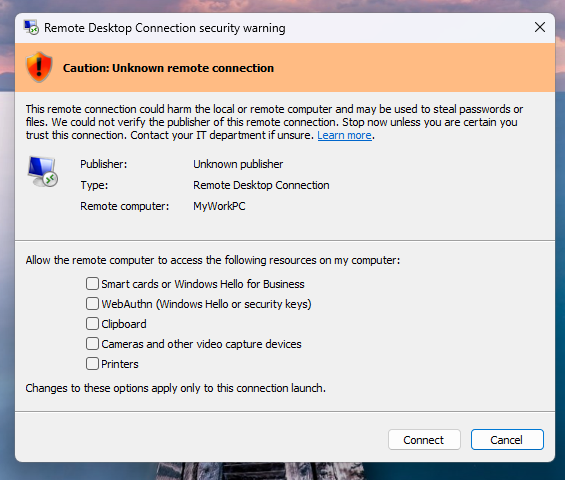
The first time a user opens an .rdp file after installing the April 2026 updates, Windows shows an educational prompt. It explains that Remote Desktop files can be risky when they come from email, downloads, or unknown senders.
After that, Windows displays a security dialog every time an .rdp file is opened. The dialog shows the remote computer address, the publisher status, and each local resource the file wants to redirect.
If the file is not digitally signed, Windows marks the publisher as unknown and warns the user about an unknown remote connection. If the file is signed, Windows still tells the user to verify the publisher before connecting.
Why attackers abuse .rdp files
Remote Desktop files can make phishing attacks more dangerous because they do not always behave like normal links or attachments. They can launch a connection and expose local resources if the user approves the prompts.
Microsoft says attackers have used malicious .rdp files in phishing campaigns to trick victims into connecting to attacker-controlled systems. Once connected, attackers may try to access files, credentials, clipboard data, or other redirected resources.
This is why the warning dialog needs to work clearly. A broken or unreadable warning makes it harder for users to understand what the file is trying to do.
What users should do now
- Install KB5083631 if you use Windows 11 24H2 or 25H2 and are affected by the display bug.
- Do not open unexpected .rdp files from email, chat apps, or download links.
- Check the remote computer address before connecting.
- Leave local resource sharing disabled unless you need it.
- Verify the sender through a separate channel before opening a business-related .rdp file.
- Report suspicious Remote Desktop files to your IT or security team.
Temporary workaround for affected systems
Microsoft’s workaround for systems that still show the broken dialog is to use the same display scaling value across all monitors. This can make the warning window render correctly until the fix is installed.
Users can open Display settings, select each monitor, and set the same scale value under Scale and layout. This workaround is useful for users who cannot install the preview update immediately.
If the buttons are difficult to select with a mouse, users can also move through the dialog with the Tab key and use the Spacebar to select a highlighted option.
KB5083631 includes more than the RDP fix
KB5083631 is a non-security preview update, so it focuses on quality improvements rather than new security patches. Microsoft says the update also includes fixes for Remote Credential Guard, Windows Security event logging, and other Windows 11 issues.
The Remote Desktop fix is still important for enterprise users because .rdp files remain common in business environments. Administrators often use them to simplify access to remote systems, virtual desktops, and internal servers.
Organizations that rely on Remote Desktop files should test the preview update before wider deployment, especially if their users have multi-monitor workstations with mixed scaling settings.
FAQ
Microsoft fixed a bug that caused Remote Desktop security warning dialogs to display incorrectly on systems with multiple monitors using different display scaling settings.
The fix is included in KB5083631, the optional preview cumulative update for Windows 11 version 24H2 and 25H2.
Microsoft added the warnings to reduce phishing risks from malicious .rdp files that can connect users to attacker-controlled systems and request access to local resources.
An .rdp file can request access to resources such as the clipboard, drives, cameras, microphones, printers, ports, smart cards, security keys, location, and other devices.


Read our disclosure page to find out how can you help VPNCentral sustain the editorial team Read more


Improve this guide
User forum
0 messages