
Microsoft Outlook.com Issue Blocks Some Users From Accessing Emails


 5 min. read
  Published on
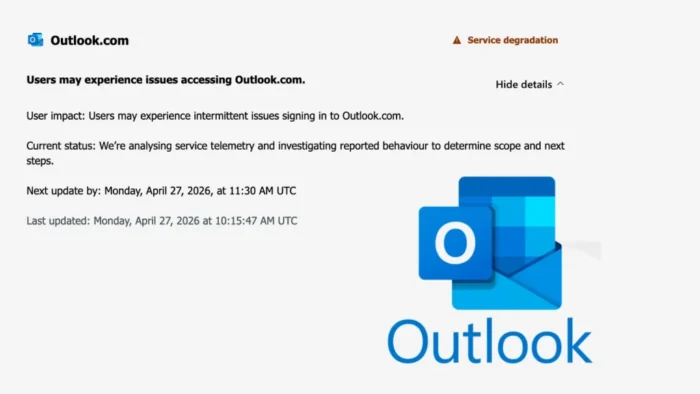
Microsoft is investigating an Outlook.com service issue that is preventing some users from signing in and accessing their mailboxes. The disruption began on Monday, April 27, 2026, and users reported login failures, connection errors, delayed mail access, and problems loading inboxes.
The issue affects Outlook.com, Microsoft’s consumer webmail service used by Outlook, Hotmail, Live, and MSN accounts. Microsoft said it was investigating intermittent sign-in problems, while outage trackers and user reports showed a spike in complaints during the morning.

Access content across the globe at the highest speed rate.
70% of our readers choose Private Internet Access
70% of our readers choose ExpressVPN

Browse the web from multiple devices with industry-standard security protocols.

Faster dedicated servers for specific actions (currently at summer discounts)
The incident is separate from another Outlook problem involving the Teams Meeting add-in in classic Outlook. That issue affects some Microsoft 365 users when an older Outlook build remains active with the Teams add-in enabled.
What users are seeing
Affected Outlook.com users are reporting problems reaching their inboxes through the web. Some users can reach the sign-in page but cannot complete authentication.
Others report that Outlook loads slowly, fails to open messages, or returns connection errors. In some cases, users say they can receive email notifications but cannot open the mailbox itself.
Microsoft’s support guidance says users who have trouble accessing Outlook.com should check the Microsoft Office Online Services status page. The company also points users to Outlook.com troubleshooting steps for sending, receiving, and sync issues.
Key details
| Detail | Information |
|---|---|
| Affected service | Outlook.com |
| Date | April 27, 2026 |
| Main issue | Sign-in failures and mailbox access problems |
| Reported symptoms | Login errors, inbox loading failures, delayed access |
| Microsoft status | Investigating service degradation |
| Separate issue | Classic Outlook crashes with Teams Meeting add-in |
| Admin check | Microsoft 365 admin center, Health > Service Health |
| Public check | Microsoft 365 service status page |
Why this is not the same as the Teams add-in issue
The Outlook.com access problem affects users trying to reach Microsoft’s webmail service. The classic Outlook issue affects desktop Outlook users with the Microsoft Teams Meeting add-in enabled.
Microsoft’s support page says the classic Outlook crash issue is tracked as Microsoft 365 incident EX1254044. The fix is tied to Microsoft Teams version 26058.712.4527.9297, and Microsoft advises users to update classic Outlook, repair Office, or temporarily disable the Teams Meeting add-in if needed.
NHSmail’s service alert also lists EX1254044 as an ongoing Exchange Online service degradation. Its April 27 update says Microsoft expected the fix deployment to complete by April 28, 2026.
Why the outage matters
Email access remains critical for personal accounts, password resets, business communication, travel documents, invoices, and security alerts. Even intermittent Outlook.com failures can lock users out of important messages.
For businesses, the disruption also creates support pressure. Employees may confuse Outlook.com consumer issues with Microsoft 365 or Exchange Online problems, especially when they use several Microsoft accounts on the same device.
Admins should separate consumer Outlook.com issues from enterprise Outlook desktop issues before applying fixes. A sign-in failure at Outlook.com needs different troubleshooting than a crashing classic Outlook client.
What users can try
Users affected by Outlook.com access problems should first check Microsoft’s service status before changing account settings. If Microsoft lists an active service issue, local troubleshooting may not fix the problem.
Still, users can try basic checks while waiting for service recovery.
- Try a private or incognito browser window.
- Test another browser or device.
- Clear cookies for Outlook.com and Microsoft login pages.
- Disable ad blockers or privacy extensions temporarily.
- Check whether mobile Outlook still syncs.
- Avoid repeated password resets unless Microsoft specifically asks for them.
- Do not trust emails or pop-ups claiming to “fix” the outage.
Microsoft’s Outlook.com help page also notes that browser extensions, ad blockers, and add-ons can sometimes interfere with inbox loading.
What Microsoft 365 admins should check
Microsoft 365 admins should check the admin center under <strong>Health > Service Health</strong>. They should look for active Exchange Online or Outlook advisories before rolling out local changes.
If users report classic Outlook crashing with the Teams Meeting add-in enabled, admins should treat that as the separate EX1254044 issue. Microsoft recommends updating Office, performing an Online Repair, or disabling the Teams Meeting add-in as a workaround for affected classic Outlook users.
Admins should also prepare fallback communication channels if email access remains unstable. Teams, phone alerts, SMS groups, or alternate mail routing can help reduce disruption during outages.
FAQ
Some users could not sign in or access their Outlook.com mailboxes because of a Microsoft service issue.
Microsoft described the issue as intermittent sign-in and access problems, not a complete global shutdown.
The Outlook.com issue mainly concerns Microsoft’s consumer webmail service. Some separate Microsoft 365 Outlook issues may affect business users.
It is a separate classic Outlook problem where Outlook may crash or open in Safe Mode when the Microsoft Teams Meeting add-in is enabled on certain older builds.


Read our disclosure page to find out how can you help VPNCentral sustain the editorial team Read more


Improve this guide




User forum
0 messages