
Microsoft Starts Rolling Out a Simpler Windows Insider Program With Experimental and Beta Channels


 5 min. read
  Published on
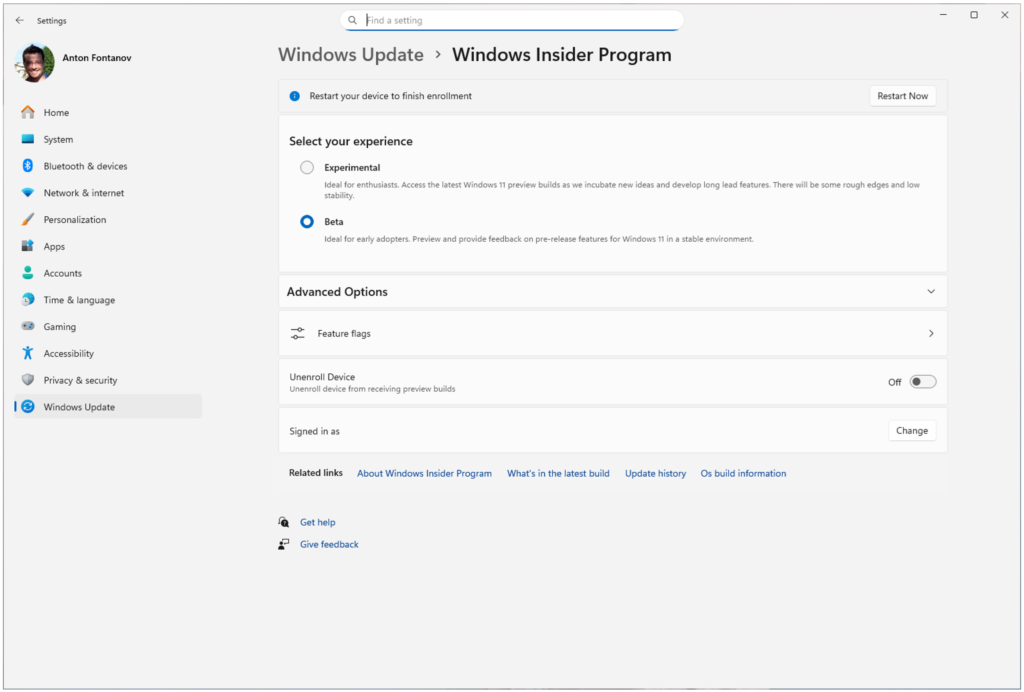
Microsoft has started rolling out its revamped Windows Insider Program, replacing the older channel structure with a simpler setup built around two main channels: Experimental and Beta. The change is meant to make Windows testing clearer, reduce confusion around preview builds, and give testers more control over early features.
The new Experimental channel replaces the previous Dev and Canary channels. It will host early Windows features that may change, arrive later, or never ship publicly. The Beta channel remains the safer option for users who want features that are closer to release.

Access content across the globe at the highest speed rate.
70% of our readers choose Private Internet Access
70% of our readers choose ExpressVPN

Browse the web from multiple devices with industry-standard security protocols.

Faster dedicated servers for specific actions (currently at summer discounts)
Microsoft says the rollout will happen in phases. Dev Channel users are moving first to Experimental, while Canary users will move later to separate Experimental paths depending on their current build series.
Microsoft wants to fix one of the biggest Insider complaints
The biggest change is not only the new channel names. Microsoft is also trying to fix the frustration caused by controlled feature rollouts, where users installed the latest build but still did not receive the feature mentioned in the release notes.
The company has acknowledged that this created confusion for testers. Many Insiders would read about a new feature, update their device, and then find that Microsoft had not enabled it for their machine yet.
The new model gives users more control through feature flags in Settings. This should reduce the need for third-party tools that many testers used to turn on hidden or gradually rolling-out Windows features.
How the new channels work
Experimental is now the place for early Windows work. Microsoft says this channel gives users access to features still under active development, including ideas that might not reach general release.
Beta is meant for a more stable preview experience. It should include features that Microsoft expects to move closer to public availability, while still giving the company time to collect feedback and make changes.
Source: Microsoft
Microsoft says users can access the new feature flag experience through Settings > Windows Update > Windows Insider Program > Feature flags. Dev users who do not see the new Experimental UI automatically can enable it manually from there.
At a glance
| Item | What Microsoft is changing |
|---|---|
| Program | Windows Insider Program |
| New main channels | Experimental and Beta |
| Replaces | Dev and Canary move into Experimental paths |
| Beta purpose | More stable previews closer to public release |
| Experimental purpose | Early features, platform work, and features that may not ship |
| Rollout style | Phased rollout over several weeks |
| First group moved | Dev Channel users |
| Manual setting | Settings > Windows Update > Windows Insider Program > Feature flags |
| New builds | 26220.8283, 26300.8289, 28020.1873, 29576.1000 |
Canary and Dev users get new paths
Most Dev Channel users will move to the new Experimental channel first. Microsoft says this transition has already started, but it will not reach every device at the same time.
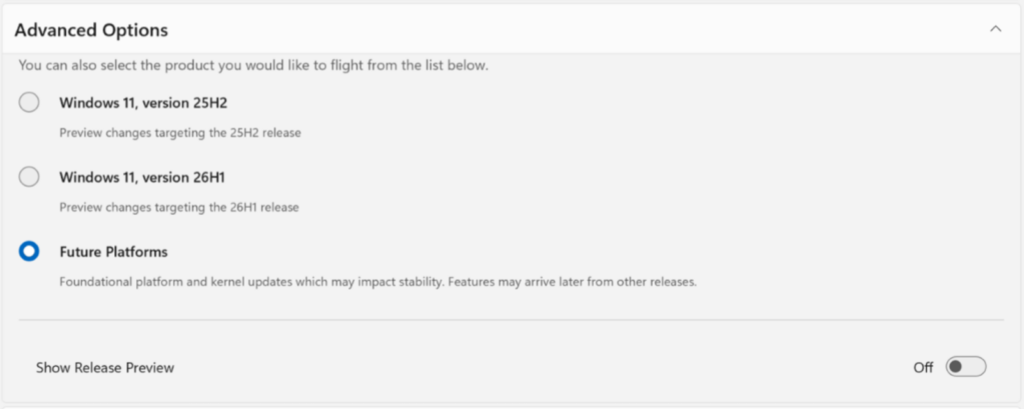
Canary users will move over the next few weeks. Devices on the Canary 28000 series will move to Experimental (26H1), while those that installed the optional 29500 series update will move to Experimental (Future Platforms).
Beta Channel users will move to the updated Beta experience. Microsoft also warns that some minor feature changes may happen during the transition, so testers who want to keep access to all current experimental features may need to move before the channel migration completes.
New builds arrive with the rollout
Microsoft is shipping several builds as part of the transition. The list includes Build 26220.8283 for Beta, Build 26300.8289 for Experimental, Build 28020.1873 for Experimental (26H1), and Build 29576.1000 for Experimental (Future Platforms).
The first Experimental build also includes Windows Update changes that give users more control. Windows Central reported that the build adds early access to improvements such as update-related security changes and an option to skip updates during the out-of-box setup experience.
Source: Microsoft
That matters because Windows setup can take longer when updates install during first run. Giving users more control during setup fits Microsoft’s broader push to improve reliability and reduce update frustration.
Why this matters for Windows 11 testers
The old Insider structure had become hard to follow. Beta, Dev, Canary, controlled rollouts, and hidden features often made it unclear which channel users should choose.
The new model gives testers a clearer choice. Pick Experimental to see early work and accept instability. Pick Beta to test features that should be closer to release.
It also makes the Insider Program more useful for feedback. If more testers can actually access the features mentioned in release notes, Microsoft can collect better feedback before changes reach regular Windows 11 users.
What users should do now
- Use Experimental if you want early Windows features and accept bugs.
- Use Beta if you want a more stable testing experience.
- Check Settings > Windows Update > Windows Insider Program > Feature flags if the new UI does not appear yet.
- Review your current build series before moving from Canary.
- Back up important files before switching channels or installing preview builds.
- Avoid preview builds on your main work PC unless you can handle bugs.
- Read the release notes before installing each build.
FAQ
Microsoft is moving the program to two main channels: Experimental and Beta. Experimental replaces the older Dev and Canary testing paths, while Beta remains the more stable preview option.
Experimental is the new channel for early Windows features and platform work. Features in this channel may change, arrive later, or never ship to regular Windows users.
Microsoft is moving Dev Channel users to Experimental first. The rollout is phased, so some users may need to enable the new experience manually through Feature flags in Windows Insider settings.
Canary users will move later. Devices on the 28000 series will move to Experimental (26H1), while devices on the optional 29500 series path will move to Experimental (Future Platforms).


Read our disclosure page to find out how can you help VPNCentral sustain the editorial team Read more


Improve this guide

User forum
0 messages