
Microsoft warns OAuth redirect abuse in Entra ID can power phishing and malware delivery


 5 min. read
  Published on

Microsoft says attackers are abusing a normal OAuth redirect behavior in Microsoft Entra ID to send victims from trusted login pages to attacker-controlled sites. The technique does not steal OAuth tokens and does not break the OAuth standard. Instead, it forces an authorization error, then uses the redirect path to move the victim to a phishing page or malware-hosting site. Microsoft says it has already disabled the malicious Entra applications it observed, but related activity is still ongoing.
The campaign matters because the link can start on a real Microsoft login domain, which makes it look safer than a typical phishing URL. Microsoft says the activity mainly targeted government and public-sector organizations and used lures tied to e-signatures, Social Security notices, Teams meetings, financial themes, and PDFs with embedded links.
At the center of the attack is a crafted authorization URL sent to the Entra ID /common/oauth2/v2.0/authorize endpoint. Microsoft says attackers used prompt=none with an intentionally invalid scope so the request would fail on purpose. That failure triggers an OAuth error redirect to the redirect URI already registered by the attacker’s malicious application.
Microsoft says the attack still needs the victim to click the link, but after that, the flow can quietly test session state and Conditional Access behavior without showing the user a normal sign-in prompt. If silent sign-in fails, Entra ID returns an error such as interaction_required and redirects the browser to the attacker-controlled site. The attacker still does not get an access token. The real goal is to use a trusted identity provider domain as the delivery path into phishing or malware.
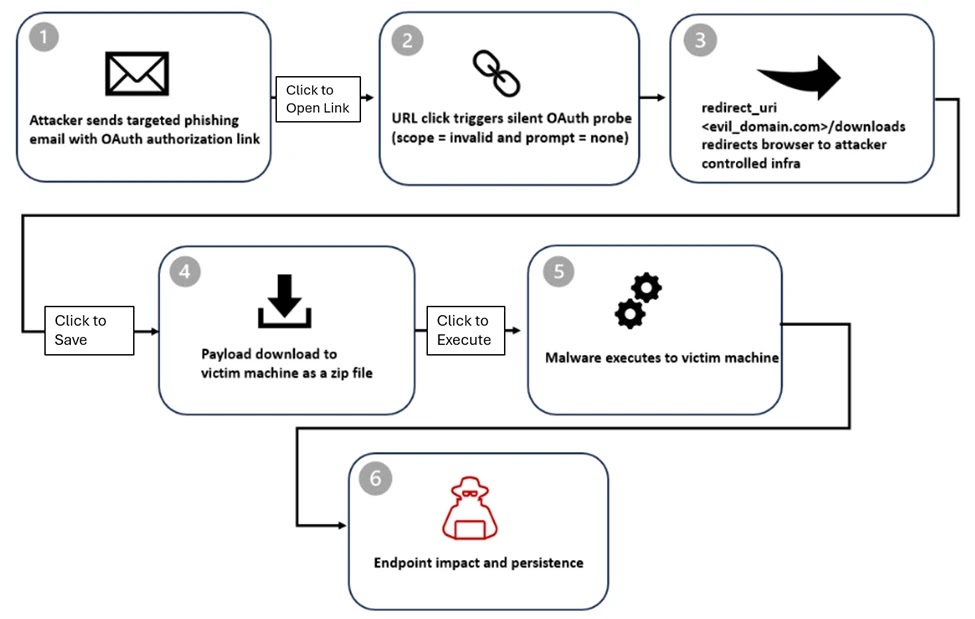
How the attack works
| Stage | What happens | Why it matters |
|---|---|---|
| Email delivery | Victim receives a lure with a crafted OAuth URL, sometimes directly in the email body and sometimes inside a PDF | The link starts with a trusted login domain, which can help it slip past suspicion |
| Silent OAuth probe | The URL uses prompt=none and a bad scope to trigger an error path | Microsoft says this can silently evaluate session state and access conditions |
| Error redirect | Entra ID redirects the browser to the attacker’s registered redirect URI with error parameters | The redirect itself is the attacker’s main objective |
| Phishing or malware delivery | Victim lands on a phishing framework or a malware download page | Microsoft observed both credential theft and malware delivery patterns |
Microsoft says attackers also misused the state parameter to carry the victim’s email address in plaintext, hex, Base64, or custom encodings. That let the landing page prefill the victim’s address and made the follow-on phishing page look more convincing. Microsoft notes that the state parameter is meant to correlate requests and responses, not act as a data carrier for the target’s email.
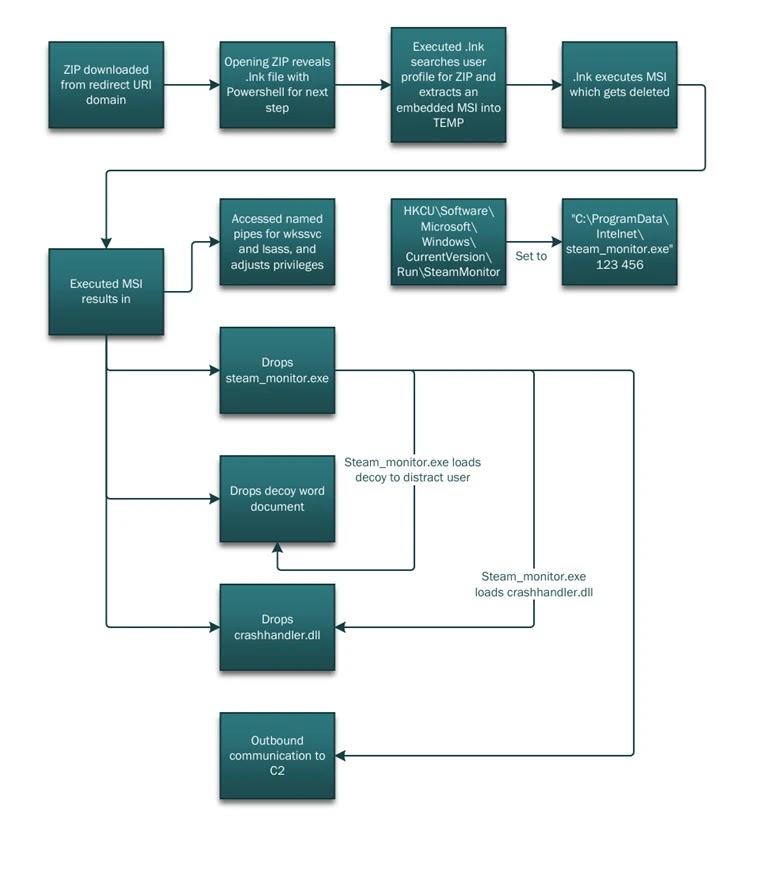
In some cases, the redirect led to attacker-in-the-middle phishing frameworks such as EvilProxy. In another campaign Microsoft described, the victim was sent to a /download/XXXX path where a ZIP file downloaded automatically. Microsoft says that payload chain could move from ZIP extraction into PowerShell execution, reconnaissance commands, and DLL side-loading.
Why defenders should pay attention
This is not a software vulnerability in Entra ID. It is an abuse of standards-compliant redirect behavior. Microsoft explicitly says the activity relies on legitimate OAuth functionality and by-design error handling defined by OAuth specifications. That makes the threat harder to spot with simple reputation checks because the first visible domain can be a legitimate Microsoft sign-in page.
Microsoft’s own Entra documentation helps explain why redirect URIs matter so much here. Microsoft says Entra login servers only redirect users to URIs already added to an app registration, and it advises organizations to keep redirect URI lists small, secure, and regularly reviewed. Microsoft also warns that the state parameter can be misused in open redirect scenarios if it is not protected properly.
What organizations should do now
- Restrict or disable user consent to OAuth applications where possible, and require admin review for new application access. Microsoft says Entra admins can choose whether user consent is allowed and can apply consent policies across users.
- Review app registrations and enterprise applications for unused, unrecognized, or overprivileged apps. Microsoft recommends keeping redirect URI lists current and trimmed.
- Tighten Conditional Access policies. Microsoft says Conditional Access is Entra’s Zero Trust policy engine and can require MFA, compliant devices, trusted locations, and other controls.
- Watch for suspicious redirect URIs, especially recently added domains, abandoned domains, insecure HTTP URIs, or overly broad redirect configurations. Microsoft advises maintaining ownership of all redirect URIs and avoiding wildcards.
- Use cross-domain detections across email, identity, and endpoint data. Microsoft says it detected this campaign by correlating those signals, not by looking at email alone.
Quick indicators defenders can hunt for
| Signal | Why it matters |
|---|---|
OAuth authorize URLs with prompt=none and suspicious or invalid scope values | Microsoft says attackers used these to trigger silent error redirects |
Redirects from login.microsoftonline.com to unfamiliar domains after an OAuth error | This is the key pivot point in the attack chain |
| App registrations with odd redirect URIs or recently added domains | Microsoft recommends regular redirect URI review and ownership checks |
| Emails themed around e-signatures, government notices, Teams meetings, or PDFs with embedded OAuth links | Microsoft says those themes appeared in observed campaigns |
FAQ


Read our disclosure page to find out how can you help VPNCentral sustain the editorial team Read more


Improve this guide




User forum
0 messages