
NWHStealer Malware Now Uses Bun Loader to Evade Detection and Steal Windows Data


 6 min. read
  Updated on
NWHStealer has returned with a more advanced delivery method that uses the Bun JavaScript runtime to infect Windows PCs. Security researchers say attackers are using fake software downloads, game cheats, and utility tools to hide the malware inside convincing ZIP archives.
The campaign matters because Bun is a legitimate developer tool. Attackers now use it to package malicious JavaScript into larger executables, which can make detection harder for some security tools.

Access content across the globe at the highest speed rate.
🔥 Save 81% + 2 bonus months! 🔥
70% of our readers choose Private Internet Access
70% of our readers choose Private Internet Access
2
Browse the web from multiple devices with industry-standard security protocols.
🔥 Save 73%! 🔥

Faster dedicated servers for specific actions (currently discounted)
🔥 Save 69%! 🔥
Once NWHStealer reaches a device, it can steal browser data, saved passwords, cryptocurrency wallet information, Discord and Steam data, FTP client credentials, and system details. It can also use persistence tricks and command-and-control updates to keep the operation running.
What is NWHStealer?
NWHStealer is a Rust-based Windows information stealer. It targets personal and financial data stored on infected systems, with a strong focus on browsers, crypto wallets, messaging apps, and gaming platforms.
Malwarebytes researchers previously found NWHStealer spreading through fake Proton VPN pages, gaming mods, hardware utilities, mining tools, GitHub, GitLab, SourceForge, MediaFire, YouTube links, and other trusted-looking channels.
The newer campaign adds Bun to the delivery chain. Bun is normally used by developers as a fast JavaScript and TypeScript toolkit. In this case, attackers abuse it to run an obfuscated JavaScript loader that checks the victim’s system, contacts a remote server, and deploys the stealer.
How the Bun-based infection chain works
The attack usually starts with a ZIP file that looks like a game trainer, software crack, activation script, or utility download. Reported archive names include MOUSE_PI_Trainer_v1.0.zip, FiveM Mod.zip, TradingView-Activation-Script-0.9.zip, and AutoTune 2026.zip.
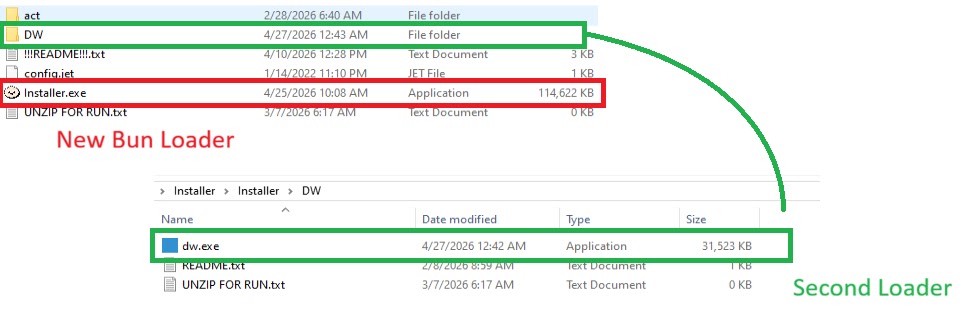
Inside the archive, victims may find an Installer.exe file. Malwarebytes says this executable contains JavaScript code bundled with the Bun runtime, hidden inside a .bun section.
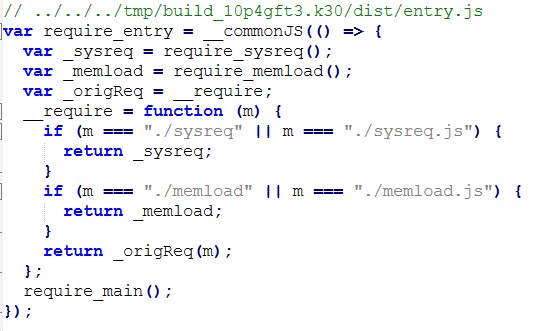
The loader uses two main JavaScript components. The first, sysreq.js, checks whether the system looks like a real user machine. The second, memload.js, contacts the attacker’s server, receives the next payload, decrypts it, and loads NWHStealer into memory.
Why the anti-VM checks matter
The sysreq.js component performs anti-virtualization checks before the malware continues. It looks at CPU count, disk size, screen resolution, USB devices, hardware names, installed software, running processes, and usernames.
These checks help the malware avoid sandboxes and virtual machines used by researchers. If the system looks like a malware analysis environment, the loader can stop before deploying the final payload.
The loader also compares system details against virtualization indicators such as qemu, vbox, vmware, virtualbox, kvm, xen, parallels, and other strings commonly tied to analysis setups.
How attackers hide the payload
The campaign uses encryption and obfuscation to make analysis harder. Malwarebytes found that the loader decrypts strings with XOR and base64 decoding, then communicates with command-and-control infrastructure.
The loader sends system information, the anti-VM result, the public IP address, a timestamp, and a base64-encoded screenshot to the attacker-controlled server. It then retrieves an encrypted payload and uses AES-based decryption before loading the next stage.
The final stage runs with native Windows API calls through Bun’s bun:ffi module. This allows JavaScript code to interact with system-level functions and execute the stealer with fewer obvious traces on disk.
At a glance
| Item | Details |
|---|---|
| Malware | NWHStealer |
| Target platform | Windows |
| New delivery method | Bun JavaScript runtime loader |
| Common lures | Game trainers, mods, software cracks, activation scripts, fake utilities |
| Main risks | Stolen passwords, browser sessions, crypto wallet theft, account takeover |
| Notable evasion | Anti-VM checks, encrypted strings, encrypted C2 traffic, in-memory loading |
The backup loader makes the campaign harder to disrupt
Some malicious ZIP archives also include a secondary loader named dw.exe inside a folder labeled DW. A Readme.txt file reportedly tells users to run this backup file manually if the main installer fails.
This gives attackers a second path to infection if the primary loader or its server stops working. It also shows that the campaign was built with redundancy in mind.
The use of fake installers, backup loaders, trusted hosting platforms, and newer developer tools makes this campaign more dangerous for regular users. It also creates more work for defenders who must inspect both the delivery file and the runtime behavior.
What data can NWHStealer steal?
- Saved browser passwords and cookies
- Browser extensions and session data
- Cryptocurrency wallet information
- Discord and Steam data
- FTP client credentials from tools such as FileZilla
- System details and security software information
- Screenshots and public IP address data
How users can reduce the risk
Users should avoid downloading game cheats, cracks, activation tools, fake installers, and utilities from unknown publishers. These files often promise something useful but deliver malware instead.
Downloads from GitHub, GitLab, SourceForge, MediaFire, Itch.io, and similar platforms should also be checked carefully. These platforms can host legitimate software, but attackers can abuse new accounts and convincing project names to trick users.
Before running any executable, users should check the publisher, digital signature, file name, archive contents, and the age of the uploader account. A ZIP file with odd folders, backup executables, or suspicious instructions should be treated as unsafe.
Indicators administrators should review
| Type | Indicator |
|---|---|
| Domain | whale-ether[.]pro |
| Domain | cosmic-nebula[.]cc |
| Domain | silent-harvester[.]cc |
| Domain | silent-orbit[.]cc |
| Domain | support-onion[.]club |
Security teams should also monitor for unusual Bun runtime execution on systems where developers do not normally use Bun. Unexpected PowerShell, WMI, screenshot activity, Defender exclusions, scheduled tasks, or outbound traffic to suspicious domains should trigger review.
Summary
- NWHStealer now uses a Bun-based JavaScript loader in newer Windows infection chains.
- The malware spreads through fake downloads, game-related lures, utility tools, and trusted-looking hosting platforms.
- The loader checks for virtual machines before deploying the final payload.
- NWHStealer can steal browser data, passwords, crypto wallet data, Discord data, Steam data, and FTP credentials.
- Users should avoid unofficial downloads and verify executables before running them.
FAQ
NWHStealer is a Windows information stealer designed to collect sensitive data from infected systems, including browser passwords, cookies, wallet data, and application credentials.
Attackers are using Bun because it can package JavaScript into larger executable files and run native system calls through its tooling. Its newer role in malware campaigns can also make detection harder.
The malware usually reaches users through fake downloads, ZIP archives, game cheats, mods, activation scripts, cracked tools, fake VPN installers, and software hosted on trusted-looking platforms.
Security tools can detect many known NWHStealer samples and indicators, but attackers keep changing loaders, domains, and delivery methods. Users should combine security software with careful download habits.


Read our disclosure page to find out how can you help VPNCentral sustain the editorial team Read more


Improve this guide




User forum
0 messages