
pnpm 11 adds a 24-hour package delay to reduce npm supply chain attacks


 5 min. read
  Published on
pnpm 11 now delays newly published package versions by default, giving the ecosystem more time to detect malicious releases before they reach developer machines and CI pipelines. The package manager sets minimumReleaseAge to 1,440 minutes, which means fresh versions normally need to be at least 24 hours old before pnpm resolves them.
The change targets a common weakness in modern JavaScript development. Attackers often compromise a maintainer account, publish a poisoned version of a trusted package, and rely on automated installs to pull it within minutes.

Access content across the globe at the highest speed rate.
🔥 Save 81% + 2 bonus months! 🔥
70% of our readers choose Private Internet Access
70% of our readers choose ExpressVPN
2
Browse the web from multiple devices with industry-standard security protocols.
🔥 Save 73%! 🔥

Faster dedicated servers for specific actions (currently at summer discounts)
🔥 Save 69%! 🔥
pnpm 11 does not remove supply chain risk, but it changes the default behavior from instant trust to delayed trust. For most projects, waiting one day for new dependency versions creates little friction while cutting exposure during the most dangerous window after publication.
What changed in pnpm 11
The biggest security change is Minimum Release Age being enabled by default. Before pnpm 11, teams could configure this setting manually, but the default value was 0. In pnpm 11, the default is 1,440 minutes.
That delay applies to dependencies and transitive dependencies. If a package version was just published, pnpm will normally choose an older eligible version instead of immediately installing the newest one.
Teams can still override the rule. They can set minimumReleaseAge to 0 to disable the wait, or use minimumReleaseAgeExclude when a specific package needs immediate updates.
At a glance
| Feature | pnpm 11 default | Why it matters |
|---|---|---|
| minimumReleaseAge | 1,440 minutes | Delays newly published package versions for 24 hours |
| blockExoticSubdeps | true | Blocks transitive dependencies from pulling code from unusual sources |
| allowBuilds | New unified model | Controls which packages can run build scripts during install |
| strictDepBuilds | true | Stops unapproved dependency build scripts from running silently |
| Node.js support | Node.js 22 or newer | Drops support for Node.js 18, 19, 20, and 21 |
Why a 24-hour delay helps
Many malicious package releases cause damage quickly. Attackers count on speed because automated workflows often install new versions as soon as semver ranges allow them.
A delay gives maintainers, registries, researchers, and security tools more time to flag suspicious behavior. If a malicious release gets removed within hours, projects using pnpm 11’s default setting may never resolve that version.
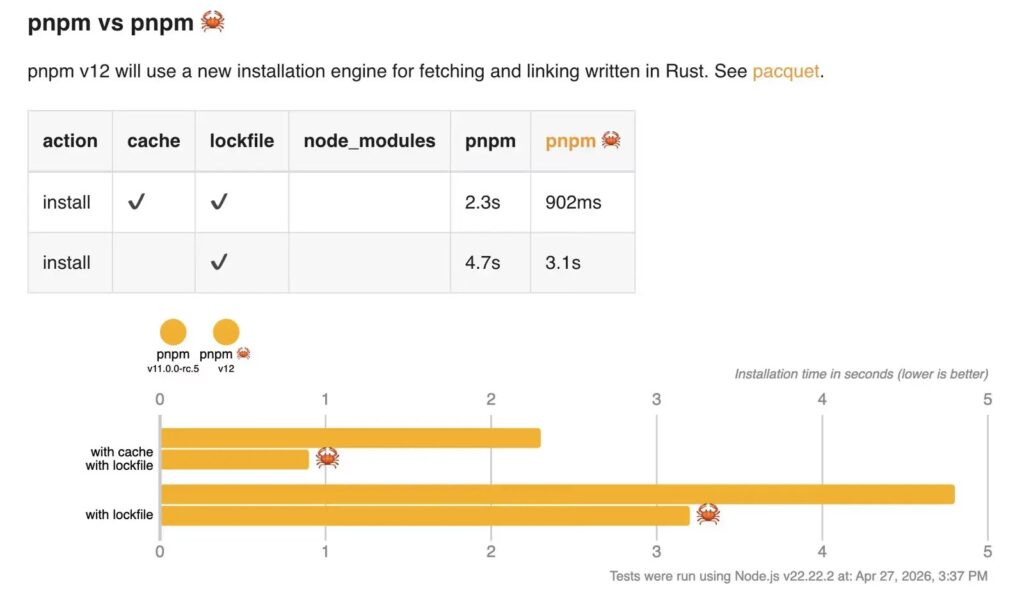
This approach does not depend on perfect detection. It reduces the chance that a project becomes part of the first wave of victims after a compromised package version appears.
How blockExoticSubdeps reduces hidden risk
pnpm 11 also enables blockExoticSubdeps by default. This setting limits transitive dependencies from resolving through non-standard sources such as Git repositories or direct tarball URLs.
Direct dependencies listed in the root package.json can still use exotic sources. The restriction focuses on subdependencies, where teams often have less visibility and less control.
This matters because attackers may hide unexpected code deep in a dependency tree. Keeping transitive dependencies tied to trusted sources makes the install graph easier to review and harder to abuse.
The new allowBuilds model
pnpm 11 also replaces several older build-script settings with allowBuilds. The new model lets teams define which packages can run build scripts during installation through a single map in pnpm-workspace.yaml.
Build scripts deserve close attention because npm attacks often use preinstall, install, or postinstall scripts to execute code. A package can look harmless in metadata, then run commands during installation.
The new model gives developers a clearer way to approve packages that genuinely need build scripts, such as native modules or tools that compile binaries. It also makes policy easier to audit in larger teams and monorepos.
Example configuration
minimumReleaseAge: 1440

minimumReleaseAgeExclude:
  - react
  - webpack

allowBuilds:
  esbuild: true
  sharp: true
  core-js: false
This setup keeps the 24-hour delay active, while allowing React and webpack to bypass the wait if the team chooses. It also allows build scripts for esbuild and sharp, while blocking them for core-js.
Teams should use exceptions carefully. Every exclusion should have a clear reason, especially in production systems and CI environments.
For emergency security updates, minimumReleaseAgeExclude gives teams a practical escape route without disabling the broader protection for every dependency.
Who should pay attention
- JavaScript teams using pnpm in production projects
- Companies with automated CI/CD dependency installs
- Monorepos with large transitive dependency trees
- Security teams reviewing npm supply chain exposure
- Developers who rely on Git or tarball-based package sources
- Projects upgrading from pnpm 10 to pnpm 11
What teams should check before upgrading
pnpm 11 includes breaking changes beyond the security defaults. It requires Node.js 22 or newer, so teams still running older Node.js versions need to upgrade their runtime first.
Teams should also review pnpm-workspace.yaml and replace older build-script settings. onlyBuiltDependencies, onlyBuiltDependenciesFile, neverBuiltDependencies, ignoredBuiltDependencies, and ignoreDepScripts have been removed in favor of allowBuilds.
Projects that depend on exotic transitive sources should test installs carefully. The safer default may break workflows that previously allowed subdependencies to pull code from Git repositories or direct tarball URLs.
Why this matters for the npm ecosystem
Package managers now play a bigger security role than they did a few years ago. They no longer just fetch code, resolve dependency trees, and save disk space. They also shape which code reaches machines and when that code can run.
pnpm 11 reflects that shift. The new defaults add friction in places where attackers benefit from speed, hidden sources, and automatic script execution.
The result is not a complete defense against supply chain attacks. It is a stronger baseline for teams that want safer installs without building every control from scratch.
FAQ
They are transitive dependencies that resolve from sources such as Git repositories or direct tarball URLs instead of a normal configured registry.
Yes. Developers can set minimumReleaseAge to 0. They can also use minimumReleaseAgeExclude to allow selected packages to install immediately.
No. It reduces exposure to fresh malicious releases, unexpected transitive sources, and unapproved build scripts. Teams still need dependency review, lockfiles, scanning, and update controls.
Minimum Release Age delays newly published package versions before pnpm can install them. In pnpm 11, the default delay is 1,440 minutes, or 24 hours.


Read our disclosure page to find out how can you help VPNCentral sustain the editorial team Read more


Improve this guide




User forum
0 messages