
StegaBin uses malicious npm packages to steal developer credentials through a hidden multi-stage payload


 6 min. read
  Published on

A fresh software supply chain campaign is targeting developers through npm packages that appear harmless at first glance. Security reporting published around March 2 and March 3 says the operation, now being tracked as “StegaBin,” involved 26 malicious npm packages that used install-time scripts, hidden Pastebin data, and Vercel-hosted infrastructure to deploy a credential stealer and remote access payload on developer systems. Some reports also link the activity to the broader Contagious Interview cluster, although that attribution still looks preliminary in public coverage.
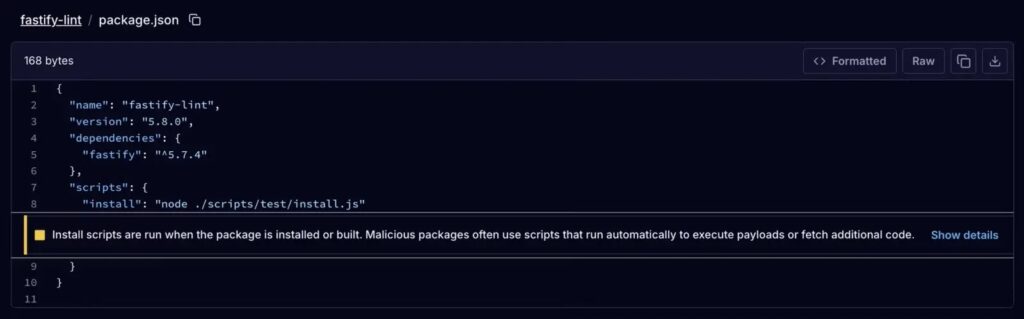
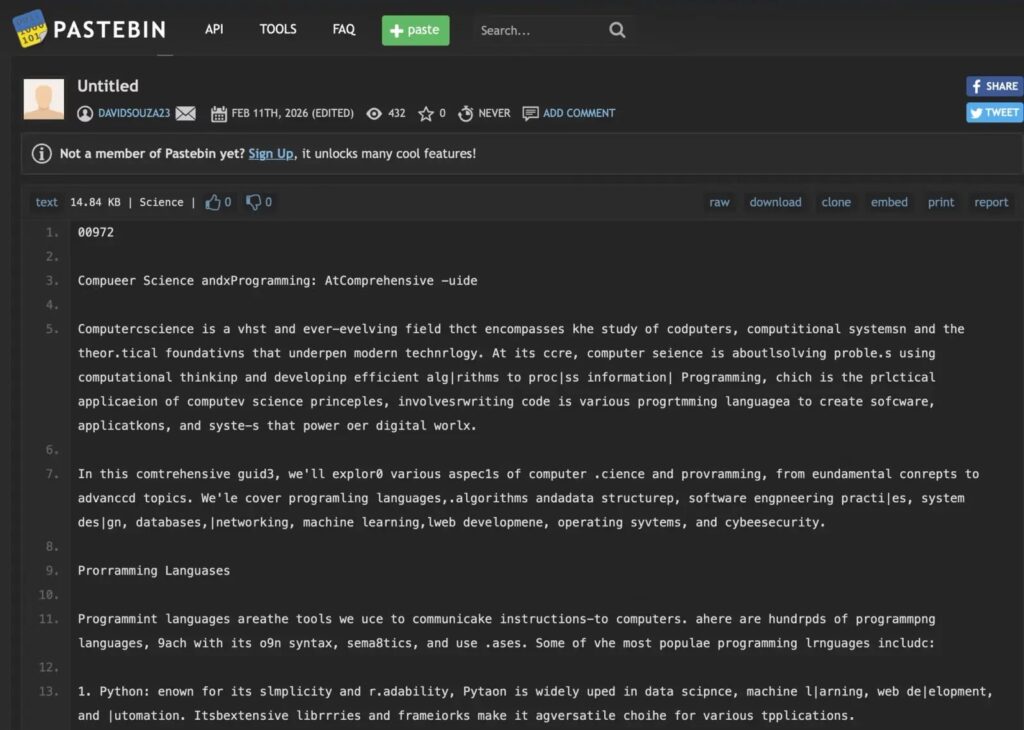
What makes this campaign stand out is the delivery chain. The reported packages did not rely on a single obvious downloader. Instead, they used an npm install script to launch malicious code from a path made to look routine, then decoded attacker infrastructure from seemingly harmless Pastebin content before reaching live staging servers on Vercel. That design helped the malware hide both its command path and its final payload.
The broader risk is easy to understand. Developers trust package managers to speed up work, and npm still runs lifecycle scripts unless a team explicitly disables them. npm’s own documentation says ignore-scripts is false by default, which means install-time scripts can run during package installation unless developers change that behavior.
What researchers say happened
Current public reporting says the campaign published 26 malicious packages that executed install.js during installation, then triggered code stored under vendor/scrypt-js/version.js. From there, the malware reportedly extracted command-and-control information hidden inside Pastebin posts and cycled through Vercel-hosted endpoints until it found a live next-stage payload. Cyware’s March 2 threat briefing describes the same general chain, including Pastebin-based C2 resolution, Vercel infrastructure, and cross-platform credential theft aimed at Windows, macOS, and Linux developers.
Several parts of the sample you shared also line up with known attacker tradecraft from earlier npm campaigns tied to North Korean operators. Socket documented previous Lazarus-linked npm attacks that used typosquatting, staged payloads, credential theft, and backdoors against developers. Still, for this March 2026 wave, the safest phrasing is that the tradecraft resembles prior Contagious Interview activity rather than treating attribution as settled fact.
Why StegaBin is dangerous
This attack appears built for developer workstations, not casual users. Reporting says the final payload chain can steal browser data, SSH keys, Git secrets, and other credentials that often lead straight into source repositories, CI pipelines, cloud consoles, and production systems. That turns one bad dependency into a much larger enterprise problem.
It also shows why supply chain attacks keep working. Malicious packages can still look believable, project installs still run scripts by default, and many teams still add dependencies quickly in local environments. npm’s own docs confirm that lifecycle scripts remain active unless teams opt out, while GitHub’s February 2026 security update introduced a new --allow-git control because some install paths could still lead to arbitrary code execution during dependency installation.
Reported StegaBin attack chain
| Stage | What reportedly happens | Why it matters |
|---|---|---|
| Malicious package install | An npm package runs install.js during install | Code executes before a developer reviews behavior |
| Loader execution | Code under vendor/scrypt-js/version.js launches the next step | The file path blends in with normal dependency content |
| Hidden infrastructure lookup | Pastebin content hides real C2 details | Attackers avoid hardcoding obvious infrastructure |
| Vercel staging | The loader cycles through Vercel-hosted endpoints | Attackers gain flexible cloud-based delivery |
| Final payload | A RAT and credential-stealing modules run on the developer machine | Source code, tokens, cookies, SSH keys, and secrets may be exposed |
The VS Code angle matters too
One part of the sample deserves extra attention even beyond this specific campaign. The write-up says a later module abuses VS Code tasks.json with runOn: "folderOpen" so the malicious task can fire again when a developer reopens the project. That is plausible because Microsoft’s own VS Code documentation confirms that runOn: "folderOpen" causes a task to run when the containing folder opens. Microsoft also says Workspace Trust exists specifically to prevent automatic code execution in untrusted folders.
That means developers should stop treating .vscode/ as harmless project metadata. In the wrong repo, it can become an execution surface. Microsoft explicitly warns that Restricted Mode is designed to block or limit tasks, debugging, extensions, and other actions that could run code from an untrusted workspace.
What teams should do now
- Audit recent npm installs for unfamiliar or typo-like package names, especially anything added in the last few days.
- Disable lifecycle scripts where you can by using npm’s
--ignore-scriptssetting for installs that do not truly need them. npm says this prevents scripts inpackage.jsonfrom running during install flows. - Use lockfiles and commit them. npm says
package-lock.jsonhelps guarantee identical dependency trees across teammates and CI, which reduces surprise installs. - Use
--allow-git=nonewhen possible. GitHub says this setting gives explicit control over git-based install behavior and reduces another code execution path during npm installs. - Review
.vscode/tasks.jsonfiles forrunOn: "folderOpen", hidden shell commands, or suspicious whitespace tricks. Microsoft confirms tasks can run automatically when a folder opens. - Rotate exposed credentials fast if a developer machine may have installed one of the reported packages. Focus on SSH keys, cloud tokens, Git credentials, browser-saved logins, npm tokens, and CI secrets. The reported payload focus makes this a priority.
Quick risk check for security teams
| Question | Why it matters |
|---|---|
| Do developers install dependencies directly on primary laptops? | Local compromise can expose browser sessions, SSH keys, and cloud tokens |
| Are lifecycle scripts allowed by default in CI and local builds? | npm runs them unless teams opt out |
| Do repos get opened in VS Code with trust enabled automatically? | Workspace Trust exists to stop automatic code execution in unknown folders |
Are .vscode/ files reviewed in code review? | tasks.json can auto-run on folder open |
| Are npm and GitHub tokens short-lived and scoped? | Stolen developer credentials often become supply chain access |
FAQ
StegaBin is the name now used in security reporting for a March 2026 npm malware campaign that reportedly used 26 malicious packages, hidden Pastebin-based infrastructure, and Vercel-hosted staging to deploy a multi-stage credential stealer and RAT against developers.
That figure appears in multiple current security write-ups and alerts, but the most detailed public reporting still comes from threat reporting rather than a formal npm incident bulletin. So the number looks credible, but I would still present it as a researcher-reported figure, not an npm-confirmed total.
Not definitively, based on the public material I found. The tradecraft reportedly overlaps with the Contagious Interview activity cluster, and outside reporting links the packages to North Korean operators, but public attribution still looks tentative.
Researchers say the malware used Pastebin as a hidden resolver for real command-and-control infrastructure. That lets attackers avoid placing obvious malicious domains directly inside the package.
The fastest improvements are to review new dependencies carefully, disable install scripts where possible, use lockfiles, restrict git-based install behavior, and treat .vscode/ files as code that deserves review. npm, GitHub, and Microsoft all publish features that directly support those steps.


Read our disclosure page to find out how can you help VPNCentral sustain the editorial team Read more


Improve this guide




User forum
0 messages