
VECT 2.0 ransomware destroys large files instead of encrypting them


 7 min. read
  Published on
A newly analyzed ransomware strain called VECT 2.0 can permanently destroy large files instead of encrypting them in a recoverable way. Check Point Research found that any file larger than 131,072 bytes, or 128 KB, loses critical decryption data during encryption.
The bug affects VECT’s Windows, Linux, and VMware ESXi variants. This means organizations hit by the malware may not be able to restore most business-critical files even if they pay the ransom.

Access content across the globe at the highest speed rate.
70% of our readers choose Private Internet Access
70% of our readers choose ExpressVPN

Browse the web from multiple devices with industry-standard security protocols.

Faster dedicated servers for specific actions (currently at summer discounts)
The issue turns VECT 2.0 into an accidental data wiper. It still presents itself as ransomware, drops ransom notes, and renames files with the .vect extension, but its encryption design makes many affected files unrecoverable.
What happened
Check Point Research analyzed VECT 2.0 after accessing its ransomware builder panel through BreachForums. The researchers reviewed the Windows, Linux, and ESXi payloads and found that all three share the same flawed encryption engine.
VECT first appeared in December 2025 as a ransomware-as-a-service operation on a Russian-language cybercrime forum. The group claimed its first victims in January 2026 and released version 2.0 in February 2026.
The operation later gained more attention after announcing partnerships with TeamPCP and BreachForums. TeamPCP has been linked to supply chain attacks affecting software packages such as Trivy, Checkmarx KICS, LiteLLM, and Telnyx.
At a glance
| Item | Details |
|---|---|
| Ransomware name | VECT 2.0 |
| Operation type | Ransomware-as-a-Service |
| First observed | December 2025 |
| Version 2.0 release | February 2026 |
| Affected platforms | Windows, Linux, and VMware ESXi |
| File extension | .vect |
| Ransom note | !!!READ_ME!!!.txt |
| Crypto library | libsodium |
| Cipher | ChaCha20-IETF |
| Critical flaw | Missing nonces for files over 128 KB |
| Main impact | Large files become unrecoverable |
Why VECT 2.0 destroys files
The problem sits in VECT’s nonce-handling logic. A nonce is a value that encryption systems need alongside the key to decrypt data correctly.
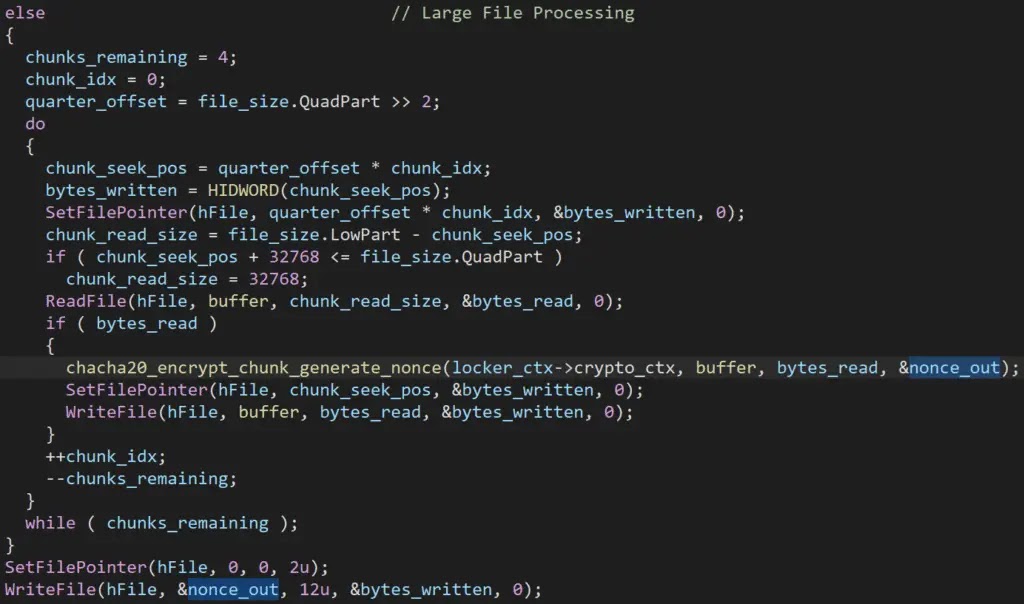
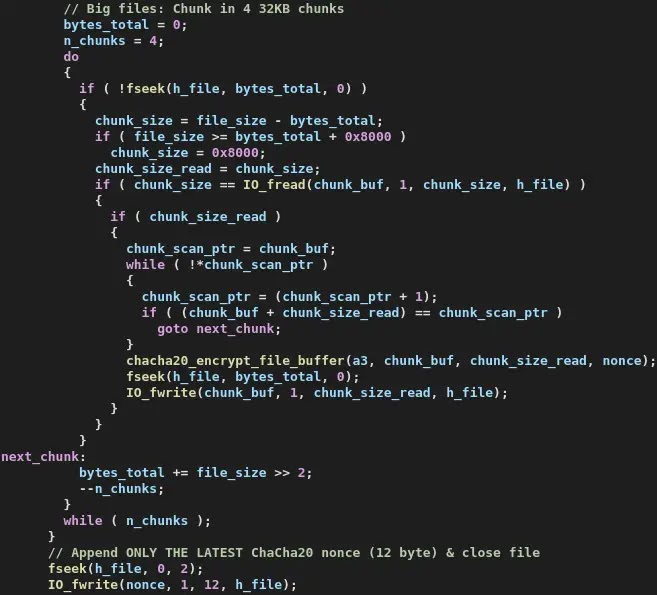
When VECT processes a file larger than 128 KB, it splits the file into four chunks. It then encrypts each chunk with a fresh random 12-byte nonce.
The mistake happens because the ransomware writes all four nonces into the same shared memory location. Each new nonce overwrites the one before it, so only the final nonce survives and gets written to disk.
Why paying cannot recover large files
ChaCha20-IETF needs the correct nonce for each encrypted chunk. Since VECT keeps only the fourth nonce, the first three chunks of a large file cannot be decrypted.
The missing nonces do not stay on the disk, in the registry, or on the attacker’s server. Once the encryption finishes, the data needed to restore the first three quarters of the file no longer exists.
This means the attacker cannot provide a working decryptor for most large files. Payment does not solve the technical problem because the ransomware destroyed the information required for recovery.
How the encryption flaw works
| Step | What VECT does | Why it breaks recovery |
|---|---|---|
| 1 | Finds a file larger than 128 KB | Most business files meet this threshold |
| 2 | Splits the file into four chunks | Each chunk needs its own nonce for decryption |
| 3 | Generates a random nonce for each chunk | The nonces must be saved to recover the file |
| 4 | Writes all nonces into one shared buffer | Each new nonce overwrites the previous nonce |
| 5 | Saves only the last nonce to the encrypted file | The first three chunks become unrecoverable |
Why the 128 KB threshold matters
A 128 KB threshold is extremely small for modern business data. Many routine documents, spreadsheets, PDFs, images, archives, mailboxes, and database files exceed that size.
For enterprises, the damage can be severe. VM disk images, backups, database exports, project files, accounting records, and email archives usually sit well above 128 KB.
That means VECT does not just damage a narrow set of files. It can destroy the data organizations most need to restore operations after an attack.
Platforms affected
| Platform | Variant type | Impact |
|---|---|---|
| Windows | PE64 executable | Targets local, removable, and network-accessible storage |
| Linux | ELF64 executable | Targets Linux file systems and server workloads |
| VMware ESXi | ELF64 executable | Targets virtualized environments and VM-related files |
A polished panel with weak code
VECT presents itself as a professional ransomware operation. Its builder panel lets affiliates create payloads for multiple platforms, and the group markets itself through cybercrime forums.
Check Point Research found a different reality inside the code. The same encryption flaw appears across all three variants, which suggests the operators reused one flawed engine across Windows, Linux, and ESXi.
Researchers also found other design problems, including ignored encryption speed options and broken anti-analysis features. These flaws make VECT look less mature than its branding suggests.
TeamPCP and BreachForums partnerships
VECT became more visible after it announced a partnership with TeamPCP, the threat actor linked to recent supply chain attacks. The stated goal was to use access from those attacks as a launchpad for ransomware operations.
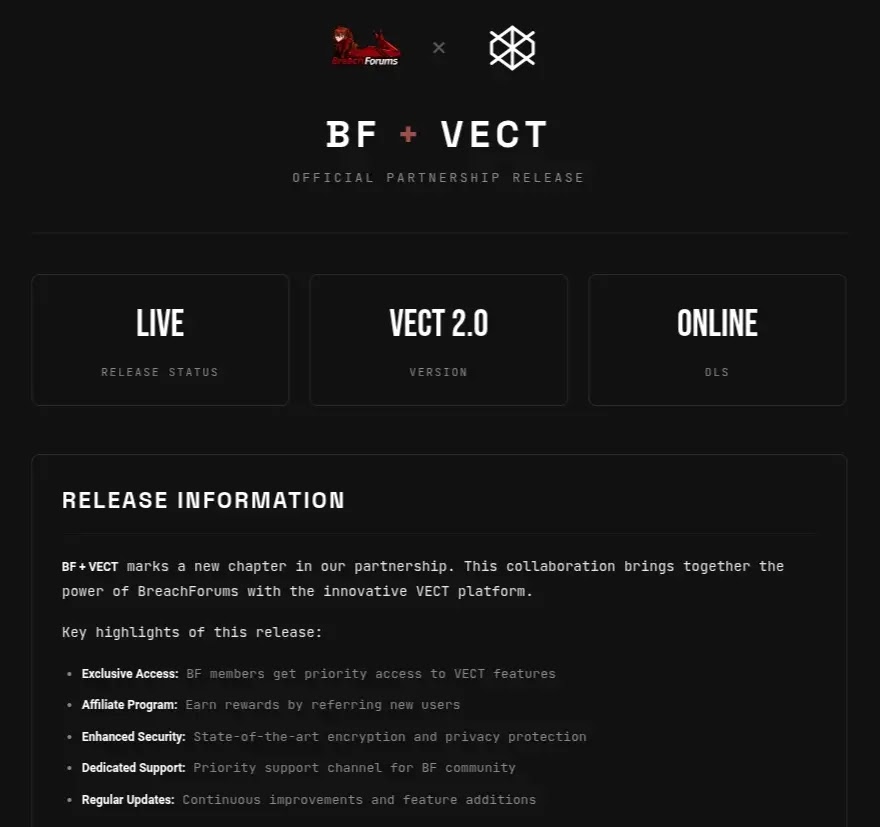
The group also partnered with BreachForums. Check Point Research said the arrangement gave registered forum members access to the ransomware platform, negotiation system, and leak site.
This open-affiliate model lowers the barrier for attackers. Less experienced operators can attempt ransomware attacks without building their own malware or infrastructure.
Why defenders should still take VECT seriously
VECT’s broken encryption does not make it harmless. The malware can still disrupt operations, damage systems, rename files, delete recovery options, and support extortion through stolen data.
The group’s partnerships also matter. A future version could fix the nonce bug while keeping the same affiliate network and distribution channels.
Organizations should treat VECT as both a ransomware threat and a destructive malware risk. Recovery planning should focus on containment, clean backups, and verified restoration, not ransom negotiation.
Recommended actions
- Do not rely on ransom payment as a recovery plan for VECT incidents.
- Maintain offline and immutable backups that attackers cannot reach.
- Test backup restoration regularly, including VM and database recovery.
- Monitor for mass file renaming to the
.vectextension. - Watch for ransom notes named
!!!READ_ME!!!.txt. - Investigate sudden shadow copy deletion or backup tampering.
- Monitor for bulk process termination before encryption activity.
- Block lateral movement paths from compromised endpoints.
- Validate software dependencies because of VECT’s TeamPCP connection.
Behavior security teams should monitor
Security teams should watch for rapid file renaming, unusual encryption activity, and mass changes across network shares. These actions can signal an active ransomware event.
On Windows systems, teams should also monitor for PowerShell commands that disable security tools, clear event logs, change boot options, or interfere with recovery settings.
For ESXi environments, administrators should watch for suspicious ELF binaries, unexpected datastore access, and changes to VM-related files. ESXi recovery can become difficult if VMDK files exceed the 128 KB threshold, which they almost always do.
VECT defender checklist
| Area | What to check |
|---|---|
| Files | Look for the .vect extension and !!!READ_ME!!!.txt |
| Backups | Confirm offline, immutable, and tested recovery copies exist |
| Windows endpoints | Review PowerShell activity, Defender tampering, and event log clearing |
| ESXi hosts | Check for suspicious binaries and VM file modification spikes |
| Network shares | Monitor for bulk encryption and mass file renaming |
| Supply chain | Validate packages and credentials linked to TeamPCP-related incidents |
| Incident response | Isolate affected systems quickly and preserve forensic evidence |
Why this matters
VECT 2.0 shows that ransomware can fail in ways that make incidents even worse for victims. In this case, the operators built a tool that cannot reliably decrypt the files it damages.
The risk extends beyond one ransomware family. Open affiliate models and supply chain partnerships can give flawed malware a larger reach than its technical quality deserves.
For companies, the lesson is direct. Prevention, segmentation, offline backups, and tested recovery procedures matter more than ransom negotiations when ransomware behaves like a wiper.
FAQ
VECT 2.0 is a ransomware-as-a-service operation that targets Windows, Linux, and VMware ESXi systems.
VECT mishandles encryption nonces for files larger than 128 KB. It saves only the last nonce, making the first three chunks of each large file unrecoverable.
For large files, payment will not help. The attacker cannot provide a working decryptor because the missing nonces no longer exist.
VECT 2.0 has variants for Windows, Linux, and VMware ESXi.


Read our disclosure page to find out how can you help VPNCentral sustain the editorial team Read more


Improve this guide
User forum
0 messages