
Vidar Malware Campaign Uses Fake YouTube Downloads to Steal Corporate Credentials


 5 min. read
  Published on
Vidar malware is being spread through fake software downloads promoted in YouTube videos, putting corporate users at risk of credential theft, browser data theft, and crypto wallet compromise.
Security researchers linked the campaign to a fake tool called NeoHub. Victims were directed from YouTube to file-sharing pages, then pushed toward a malicious archive hosted on Mediafire. Once opened, the archive launched a staged infection designed to look like a normal software install.

Access content across the globe at the highest speed rate.
70% of our readers choose Private Internet Access
70% of our readers choose ExpressVPN

Browse the web from multiple devices with industry-standard security protocols.

Faster dedicated servers for specific actions (currently at summer discounts)
The campaign shows why infostealers remain one of the most dangerous threats for businesses. A single infected employee device can expose saved passwords, session cookies, browser autofill data, payment details, and files tied to crypto wallets. That stolen data can then help attackers break into company accounts.
How the Vidar campaign works
The attack begins with social engineering rather than a software vulnerability. Threat actors use YouTube videos to advertise fake software and make the download appear legitimate.
After the victim follows the link, the attack chain moves through file-sharing infrastructure. The final download contains a visible executable named NeoHub.exe, which appears to act like a standard installer.
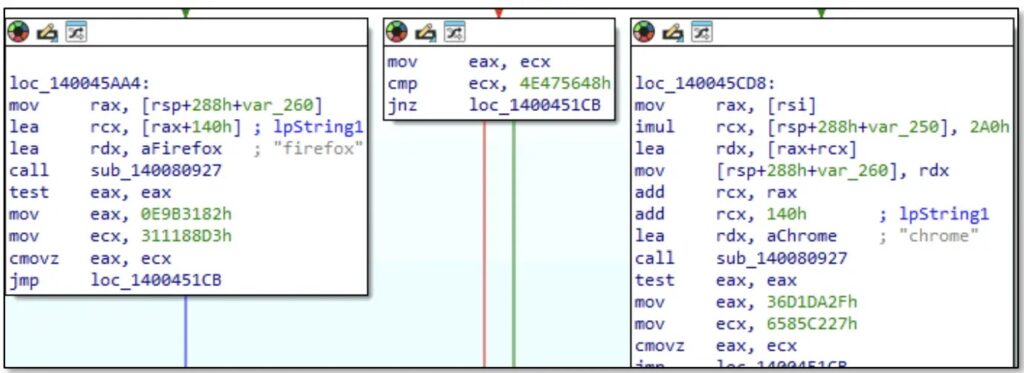
Behind the scenes, the executable loads a second file named msedge_elf.dll. Researchers said this DLL carries the actual Vidar payload and mimics a Microsoft Edge component to look less suspicious during a quick inspection.
What Vidar steals from infected systems
Vidar is an infostealer, which means its main purpose is to collect sensitive data from infected Windows machines.
The malware targets major browsers, including Chrome, Firefox, Edge, Opera, Vivaldi, Waterfox, and Pale Moon. It can collect saved passwords, cookies, credit card data, autofill records, and cryptocurrency wallet files.
Stolen browser cookies create a major risk because they may let attackers hijack sessions without needing the victim’s password. This can weaken account protection even when a company uses multi-factor authentication.
| Targeted data | Why attackers want it |
|---|---|
| Saved passwords | Direct access to business and personal accounts |
| Browser cookies | Session hijacking and MFA bypass attempts |
| Autofill data | Names, addresses, phone numbers, and payment details |
| Credit card data | Fraud and resale |
| Crypto wallet files | Direct theft of digital assets |
| Corporate credentials | VPN, SaaS, email, and internal tool access |
Fake certificates and packed payloads add cover
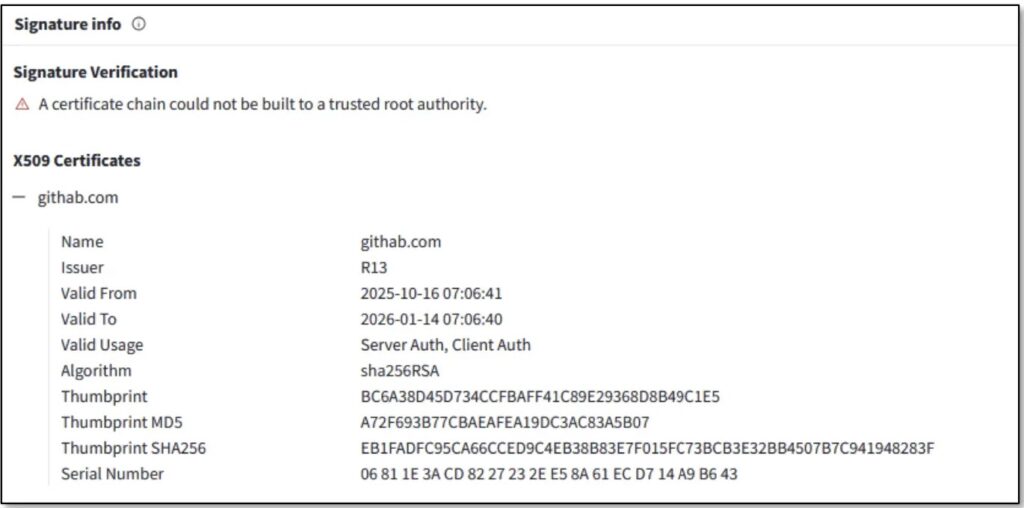
The campaign also used fake code-signing details to make malicious files look more trustworthy. One version reportedly impersonated GitHub with the name githab.com, while another impersonated grow.com.
The malicious DLL used a Go-based packer with unusual section names and control-flow flattening. This makes analysis harder and can slow down detection by security tools.
Vidar also avoids hardcoding one command-and-control address. Instead, it uses a Dead Drop Resolver technique, hiding C2 location details inside public services such as Steam profiles and Telegram channels. This gives attackers a way to change infrastructure without rebuilding the malware.
Why this campaign matters for companies
Vidar infections do not stop at the first compromised user. Stolen credentials often end up in underground marketplaces, where other attackers can buy access and search for useful business accounts.
CISA and partner agencies have also warned that Scattered Spider uses a wide range of social engineering and identity-focused techniques against large organizations. The updated advisory describes the group as a threat to major enterprises and says it targets help desks, identity systems, and high-value business environments.
That broader context matters because infostealer logs can feed larger intrusions. Attackers may use stolen credentials to access cloud apps, email accounts, VPN portals, admin consoles, and internal collaboration platforms.
Key campaign details
| Detail | Information |
|---|---|
| Malware family | Vidar |
| Campaign lure | Fake software promoted through YouTube videos |
| Fake tool name | NeoHub |
| Delivery path | YouTube link, file-sharing redirect, Mediafire archive |
| Visible file | NeoHub.exe |
| Payload file | msedge_elf.dll |
| Main goal | Credential and browser data theft |
| Business risk | Account takeover, session hijacking, internal access |
| Defensive priority | Stop unofficial downloads and monitor credential abuse |
How organizations can reduce the risk
Companies should warn employees not to download software from YouTube descriptions, comments, shortened links, or file-sharing pages. Legitimate software should come from official vendor sites, verified app stores, or approved internal portals.
Security teams should also review whether employees store corporate passwords in browsers. Browser-based password storage creates extra risk when infostealers reach a device.
Endpoint protection, DNS filtering, web gateways, and file sandboxing can help block the attack earlier. However, user training still matters because this campaign relies heavily on convincing people to install fake tools.
Recommended actions:
- Block software downloads from unapproved file-sharing sites.
- Train users to avoid YouTube-linked installers.
- Use application allowlisting on managed devices.
- Disable browser password storage for corporate accounts where possible.
- Enforce phishing-resistant MFA for sensitive systems.
- Monitor for logins from unusual locations or new devices.
- Rotate passwords after any confirmed infostealer infection.
- Revoke active sessions after credential theft.
- Hunt for suspicious
msedge_elf.dllactivity on Windows endpoints. - Block known malicious domains and IPs from published indicators.
What users should do after a suspected infection
A user who opened the fake NeoHub download should disconnect the device from the network and report it to IT immediately.
Changing passwords from the infected device is not enough. Attackers may already have stolen browser cookies, saved credentials, and wallet files. Password resets should happen from a clean device.
Security teams should also revoke active sessions for affected accounts, review sign-in logs, and check whether the user accessed sensitive business systems after the infection.
FAQ
Vidar is an information-stealing malware family that targets passwords, browser cookies, credit card data, autofill information, and crypto wallet files.
The campaign uses fake software downloads promoted through YouTube videos. Victims are pushed to file-sharing pages and then download a malicious archive.
NeoHub is the fake software name used in this campaign. The visible installer is called NeoHub.exe, but it secretly loads a malicious DLL tied to Vidar.
MFA helps, but it may not fully stop account abuse if attackers steal active browser cookies. Companies should combine MFA with session revocation, device checks, and login monitoring.


Read our disclosure page to find out how can you help VPNCentral sustain the editorial team Read more


Improve this guide


User forum
0 messages