
Windows now warns before opening risky RDP files after April 2026 security update


 5 min. read
  Published on
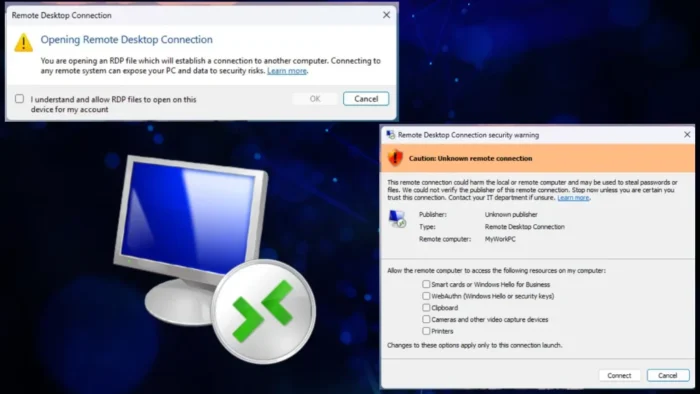
Microsoft has changed how Windows handles Remote Desktop .rdp files after the April 2026 security update. The new behavior adds warning dialogs before a connection starts, shows the remote address and publisher details, and turns local resource sharing off by default. Microsoft says the change is meant to reduce phishing attacks that use malicious RDP files to trick people into connecting to attacker-controlled systems.
That makes this a meaningful security shift, not a cosmetic tweak. Before this update, an .rdp file could carry connection settings and local redirection requests with far less visibility for the user. Now Windows surfaces those requests clearly before the session starts, so people can see what the file wants to access and approve each item manually.

Access content across the globe at the highest speed rate.
70% of our readers choose Private Internet Access
70% of our readers choose ExpressVPN

Browse the web from multiple devices with industry-standard security protocols.

Faster dedicated servers for specific actions (currently at summer discounts)
Microsoft shipped the change as part of the April 14, 2026 security updates, including KB5083769 for Windows 11 version 24H2 and 25H2 builds 26100.8246 and 26200.8246. Microsoft also added the same protection language to Windows Server 2022’s April 2026 update notes, which shows the hardening is broader than one client release.
What changed in Remote Desktop
Microsoft’s new documentation says the first time a user opens an .rdp file after installing the April 2026 update, Windows shows a one-time educational warning. That dialog explains what an RDP file is, why it can be risky, and why a connection file should not be trusted automatically just because it looks routine.
After that first prompt, Windows shows a security dialog every time an .rdp file opens. Microsoft says that dialog displays the remote computer address, whether the file is digitally signed, and every requested local redirection setting, such as clipboard, drives, printers, smart cards, camera, microphone, and WebAuthn credentials. Each redirect option starts turned off by default.
If the file is unsigned or the publisher cannot be verified, Windows shows a stronger caution state for the connection. Microsoft’s guidance says users should treat unsigned files carefully and only allow access to local resources when they trust both the file source and the destination system.
Why this matters
The update changes the security model from inherited trust to explicit consent. Instead of letting the .rdp file carry local sharing settings silently into the session, Windows now forces the user to review them before the connection starts. That blocks a simple phishing trick where a victim opens what looks like a normal remote access file and unknowingly shares local data or credentials with a hostile server.
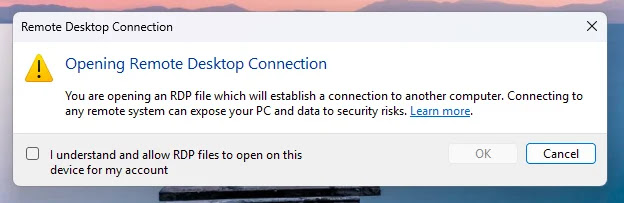
Microsoft’s own wording focuses on phishing protection, which is the most important part here. A malicious .rdp file can do more than point to a remote machine. It can also request access to local resources that make the resulting session much more dangerous if the destination belongs to an attacker.
For organizations, this also changes how RDP files should be distributed internally. Signed files and controlled delivery now matter more, because unsigned files will trigger stronger suspicion by design. Microsoft’s guidance also notes that administrators and app developers can control some of this behavior through policy and the ActiveX settings path, but the safer default is to keep the new warnings in place.
What Windows now shows before an RDP connection
| Item | What Microsoft says users will see |
|---|---|
| First-time dialog | A one-time educational warning after the April 2026 update when opening an .rdp file for the first time. |
| Per-connection dialog | A security prompt every time an .rdp file opens. |
| Remote address | The remote computer name or address before connection. |
| Publisher status | Whether the file is digitally signed and who signed it, if available. |
| Local resources | Requested redirections such as clipboard, drives, printers, smart cards, camera, microphone, and WebAuthn credentials. |
| Default state | Requested local resources are off by default until the user turns them on. |
What admins and users should do
Users should stop treating .rdp files like harmless shortcuts. If the publisher is unknown, the destination looks unfamiliar, or the file asks for more local access than expected, they should not connect until they verify the source through a trusted channel. Microsoft’s new guidance makes that review step part of the normal workflow.
Administrators should review how their teams share Remote Desktop connection files. Signing those files, documenting expected redirection settings, and limiting unnecessary local sharing will reduce confusion and cut the chance that staff approve dangerous requests out of habit. That is partly an operational inference, but it follows directly from Microsoft’s new dialog design and default-off resource model.
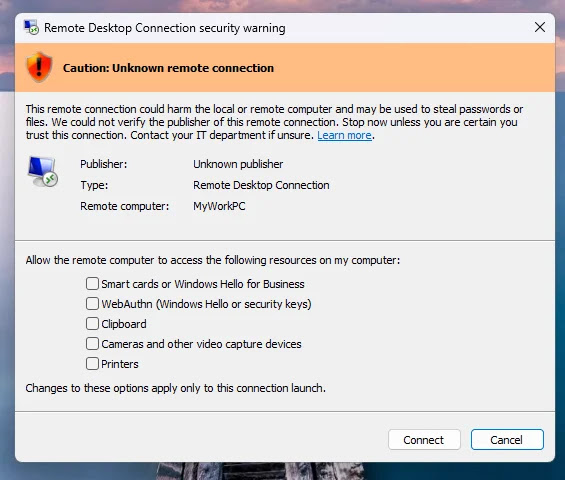
Microsoft also says there is a policy-backed way to disable the newer dialog behavior temporarily through RedirectionWarningDialogVersion, but that is better suited to transition cases than long-term use. From a security standpoint, the safer path is to adapt internal workflows to the new warnings rather than roll them back.
Quick defensive steps
- Verify the source of any
.rdpfile before opening it. - Check the remote address and publisher details before you connect.
- Leave local resource sharing off unless you truly need it.
- Standardize signed RDP files for internal use where possible. This is a best-practice inference based on Microsoft’s new trust model.
- Avoid disabling the new warning system except for short-term compatibility needs.
FAQ
Microsoft added a one-time warning and a per-connection security dialog when users open .rdp files. The dialog now shows the destination, publisher details, and local resource requests before the session starts.
Microsoft says the change improves protection against phishing attacks that misuse .rdp files to connect users to attacker-controlled systems and request access to local resources.
No. Microsoft says requested local resources now appear in the dialog and start turned off by default, so users must enable them actively.
Microsoft’s documentation says admins and developers can control the newer dialog behavior through policy and the RedirectionWarningDialogVersion setting, though leaving the safer default in place makes more sense for most environments.


Read our disclosure page to find out how can you help VPNCentral sustain the editorial team Read more


Improve this guide



User forum
0 messages