
How to Hide Your Identity on Snapchat (Simple Methods)


 6 min. read
  Published on
Snapchat may feel private because your snaps disappear, but it doesn’t mean your identity is invisible. The app stores certain data, tracks your activity, and can connect your account to your real information even if you use a fake username.
That said, you can take steps to reduce what Snapchat knows about you and how others find you.

Access content across the globe at the highest speed rate.
🔥 Save 81% + 2 bonus months! 🔥
70% of our readers choose Private Internet Access
70% of our readers choose Private Internet Access
2
Browse the web from multiple devices with industry-standard security protocols.
🔥 Save 73%! 🔥

Faster dedicated servers for specific actions (currently discounted)
🔥 Save 69%! 🔥
Table of contents
Is It Possible to Stay Anonymous on Snapchat?
Snapchat lets you appear anonymous to other users, but not to the company itself.
Here’s what actually happens behind the scenes:
- Private to users: You can use a random username and a display name that doesn’t reveal who you are.
- Not private to Snapchat: The company still collects your phone number, email, IP address, device info, and location data (if enabled).
- Limited encryption: Only snaps between two users are encrypted end to end, not all chats or stories.
That means you can stay anonymous to people, but not to Snapchat’s systems or law enforcement if they request access. Snaps disappear from your device after viewing, but Snapchat temporarily stores them on its servers to ensure delivery. The recipient can also screenshot or screen-record your content.
Even if you use a fake name or random username, Snapchat can still identify you through:
- Device details like model, SIM card, and IP address.
- Linked accounts such as your phone number or email.
- Location and contact sync data.
So while your profile can look anonymous, your account is still traceable internally.
Step-by-Step: Lock Down Your Snapchat Privacy
To hide your identity as much as possible, you need to block data collection, limit who can reach you, and disable discovery tools. Follow these steps carefully.
1. Turn Off Account Discovery
Snapchat automatically allows others to find you through your phone number or email. Disable this to avoid being suggested in searches or “Quick Add.”
- Open Snapchat → tap your profile icon → ⚙️ Settings.
- Tap Mobile Number and Email → toggle off “Let others find me.”
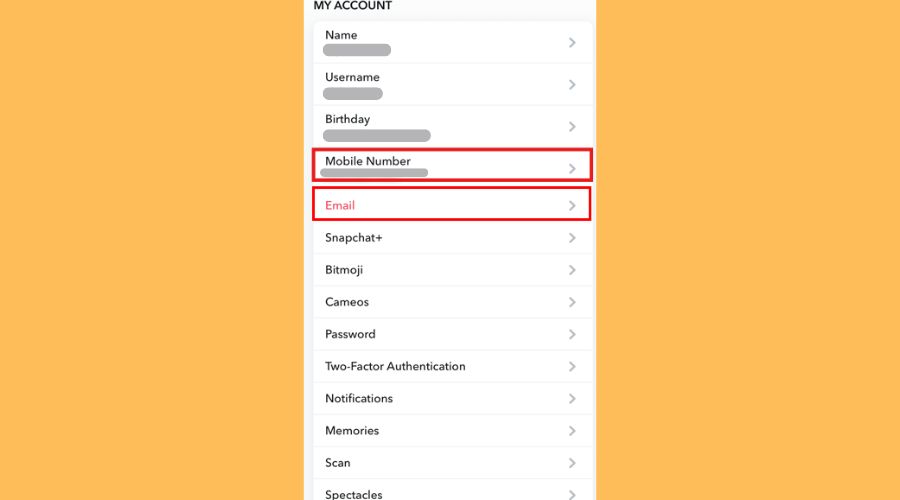
- Go back → tap Contact Syncing → turn it off.
- Tap Delete All Contacts Data to remove previously synced information.
2. Limit Who Can Contact You
Restricting who can message or add you is one of the strongest privacy protections you can apply.
- In Settings, tap Privacy Controls.
- Tap Contact Me → select Friends to stop strangers from sending Snaps.
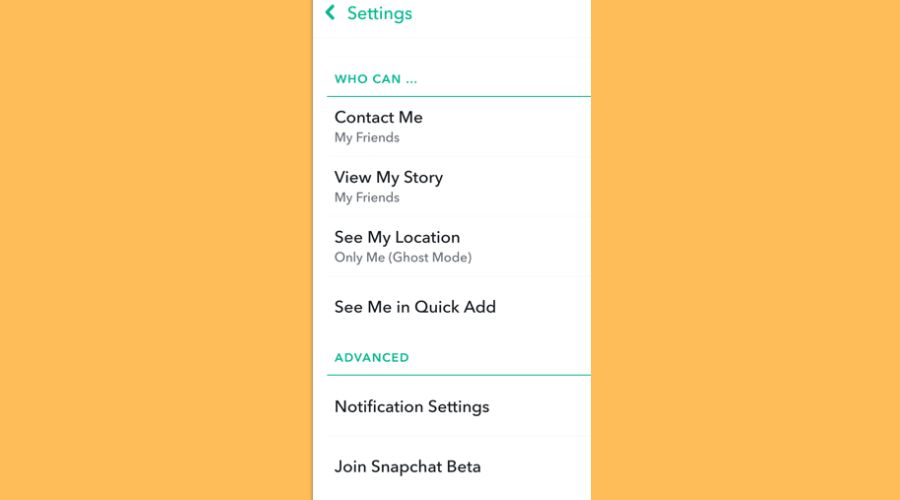
- Tap Send Me Notifications → choose Friends only.
- Disable Quick Add under See Me in Quick Add so you don’t appear in friend suggestions.
3. Hide Your Story and Location
Your story visibility and Snap Map reveal a lot about you. Make sure only close friends can see your content.
- Go to View My Story → choose Friends Only or Custom to select who can view.
- Tap See My Location → enable Ghost Mode to stay hidden on Snap Map.
- Disable Activity Indicator to hide when you’re active.
4. Stop Snapchat From Tracking You
Snapchat uses behavioral data to serve targeted ads and recommend content. Reduce what it collects by turning off these permissions:
- Open Settings → Ads → turn off Audience-based and Activity-based Ads.
- Go to your phone’s App Permissions and disable Location, Contacts, Bluetooth, and Background Data for Snapchat.
- Avoid connecting third-party apps to your Snapchat account since they often share data back with the company.
5. Strengthen Account Security
Use two-factor authentication and verified recovery methods to prevent hacks or impersonation.
- In Settings, tap Two-Factor Authentication.
- Choose SMS Verification or an Authenticator App.
- Keep your recovery email and number updated, but avoid using your main phone number if privacy is your goal.
- Never reuse your Snapchat password across other accounts.
Create a Burner Setup for Maximum Anonymity
For near-total privacy, you can create a completely separate Snapchat account using burner details that can’t be linked to your real identity. Here’s how to do it.
Step 1: Create a Burner Email
Use a privacy-first service like ProtonMail or a new Gmail account in incognito mode.
Avoid using personal details in the email name. Example: [email protected].
Step 2: Get a Temporary or Prepaid Number
Use one of these options:
- Prepaid SIM purchased with cash.
- Google Voice (if accepted in your region).
- Temporary SMS services such as SMSReceiveFree or TextNow for short-term verification.
These options let you verify your Snapchat account without linking your real phone number.
Step 3: Register With Fake Info
- Open Snapchat → tap Sign Up.
- Use the burner email and phone number.
- Choose a random username that doesn’t reveal personal details.
- Enter a random birthdate (must be over 18).
Step 4: Apply All Privacy Settings
Immediately after sign-up, redo all steps from the privacy section above: disable discovery, location sharing, and ad tracking.
Step 5: Use a VPN for Extra Privacy
A VPN conceals your IP address and prevents Snapchat from linking your new account to your usual device.
It also lets you access Snapchat if it’s unavailable in your region.
Check this guide for solutions if Snapchat is not available in your country.
For best results, use NordVPN for its fast speeds, reliable encryption, and dedicated privacy features.
Tips to Stay Private on Snapchat
- Never post your Snapcode publicly.
- Avoid sending content you wouldn’t want saved since screenshots or recordings are always possible.
- Change your Display Name to something generic.
- Turn off Quick Add and Contact Syncing.
- Clear search and chat history regularly.
- Review connected devices and sessions in Settings → Two-Factor Authentication → Forget Devices.
Example of Privacy Settings Comparison
| Setting | Default Behavior | Recommended for Privacy |
|---|---|---|
| Story Visibility | Public | Friends Only or Custom |
| Snap Map | On | Ghost Mode |
| Quick Add | Enabled | Off |
| Contact Syncing | Enabled | Off |
| Two-Factor Auth | Off | On |
Keep Your Account Secure, Not Just Private
Hiding your identity doesn’t mean ignoring security. Use strong passwords, log out on shared devices, and review Snapchat’s permissions every few months.
If you want true anonymity, combine burner credentials with VPN protection each time you use Snapchat. This method minimizes data exposure and helps you stay private to both other users and the platform itself.
FAQs
Yes. Even if you use a random username, Snapchat can identify your account through your email, phone number, IP address, and device data.
No. Snaps are deleted from servers after delivery, but they remain temporarily before deletion. The recipient can still screenshot or record them.
You can sign up with an email, but Snapchat often requests a phone number for verification or recovery.
No, not publicly. That information stays within Snapchat’s systems and isn’t visible to other user.


Read our disclosure page to find out how can you help VPNCentral sustain the editorial team Read more


Improve this guide




User forum
0 messages