
Hackers exploit Microsoft Teams chats to trick employees into giving remote access


 5 min. read
  Published on
Yes, attackers are using Microsoft Teams messages and Windows Quick Assist to fool employees into handing over control of their PCs. BlueVoyant says the latest wave goes further by deploying a newly tracked malware family called A0Backdoor after the victim approves remote access.
This is not a flaw in Microsoft Teams or Quick Assist themselves. Microsoft says Quick Assist and Microsoft are not compromised in these attacks. Instead, the campaign relies on social engineering, usually after a burst of junk emails creates confusion and urgency inside the target organization.

Access content across the globe at the highest speed rate.
70% of our readers choose Private Internet Access
70% of our readers choose ExpressVPN

Browse the web from multiple devices with industry-standard security protocols.

Faster dedicated servers for specific actions (currently at summer discounts)
BlueVoyant published the new findings on March 6, 2026, and linked the activity to a playbook that matches behavior long associated with Blitz Brigantine, also known as Storm-1811. Microsoft has previously tied Storm-1811 to tech-support impersonation attacks that abused Quick Assist and led to malware delivery and, in some cases, Black Basta ransomware.
The pitch is simple. The victim gets flooded with spam, then someone claiming to be IT support reaches out over Teams and offers help. The attacker asks the employee to open Quick Assist, approve the session, and let the “helper” fix the problem. That step gives the intruder a trusted way into the machine.
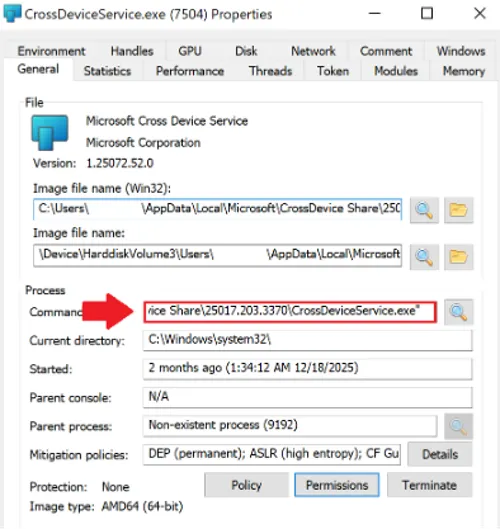
Once inside, BlueVoyant says the attackers used signed MSI installers disguised as Microsoft-related components. Some samples arrived through tokenized Microsoft cloud-storage links, which made the download look more legitimate and harder to triage later. The installers then dropped files into AppData paths that resembled normal Microsoft software locations and used DLL sideloading to run malicious code.
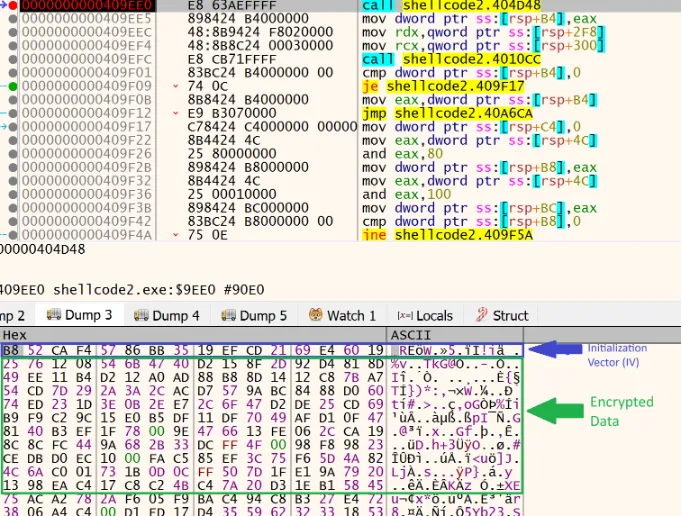
BlueVoyant says the loader behind this chain used runtime decryption, anti-sandbox checks, and heavy thread creation to frustrate defenders. The final payload, A0Backdoor, stayed memory-resident and used covert DNS tunneling through MX record lookups to public recursive resolvers instead of a more obvious direct command-and-control channel.
That matters because this campaign shows that an older ransomware access technique still works in 2026, but the tooling has become stealthier. Microsoft warned in 2024 and again in later guidance that Storm-1811 abused Quick Assist after posing as IT support, while Trend Micro separately documented similar Teams, Quick Assist, and cloud-hosted payload activity in Black Basta and Cactus intrusions.
For businesses, the big takeaway is that Teams now sits firmly in the initial-access conversation. It is no longer just a collaboration app risk. It is also a social-engineering channel that can lead to remote access, malware staging, and ransomware if employees trust the wrong message at the wrong moment.
How the attack works
| Stage | What the attacker does | Why it works |
|---|---|---|
| 1. Email bombing | Floods the employee with spam or junk mail | Creates stress and confusion |
| 2. Teams contact | Poses as internal or outsourced IT support | Looks familiar and urgent |
| 3. Quick Assist request | Asks the victim to share the screen or grant control | Uses a legitimate Microsoft tool |
| 4. Payload delivery | Drops signed MSI files and sideloaded DLLs | Blends into normal software activity |
| 5. Persistence and control | Launches A0Backdoor and tunnels traffic over DNS | Hides activity better than classic beaconing |
Why this campaign stands out
- BlueVoyant identified a newly named malware family, A0Backdoor, in this chain.
- The payload reportedly used DNS MX lookups to public resolvers such as 1.1.1.1 for covert communications.
- The attackers used signed MSI installers and Microsoft-looking file paths to reduce suspicion.
- Microsoft and third-party researchers have now documented several related campaigns that rely on Teams impersonation plus remote-access abuse.
What organizations should do now
Companies should treat unsolicited Teams support chats the same way they treat suspicious email links. Staff should verify the request through a known internal channel before they click anything or approve any remote session. Microsoft’s own Quick Assist guidance says users should only allow a helper to connect if they initiated the interaction by contacting Microsoft Support directly.
Security teams should also review whether Quick Assist is truly needed across the organization. If the tool is not essential, restricting or removing it lowers the chance that a fake help-desk message turns into full device access. Teams admins should also review external access and guest settings because Microsoft documents that organizations can control how users chat and meet with people outside the company.
Detection logic needs attention too. BlueVoyant’s research suggests defenders should look for Microsoft-branded binaries and signed MSI files launching from unusual user-writable directories, especially AppData, and for suspicious DNS behavior that does not fit normal enterprise traffic. Organizations that only watch for classic HTTP or TXT-based tunneling could miss this style of backdoor communication.
Quick signs an employee may be getting targeted
- A sudden flood of junk emails appears, then “IT” contacts the user soon after
- The Teams message asks for urgent remote access
- The sender pressures the employee to use Quick Assist immediately
- A supposed support worker shares a cloud link for a Microsoft-branded installer
- The request arrives from an unknown external account or unusual tenant
FAQ
No. The current reporting points to impersonation and social engineering, not a Teams platform compromise. Microsoft also says Quick Assist and Microsoft are not compromised in these scenarios.
BlueVoyant describes A0Backdoor as a memory-resident backdoor delivered after the victim grants access. It fingerprints the host and uses covert DNS-based communications instead of a simpler direct connection.
Because it is a legitimate remote-support tool. That makes the request look normal to employees and can help attackers bypass suspicion if the user believes they are speaking with real IT staff.
Disconnect the session at once, contact the real internal security or IT team using a known number or portal, isolate the device if instructed, reset credentials, and report the incident to Microsoft if the scam involved Microsoft-branded support claims.


Read our disclosure page to find out how can you help VPNCentral sustain the editorial team Read more


Improve this guide


User forum
0 messages