
Anthropic adds Projects to Claude Cowork Desktop to keep files, instructions, and memory in one workspace


 5 min. read
  Published on
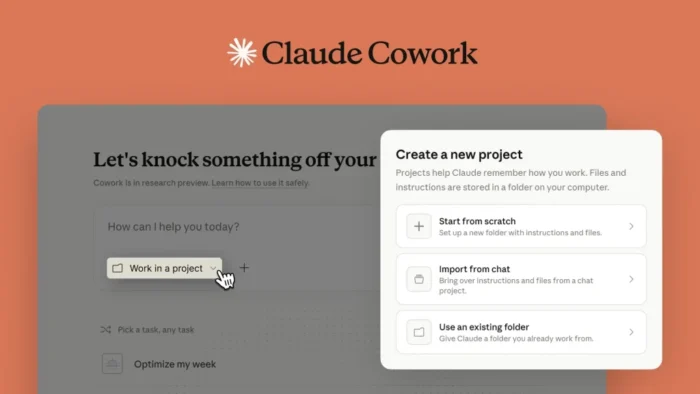
Anthropic has added Projects to Claude Cowork, giving users a more persistent way to manage long-running desktop tasks. The new feature lets people create a Cowork project from scratch, import an existing Claude project, or point Cowork at an existing folder on their computer.
That change matters because Cowork was built for multi-step work that goes beyond a normal chat window. Anthropic says Cowork brings Claude Code’s agentic capabilities into Claude Desktop, so users can hand off complex tasks and return to finished work.

Access content across the globe at the highest speed rate.
70% of our readers choose Private Internet Access
70% of our readers choose ExpressVPN

Browse the web from multiple devices with industry-standard security protocols.

Faster dedicated servers for specific actions (currently at summer discounts)
Projects make that workflow easier to keep organized over time. Anthropic says each project can include its own instructions, scheduled tasks, context, and memory, which gives users a dedicated workspace for recurring research, document handling, and file-based jobs.
The rollout also closes one of Cowork’s earlier gaps. Anthropic’s Cowork product page previously listed Projects and memory across sessions as missing features, but the latest help documentation now says Projects are available inside Cowork and can store memory within the project itself.
Cowork remains a research preview, and Anthropic still frames it that way in both its product and support pages. The company says Cowork is available on paid plans, including Pro, Max, Team, and Enterprise, on macOS and Windows x64, with Windows Arm still unsupported.
What Projects add to Claude Cowork
Projects give Cowork a clearer structure for ongoing tasks. Instead of starting every session from zero, users can keep files, rules, and working context inside one workspace that stays tied to the task.
Anthropic’s official help page shows three ways to create a project. Users can build a new workspace from scratch, import from an existing Claude project, or use an existing folder on their computer.
Project creation options
| Option | What Anthropic says it does |
|---|---|
| Start from scratch | Set up a new folder with instructions and files |
| Import from a Claude project | Transfer files and instructions from an existing Claude project |
| Use an existing folder | Attach a local folder, add instructions, and include extra files |
Source: Anthropic Help Center.
What is included in a Cowork project?
Anthropic says each project has four core parts. Those are instructions, scheduled tasks, context, and memory. That mix turns Cowork from a one-off desktop agent into something closer to a reusable work area.
The memory piece is especially important. Anthropic’s support page says Claude remembers context from work within the project, which should reduce the need to repeat goals and background every time a task resumes.
What each project includes
- Instructions for tone, formatting, and rules
- Scheduled tasks tied to that project
- Context from local folders, linked chat projects, or pasted URLs
- Memory from work done inside the project
Anthropic lists these items directly in its Cowork Projects documentation.
Why this update matters
Anthropic launched Cowork in January as a research preview for desktop users who want Claude to do more than answer prompts. The company describes it as Claude Code power for knowledge work, with support for local files and multi-step execution on behalf of the user.
That broader vision made Cowork interesting, but early limitations were clear. Anthropic’s own product page said Cowork did not yet support Projects or memory across sessions, which made persistent workflows harder to manage. Projects directly address that weakness.
For people using Claude on repeat tasks, that should make Cowork more practical. A persistent workspace is more useful than a disposable session when the job involves folders, instructions, sources, and follow-up work that stretches across days rather than minutes. This is an inference based on Anthropic’s before-and-after product positioning.
Availability and current limits
Anthropic says Projects in Cowork require the latest version of Claude Desktop. The feature is available in the Cowork research preview on paid plans for macOS and Windows x64.
The company also keeps some caution labels in place. Anthropic says Cowork stores conversation history locally on the user’s computer, is not covered by Anthropic’s normal data retention timeframe, and should not be used for regulated workloads because activity is not captured in audit logs, the Compliance API, or data exports.
Availability at a glance
| Category | Status |
|---|---|
| Product | Claude Cowork |
| Feature | Projects |
| Plan access | Paid plans only |
| Supported desktop platforms | macOS and Windows x64 |
| Windows Arm support | Not supported |
| Current product state | Research preview |
Source: Anthropic support and product pages.
FAQ
It is a new workspace layer inside Cowork that lets users organize files, instructions, context, scheduled tasks, and memory around one ongoing job.
Yes. Anthropic says users can import from an existing Claude project or connect an existing folder on their computer.
Anthropic says Cowork is available on paid plans, including Pro, Max, Team, and Enterprise. Projects in Cowork require the latest Claude Desktop app.
Yes. Anthropic still describes Cowork as a research preview and says agent safety is still in development.
Within projects, yes. Anthropic’s help page says each project includes memory and that Claude remembers context from work within the project.


Read our disclosure page to find out how can you help VPNCentral sustain the editorial team Read more


Improve this guide




User forum
0 messages