
Open VSX scanner flaw let malicious extensions bypass checks and go live


 5 min. read
  Published on

A security flaw in Open VSX allowed malicious extensions to bypass the marketplace’s new pre-publish scanning system and appear as if they had passed review. The issue affected the registry used across the wider VS Code fork ecosystem, including editors such as Cursor and Windsurf. Researchers say an attacker with a free publisher account could abuse the bug without insider access.
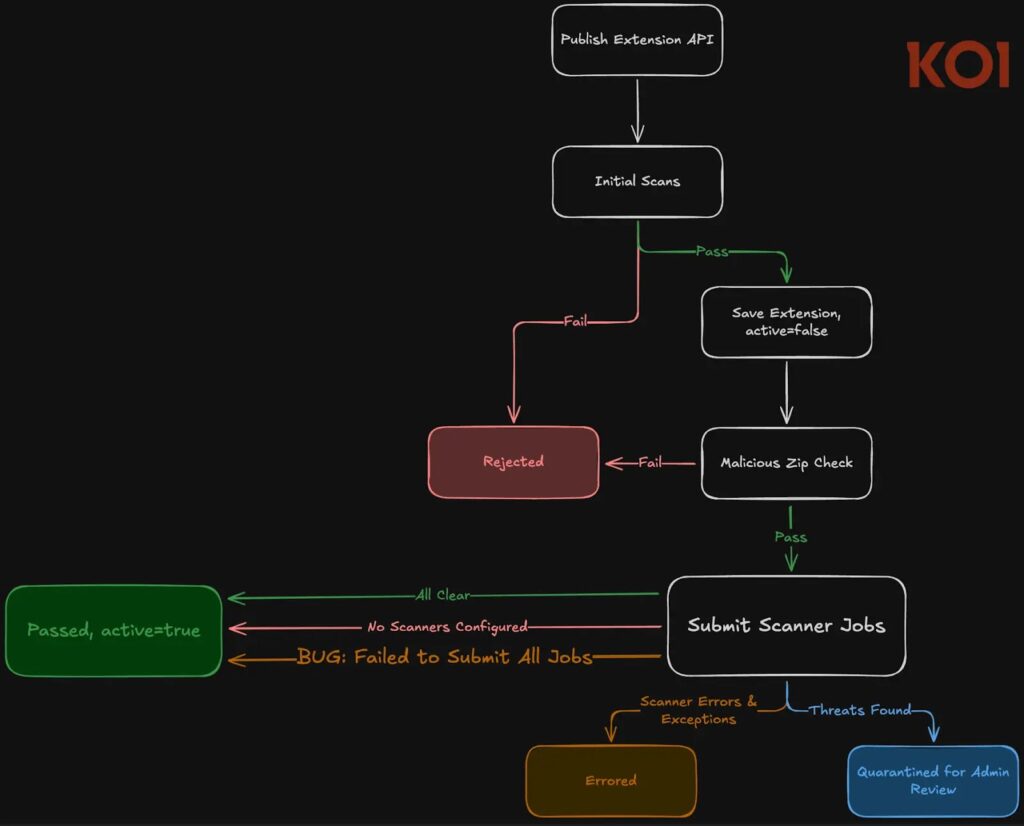
The bug sat inside Open VSX’s new extension scanning pipeline, which was supposed to keep uploaded extensions inactive until all configured scanners approved them. Instead, a logic error could mark an extension as “PASSED” and activate it for download even when no scan job had actually run.

Access content across the globe at the highest speed rate.
70% of our readers choose Private Internet Access
70% of our readers choose ExpressVPN

Browse the web from multiple devices with industry-standard security protocols.

Faster dedicated servers for specific actions (currently at summer discounts)
The good news is that the flaw is already patched. Koi Security disclosed the issue on February 8, 2026, and says the Open VSX team shipped a fix on February 11. The Eclipse Foundation later scheduled its public OpenVSX 0.32.0 service upgrade for February 17, 2026.
How the Open VSX bug worked
According to Koi’s technical write-up, the problem came from one boolean return value in the scan submission flow. That same value could mean either that no scanners were configured at all, or that all scanner jobs failed to enqueue because the system came under load. The publishing logic treated both outcomes the same way.
That mistake created a fail-open condition. If scanner jobs failed during submission, Open VSX could still mark the extension as approved and make it publicly downloadable. Koi says the same flawed pattern also appeared in the recovery service that was supposed to retry failed scans.
Researchers say the exploit did not require special privileges. A malicious publisher could repeatedly flood the publish endpoint with concurrent uploads, exhaust the shared database connection pool, trigger scanner enqueue failures, and then wait for the extension to go live. Koi also noted that the endpoint had no rate limiting, which made repeated attempts cheap.
What the scanner was supposed to do
| Feature | Intended purpose |
|---|---|
| Malware detection | Catch known or suspicious malicious extension content |
| Secret scanning | Detect hardcoded keys, tokens, or credentials |
| Binary analysis | Flag suspicious bundled binaries |
| Name-squatting checks | Stop lookalike extension names used for impersonation |
| Quarantine flow | Hold risky extensions for admin review instead of publishing |
This pre-publish model was part of a broader Open VSX push to tighten extension security before downloads reach users. Koi points to Open VSX issue and pull request records showing the system was designed to verify every extension before publication, then quarantine anything suspicious for review.
Why this matters for Cursor, Windsurf, and other VS Code forks
Open VSX is not a niche backend. Its own project page describes it as a vendor-neutral open-source alternative to Microsoft’s Visual Studio Marketplace, and it serves the extension ecosystem behind several code editors and forks. That gives any publishing flaw a much wider blast radius than a typical single-app bug.
This also lands at a sensitive moment for developer supply chain security. Open VSX has already drawn attention this year over malicious extension activity, including separate reporting around GlassWorm campaigns and compromised publisher accounts. That background makes any flaw in the marketplace’s security gate more important, even if the specific bug got fixed quickly.
In plain terms, the issue could have let a harmful extension look normal to end users. Koi says the user interface gave no visible indication that security checks had been skipped, so a developer browsing the marketplace would have seen an extension that appeared clean and approved.
What developers and security teams should do now
If you installed or updated Open VSX extensions before the February 11, 2026 fix, review them carefully. Start with newly added or recently updated extensions, especially lesser-known tools and anything that requests broad permissions or bundles unexpected binaries. Koi explicitly recommends reviewing extensions installed during the vulnerable window.
Organizations that run internal extension registries or scanner pipelines should also treat this as a design lesson. Failure states should never share the same return value as “nothing to do.” If a scanner fails to run, the safe response is to block publication until the system can verify the package.
Rate limiting matters too. Koi’s report says the exploit depended on repeatedly stressing the publish path until scanner jobs failed to enqueue. A stricter publish throttle, isolation of critical job queues, and clearer error handling would all reduce the odds of similar bypasses in the future.
Quick response checklist
- Review Open VSX extensions installed or updated before February 11, 2026.
- Prioritize unknown publishers, recent updates, and extensions with bundled binaries.
- Verify whether your environment pulls from Open VSX directly or through a forked editor.
- Add publish rate limits and fail-closed logic if you run similar pipelines.
- Separate scanner failure states from “no scanners configured” states in code paths.
FAQ
Yes. Koi says it reported the issue on February 8, 2026, and Open VSX shipped a fix on February 11. The Eclipse Foundation then rolled out OpenVSX 0.32.0 on February 17.
Researchers say any attacker with a free publisher account could attempt exploitation. They did not need special access or insider permissions.
No. Open VSX supports a broader ecosystem of editors and forks that rely on its marketplace, including Cursor and Windsurf.
The extension could look fully approved even though no scan actually completed. That made the bypass hard for ordinary users to spot.


Read our disclosure page to find out how can you help VPNCentral sustain the editorial team Read more


Improve this guide




User forum
0 messages